1. Introdução
This manual provides essential instructions for the safe and proper use, setup, and maintenance of your NERF Elite 2.0 Trailblazer RD-8 blaster. Please read this manual thoroughly before operating the product and retain it for future reference. This product is designed for recreational use and is suitable for ages 8 and up.
2. Produto acabadoview
The NERF Elite 2.0 Trailblazer RD-8 is a dart blaster featuring an 8-dart rotating drum. It is designed for quick loading and firing. The blaster comes with 16 NERF Elite 2.0 darts.
2.1 Conteúdo da embalagem
- NERF Elite 2.0 Trailblazer RD-8 Blaster
- 16 NERF Elite 2.0 Darts
- Manual de Instruções (este documento)
2.2 Blaster Components
Familiarize yourself with the key parts of your Trailblazer RD-8 blaster:
- Dart Drum: Holds up to 8 darts.
- Priming Handle: Used to prepare the blaster for firing.
- Acionar: Ativa o mecanismo de disparo.
- Trilhos táticos: For attaching compatible NERF accessories (sold separately).
- Armazenamento de dardo: Integrated storage for additional darts.

Figure 1: NERF Elite 2.0 Trailblazer RD-8 Blaster in its original packaging, showing the blaster and included darts.
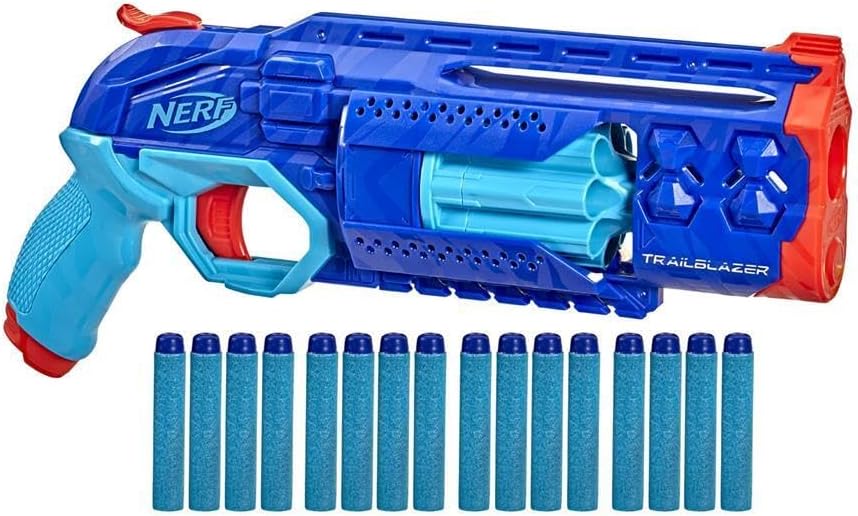
Figure 2: The NERF Elite 2.0 Trailblazer RD-8 Blaster displayed with 16 Elite 2.0 darts, highlighting the blaster's design and dart capacity.
3. Configuração
3.1 Desembalagem
Carefully remove all components from the packaging. Ensure all listed package contents are present. Dispose of packaging materials responsibly.
3.2 Carregando Dardos
- Certifique-se de que o lançador não esteja armado.
- Insert one NERF Elite 2.0 dart into each of the 8 chambers of the rotating dart drum. Push the darts in until they are fully seated.
- Do not use damaged darts or darts not specifically designed for NERF blasters, as this may cause jams or damage to the blaster.
4. Instruções de operação
Follow these steps to operate your NERF Elite 2.0 Trailblazer RD-8 blaster:
- Carregar dardos: As described in Section 3.2, load up to 8 darts into the dart drum.
- Prepare o lançador: Pull the priming handle located on the top of the blaster all the way back until it clicks into place. Then, push the priming handle forward to its original position. The dart drum will rotate to the next chamber.
- Mirar: Point the blaster at your intended target.
- Fogo: Squeeze the trigger to launch a dart.
- Repita: To fire another dart, repeat steps 2-4. The dart drum will automatically advance with each priming action.
Importante: Always ensure the blaster is pointed in a safe direction before priming or firing.
5. Manutenção
5.1 Cuidados com os Dardos
- Use only official NERF Elite 2.0 darts.
- Inspect darts for damage (tears, bends) before use. Damaged darts can affect performance and potentially jam the blaster.
- Store darts in a clean, dry place to maintain their shape and integrity.
5.2 Blaster Cleaning and Storage
- Limpe o lançador com um pano limpo e seco.amp cloth to remove dust or dirt. Do not submerge the blaster in water.
- Evite usar produtos químicos agressivos ou produtos de limpeza abrasivos.
- Store the blaster in a cool, dry place away from direct sunlight and extreme temperatures.
- Do not store the blaster in a primed state for extended periods, as this can weaken the spring mechanism.
6. Solução De Problemas
- Blaster not firing or dart not launching:
- Ensure the blaster is fully primed. The priming handle must be pulled back completely and then pushed forward until it clicks.
- Check if a dart is properly loaded into the firing chamber.
- Inspect darts for damage. Replace any bent or torn darts.
- Travamento de dardos:
- Ensure only official NERF Elite 2.0 darts are used.
- Check darts for damage and replace as necessary.
- Make sure darts are fully inserted into the dart drum chambers.
- Do not attempt to force a jammed dart. Gently remove it from the dart drum or barrel opening.
7. Especificações
- Número do modelo: F5029
- Marca: Nerf
- Capacidade de dardos: 8 darts (rotating drum)
- Included Darts: 16 NERF Elite 2.0 Darts
- Idade recomendada: 8 anos ou mais
- Peso do item: 11.8 onças (aproximadamente 334 gramas)
- Dimensões da embalagem: 14.48 x 8.46 x 2.72 polegadas (aproximadamente 36.78 x 21.49 x 6.91 cm)
- Fabricante: Hasbro
8. Informações de segurança
- AVISO: Não aponte para os olhos ou para o rosto.
- AVISO: Use somente dardos NERF oficiais. Outros dardos podem não atender aos padrões de segurança.
- Não modifique dardos ou blaster.
- Recomenda-se a supervisão de um adulto para usuários mais jovens.
- Keep fingers and other objects clear of the dart drum and firing mechanism during operation.
- Do not fire at close range.
9. Garantia e Suporte
For information regarding warranty coverage, product support, or to purchase replacement parts, please visit the official Hasbro or Nerf website, or contact their customer service department. Specific warranty details may vary by region and retailer.
For further assistance, refer to the contact information provided on the product packaging or the official brand website.