1. Introdução
This manual provides comprehensive instructions for the OMAIC BN59-01312A Replacement Voice Remote Control. It covers setup, operation, compatibility, and troubleshooting to ensure optimal performance with your compatible Samsung television.
2. Produto acabadoview
The OMAIC BN59-01312A remote control is designed as a direct replacement for various Samsung Smart TV remotes, offering voice control functionality and quick access buttons for popular streaming services. It features a durable design tested for extensive use.

Figure 1: OMAIC Replacement Voice Remote Control with highlighted shortcut buttons.

Figura 2: Compatibilidade sobreview of the remote with different Samsung Smart TV types.
3. Configuração e Emparelhamento
To use your OMAIC Replacement Voice Remote Control, it must first be paired with your Samsung TV. Follow these steps:
- Certifique-se de que sua TV esteja ligada.
- Point the new remote control towards your Samsung TV.
- Pressione e segure o Voltar / Sair botão e o Reproduzir/Pausar button simultaneously for 5-8 seconds.
- A "Pairing complete" message should appear on your TV screen, indicating successful pairing.
- If pairing fails, repeat the steps. It may be helpful to turn the TV off and then on again before re-attempting the pairing process.

Figure 3: Visual guide for pairing the remote control with a Samsung Smart TV.
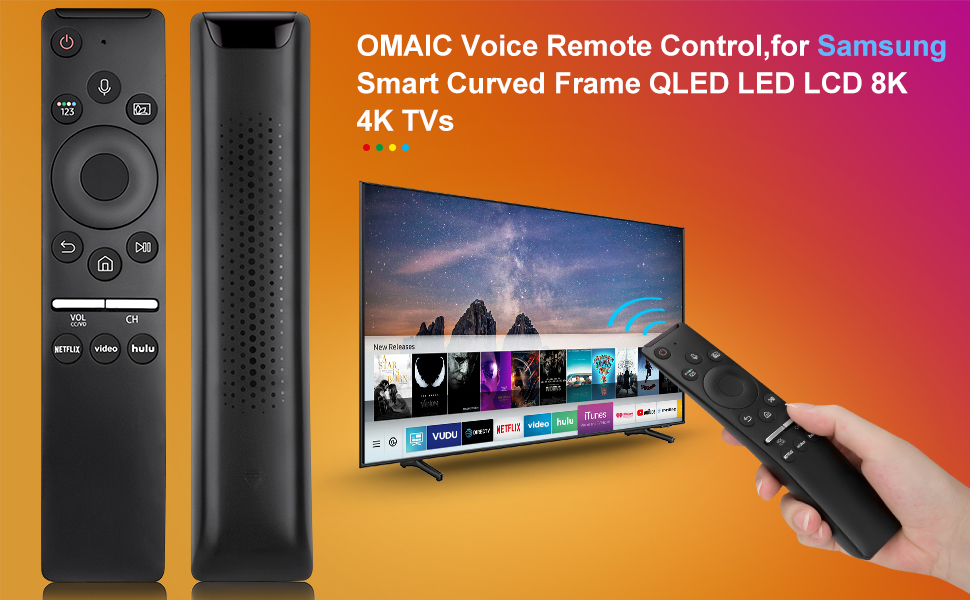
Figure 4: Detailed steps for connecting your Smart TV remote.
4. Instruções de operação
The remote control offers intuitive navigation and quick access to various functions:
- Controle de voz: Press the microphone button and speak your commands to interact with your Smart TV.
- Botões de atalho: Dedicated buttons for Netflix, Prime Video, and Hulu provide instant access to these streaming applications.
- Volume and Channel: Use the dedicated volume (VOL) and channel (CH) buttons to adjust audio levels and navigate channels.
- Painel de navegação: The circular navigation pad allows for easy menu navigation and selection.
- Full-Angle Control: The remote is tested to control your TV from any angle within 40 feet.

Figure 5: Key features including voice search and streaming service shortcuts.

Figure 6: Demonstrating voice control functionality to open applications.
5. Instalação da bateria
The remote control requires 2 AA batteries for operation. These batteries are typically included with your purchase.
- Slide open the battery cover located on the back of the remote control.
- Insira duas pilhas AA, certificando-se da polaridade correta (+ e -).
- Deslize a tampa da bateria de volta no lugar até que ela se encaixe com segurança.
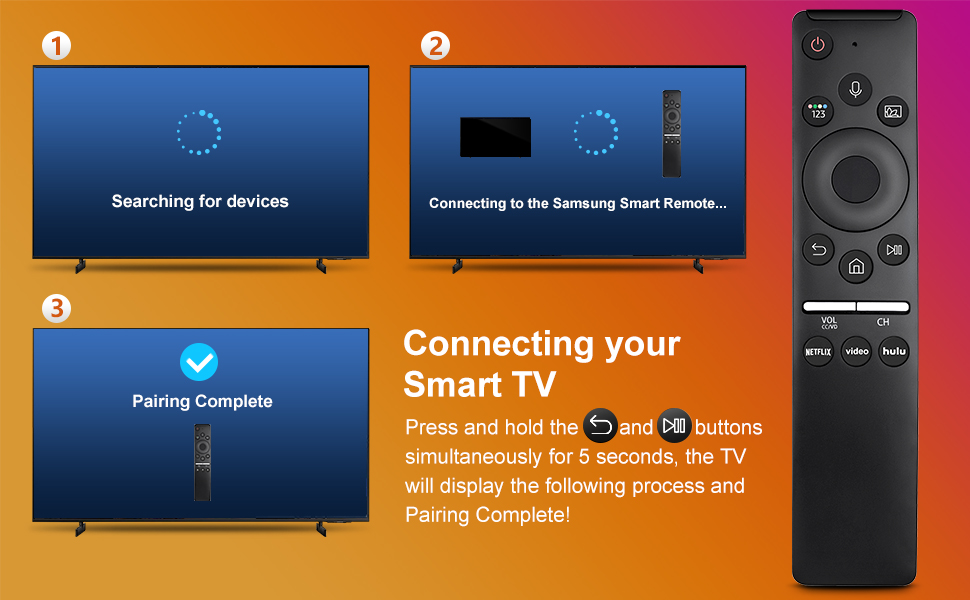
Figure 7: Battery installation and other key features.
6. Compatibilidade
This remote control is compatible with a wide range of Samsung TV models and original remote control models. Refer to the lists below for specific compatibility:
Compatible Samsung TV Remote Control Models:
- BN59-01312A, BN59-01312F, BN59-01312D, BN59-01312E, BN59-01312G, BN59-01312K, BN59-01312L, BN59-01312M, BN59-01312X, BN59-01312U, BN59-01312T
- BN59-01329A, BN59-01329C, BN59-01329F
- BN59-01330A, BN59-01330C, BN59-01330H, BN59-01330N, BN59-01330Q, BN59-01330M, BN59-01330H, BN59-01312Q
Compatible Samsung TV Models:
- QN75Q60RAFX, QN43Q60RAFX, QN49Q60RAFX, QN49Q70RAFX, QN55Q60RAFX, QN55Q70RAFX, QN55Q80RAFX, QN65Q60RAFX, QN65Q70RAFX, QN65Q80RAFX, QN65Q90RAFX, QN75Q70RAFX, QN75Q80RAFX, QN75Q90RAFX, QN82Q60RAFX, QN82Q70RAFX, QN82Q80RAFX, QN82Q90RAFX
- QN55Q900RBFX, QN65Q900RBFX, QN75Q900RBFX, QN82Q900RBFX, QN85Q900RBFX, QN98Q900RBFX
7. Solução De Problemas
- O controle remoto não está respondendo: Verifique se as pilhas estão instaladas corretamente e se têm carga suficiente. Substitua as pilhas, se necessário.
- Problemas de emparelhamento: If the remote does not pair, ensure no other remotes are actively paired with the TV. Turn the TV off and on, then re-attempt the pairing process as described in Section 3.
- Controle de voz não funciona: Ensure the remote is properly paired. Some TV models may require specific settings to enable voice control. Consult your TV's user manual for details.
- Alcance limitado: Ensure there are no obstructions between the remote and the TV. The remote is designed for optimal performance within 40 feet.
8. Especificações
| Recurso | Detalhe |
|---|---|
| Dimensões do produto | 6.35 x 1.42 x 0.66 polegadas |
| Peso do item | 1.76 onças |
| Número do modelo do item | BN59-01312A |
| Baterias | 2 pilhas AA necessárias (incluídas) |
| Recurso especial | Pesquisa por voz |
| Número máximo de dispositivos compatíveis | 18 |
| Dispositivos compatíveis | Televisão |

Figure 8: Physical dimensions of the OMAIC Replacement Voice Remote Control.
9. Garantia e Suporte
OMAIC provides 100 days of after-sales support for this product. If you have any questions or encounter issues, please contact us. We aim to reply within 12 hours and are committed to assisting you.


