Introdução
The One For All URC4810 is a dedicated replacement remote control designed specifically for Samsung televisions. This remote offers 100% compatibility with all Samsung TV models, providing a seamless and intuitive user experience. It features a quick setup process called SimpleSet and a learning function to transfer commands from your original remote, ensuring you retain all necessary functionalities.
Informações de segurança
- Mantenha as pilhas fora do alcance das crianças.
- Não misture pilhas velhas e novas, ou tipos diferentes de pilhas.
- Remove batteries if the remote control is not used for an extended period.
- Avoid exposing the remote control to direct sunlight, heat sources, or excessive moisture.
- Do not attempt to disassemble or modify the remote control.
Conteúdo da embalagem
Por favor, verifique se a embalagem contém os seguintes itens:
- One For All Samsung TV Replacement Remote Control (URC4810)
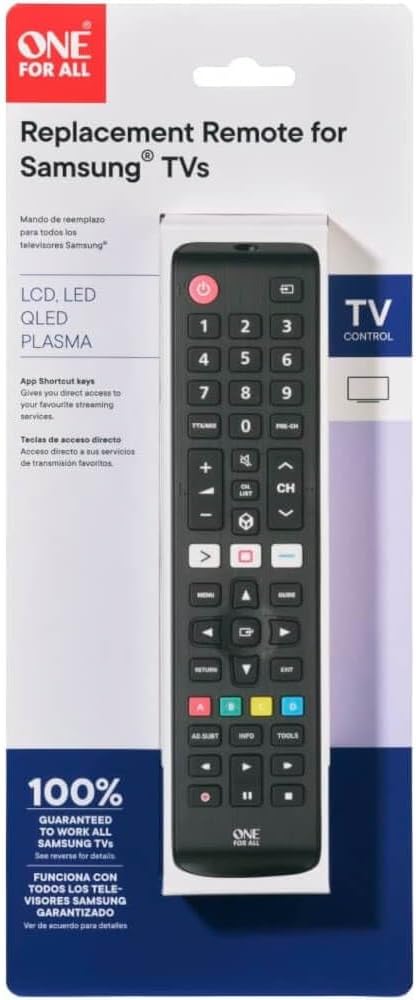
Image: The One For All URC4810 remote control displayed within its retail packaging, showing the product name and key features.
Configurar
1. Instalação da bateria
The URC4810 remote control requires 2x AAA batteries (not included). Follow these steps to install them:
- Abra a tampa do compartimento da bateria na parte traseira do controle remoto.
- Insira duas pilhas AAA, certificando-se de que os terminais positivo (+) e negativo (-) estejam alinhados com as marcações dentro do compartimento.
- Feche bem a tampa do compartimento da bateria.

Imagem: Um profissional lateralfile view of the One For All URC4810 remote control, illustrating its ergonomic design and the location of the battery compartment seam.
2. SimpleSet Setup
The URC4810 remote features SimpleSet, allowing for quick setup in under 30 seconds. No codes are needed.
- Ensure your Samsung TV is turned on.
- Point the One For All remote at your Samsung TV.
- Pressione e segure o Poder button on the One For All remote until your TV turns off. This may take a few seconds.
- Once the TV turns off, release the Poder button immediately. The remote is now set up.
- Test other functions like Volume Up/Down and Channel Up/Down to confirm full functionality.

Imagem: Uma frente direta view of the One For All URC4810 remote control, showcasing its full button layout, including the power button at the top.
3. Learning Feature (Optional)
The learning feature allows you to copy functions from your original Samsung TV remote to the URC4810. This is useful for any specific buttons not covered by the default setup.
- Place the One For All remote and your original Samsung remote on a flat surface, facing each other, about 1-2 inches apart.
- On the One For All remote, press and hold the CONFIGURAR button (if available, otherwise refer to the specific manual for learning mode entry, typically a combination of buttons like MUDANÇA + APRENDER or similar) until the LED blinks twice and then stays lit.
- Press the button on the One For All remote that you wish to program (e.g., a specific app button). The LED will blink rapidly.
- On your original Samsung remote, press the corresponding button you want to copy. The LED on the One For All remote will blink twice to confirm successful learning.
- Repeat steps 3 and 4 for any other buttons you wish to learn.
- Para sair do modo de aprendizagem, pressione o CONFIGURAR button again (or the button used to enter learning mode). The LED will turn off.

Imagem: Um ângulo view of the One For All URC4810 remote control, showcasing its comfortable grip and button placement.
Instruções de operação
Once set up, the URC4810 remote functions like your original Samsung TV remote. Here are some common button functions:
- Botão liga/desliga (botão vermelho): Liga ou desliga a TV.
- Botões numéricos (0-9): Seleção direta de canal.
- Aumentar/diminuir volume (+/-): Ajusta o volume da TV.
- Canal para cima/para baixo (CH +/-): Muda de canal na TV.
- Mudo: Silencia ou ativa o som da TV.
- Menu: Acessa o menu principal da TV.
- Navigation (Arrow Buttons): Navega pelos menus e opções.
- OK/Entrar: Confirma seleções.
- Retorno/Voltar: Retorna à tela ou menu anterior.
- Saída: Sai do menu ou aplicativo atual.
- Botões coloridos (vermelho, verde, amarelo, azul): Functionality varies by TV model and application.
- Smart Hub/Home: Accesses the TV's Smart Hub or Home screen.
Manutenção
Limpeza
To clean your remote control, use a soft, dry cloth. Do not use abrasive cleaners, waxes, or solvents. Avoid spraying liquids directly onto the remote.
Substituição da bateria
If the remote control's range decreases or buttons become unresponsive, it may be time to replace the batteries. Follow the "Battery Installation" steps in the Setup section to replace the old batteries with new AAA alkaline batteries.
Solução de problemas
| Problema |
Possível causa |
Solução |
| Remote does not work after setup. |
Incorrect setup or dead batteries. |
Ensure batteries are correctly inserted and charged. Repeat the SimpleSet process carefully. |
| Alguns botões não funcionam. |
Button not recognized by SimpleSet or not learned. |
Use the Learning Feature to copy the function from your original remote. Ensure the remote is pointed directly at the TV. |
| O alcance do controle remoto é ruim. |
Baterias fracas ou obstrução. |
Replace batteries. Ensure there are no obstructions between the remote and the TV's IR receiver. |
| O LED do controle remoto não acende. |
No batteries or incorrect battery insertion. |
Check battery orientation and ensure they are new and correctly inserted. |
Especificações
| Marca |
Um por todos |
| Número do modelo |
URC4810 |
| Dispositivos compatíveis |
Samsung Televisions |
| Fonte de energia |
Alimentado por pilhas (2 pilhas AAA, não incluídas) |
| Cor |
White (Note: Product images show black, but specification states white. Please refer to product packaging for exact color.) |
| Peso do item |
3.52 onças (aproximadamente 100 gramas) |
| Dimensões do produto (C x L x A) |
Approx. 4"D x 3"W x 1"H (Note: Dimensions may refer to packaging or a specific part. Actual remote dimensions are typically longer and narrower.) |
| UPC |
810209030940 |
Garantia e Suporte
One For All products are designed and manufactured to the highest standards. For information regarding warranty, technical support, or frequently asked questions, please visit the official One For All website ou entre em contato diretamente com o atendimento ao cliente.
For the most up-to-date support information, please refer to the manufacturer's official channels:
- Um por todos Website: www.oneforall.com
- Atendimento ao Cliente: Consulte o webSite com informações de contato regionais.
Introdução
The One For All URC4810 is a dedicated replacement remote control designed specifically for Samsung televisions. This remote offers 100% compatibility with all Samsung TV models, providing a seamless and intuitive user experience. It features a quick setup process called SimpleSet and a learning function to transfer commands from your original remote, ensuring you retain all necessary functionalities.
Informações de segurança
- Mantenha as pilhas fora do alcance das crianças.
- Não misture pilhas velhas e novas, ou tipos diferentes de pilhas.
- Remove batteries if the remote control is not used for an extended period.
- Avoid exposing the remote control to direct sunlight, heat sources, or excessive moisture.
- Do not attempt to disassemble or modify the remote control.
Conteúdo da embalagem
Por favor, verifique se a embalagem contém os seguintes itens:
- One For All Samsung TV Replacement Remote Control (URC4810)
Image: The One For All URC4810 remote control displayed within its retail packaging, showing the product name and key features.
Configurar
1. Instalação da bateria
The URC4810 remote control requires 2x AAA batteries (not included). Follow these steps to install them:
- Abra a tampa do compartimento da bateria na parte traseira do controle remoto.
- Insira duas pilhas AAA, certificando-se de que os terminais positivo (+) e negativo (-) estejam alinhados com as marcações dentro do compartimento.
- Feche bem a tampa do compartimento da bateria.
Imagem: Um profissional lateralfile view of the One For All URC4810 remote control, illustrating its ergonomic design and the location of the battery compartment seam.
2. SimpleSet Setup
The URC4810 remote features SimpleSet, allowing for quick setup in under 30 seconds. No codes are needed.
- Ensure your Samsung TV is turned on.
- Point the One For All remote at your Samsung TV.
- Pressione e segure o Poder button on the One For All remote until your TV turns off. This may take a few seconds.
- Once the TV turns off, release the Poder button immediately. The remote is now set up.
- Test other functions like Volume Up/Down and Channel Up/Down to confirm full functionality.
Imagem: Uma frente direta view of the One For All URC4810 remote control, showcasing its full button layout, including the power button at the top.
3. Learning Feature (Optional)
The learning feature allows you to copy functions from your original Samsung TV remote to the URC4810. This is useful for any specific buttons not covered by the default setup.
- Place the One For All remote and your original Samsung remote on a flat surface, facing each other, about 1-2 inches apart.
- On the One For All remote, press and hold the CONFIGURAR button (if available, otherwise refer to the specific manual for learning mode entry, typically a combination of buttons like MUDANÇA + APRENDER or similar) until the LED blinks twice and then stays lit.
- Press the button on the One For All remote that you wish to program (e.g., a specific app button). The LED will blink rapidly.
- On your original Samsung remote, press the corresponding button you want to copy. The LED on the One For All remote will blink twice to confirm successful learning.
- Repeat steps 3 and 4 for any other buttons you wish to learn.
- Para sair do modo de aprendizagem, pressione o CONFIGURAR button again (or the button used to enter learning mode). The LED will turn off.
Imagem: Um ângulo view of the One For All URC4810 remote control, showcasing its comfortable grip and button placement.
Instruções de operação
Once set up, the URC4810 remote functions like your original Samsung TV remote. Here are some common button functions:
- Botão liga/desliga (botão vermelho): Liga ou desliga a TV.
- Botões numéricos (0-9): Seleção direta de canal.
- Aumentar/diminuir volume (+/-): Ajusta o volume da TV.
- Canal para cima/para baixo (CH +/-): Muda de canal na TV.
- Mudo: Silencia ou ativa o som da TV.
- Menu: Acessa o menu principal da TV.
- Navigation (Arrow Buttons): Navega pelos menus e opções.
- OK/Entrar: Confirma seleções.
- Retorno/Voltar: Retorna à tela ou menu anterior.
- Saída: Sai do menu ou aplicativo atual.
- Botões coloridos (vermelho, verde, amarelo, azul): Functionality varies by TV model and application.
- Smart Hub/Home: Accesses the TV's Smart Hub or Home screen.
Manutenção
Limpeza
To clean your remote control, use a soft, dry cloth. Do not use abrasive cleaners, waxes, or solvents. Avoid spraying liquids directly onto the remote.
Substituição da bateria
If the remote control's range decreases or buttons become unresponsive, it may be time to replace the batteries. Follow the "Battery Installation" steps in the Setup section to replace the old batteries with new AAA alkaline batteries.
Solução de problemas
| Problema |
Possível causa |
Solução |
| Remote does not work after setup. |
Incorrect setup or dead batteries. |
Ensure batteries are correctly inserted and charged. Repeat the SimpleSet process carefully. |
| Alguns botões não funcionam. |
Button not recognized by SimpleSet or not learned. |
Use the Learning Feature to copy the function from your original remote. Ensure the remote is pointed directly at the TV. |
| O alcance do controle remoto é ruim. |
Baterias fracas ou obstrução. |
Replace batteries. Ensure there are no obstructions between the remote and the TV's IR receiver. |
| O LED do controle remoto não acende. |
No batteries or incorrect battery insertion. |
Check battery orientation and ensure they are new and correctly inserted. |
Especificações
| Marca |
Um por todos |
| Número do modelo |
URC4810 |
| Dispositivos compatíveis |
Samsung Televisions |
| Fonte de energia |
Alimentado por pilhas (2 pilhas AAA, não incluídas) |
| Cor |
White (Note: Product images show black, but specification states white. Please refer to product packaging for exact color.) |
| Peso do item |
3.52 onças (aproximadamente 100 gramas) |
| Dimensões do produto (C x L x A) |
Approx. 4"D x 3"W x 1"H (Note: Dimensions may refer to packaging or a specific part. Actual remote dimensions are typically longer and narrower.) |
| UPC |
810209030940 |
Garantia e Suporte
One For All products are designed and manufactured to the highest standards. For information regarding warranty, technical support, or frequently asked questions, please visit the official One For All website ou entre em contato diretamente com o atendimento ao cliente.
For the most up-to-date support information, please refer to the manufacturer's official channels:
- Um por todos Website: www.oneforall.com
- Atendimento ao Cliente: Consulte o webSite com informações de contato regionais.
Introdução
The One For All URC4810 is a dedicated replacement remote control designed specifically for Samsung televisions. This remote offers 100% compatibility with all Samsung TV models, providing a seamless and intuitive user experience. It features a quick setup process called SimpleSet and a learning function to transfer commands from your original remote, ensuring you retain all necessary functionalities.
Informações de segurança
- Mantenha as pilhas fora do alcance das crianças.
- Não misture pilhas velhas e novas, ou tipos diferentes de pilhas.
- Remove batteries if the remote control is not used for an extended period.
- Avoid exposing the remote control to direct sunlight, heat sources, or excessive moisture.
- Do not attempt to disassemble or modify the remote control.
Conteúdo da embalagem
Por favor, verifique se a embalagem contém os seguintes itens:
- One For All Samsung TV Replacement Remote Control (URC4810)
Image: The One For All URC4810 remote control displayed within its retail packaging, showing the product name and key features.
Configurar
1. Instalação da bateria
The URC4810 remote control requires 2x AAA batteries (not included). Follow these steps to install them:
- Abra a tampa do compartimento da bateria na parte traseira do controle remoto.
- Insira duas pilhas AAA, certificando-se de que os terminais positivo (+) e negativo (-) estejam alinhados com as marcações dentro do compartimento.
- Feche bem a tampa do compartimento da bateria.
Imagem: Um profissional lateralfile view of the One For All URC4810 remote control, illustrating its ergonomic design and the location of the battery compartment seam.
2. SimpleSet Setup
The URC4810 remote features SimpleSet, allowing for quick setup in under 30 seconds. No codes are needed.
- Ensure your Samsung TV is turned on.
- Point the One For All remote at your Samsung TV.
- Pressione e segure o Poder button on the One For All remote until your TV turns off. This may take a few seconds.
- Once the TV turns off, release the Poder button immediately. The remote is now set up.
- Test other functions like Volume Up/Down and Channel Up/Down to confirm full functionality.
Imagem: Uma frente direta view of the One For All URC4810 remote control, showcasing its full button layout, including the power button at the top.
3. Learning Feature (Optional)
The learning feature allows you to copy functions from your original Samsung TV remote to the URC4810. This is useful for any specific buttons not covered by the default setup.
- Place the One For All remote and your original Samsung remote on a flat surface, facing each other, about 1-2 inches apart.
- On the One For All remote, press and hold the CONFIGURAR button (if available, otherwise refer to the specific manual for learning mode entry, typically a combination of buttons like MUDANÇA + APRENDER or similar) until the LED blinks twice and then stays lit.
- Press the button on the One For All remote that you wish to program (e.g., a specific app button). The LED will blink rapidly.
- On your original Samsung remote, press the corresponding button you want to copy. The LED on the One For All remote will blink twice to confirm successful learning.
- Repeat steps 3 and 4 for any other buttons you wish to learn.
- Para sair do modo de aprendizagem, pressione o CONFIGURAR button again (or the button used to enter learning mode). The LED will turn off.
Imagem: Um ângulo view of the One For All URC4810 remote control, showcasing its comfortable grip and button placement.
Instruções de operação
Once set up, the URC4810 remote functions like your original Samsung TV remote. Here are some common button functions:
- Botão liga/desliga (botão vermelho): Liga ou desliga a TV.
- Botões numéricos (0-9): Seleção direta de canal.
- Aumentar/diminuir volume (+/-): Ajusta o volume da TV.
- Canal para cima/para baixo (CH +/-): Muda de canal na TV.
- Mudo: Silencia ou ativa o som da TV.
- Menu: Acessa o menu principal da TV.
- Navigation (Arrow Buttons): Navega pelos menus e opções.
- OK/Entrar: Confirma seleções.
- Retorno/Voltar: Retorna à tela ou menu anterior.
- Saída: Sai do menu ou aplicativo atual.
- Botões coloridos (vermelho, verde, amarelo, azul): Functionality varies by TV model and application.
- Smart Hub/Home: Accesses the TV's Smart Hub or Home screen.
Manutenção
Limpeza
To clean your remote control, use a soft, dry cloth. Do not use abrasive cleaners, waxes, or solvents. Avoid spraying liquids directly onto the remote.
Substituição da bateria
If the remote control's range decreases or buttons become unresponsive, it may be time to replace the batteries. Follow the "Battery Installation" steps in the Setup section to replace the old batteries with new AAA alkaline batteries.
Solução de problemas
| Problema |
Possível causa |
Solução |
| Remote does not work after setup. |
Incorrect setup or dead batteries. |
Ensure batteries are correctly inserted and charged. Repeat the SimpleSet process carefully. |
| Alguns botões não funcionam. |
Button not recognized by SimpleSet or not learned. |
Use the Learning Feature to copy the function from your original remote. Ensure the remote is pointed directly at the TV. |
| O alcance do controle remoto é ruim. |
Baterias fracas ou obstrução. |
Replace batteries. Ensure there are no obstructions between the remote and the TV's IR receiver. |
| O LED do controle remoto não acende. |
No batteries or incorrect battery insertion. |
Check battery orientation and ensure they are new and correctly inserted. |
Especificações
| Marca |
Um por todos |
| Número do modelo |
URC4810 |
| Dispositivos compatíveis |
Samsung Televisions |
| Fonte de energia |
Alimentado por pilhas (2 pilhas AAA, não incluídas) |
| Cor |
White (Note: Product images show black, but specification states white. Please refer to product packaging for exact color.) |
| Peso do item |
3.52 onças (aproximadamente 100 gramas) |
| Dimensões do produto (C x L x A) |
Approx. 4"D x 3"W x 1"H (Note: Dimensions may refer to packaging or a specific part. Actual remote dimensions are typically longer and narrower.) |
| UPC |
810209030940 |
Garantia e Suporte
One For All products are designed and manufactured to the highest standards. For information regarding warranty, technical support, or frequently asked questions, please visit the official One For All website ou entre em contato diretamente com o atendimento ao cliente.
For the most up-to-date support information, please refer to the manufacturer's official channels:
- Um por todos Website: www.oneforall.com
- Atendimento ao Cliente: Consulte o webSite com informações de contato regionais.


