1. Produto acabadoview
The Point Wired Mini Keyboard Pt-350 is a compact and versatile keyboard designed for both gaming and general typing. It features a high-quality build and a modern design, adhering to industry standards for reliable performance. This keyboard is an ideal choice for users seeking a durable and efficient input device.
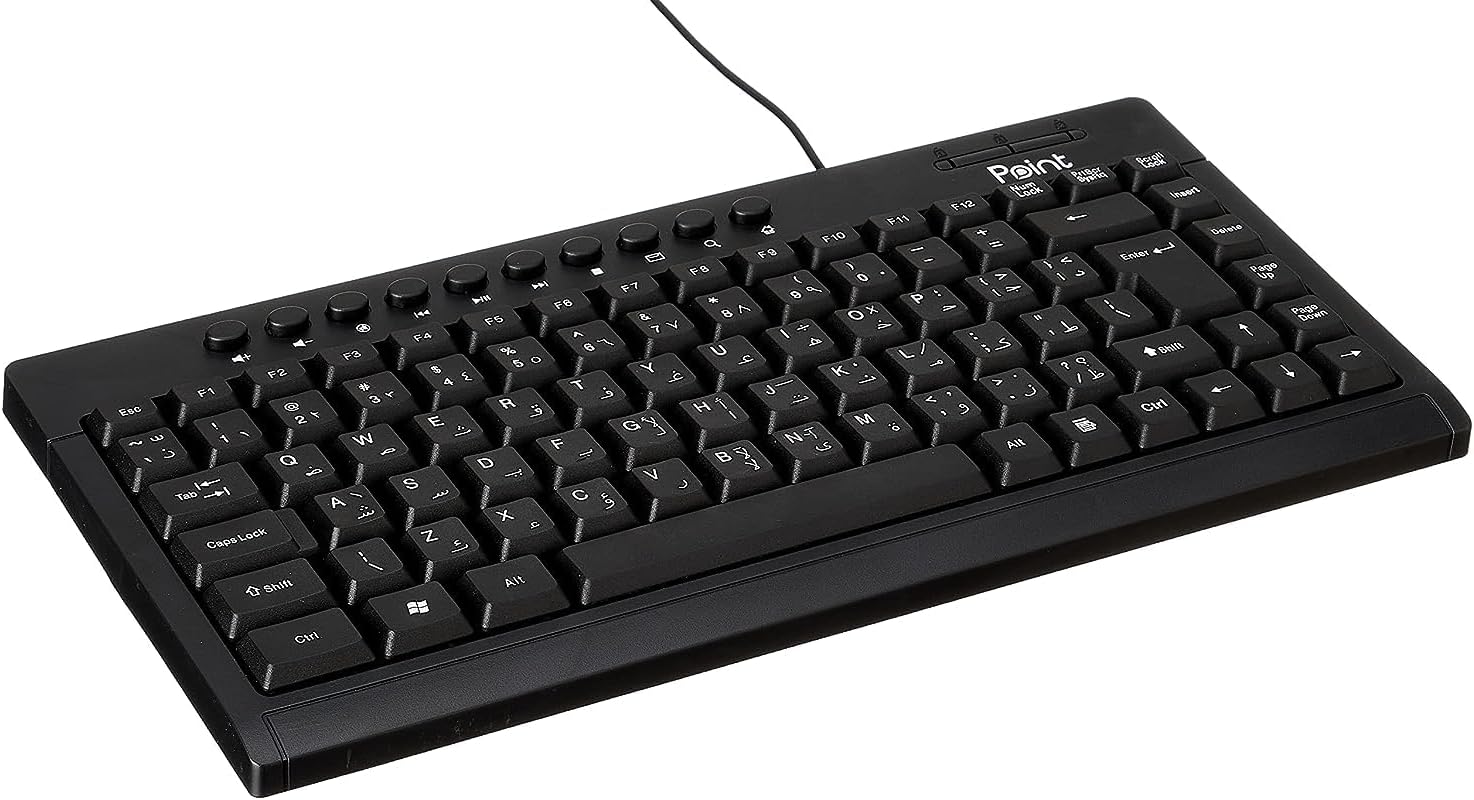
Figura 1.1: Angulado view of the Point Wired Mini Keyboard Pt-350, showcasingraças ao seu design compacto e layout das teclas.
Principais características:
- Wired connectivity for stable performance.
- Compact design suitable for various setups.
- Durable construction from high-quality plastic materials.
- Designed for both gaming and typing applications.
2. Conteúdo da embalagem
Por favor, verifique cuidadosamente a embalagem para garantir que todos os itens estejam presentes:
- Point Wired Mini Keyboard Pt-350
- Manual do usuário (este documento)
3. Configuração
Follow these steps to set up your Point Wired Mini Keyboard Pt-350:
- Desembale o teclado: Retire cuidadosamente o teclado da embalagem.
- Identifique o conector USB: The keyboard comes with an integrated USB cable.
- Conecte-se ao seu computador: Locate an available USB port on your computer (desktop PC, laptop, etc.). Insert the keyboard's USB connector firmly into the USB port.
- Instalação do driver (Plug & Play): The keyboard is plug-and-play compatible. Your operating system (Windows, macOS, Linux) should automatically detect and install the necessary drivers. This process usually takes a few seconds.
- Verificar funcionalidade: Once connected, open a text editor or any application that accepts text input and test the keys to ensure proper operation.

Figura 3.1: Visão de cima para baixo view of the keyboard, illustrating the key layout and integrated cable for connection.
4. Instruções de operação
The Point Wired Mini Keyboard Pt-350 operates like a standard computer keyboard. Below are general instructions and tips for use:
Digitação básica:
- Simply press the desired keys to input characters, numbers, and symbols into your active application.
- Use o Mudança key for uppercase letters and alternative symbols on keys.
- O Caps Lock key toggles permanent uppercase typing.
- O Retrocesso key deletes characters to the left of the cursor.
- O Digitar key confirms input or moves to the next line.
Teclas de função (F1-F12):
The function keys (F1 through F12) perform various tasks depending on the active program or operating system. Some common uses include:
- F1: Often opens help for the active program.
- F2: Renames a selected item.
- F5: Atualiza um web page or document.
- F11: Toggles full-screen mode in many browsers.
Chaves multimídia:
The keyboard may include dedicated multimedia keys or secondary functions on the F-keys (accessed via the Fn key, if present). These typically control:
- Volume control (Mute, Volume Up, Volume Down)
- Media playback (Play/Pause, Stop, Previous Track, Next Track)
5. Manutenção
A manutenção adequada garante a longevidade e o desempenho ideal do seu teclado:
- Limpeza: Regularly clean the keyboard to prevent dust and debris buildup. Use a soft, lint-free cloth slightly dampLimpe com água ou uma solução de limpeza suave. Evite produtos químicos agressivos ou materiais abrasivos.
- Remoção de poeira: Use compressed air to blow out dust and crumbs from between the keys.
- Evite derramamentos: Mantenha líquidos longe do teclado para evitar danos aos componentes internos. Em caso de derramamento, desconecte o teclado imediatamente e deixe-o secar completamente antes de reconectá-lo.
- Armazenar: Quando não estiver em uso, guarde o teclado em um local limpo e seco, longe de temperaturas extremas.
6. Solução De Problemas
If you encounter issues with your Point Wired Mini Keyboard Pt-350, refer to the following common problems and solutions:
Teclado não responde:
- Verifique a conexão USB: Certifique-se de que o cabo USB esteja firmemente conectado a uma porta USB funcional do seu computador. Tente usar uma porta USB diferente.
- Reinicialização do computador: Uma simples reinicialização geralmente resolve problemas de conectividade.
- Teste em outro computador: Connect the keyboard to another computer to determine if the issue is with the keyboard or your computer's setup.
- Verifique o Gerenciador de Dispositivos (Windows): In Windows, go to Device Manager and check if the keyboard is listed under 'Keyboards' and if there are any error symbols. You might need to update or reinstall the driver.
Keys Not Working or Sticky:
- Teclas limpas: Dust, crumbs, or liquid residue can cause keys to stick or malfunction. Refer to the Maintenance section for cleaning instructions.
- Dano Físico: Inspect the keys for any visible physical damage.
Saída de caracteres incorreta:
- Check Language Settings: Ensure your operating system's keyboard language settings match the physical layout of your keyboard.
- Problema com o driver: Reinstalling the keyboard driver might resolve this.
Se o problema persistir após seguir esses passos, entre em contato com o suporte ao cliente.
7. Especificações
Technical specifications for the Point Wired Mini Keyboard Pt-350:

Figura 7.1: Lateral view of the keyboard, highlighting its profile and compact form factor.
| Recurso | Detalhe |
|---|---|
| Marca | Apontar |
| Modelo | Parte 350 |
| Tecnologia de Conectividade | Com fio |
| Dispositivos compatíveis | Computador |
| Descrição do teclado | Multifuncional |
| Usos recomendados | Jogos de PC |
| Características especiais | Jogos |
| Cor | Preto |
| Estilo | Moderno |
| Material | Plástico |
| Dimensões de envio | 34.5 x 26.4 x 3 cm |
| Peso | 800 gramas |
| Primeira data disponível | 4 de setembro de 2022 |
| ASIN | B0BD2DM9ZJ |
8. Garantia e Suporte
This product is covered by a standard manufacturer's warranty. Please refer to the warranty card included with your purchase for specific terms and conditions, including the warranty period and coverage details.
For technical support, troubleshooting assistance, or warranty claims, please contact Point customer service through the contact information provided on the product packaging or the official Point website. When contacting support, please have your product model (Pt-350) and purchase details ready.


