1. Introdução
This manual provides essential information for the proper setup, operation, and maintenance of your Sharp 32FG6EA 32-inch HD Android TV. The Sharp 32FG6EA offers a wide range of connection options and features the Android TV operating system, providing a modern and intuitive television experience. It functions as an all-in-one entertainment hub, integrating Google Assistant for a smarter viewing experience. Users can quickly access entertainment, control smart devices, and obtain on-screen information using voice commands.
2. Informações de segurança
Please read all safety instructions carefully before using the television. Keep this manual for future reference.
- Fonte de energia: Certifique-se de que a TV esteja conectada a uma fonte de energia com a voltagem correta.tage. Não sobrecarregue as tomadas elétricas.
- Ventilação: Não obstrua as aberturas de ventilação. Deixe espaço suficiente ao redor da TV para permitir a circulação adequada de ar e evitar o superaquecimento.
- Água e Umidade: Do not expose the TV to rain, moisture, or excessive humidity. Avoid placing objects filled with liquids on or near the TV.
- Limpeza: Desligue a TV da tomada antes de limpar. Use um pano macio e seco. Não use produtos de limpeza líquidos ou sprays aerossóis.
- Colocação: Coloque a TV em uma superfície estável e nivelada. Se for fixá-la na parede, certifique-se de que o suporte esteja bem preso e seja capaz de suportar o peso da TV.
- Manutenção: Não tente consertar a TV por conta própria. Encaminhe todos os serviços de manutenção a pessoal qualificado.
3. Conteúdo da embalagem
Verifique se todos os itens estão presentes na embalagem:
- Sharp 32FG6EA 32-inch HD Android TV
- Controle remoto (com 2 pilhas AAA)
- Stand Type Base
- Manual de instruções
- Cabo de energia
4. Configuração
4.1 Desembalagem
Retire cuidadosamente a TV e todos os acessórios da embalagem. Guarde os materiais da embalagem para transporte ou manutenção futuros.
4.2 Fixação do suporte
If you are not wall-mounting the TV, attach the included stand base:
- Coloque a TV com a tela virada para baixo sobre uma superfície macia e plana para evitar danos.
- Alinhe a base do suporte com os orifícios de montagem na parte inferior da TV.
- Fixe o suporte utilizando os parafusos fornecidos. Certifique-se de que o suporte esteja firmemente preso.
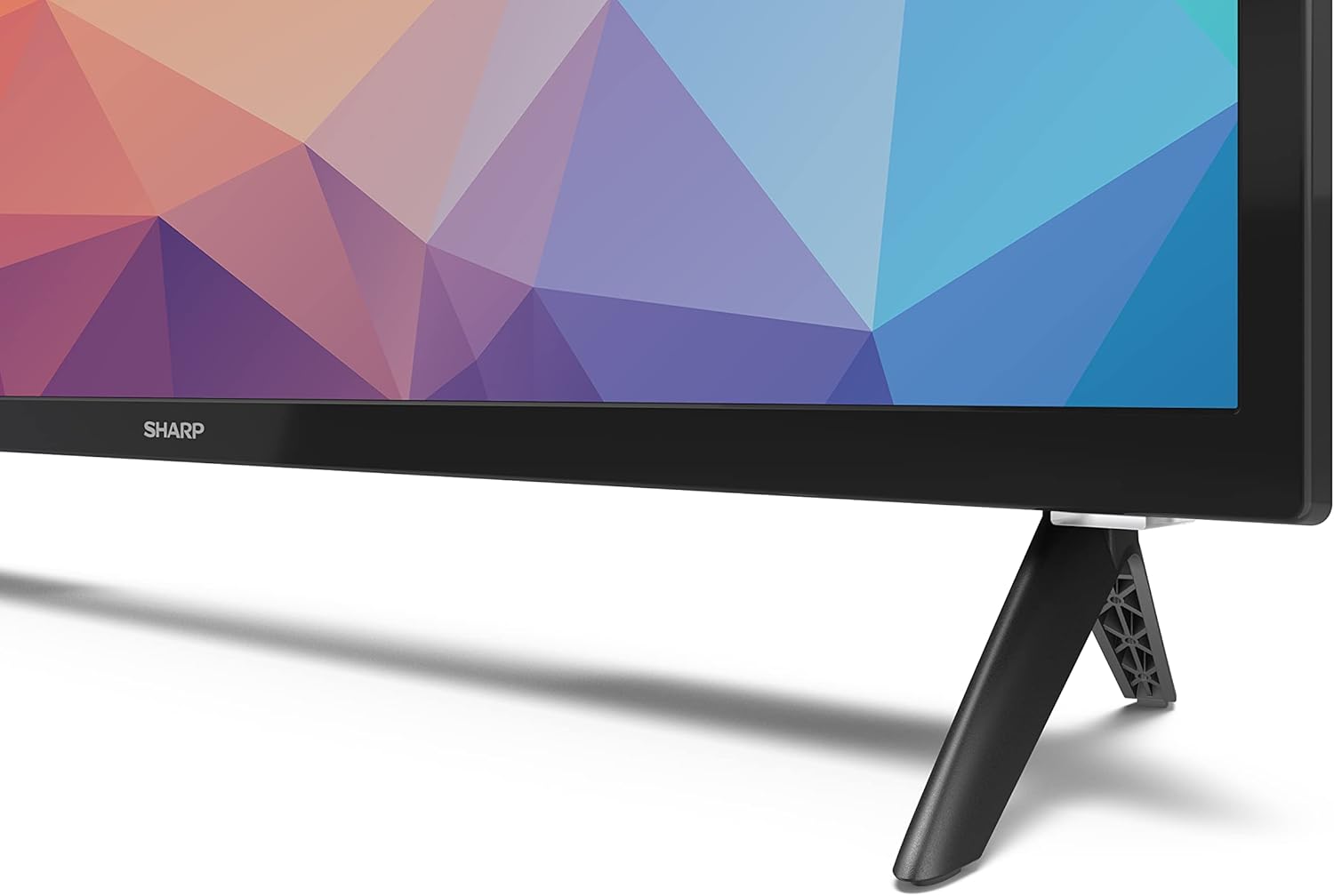
Image: Close-up of the TV stand attachment.
4.3 Montagem na parede
The Sharp 32FG6EA supports VESA wall mounts with dimensions of 75 x 75 mm. Wall mount hardware is not included. Follow the instructions provided with your wall mount kit.
4.4 Conectando dispositivos externos
Sua TV possui várias portas para conectar diversos dispositivos:
- HDMI: Connect Blu-ray players, game consoles, or set-top boxes to the 2 HDMI ports.
- USB: Connect USB storage devices for media playback to the 2 USB ports.
- Antena/Cabo: Conecte uma antena ou fonte de TV a cabo para receber canais abertos.
- Ethernet: Para uma conexão de internet com fio.
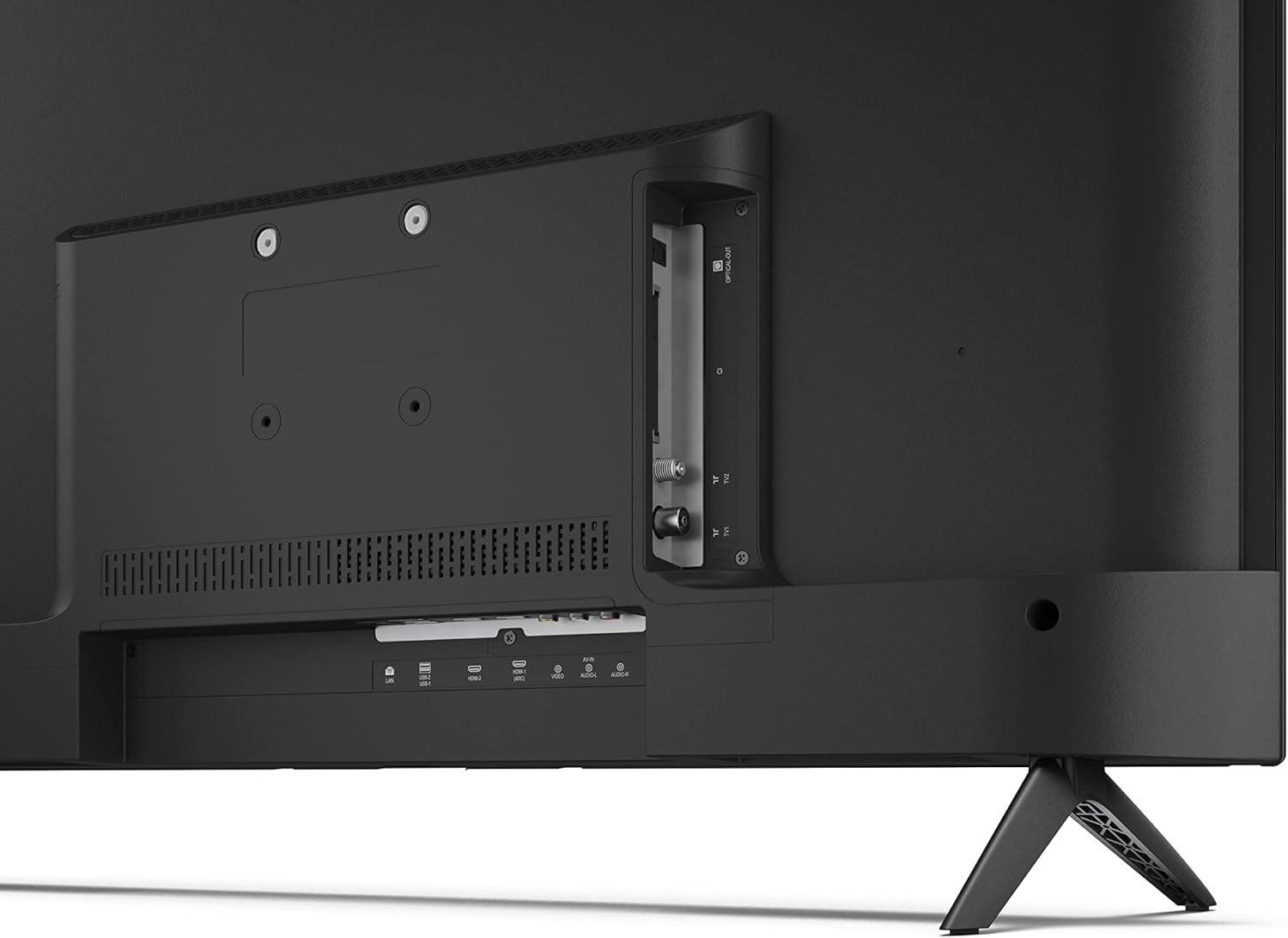
Imagem: Traseira view of the TV with connection ports.
4.5 Conexão de Energia
After connecting all necessary devices, plug the power cable into the TV and then into a wall outlet.
4.6 Assistente de Configuração Inicial
Ao ser ligada pela primeira vez, a TV irá guiá-lo pelo processo de configuração inicial. Isso inclui:
- Seleção de idioma.
- Conexão de rede (Wi-Fi ou Ethernet).
- Google account sign-in (required for full Android TV features).
- Varredura de canais.
5. Operação
5.1 Controle Remoto Sobreview
The included remote control allows you to navigate the TV's features. Insert the 2 AAA batteries into the remote control before use.
- Botão de energia: Liga ou desliga a TV.
- Teclado direcional (D-Pad) e botão OK: Navegue pelos menus e confirme as seleções.
- Botão Voltar: Retorna à tela anterior.
- Botão Home: Acessa a tela inicial do Android TV.
- Aumentar/diminuir volume: Ajusta o volume do áudio.
- Canal para cima/para baixo: Muda de canal na TV.
- Botão do Google Assistente: Ativa o controle por voz.
- Botões de atalho do aplicativo: Dedicated buttons for popular streaming services like Netflix, Prime Video, and YouTube.
5.2 Navegação da interface do Android TV
The Android TV home screen provides access to your installed apps, recommended content, and settings. Use the directional pad on your remote to navigate through the interface.
5.3 Google Assistente
Press the Google Assistant button on your remote and speak into the microphone to:
- Procurar filmes, programas ou informações.
- Controle dispositivos domésticos inteligentes.
- Inscrições abertas.
- Ajuste as configurações da TV.
5.4 Chromecast integrado
The TV includes Chromecast built-in, allowing you to cast content from compatible apps on your smartphone, tablet, or computer directly to the TV screen.
5.5 Conectividade Bluetooth
Connect Bluetooth devices such as headphones or speakers to your TV for a personalized audio experience. Navigate to the TV's settings menu to pair new Bluetooth devices.
5.6 Configurações de áudio
The TV supports Dolby Audio with 2 x 6 W RMS speakers. You can adjust audio settings, including sound modes and equalizer, through the TV's settings menu.
6. Manutenção
6.1 Limpando a TV
Para limpar a tela da TV e o móvel:
- Desconecte o cabo de alimentação da tomada.
- Use a soft, lint-free cloth to gently wipe the screen and surfaces.
- Para manchas persistentes, ligeiramente dampUmedeça o pano com água ou um produto de limpeza específico para telas (aplique no pano, não diretamente na tela).
- Não utilize produtos de limpeza abrasivos, ceras ou solventes.
6.2 Atualizações de Software
Your Android TV may receive periodic software updates to improve performance and add new features. Ensure your TV is connected to the internet to receive these updates. You can check for updates manually in the TV's settings menu.
7. Solução De Problemas
Se você tiver problemas com sua TV, consulte os problemas e soluções comuns a seguir:
- Sem energia: Verifique se o cabo de alimentação está firmemente conectado tanto à TV quanto a uma tomada elétrica em funcionamento. Tente usar outra tomada.
- Sem imagem/som: Check that the correct input source is selected. Verify all cables (HDMI, antenna) are properly connected.
- Controle remoto não funciona: Verifique as pilhas e certifique-se de que estão inseridas corretamente. Aponte o controle remoto diretamente para o sensor infravermelho da TV.
- Qualidade de imagem ruim: Check antenna/cable connections. Adjust picture settings in the TV menu. For streaming content, ensure a stable internet connection.
- Sem conexão com a Internet: Verify Wi-Fi password or Ethernet cable connection. Restart your router and the TV.
- Apps Not Working: Verifique se o software da TV está atualizado. Tente limpar o cache do aplicativo ou reinstalá-lo.
If problems persist, consult the Sharp support website ou entre em contato com o atendimento ao cliente.
8. Especificações
| Recurso | Especificação |
|---|---|
| Número do modelo | 32FG6EA |
| Marca | Afiado |
| Tamanho da tela | 32 polegadas (81 cm na diagonal) |
| Tecnologia de exibição | LIDERADO |
| Resolução | 720p (1366 x 768 pixels) |
| Proporção da tela | 16:9 |
| Taxa de atualização | 50 Hz |
| Sistema operacional | Android TV 11 |
| Características especiais | Android TV, Google Assistant, Chromecast built-in |
| Saída de áudio | 2 x 6 W RMS, Dolby Audio |
| Portas HDMI | 2 |
| Portas USB | 2 |
| Conectividade | Wi-Fi, Bluetooth, Ethernet |
| Suporte de parede VESA | 75 x 75 mm |
| Dimensões com suporte (L x A x P) | 731 x 486 x 177 mm |
| Dimensões sem suporte (L x A x P) | 731 x 433 x 68 mm |
| Dimensões do produto (P x L x A) | 16 x 73 x 46.4 cm (aproximadamente, com suporte) |
| Peso | 3.9 kg |
| Classe de Eficiência Energética | E |

Image: TV dimensions diagram.

Image: Energy Label. For more details, visit Banco de dados EPREL.
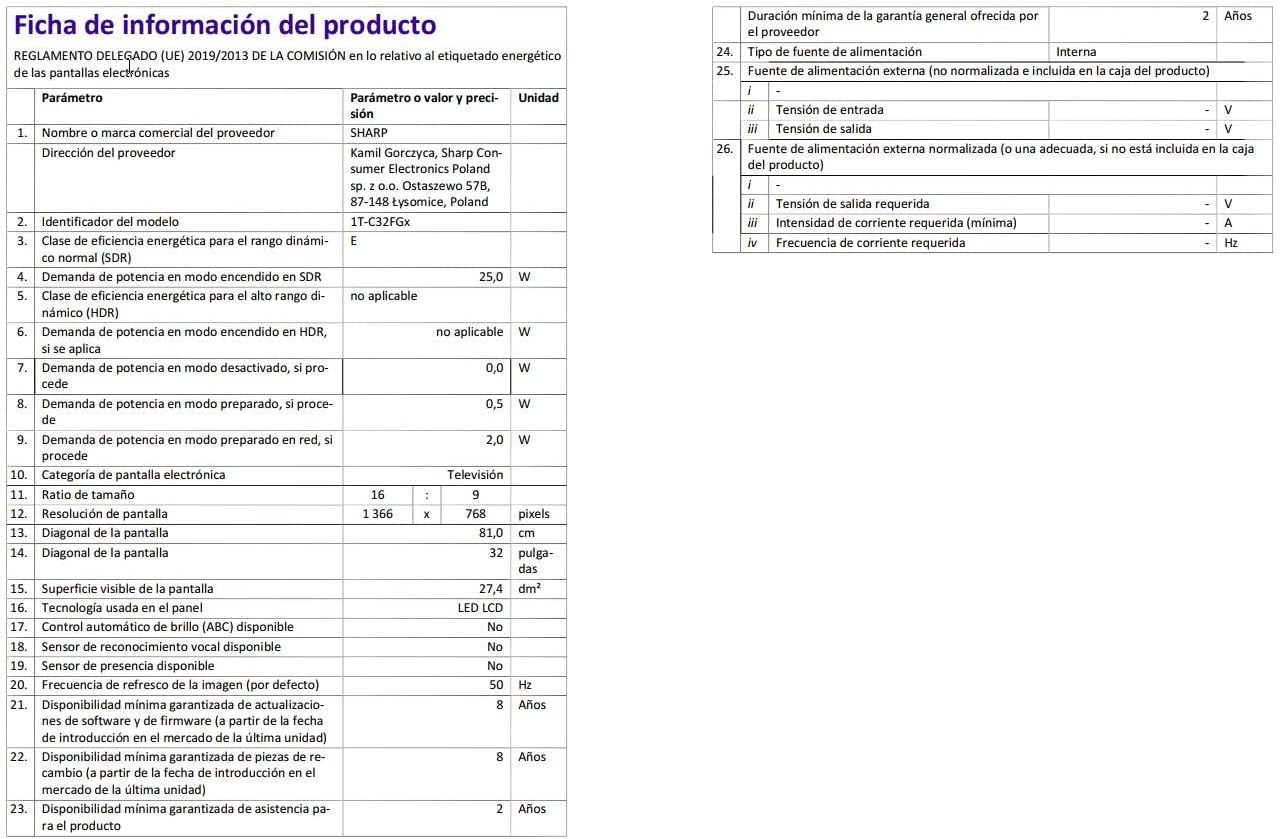
Image: Detailed product information sheet.
9. Garantia e Suporte
The Sharp 32FG6EA television comes with a minimum general warranty duration of 2 years from the provider.
For technical support, warranty claims, or further assistance, please refer to the contact information provided with your purchase documentation or visit the official Sharp support website da sua região.


