1. Introdução
This manual provides essential information for the safe and correct operation of your Vonyx VMM100 4-Channel DJ Mixer. Please read this manual thoroughly before using the device to ensure optimal performance and to prevent damage. Keep this manual for future reference.
2. Instruções de segurança
- Certifique-se de que a fonte de alimentação voltage matches the requirements specified for the device.
- Do not expose the device to rain or moisture to avoid electric shock.
- Evite colocar o dispositivo perto de fontes de calor ou sob luz solar direta.
- Não abra o casing; não há peças que possam ser reparadas pelo usuário no interior. Encaminhe todos os serviços de manutenção para pessoal qualificado.
- Disconnect the power adapter during thunderstorms or when not in use for extended periods.
- Mantenha o dispositivo longe das crianças.
3. Recursos do Produto
- Compact 4-channel analog mixer.
- Conectividade Bluetooth para transmissão de áudio sem fio.
- Integrated USB MP3 player with digital display.
- Adjustable delay effect with dedicated volume control.
- Effect send/return on channels 1 and 2.
- High and low tone controls for each channel.
- USB power supply (5V) for mobile use, compatible with power banks.
- Channels 1 and 2 feature +48V phantom power for condenser microphones.
- LED VU meter and peak indicators for signal monitoring.
- Includes USB power adapter and USB cable.
4. Conteúdo da embalagem
Por favor, verifique se todos os itens estão presentes ao desembalar:
- Vonyx VMM100 4-Channel DJ Mixer
- USB Power Adapter
- Cabo USB
- Manual do usuário (este documento)
5. Controles e funções
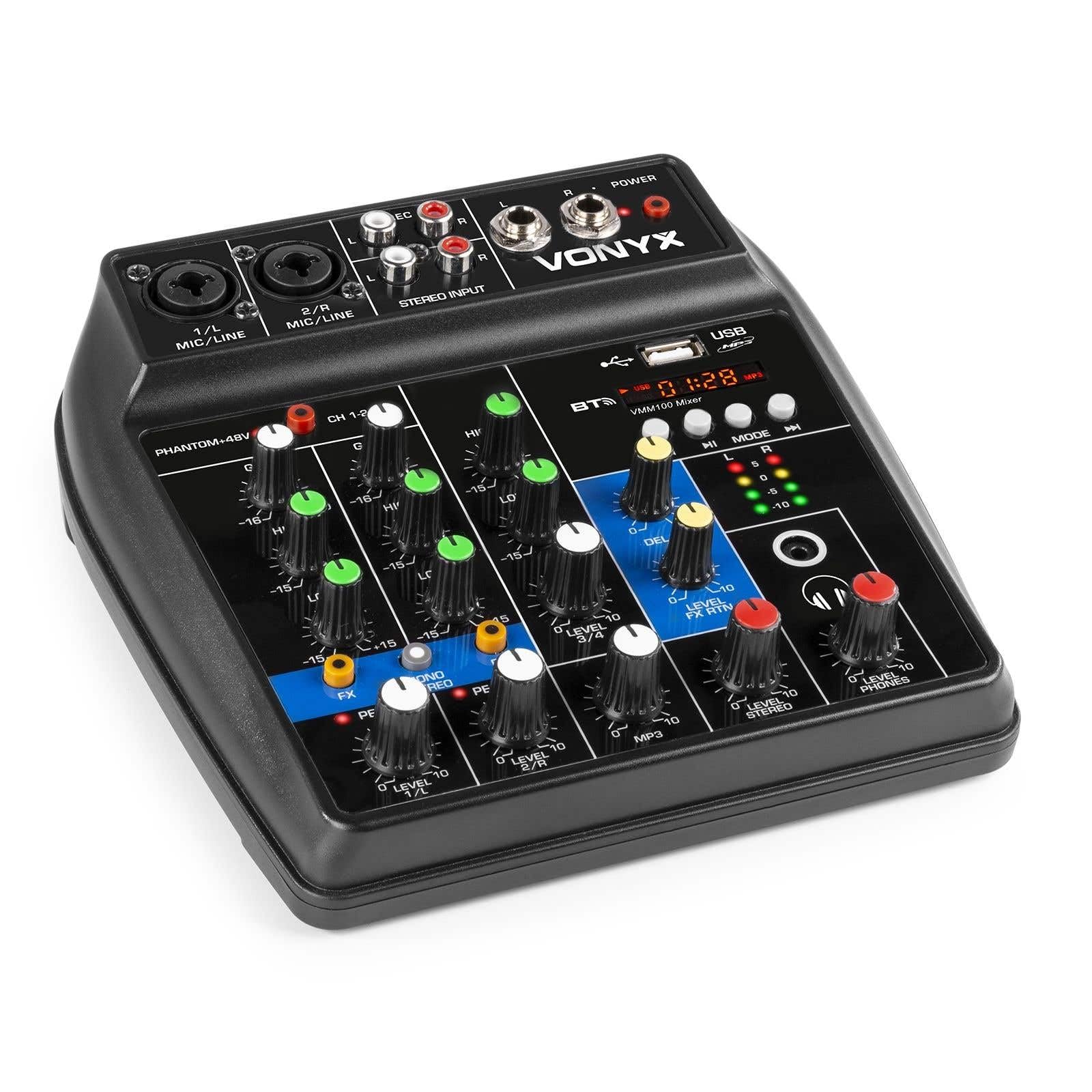
Figura 1: Geral view of the Vonyx VMM100 mixer, highlighting the layout of all controls, inputs, and outputs.

Figura 2: Close-up of the mixer's control panel, showing individual channel controls, EQ, gain, and effect knobs.
5.1 Input Channels (1 & 2)
- Combi XLR / 6.3mm Jack: Connect microphones (XLR) or line-level instruments (6.3mm jack).
- Phantom +48V Switch: Activates phantom power for condenser microphones on channels 1 and 2.
- Botão de GANHO: Adjusts the input sensitivity for the connected device.
- Botão ALTO: Adjusts the high-frequency (treble) level for the channel.
- Botão BAIXO: Adjusts the low-frequency (bass) level for the channel.
- Botão FX: Controls the amount of delay effect applied to the channel.
- LED DE PICO: Illuminates when the input signal is too high, indicating potential clipping. Adjust GAIN to prevent this.
- Botão de NÍVEL: Ajusta o nível de saída geral do canal.
5.2 Stereo Input (Channel 3)
- Entradas RCA (E/D): Connect external stereo audio sources such as CD players or other line-level devices.
- Botão de NÍVEL: Adjusts the output level of the stereo input.
5.3 MP3/Bluetooth Channel (Channel 4)

Figura 3: USB port with a USB drive, demonstrating media playback capability.

Figura 4: Bluetooth and USB player section, showing the display and control buttons.
- Porta USB: Insira um pen drive USB para reproduzir arquivos MP3.
- Mostrar: Shows track information, playback time, and mode.
- Control Buttons (Play/Pause, Skip, Mode): Navigate tracks and switch between USB and Bluetooth modes.
- Bluetooth (BT) Indicator: Lights up when Bluetooth is active and paired.
- Botão de NÍVEL: Adjusts the output level of the MP3/Bluetooth channel.
5.4 Seção principal
- DELAY Knob: Adjusts the overall intensity of the delay effect.
- LEVEL FX RTN Knob: Controls the return level of the delay effect.
- LEVEL STEREO Knob: Master volume control for the main stereo output.
- LEVEL PHONES Knob: Ajusta o volume da saída de fone de ouvido.
- VU Meter (LED): Displays the main output level.
- Main Output (6.3mm Jack L/R): Liga a ampsalva-vidas ou alto-falantes amplificados.
- Saída de gravação (RCA L/R): Connects to recording devices.
- Saída para fones de ouvido (conector de 6.3 mm): Connects stereo headphones.
- LED DE FORÇA: Indicates when the mixer is powered on.
5.5 entrada de energia

Figura 5: Lado view of the mixer, illustrating the 5V DC USB power input port.
- 5V DC USB Input: Connect the provided USB power adapter or a compatible USB power source (e.g., power bank) to power the mixer.
6. Configuração
6.1 Conexão de Energia
- Connect the supplied USB cable to the 5V DC USB input on the mixer.
- Conecte a outra extremidade do cabo USB ao adaptador de energia USB fornecido.
- Plug the USB power adapter into a suitable wall outlet. The POWER LED on the mixer will illuminate.
6.2 Conectando fontes de áudio
- Microphones/Line Instruments: Connect microphones via XLR or line-level instruments via 6.3mm jack to channels 1 and 2. If using condenser microphones, activate the +48V phantom power switch.
- Stereo Line Devices: Connect devices like CD players to the RCA inputs of channel 3.
- Pendrive: Insira uma unidade flash USB contendo MP3 files into the USB port on channel 4.
6.3 Conectando as Saídas
- Produto principal: Connect the 6.3mm jack main outputs (L/R) to your ampAmplificador, caixas de som amplificadas ou sistema de som profissional.
- Fones de ouvido: Connect your headphones to the 6.3mm headphone jack.
- Dispositivo de gravação: Connect the RCA record outputs (L/R) to an external recording device if desired.
7. Instruções de operação
7.1 Mistura Básica
- Ensure all LEVEL and GAIN knobs are set to their minimum positions before powering on.
- Power on the mixer and any connected audio equipment.
- Gradually increase the GAIN knob for each active input channel until the PEAK LED flashes only occasionally during the loudest parts of the signal.
- Adjust the HIGH and LOW EQ knobs for each channel to shape the tone as desired.
- Use the individual LEVEL knobs to balance the volume of each channel.
- Adjust the main STEREO LEVEL knob to control the overall output volume. Monitor the VU meter to avoid clipping.
- Adjust the PHONES LEVEL knob for comfortable headphone monitoring.
7.2 Operação Bluetooth
- Press the MODE button on the MP3/Bluetooth channel until the display shows "BT" or the Bluetooth indicator flashes.
- On your smartphone, tablet, or PC, search for Bluetooth devices and select "Vonyx VMM100".
- Once paired, the Bluetooth indicator will glow steadily. You can now stream audio wirelessly to the mixer.
- Use the playback controls on the mixer or your device to manage audio.
Reprodução de MP3 via USB 7.3
- Insira uma unidade flash USB contendo MP3 files na porta USB.
- Press the MODE button on the MP3/Bluetooth channel until the display shows track information.
- Use the playback controls (Play/Pause, Skip) to navigate and play tracks.
7.4 Utilizando Efeitos
- Turn the FX knob on channels 1 and 2 to send a portion of that channel's signal to the internal delay effect.
- Adjust the main DELAY knob to control the overall intensity and characteristics of the delay.
- Use the LEVEL FX RTN knob to control how much of the processed effect signal is mixed back into the main output.
8. Gravação
The VMM100 mixer allows for easy recording of your mix. Connect the RCA record outputs (L/R) to the input of a suitable recording device (e.g., computer audio interface, dedicated recorder). Ensure your recording software or device is configured to receive audio from the connected inputs. The signal sent to the record output is a stereo mix of all active channels, post-fader.
9. Manutenção
- Limpeza: Use um pano macio e seco para limpar a parte externa da batedeira. Não use produtos de limpeza abrasivos ou solventes.
- Armazenar: Guarde a batedeira em local fresco e seco, longe da luz solar direta e de temperaturas extremas.
- Manuseio: Evite deixar cair o misturador ou submetê-lo a impactos fortes.
10. Solução De Problemas
| Problema | Possível causa | Solução |
|---|---|---|
| Sem energia | Adaptador de energia não está conectado ou está com defeito. | Check power connections. Try a different USB port or adapter. |
| Nenhuma saída de som | Incorrect cable connections; volume knobs too low; incorrect input selection. | Verify all audio cables are securely connected. Increase channel LEVEL and STEREO LEVEL knobs. Ensure correct input mode (e.g., USB/BT). |
| Som distorcido | Input GAIN too high; output level too high. | Reduce GAIN for the affected channel until the PEAK LED stops flashing excessively. Lower STEREO LEVEL. |
| Bluetooth não está pareando | Mixer not in Bluetooth mode; device too far; previously paired device connected. | Ensure mixer is in BT mode. Move device closer. Disconnect from other Bluetooth devices. |
| A reprodução USB não está funcionando | Unidade USB formatada incorretamente; não suportada. file Tipo: mixer não está no modo USB. | Ensure USB drive is FAT32 formatted and contains MP3 files. Press MODE to select USB. |
11. Especificações
- Entradas:
- Channels 1 & 2: Combi XLR / 6.3mm Jack (Line or Microphone)
- Channel 3: RCA (Stereo)
- Channel 4: Bluetooth or USB MP3 Player
- Saídas:
- Main: 6.3mm Jack (Stereo)
- Record: RCA (Stereo)
- Headphone: 6.3mm Jack
- Faixa de frequência: 20 Hz - 20,000 Hz
- Equalizer: 2-band (High, Low) per channel
- Poder fantasma: +48V (Channels 1 & 2)
- Volume de conexãotage: 5V CC (via USB)
- Dimensões (C x L x A): 18 x 19.5 x 5.8 cm (7.09 x 7.68 x 2.28 polegadas)
- Peso: 0.5 kg (1.1 libras)
- Material: Nylon
12. Garantia e Suporte
Vonyx products are designed and manufactured to the highest quality standards. In the unlikely event of a problem with your product, please contact your retailer for warranty service. Please retain your proof of purchase. For technical support or further inquiries, refer to the official Vonyx website ou entre em contato com o departamento de atendimento ao cliente.


