
1. Introdução
This manual provides essential information for the safe and efficient operation of your Sygonix Built-in Thermostat SY-5044424. This device is designed as a built-in solution for regulating and monitoring heat generators within heating, climate, and ventilation technology systems. Please read these instructions thoroughly before installation and use, and retain them for future reference.
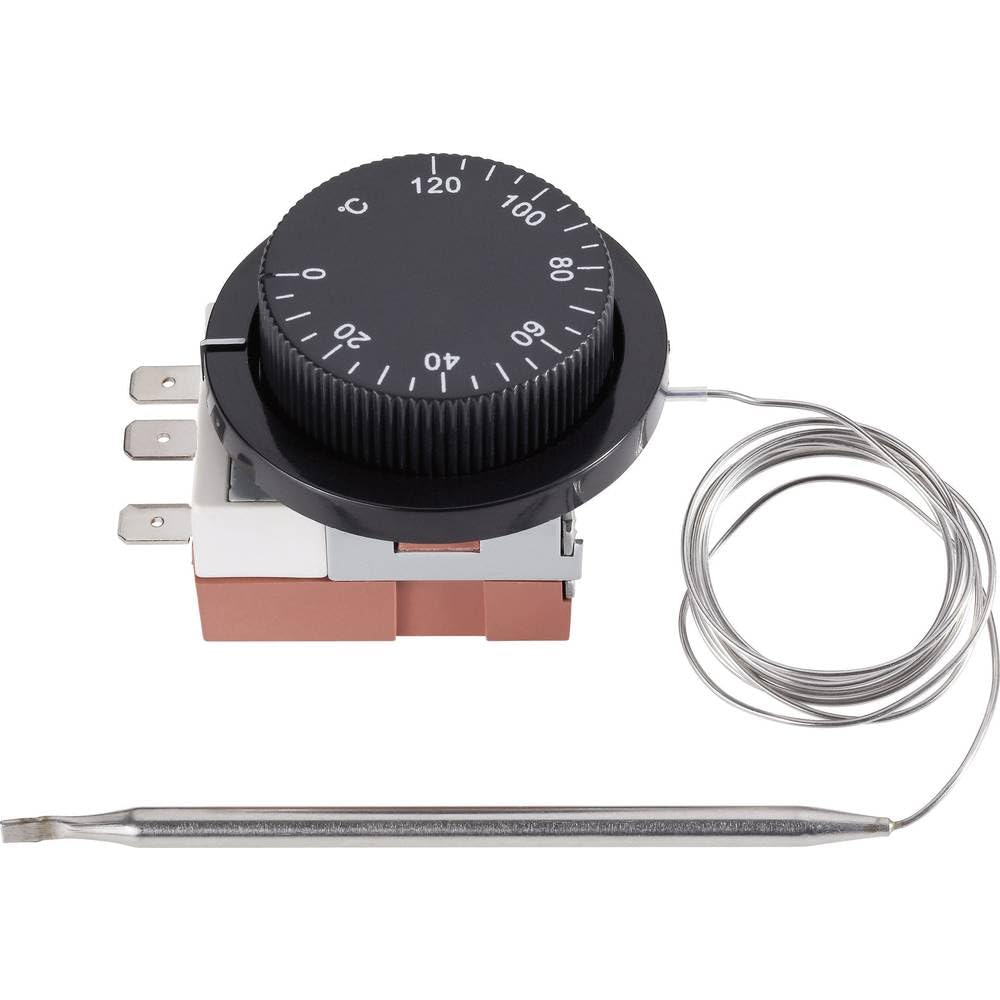
Image 1.1: The Sygonix Built-in Thermostat SY-5044424. This image shows the compact design of the thermostat, ready for integration into a control panel or wall unit.
2. Instruções de segurança
Aviso: Failure to follow these safety instructions may result in fire, electric shock, injury, or damage to the product or property.
- A instalação deve ser realizada por um eletricista qualificado, em conformidade com todos os códigos elétricos locais e nacionais.
- Ensure the power supply is disconnected before installation, maintenance, or troubleshooting.
- Não exponha o dispositivo à umidade, temperaturas extremas ou luz solar direta.
- Não tente modificar ou reparar o dispositivo por conta própria. Contate pessoal de serviço qualificado.
- Mantenha os materiais de embalagem longe das crianças.
3. Recursos do Produto
- Setting range: 0 - 120 °C
- Switching differential: 3 ± 1.5 °C
- Design integrado para integração perfeita
- Suitable for heating, climate, and ventilation systems
- Remote control capability (via RF connectivity)
4. Configuração e instalação
The Sygonix Built-in Thermostat is designed for integration into existing control systems or panels. Professional installation is highly recommended.
4.1. Verificações pré-instalação
- Verify that the power supply matches the thermostat's requirements (230V).
- Ensure the installation location is free from excessive vibration, moisture, and direct heat sources.
- Confirm that all necessary mounting hardware is available.
4.2. Fiação
- Desconecte a energia: Turn off the main power supply to the circuit where the thermostat will be installed. Use a voltage tester to confirm that power is off.
- Montagem: Secure the thermostat in its designated built-in location using the provided mounting hardware.
- Fios de conexão: Follow the wiring diagram provided with the product packaging. Connect the power input, load output, and sensor wires to the appropriate terminals. Ensure all connections are secure.
- Colocação do Sensor: Position the temperature sensor in an area that accurately reflects the ambient temperature to be controlled, away from drafts or direct heat sources.
- Restaurar energia: Após todas as conexões estarem seguras e verificadas, restabeleça a energia no circuito.
5. Instruções de operação
The Sygonix Built-in Thermostat is designed for straightforward temperature control. Specific operation details may vary based on the integrated system and any connected remote control unit.
5.1. Inicialização da alimentação
- Upon first power-on, the thermostat may display a default temperature or enter a calibration mode. Refer to the specific display indicators in your product packaging.
5.2. Configurando a Temperatura
- Use the integrated controls (if any) or a compatible remote control unit to adjust the desired temperature. The setting range is 0 to 120 °C.
- The thermostat will activate or deactivate the connected heating/cooling device to maintain the set temperature within the specified switching differential.
5.3. Funcionalidade de controle remoto
- The thermostat supports RF connectivity for remote control. Pair your compatible remote control or smart system according to its specific instructions.
- Ensure the remote control unit is within the effective range and has fresh batteries (if applicable).
6. Manutenção
The Sygonix Built-in Thermostat requires minimal maintenance.
- Limpeza: Gently wipe the surface of the thermostat with a soft, dry cloth. Do not use abrasive cleaners, solvents, or excessive moisture.
- Verificações regulares: Periodically inspect the wiring connections for any signs of wear or damage. Ensure the temperature sensor is clean and unobstructed.
- Ciclo de energia: If the device behaves unexpectedly, try disconnecting and reconnecting the power supply for a few minutes.
7. Solução De Problemas
Se você tiver problemas com o seu termostato, consulte os problemas comuns e suas soluções a seguir:
| Problema | Possível causa | Solução |
|---|---|---|
| Termostato não liga | Sem fonte de alimentação; fiação incorreta | Check circuit breaker; verify wiring connections (ensure power is off first). |
| Leituras de temperatura incorretas | Sensor obstructed or misplaced; faulty sensor | Ensure sensor is clean and in an appropriate location; contact support if suspected faulty. |
| Heating/cooling device not responding | Incorrect wiring; thermostat setting issue; device malfunction | Verify wiring; check thermostat settings; test the heating/cooling device independently. |
| Controle remoto não funciona | Remote not paired; batteries low; out of range | Pair remote as per its instructions; replace batteries; ensure remote is within RF range. |
Se o problema persistir após tentar essas soluções, entre em contato com o suporte ao cliente.
8. Especificações
| Recurso | Detalhe |
|---|---|
| Marca | Sygonix |
| Número do modelo | SY-5044424 |
| Cor | Preto |
| Dimensões do produto | 7 x 5 x 18 cm; 14 kg (or 17D x 6W x 5H cm) |
| Capacidade | 10 litros |
| Potência / Voltage | 280 |
| Volumetage | 230 V |
| Nível de ruído | 1 decibéis |
| Características especiais | Controle remoto |
| Fabricante | Sygonix |
| Número do item | SY-5044424 |
| ASIN | B0BPX282HB |
| Tipo de controlador | Controlador portátil |
| Usos específicos do produto | Building heating and air conditioning |
| Tipo de controle de temperatura | Smart/Remote Control |
| Tecnologia de Conectividade | RF |
| Componentes incluídos | Hardware de montagem |
| Faixa de configuração | 0 - 120 °C |
| Diferencial de comutação | 3 ± 1.5 °C |
9. Garantia e Suporte
For warranty information and technical support, please refer to the documentation included with your purchase or visit the official Sygonix website. Guarde o comprovante de compra para solicitações de garantia.