1. Introdução
Thank you for choosing the Vetroo 1000W Black Power Supply. This power supply unit (PSU) is designed to provide stable and efficient power to your personal computer, especially for high-performance gaming and workstation builds. It features 80 Plus Gold certification for energy efficiency, full modular cabling for easy management, and is compliant with the latest ATX 3.1 and PCIe 5.1 standards. This manual provides essential information for safe installation, operation, and maintenance of your PSU.
2. Informações de segurança
Please read and understand all safety warnings before installing or operating this product. Failure to follow these instructions may result in electric shock, fire, or serious injury.
- Vol altotage: The PSU contains high voltage components. Do not open the PSU casing. Não existem peças internas que possam ser reparadas pelo usuário.
- Instalação profissional: Installation should be performed by qualified personnel. Incorrect installation can damage your system or the PSU.
- Desconexão de energia: Always disconnect the AC power cord from the wall outlet before installing, removing, or cleaning the PSU or any other components in your computer.
- Aterramento: Ensure the PSU is properly grounded. Use only the provided power cord.
- Ambiente: Operate the PSU in a dry, well-ventilated environment. Avoid exposure to moisture, extreme temperatures, or direct sunlight.
- Ventilação: Do not block the ventilation openings of the PSU. Ensure adequate airflow around the unit.
- Gerenciamento de cabos: Ensure all cables are securely connected and routed to prevent interference with cooling fans or other components.
3. Conteúdo da embalagem
Verifique se todos os itens estão presentes no seu pacote:
- Vetroo 1000W Black Power Supply Unit
- Modular Cable Set (including 24-pin ATX, 8-pin CPU, PCIe 5.1 12+4-pin, PCIe 6+2-pin, SATA, Molex, FDD cables)
- Cabo de alimentação CA
- Parafusos de montagem
- Abraçadeiras de nylon/Tiras de velcro
- Manual do usuário (este documento)


4. Recursos do Produto
- Certificação 80 Plus Gold: Ensures high energy efficiency, reducing power consumption and heat generation.
- Fully Compliant with ATX 3.1 Specifications: Designed to meet the latest power delivery standards for modern PC components.
- PCIe Gen 5.1 Ready: Equipped with dedicated 12+4-pin connectors for the latest PCIe 5.1 graphics cards, offering up to 600W power delivery. Also backwards compatible with PCIe 4.0 and 3.0.
- Premium 105° C Capacitors: Utilizes high-quality Japanese capacitors for enhanced stability, reliability, and extended lifespan.
- Full Modular Design: Allows users to connect only the necessary cables, improving airflow and simplifying cable management within the PC case.
- Eco Mode with 120mm FDB Fan: Features a fluid dynamic bearing (FDB) fan that operates silently under low loads, with an Eco Mode switch to stop the fan entirely when power consumption is below 50%.
- Tamanho compacto: Designed to fit comfortably in various PC chassis types.
- Proteção abrangente: Inclui mais de 1 volumetage Protection (OVP), Over Current Protection (OCP), Over Power Protection (OPP), Short Circuit Protection (SCP), Under Voltage Protection (UVP), and Over Temperature Protection (OTP).
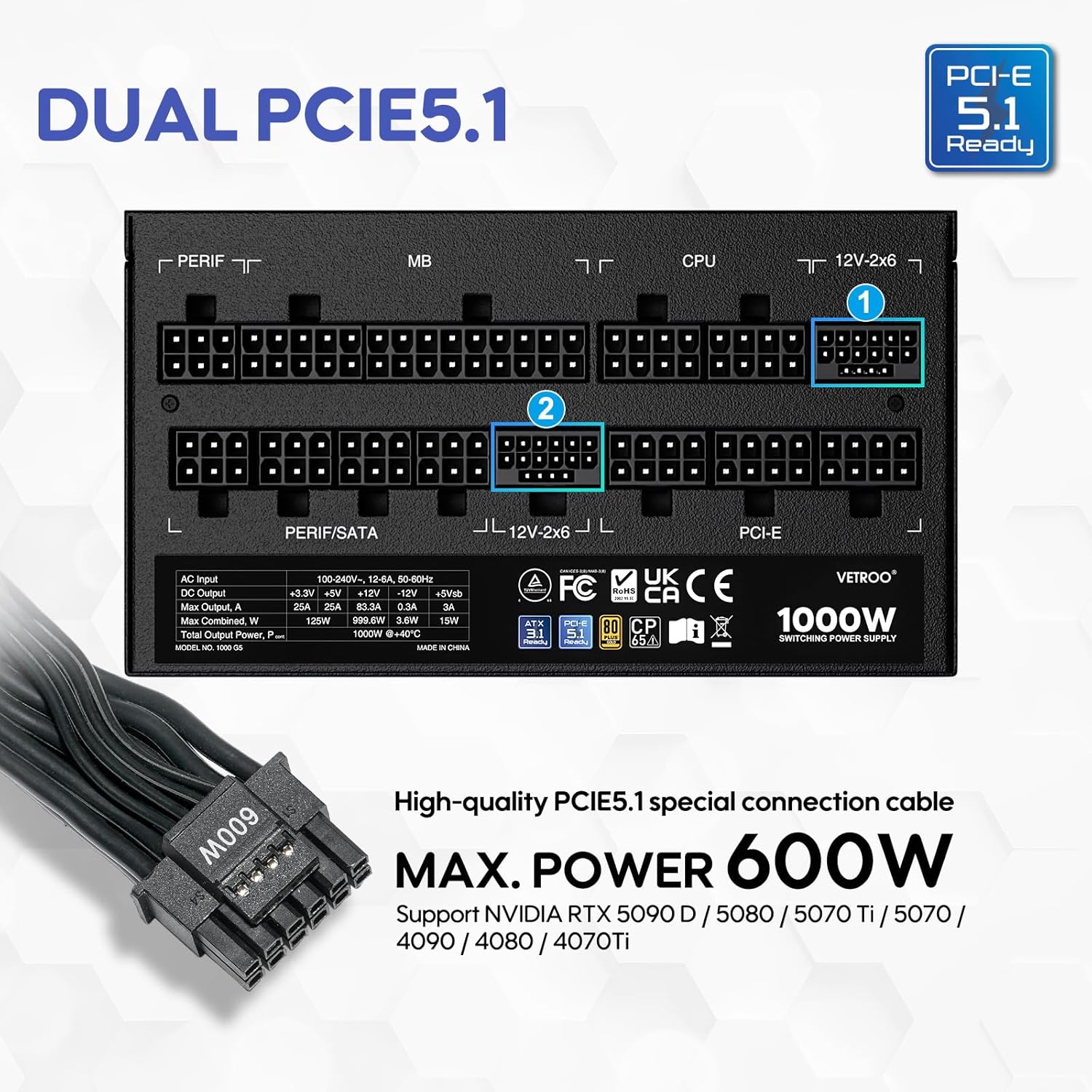

5. Especificações
| Recurso | Detalhe |
|---|---|
| Nome do modelo | 1000G5 |
| Potência de saídatage | 1000 Watts |
| Fator de forma | ATX |
| Projeto de Fonte de Alimentação | Modular completo |
| Certificação de Eficiência | Mais de 80 ouro |
| Padrão ATX | Pronto para ATX 3.1 |
| Padrão PCIe | PCIe 5.1 Ready (Dual) |
| Método de resfriamento | Ar (Ventilador FDB de 120 mm) |
| Dimensões do produto (C x L x A) | 5.9 x 5.5 x 3.4 polegadas |
| Peso do item | 5.83 libras |
| Dispositivos compatíveis | Computador pessoal |
| Tipo de conector | ATX & PCIE |

6. Configuração e instalação
Follow these steps to install your Vetroo 1000W Power Supply:
- Prepare seu sistema: Ensure your computer is completely powered off and unplugged from the wall outlet. Open your PC case to access the PSU mounting area.
- Remova a fonte de alimentação antiga (se aplicável): Disconnect all cables from your old power supply and remove it from the chassis.
- Instale a nova fonte de alimentação: Carefully slide the Vetroo 1000W PSU into the designated power supply bay in your PC case. Secure it with the provided mounting screws.
- Conecte cabos modulares: Identify the necessary cables for your motherboard, CPU, graphics card(s), and storage devices. Connect these cables to the corresponding ports on the PSU first, then route them to your components.
- Placa-mãe: Conecte o cabo ATX de 24 pinos à sua placa-mãe.
- CPU: Connect the 8-pin (or 4+4-pin) CPU power cable(s) to your motherboard.
- Placa(s) gráfica(s): For modern GPUs, use the PCIe 5.1 12+4-pin cable. For older or additional GPUs, use the PCIe 6+2-pin cables.
- Storage/Peripherals: Connect SATA power cables to SSDs/HDDs and Molex cables for other peripherals as needed.
- Gerenciamento de cabos: Use the included cable ties or Velcro straps to organize cables, ensuring optimal airflow and a tidy build.
- Conexões finais: Close your PC case. Connect the AC power cord to the PSU and then to a wall outlet or surge protector.

7. Instruções de operação
- Ligar/desligar: After all connections are secure, flip the main power switch on the back of the PSU to the 'ON' position. Your computer can now be powered on via its front panel button. To power off, shut down your computer normally, then flip the PSU switch to 'OFF' for complete power disconnection.
- Modo Eco: The Vetroo 1000W PSU features an Eco Mode switch on the rear panel.
- Eco Mode ON: When the Eco Mode switch is in the 'ON' position, the PSU fan will remain off under low to moderate loads (typically below 50% load) for silent operation. The fan will automatically activate when the load increases or internal temperature rises.
- Eco Mode OFF: When the Eco Mode switch is in the 'OFF' position, the PSU fan will spin continuously regardless of the load, providing constant cooling.

8. Manutenção
A manutenção adequada garante a longevidade e o desempenho ideal da sua fonte de alimentação:
- Limpeza de pó: Periodically clean the PSU fan and ventilation grilles to prevent dust buildup, which can hinder cooling performance. Use compressed air to gently blow dust away. Always disconnect power before cleaning.
- Inspeção de cabos: Regularly check all modular cable connections to ensure they are secure and free from damage.
- Condições ambientais: Maintain a clean, dry, and well-ventilated environment for your PC to prevent excessive heat and moisture exposure to the PSU.
9. Solução De Problemas
If you encounter issues with your Vetroo 1000W Power Supply, try the following steps:
- Sem energia:
- Ensure the AC power cord is securely plugged into both the PSU and the wall outlet.
- Verify the main power switch on the PSU is in the 'ON' position.
- Check all modular cable connections, especially the 24-pin ATX and 8-pin CPU cables, to ensure they are fully seated.
- Teste a tomada com outro aparelho para confirmar se ela está energizada.
- Instabilidade do sistema/Desligamentos aleatórios:
- Verifique se sua fonte de alimentação está funcionando corretamente.tage is sufficient for all your components, especially high-power GPUs.
- Verifique se há ventilação adequada dentro do gabinete do seu PC para evitar superaquecimento.
- Verify that all PCIe power cables to your graphics card(s) are correctly connected.
- If Eco Mode is enabled, try disabling it to see if continuous fan operation resolves the issue.
- Ruídos incomuns:
- If you hear a fan noise, ensure the PSU fan is not obstructed by cables or dust.
- If a 'coil whine' noise is present, it is often harmless but can sometimes indicate a component under stress. Ensure your system is not drawing excessive power.
If problems persist after performing these checks, please contact Vetroo customer support for further assistance.
10. Garantia e Suporte
The Vetroo 1000W Black Power Supply comes with a Garantia de 10 anos a partir da data da compra. Esta garantia cobre defeitos em materiais e mão de obra sob uso normal.
A garantia não cobre:
- Danos causados por acidente, abuso, uso indevido, inundação, incêndio, terremoto ou outras causas externas.
- Damage caused by operating the product outside the permitted or intended uses described by Vetroo.
- Damage caused by service (including upgrades and expansions) performed by anyone who is not a representative of Vetroo.
- Products or parts that have been modified to alter functionality or capability without the written permission of Vetroo.
For warranty claims or technical support, please visit the official Vetroo website or contact their customer service department with your product model and proof of purchase.


