Introdução
Thank you for choosing the sonoro Primus Internet Radio with Bluetooth. This manual provides essential information for setting up, operating, and maintaining your device to ensure optimal performance and longevity. Please read it thoroughly before use.
Instruções importantes de segurança
- Fonte de energia: Utilize apenas o adaptador de energia especificado. Certifique-se de que o volume esteja correto.tage corresponde à sua fonte de alimentação local.
- Ventilação: Não obstrua nenhuma abertura de ventilação. Mantenha espaço suficiente ao redor do aparelho para garantir a circulação adequada do ar.
- Água e Umidade: Do not expose the unit to rain, moisture, dripping, or splashing. Keep liquids away from the device.
- Aquecer: Não instale perto de fontes de calor, como radiadores, registros de calor, fogões ou outros aparelhos (incluindo amplificadores) que produzem calor.
- Limpeza: Unplug the unit before cleaning. Use a dry cloth only.
- Manutenção: Não tente consertar este produto sozinho. Encaminhe todos os serviços de manutenção para pessoal de serviço qualificado.
- Produto Laser: This product contains a Class 1 laser. Do not open the casing.
Conteúdo da embalagem
Por favor, verifique se todos os itens estão presentes:
- sonoro Primus Internet Radio Unit
- Adaptador de energia
- Controle remoto (com pilhas)
- Manual do usuário (este documento)
Configurar
1. Desembalagem e colocação
Carefully remove the unit from its packaging. Place the sonoro Primus on a stable, flat surface, ensuring adequate ventilation around the device. Avoid placing it near strong magnetic fields or direct sunlight.
2. Conectando energia
Connect the provided power adapter to the AC IN port on the rear of the unit. Plug the other end into a suitable wall outlet. The unit will enter standby mode.
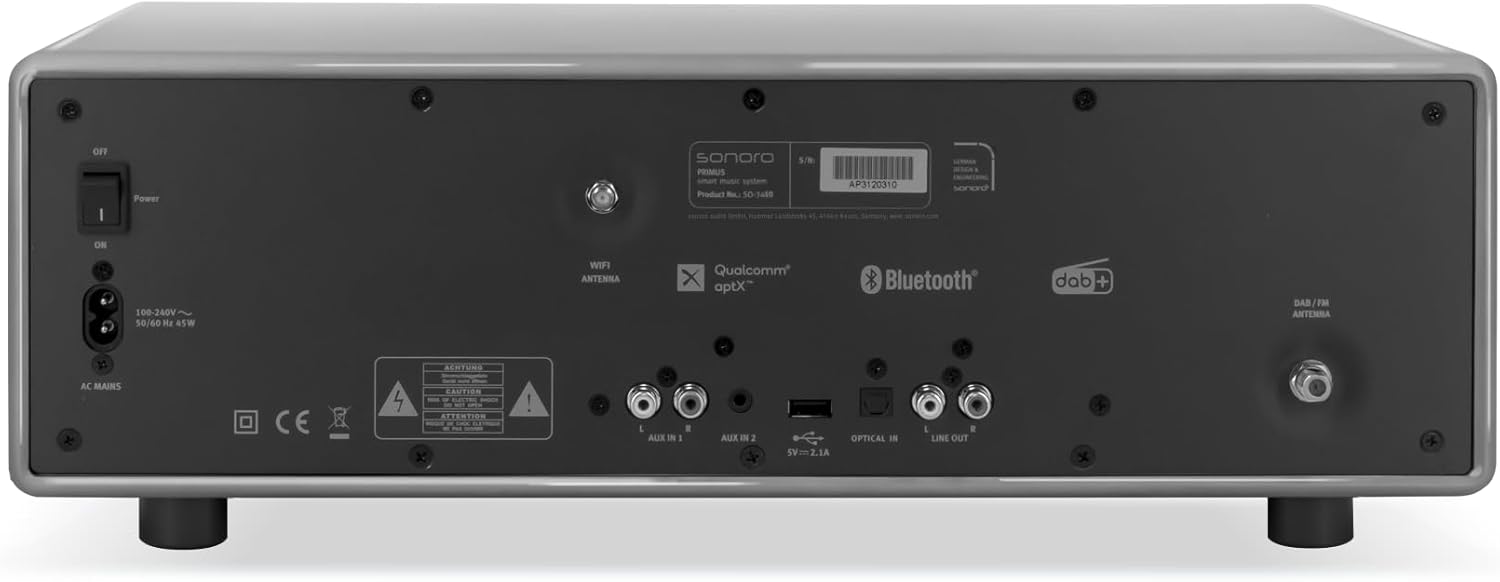
Imagem: Rear panel of the sonoro Primus, highlighting the power input and other connectivity options like AUX-in, Optical-in, and antenna connections.
3. Conexão da Antena
For optimal FM and DAB+ reception, connect the included antenna to the appropriate antenna input on the rear panel. Extend the antenna fully for best signal quality.
4. Ligação inicial
Press the Power button on the front panel or the remote control to turn on the unit. Follow the on-screen instructions for initial setup, including language selection and network configuration.

Imagem: Frente view of the sonoro Primus, displaying the central screen, control knobs, and various buttons for media playback and source selection.
Instruções de operação
Controles básicos
The sonoro Primus features intuitive controls on the front panel and a comprehensive remote control. Key controls include:
- Botão de energia: Liga/desliga a unidade ou a coloca em modo de espera.
- Botão de volume: Ajusta o nível de volume principal.
- Botão de sintonia/seleção: Navega pelos menus e seleciona as opções.
- Botões de origem: Selects input sources (Internet Radio, DAB+, FM, Bluetooth, CD, AUX-in, Optical-in).
- Controles de reprodução: Play/Pause, Skip Forward/Backward for CD and streaming.
Internet Radio and Podcasts
Access over 25,000 internet radio stations and numerous podcasts worldwide. Ensure your device is connected to a stable Wi-Fi network. Navigate through the menu using the Tune/Select knob to find and save your favorite stations.
Rádio DAB+ e FM
Switch to DAB+ or FM mode using the source buttons. The unit will automatically scan for available stations. You can manually tune or save presets for quick access to your preferred channels.
Conectividade Bluetooth
To connect a Bluetooth device (smartphone, tablet, laptop):
- Select the Bluetooth source on the sonoro Primus.
- Habilite o Bluetooth no seu dispositivo externo.
- Procurar "sonoro Primus" in your device's Bluetooth settings and pair.
- Uma vez conectado, você pode transmitir áudio sem fio para a unidade.
Reprodução de CD
Insert an audio CD into the CD slot. The unit will automatically detect and begin playback. Use the playback controls to manage your music.
Streaming Services (Spotify Connect, Amazon Music, Deezer)
The sonoro Primus supports various streaming services. To use Spotify Connect, Amazon Music, or Deezer, ensure your device is connected to Wi-Fi and you have an active subscription to the respective service. Follow the instructions within the service's app to connect to your sonoro Primus.
AUX-in and Optical-in
Connect external audio devices using the AUX-in (3.5mm jack) or Optical-in ports on the rear panel. Select the corresponding source on the unit to play audio from these inputs.
Manutenção
Limpeza da unidade
To clean the exterior of the unit, unplug it from the power source. Use a soft, dry, lint-free cloth. Do not use abrasive cleaners, waxes, or solvents as they may damage the finish.
Cuidados com o Leitor de CD
Handle CDs by their edges to avoid fingerprints. If a CD is dirty, wipe it gently with a soft, dry cloth from the center outwards. Do not use solvents or abrasive cleaners on CDs.
Atualizações de software
Periodically check for software updates via the unit's menu (if available). Updates can improve performance and add new features. Ensure a stable internet connection during updates.
Solução de problemas
| Problema | Possível causa | Solução |
|---|---|---|
| Sem energia | Cabo de alimentação desconectado; tomada com defeito. | Verifique a conexão do cabo de alimentação; tente outra tomada. |
| Sem som | Volume too low; wrong input source selected; mute activated. | Increase volume; select correct input source; deactivate mute. |
| Má recepção de rádio | Antenna not properly connected or extended; interference. | Ajuste a posição da antena; afaste o aparelho de outros dispositivos eletrônicos. |
| Falha no pareamento Bluetooth | Device too far; Bluetooth not enabled on external device; unit not in pairing mode. | Ensure devices are close; enable Bluetooth; put sonoro Primus in pairing mode. |
| CD não está tocando | CD inserido incorretamente; CD sujo ou riscado; formato de disco não suportado. | Reinsira o CD corretamente; limpe ou substitua o CD; certifique-se de que seja um CD de áudio. |
| Problemas de conexão Wi-Fi | Incorrect password; router too far; network interference. | Verifique a senha do Wi-Fi; aproxime o dispositivo do roteador; reinicie o roteador. |
Se o problema persistir, entre em contato com o suporte ao cliente.
Especificações
- Marca: sonoro
- Modelo: e60a53a9-4d44-4a55-b129-3386e8f3e186
- Tecnologia do sintonizador: Rádio FM, DAB+
- Modo de saída de áudio: Estéreo
- Formatos de áudio suportados: MP3, AAC, WAV
- Configuração do alto-falante: 2.1 (Two coaxial speakers and a powerful 5.25 inch subwoofer)
- Conectividade: Optical, Auxiliary, Bluetooth, WLAN
- Dispositivos compatíveis: Laptop, MP3 player, Smartphone, Tablet
- Fonte de energia: Elétrico com fio
- Tipo de exibição: LCD ou LED
- Componentes incluídos: Power adapter, Remote control (with Lithium-metal batteries)
- Dimensões (pacote): 52.6 x 33.2 x 27.4 cm
- Peso (pacote): 9.45 kg
- Cor: Chalk Grey (Note: Other colors may be available for different models)
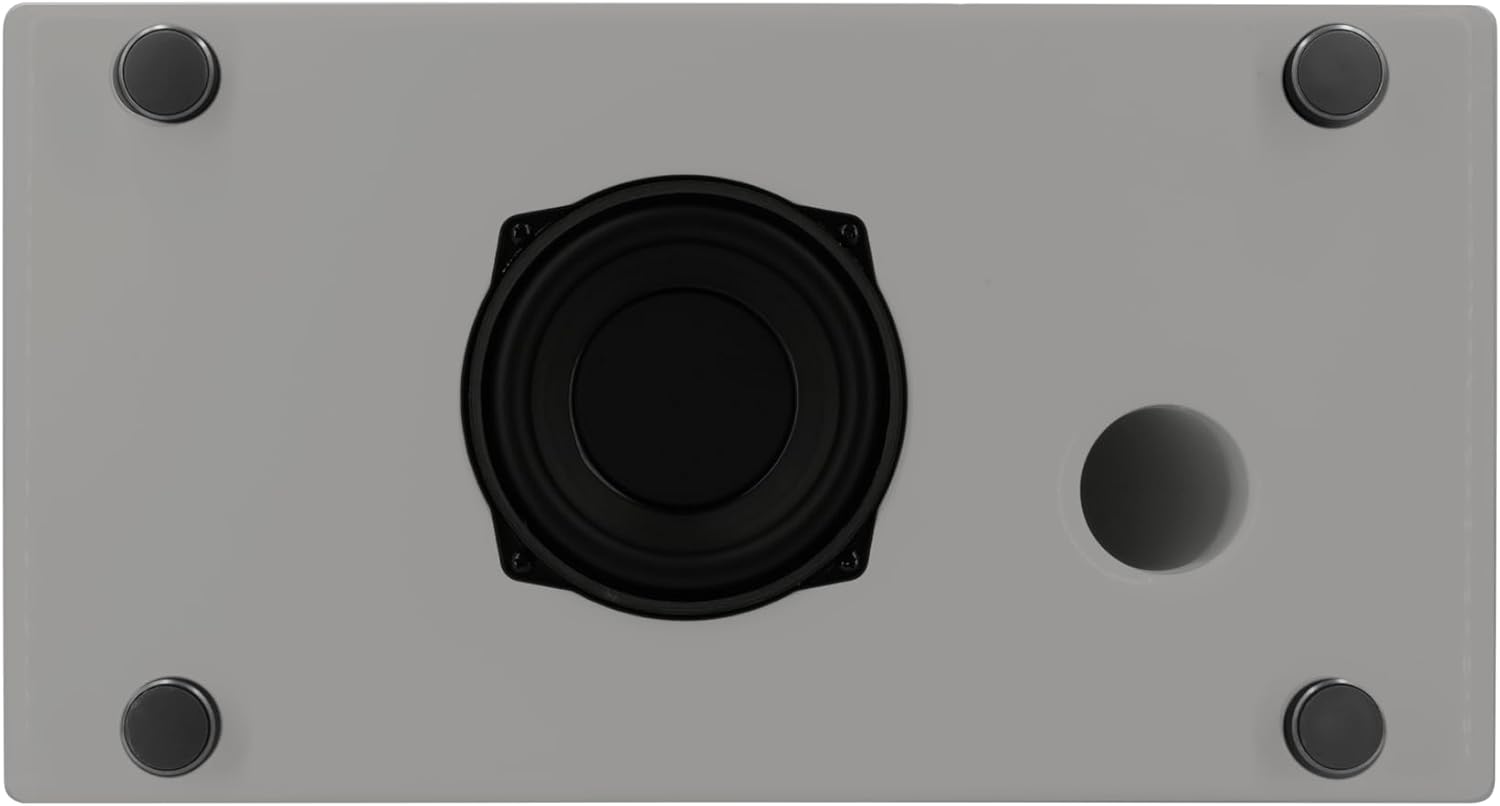
Imagem: Underside of the sonoro Primus, revealing the integrated 5.25-inch subwoofer for enhanced bass performance.
Garantia e Suporte
The sonoro Primus comes with a standard manufacturer's warranty. Please refer to the warranty card included in your package for specific terms and conditions. For technical support, service, or warranty claims, please contact sonoro audio GmbH customer service through their official website ou as informações de contato fornecidas com sua compra.
Fabricante: sonora audio GmbH
Primeira data disponível: 2 de janeiro de 2023


