1. Introdução
This manual provides detailed instructions for the amazon basics Wired Gaming Mouse, Model ABIM03. This mouse is designed to enhance your gaming and computing experience with its adjustable DPI, customizable RGB lighting, and programmable buttons. Please read this manual thoroughly before use to ensure proper operation and longevity of your device.
2. Recursos do Produto
- DPI ajustável: Up to 6400 DPI for precise cursor control and quick movements.
- Iluminação RGB personalizável: Personalize your mouse with various RGB lighting modes and driver customization options for PC.
- Botões programáveis: Equipped with multiple programmable buttons for assigning custom functions or macros.
- Gaming-Grade Sensor: Ensures accurate tracking and rapid response for gaming.
- Design durável: Features extra durable switches and enhanced build quality for extended use.
- Honeycomb Grip: Ergonomic honeycomb design provides a comfortable and secure grip.

Image: The amazon basics Wired Gaming Mouse highlighting its adjustable DPI settings, ranging from 1200 to 7200 (though product states up to 6400).
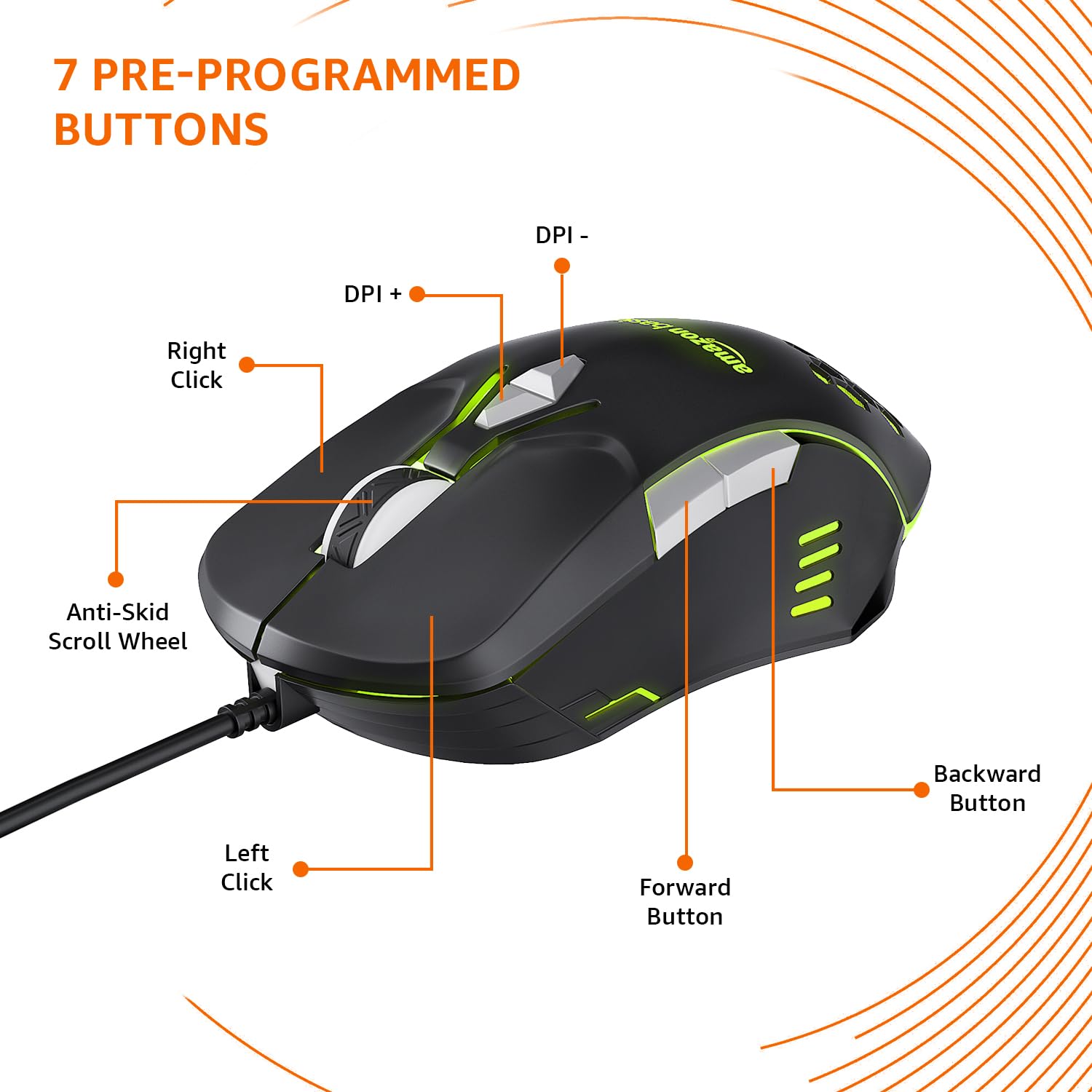
Image: The amazon basics Wired Gaming Mouse showing its 7 pre-programmed buttons, including Left Click, Right Click, Anti-Skid Scroll Wheel, DPI+, DPI-, Forward Button, and Backward Button.

Imagem: Uma visão de cima para baixo view of the amazon basics Wired Gaming Mouse, emphasizing its honeycomb-designed surface for improved grip and airflow.

Image: The amazon basics Wired Gaming Mouse illuminated with red RGB lighting, showcasing its light and comfortable design.
3. Instruções de configuração
- Desembale o mouse: Carefully remove the gaming mouse from its packaging.
- Conectar ao PC: Conecte o conector USB do mouse em uma porta USB disponível no seu computador.
- Instalação do driver: Your operating system (Windows, Linux) should automatically detect and install the necessary drivers. If prompted, follow the on-screen instructions. For advanced customization of RGB and programmable keys, refer to the manufacturer's website for specific driver software.
- Colocação: Place the mouse on a flat, clean surface or a mouse pad for optimal performance.
4. Instruções de operação
4.1 Funcionalidade Básica
- Clique esquerdo: Ação primária, seleção.
- Clique com o botão direito: Secondary action, context menus.
- Rodinha do mouse: Scroll up/down pages. Pressing the scroll wheel often acts as a middle click.
- Botões Avançar/Retroceder: Normalmente usado para navegação em web navegadores ou file exploradores.
4.2 Ajustando o DPI (pontos por polegada)
The mouse features dedicated DPI adjustment buttons (DPI+ and DPI-) to change cursor sensitivity on the fly. Press these buttons to cycle through different DPI levels up to 6400. A higher DPI setting results in faster cursor movement across the screen with less physical mouse movement.
4.3 Customizing RGB Lighting
The mouse includes customizable RGB lighting. Specific lighting modes can often be cycled through using a dedicated button (if present) or through the optional driver software. Refer to the driver software for advanced customization options, including color selection, effects, and brightness.
4.4 Botões de Programação
The mouse is equipped with programmable buttons. To assign custom functions, macros, or key combinations to these buttons, you will need to install and use the specific driver software provided by the manufacturer. This software typically allows you to create profilepara diferentes aplicações ou jogos.
Video: A short product highlight video demonstrating the key features of the amazon basics Wired Gaming Mouse, including adjustable DPI, RGB lighting, programmable buttons, and durable design.
5. Manutenção
- Limpeza: Use um pano macio e seco para limpar a parte externa do mouse. Para sujeira mais resistente, use um pano levemente umedecido.amp Pode-se usar um pano, garantindo que nenhum líquido entre no mouse.
- Limpeza do sensor: Ocasionalmente, use um cotonete levementeampened with isopropyl alcohol to gently clean the optical sensor on the underside of the mouse. Ensure the mouse is disconnected before cleaning.
- Evite líquidos: Do not immerse the mouse in water or any cleaning solutions.
- Armazenar: Guarde o mouse em um local fresco e seco, longe da luz solar direta e de temperaturas extremas.
6. Solução De Problemas
| Problema | Solução |
|---|---|
| O mouse não responde. |
|
| O movimento do cursor é errático ou instável. |
|
| Programmable buttons are not working. |
|
| A iluminação RGB não está funcionando ou está travada. |
|
7. Especificações
| Recurso | Detalhe |
|---|---|
| Marca | Noções básicas sobre a Amazon |
| Número do modelo | ABIM03 |
| Tecnologia de Conectividade | Com fio (USB) |
| Tecnologia de detecção de movimento | Óptico |
| Faixa de DPI | Até 6400 DPI |
| Teclas programáveis | 4 (in addition to standard left/right click and scroll) |
| Iluminação | RGB |
| Cor | Preto |
| Peso do item | 145 g |
| Dimensões do produto (CxLxA) | 15.8 x 10.4 x 5.4 cm |
| Plataforma de Hardware | PC |
| Compatibilidade do sistema operacional | Linux, Windows 7 and above |
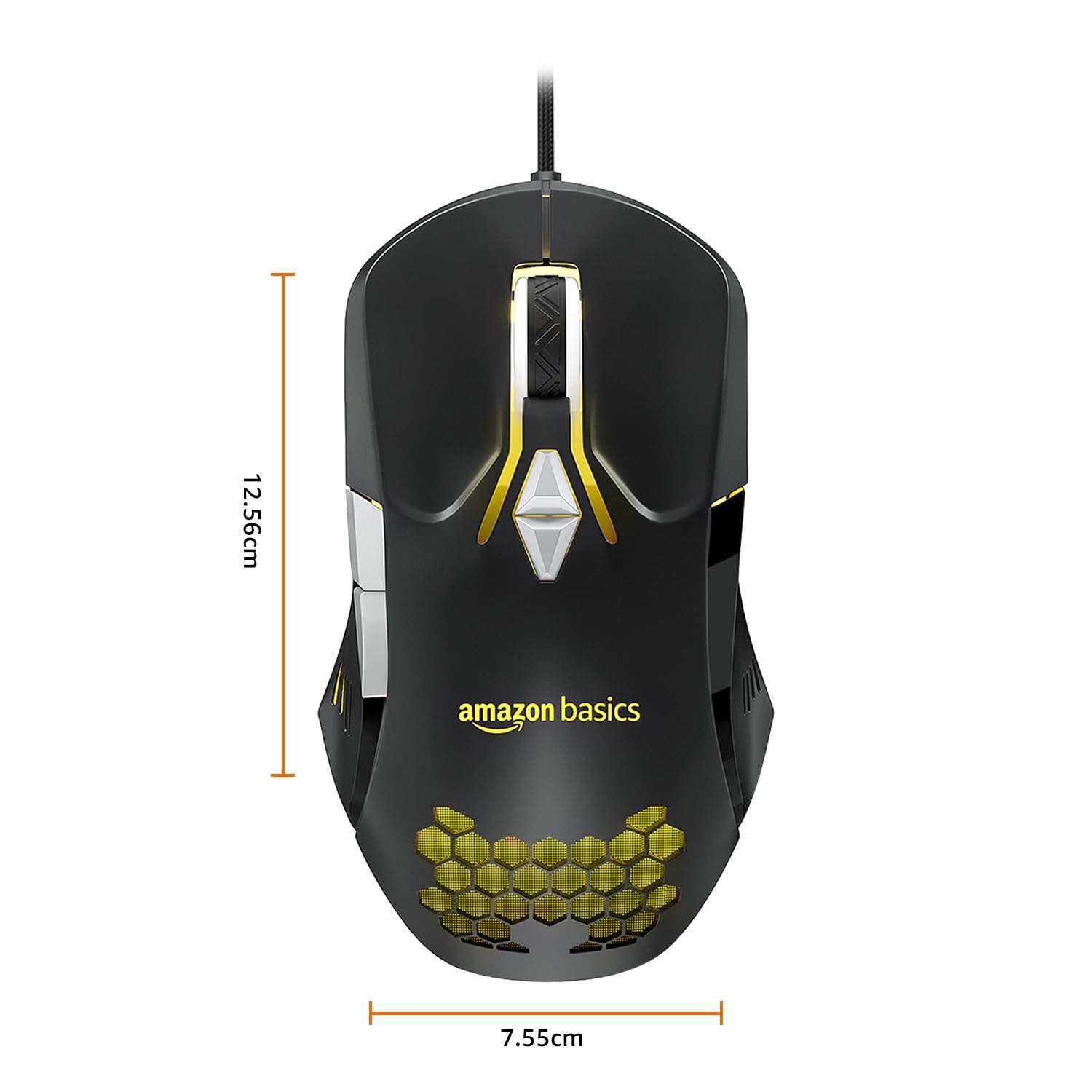
Image: The amazon basics Wired Gaming Mouse with its length (12.56cm) and width (7.55cm) dimensions indicated.
8. Informações de garantia
This amazon basics Wired Gaming Mouse comes with a Garantia de 1 anos from the date of purchase. This warranty covers manufacturing defects and issues arising from normal use. It does not cover damage caused by misuse, accidents, unauthorized modifications, or normal wear and tear. Please retain your proof of purchase for warranty claims.
9. Suporte
For further assistance, technical support, or warranty claims, please visit the official amazon basics support page or contact customer service through your purchase platform. Ensure you have your product model number (ABIM03) and proof of purchase ready when contacting support.
Recursos on-line:
- Página do produto: amazon.in/dp/B0BTD2YN6Y
- amazon basics Store: amazon basics Store