1. Produto acabadoview
The ProtoArc K100-A is an ultra-slim wireless Bluetooth keyboard specifically designed for Mac devices. It features a full-size layout with a numeric keypad, responsive scissor-switch keys for quiet typing, and adjustable white LED backlighting. This keyboard supports connection to up to three devices simultaneously, allowing for seamless switching between your MacBook, iMac, iPad, or iPhone. Its built-in rechargeable battery ensures long-lasting use.

Image: The ProtoArc K100-A keyboard connected to a MacBook, iPad, and iPhone, showcasing its multi-device capability.
2. Conteúdo da embalagem
- Teclado Bluetooth retroiluminado ProtoArc K100-A
- Cabo de carregamento USB-C
- Manual do usuário (este documento)
3. Introdução
3.1 Carregando o teclado
Before first use, fully charge the keyboard. Connect the provided USB-C charging cable to the keyboard's Type-C port and the other end to a USB power source (e.g., computer USB port, USB wall adapter). A full charge takes approximately 4-5 hours. The built-in 1200mAh lithium-ion battery provides a standby time of 3-4 months.

Image: The keyboard's Type-C charging port with the charging cable inserted.
3.2 Ligar/Desligar
Locate the power switch on the side or back of the keyboard. Slide it to the "ON" position to power on the keyboard. Slide it to "OFF" when not in use to conserve battery.
4. Conexão Bluetooth
The ProtoArc K100-A keyboard supports connection to three different devices via Bluetooth. Follow these steps to pair your devices:
- Certifique-se de que o teclado esteja ligado.
- Pressione e mantenha pressionada uma das teclas do canal Bluetooth (BT1, BT2, ou BT3Pressione e segure o botão do mouse por 3 a 5 segundos até que a luz indicadora correspondente pisque rapidamente. Isso indica que o teclado está no modo de emparelhamento.
- On your Mac device (MacBook, iMac, iPad, iPhone), go to Configurações do sistema (ou Preferências do sistema) > Bluetooth.
- Ative o Bluetooth e procure por dispositivos disponíveis.
- Selecione "ProtoArc K100-A"da lista de dispositivos."
- Follow any on-screen prompts to complete the pairing process. The indicator light will stop flashing and remain solid for a few seconds, then turn off, indicating successful pairing.
- Repita esses passos para até dois dispositivos adicionais usando as outras teclas de canal Bluetooth.

Image: The dedicated Bluetooth channel keys (BT1, BT2, BT3) on the keyboard.
4.1 Alternando entre dispositivos
To switch between paired devices, simply press the corresponding Bluetooth channel key (BT1, BT2, ou BT3) once. The keyboard will connect to the selected device within a few seconds.
5. Instruções de operação
Controle de luz de fundo 5.1
The keyboard features soft white LED backlighting with three adjustable brightness levels (low, medium, high). To adjust the backlight brightness, press the backlight key (often indicated by a sun icon or similar) located on the top right of the keyboard. Pressing it repeatedly cycles through the brightness levels and turns the backlight off.

Image: The keyboard with its white adjustable backlight at different brightness levels.
5.2 Teclas de Atalho
The keyboard includes 12 shortcut keys for enhanced productivity on Mac devices. These keys provide quick access to functions such as brightness adjustment, mission control, media playback, volume control, and more. Refer to the key labels for specific functions.

Image: Detail of the keyboard's silent scissor-switch keys, designed for quiet and responsive typing.
6. Manutenção e Cuidados
- Mantenha o teclado limpo passando um pano macio e seco. Evite usar produtos químicos agressivos ou materiais abrasivos.
- Não exponha o teclado a temperaturas extremas, umidade ou luz solar direta.
- Avoid spilling liquids on the keyboard. If a spill occurs, immediately power off the keyboard and allow it to dry completely before use.
- When not in use for extended periods, power off the keyboard to preserve battery life.
- The keyboard automatically enters sleep mode after 30 minutes of inactivity to save power. Press any key to wake it up.
7. Solução De Problemas
- Keyboard not connecting/disconnecting frequently:
- Certifique-se de que o teclado esteja totalmente carregado.
- Verify Bluetooth is enabled on your device and the keyboard is within range (up to 10 meters).
- Tente emparelhar novamente o teclado com o seu dispositivo.
- Certifique-se de que nenhum outro sinal sem fio forte esteja interferindo.
- Keys not responding or delayed response:
- Verifique o nível da bateria e carregue-a, se necessário.
- Certifique-se de que o teclado esteja conectado corretamente via Bluetooth.
- If the keyboard has entered sleep mode, press any key and wait a few seconds for it to reconnect.
- A luz de fundo não está funcionando:
- Certifique-se de que o teclado esteja ligado.
- Press the backlight key to cycle through brightness levels and turn it on.
- If the battery is very low, the backlight may not function to conserve power. Charge the keyboard.
8. Especificações
| Número do modelo | K100-A |
| Marca | ProtoArco |
| Tecnologia de Conectividade | Bluetooth |
| Dispositivos compatíveis | Mac OS 12.2 or higher (MacBook, MacBook Pro, MacBook Air, iMac, iMac Pro, Mac Pro/Mini, iPad, iPhone) |
| Características especiais | Backlit, Rechargeable, Multi-Device Connection (3 devices) |
| Capacidade da bateria | 1200mAh de íon de lítio |
| Tempo de carregamento | 4-5 horas |
| Tempo de espera | 90-120 dias |
| Dimensões do produto | 16.79" C x 4.78" L x 0.57" A |
| Peso do item | 1.59 libras |
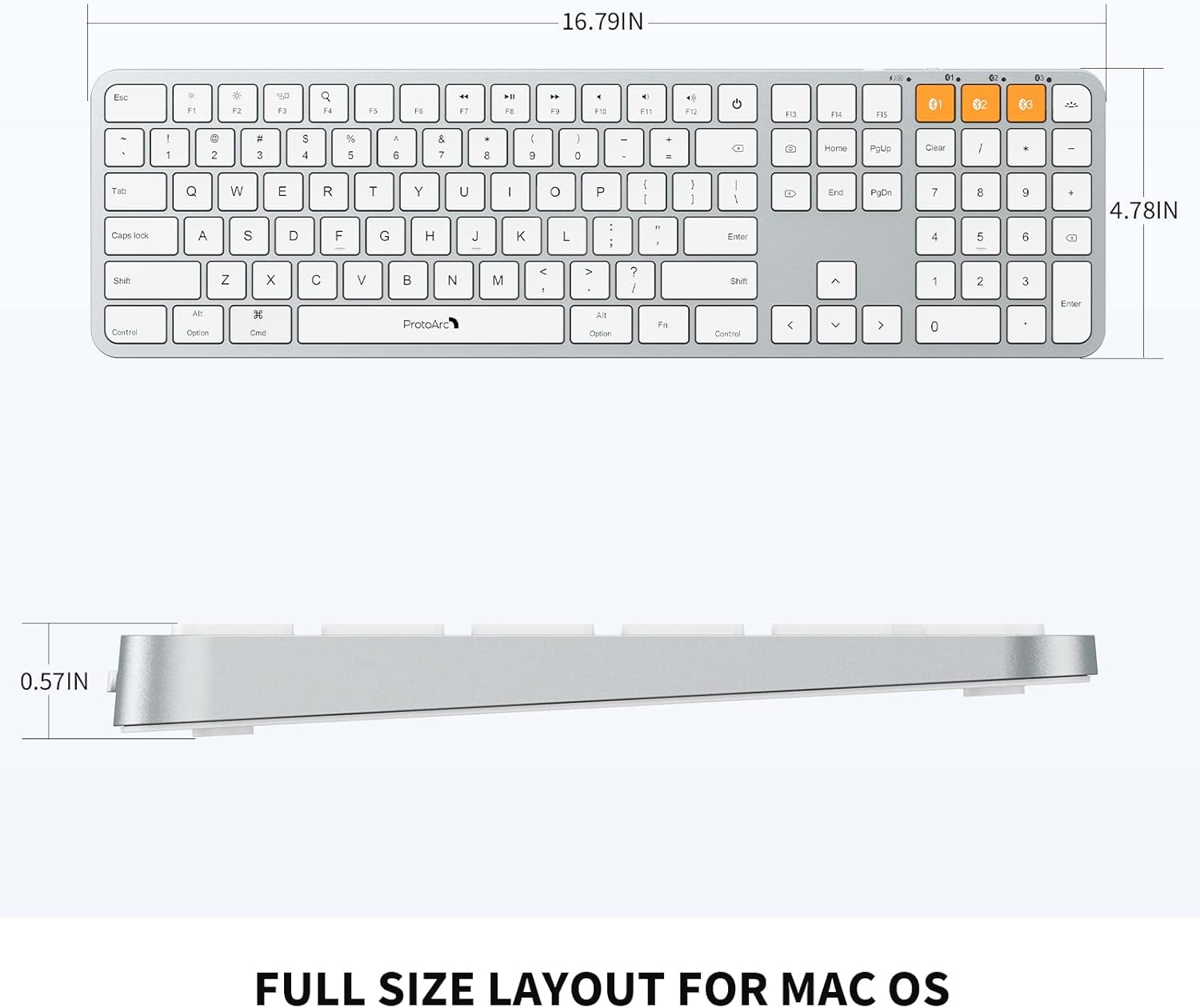
Image: Dimensional diagram of the ProtoArc K100-A keyboard.
9. Garantia e Suporte
Para informações sobre garantia e suporte técnico, consulte o site oficial da ProtoArc. webou entre em contato diretamente com o serviço de atendimento ao cliente. Guarde o comprovante de compra para eventuais solicitações de garantia.