1. Introdução
Thank you for choosing the ZGCINE S200 V-Mount Battery. This high-capacity 199Wh/14.8V battery is designed to provide reliable power for professional video cameras, camcorders, and other compatible devices. It features multiple output ports, including Dual DC, USB-C PD, Dual D-TAP, and a BP Interface, allowing simultaneous power delivery to various equipment. This manual provides essential information for safe and efficient operation, setup, maintenance, and troubleshooting.
2. Informações de segurança
- Não desmonte, abra ou destrua a bateria.
- Não exponha a bateria ao calor ou fogo. Evite o armazenamento sob luz solar direta.
- Não provoque curto-circuito na bateria.
- Não exponha a bateria a choques mecânicos.
- Em caso de vazamento da bateria, evite que o líquido entre em contato com a pele ou os olhos. Se ocorrer contato, lave a área afetada com água em abundância e procure atendimento médico.
- Mantenha a bateria limpa e seca.
- Não utilize nenhum carregador diferente daquele fornecido especificamente para uso com o equipamento.
- Descarte a bateria adequadamente de acordo com os regulamentos locais.

Image: The ZGCINE S200 V-Mount Battery highlighting its built-in protection features including overcurrent, overpower, overvoltage, overcharge, short circuit, temperature, reset, and circuit protection.
3. Produto acabadoview
The ZGCINE S200 V-Mount Battery is designed with a compact form factor and robust construction, featuring an aluminum alloy V-lock mount and an ABS cover for durability. It includes various input and output ports to meet diverse power requirements.
3.1 Layout e indicadores de portas

Imagem: Vista superior e lateral views of the ZGCINE S200 V-Mount Battery, clearly labeling all input and output ports including D-Tap, DC (8.4V/12V), USB-C PD, and the V-mount interface. Input/Output specifications are also shown.
- D-Tap Ports: Two D-Tap ports for input and output (Input: 16.8V/3A Max, Output: 14.8V/13A Max).
- Portas de saída CC: Two DC output ports (8.4V/3A and 12V/3A).
- Porta USB-C PD: Bi-directional USB-C Power Delivery port for both input and output (Input: 5V/3A, 9V/3A, 12V/3A, 15V/3A, 20V/5A Max; Output: 5V/3A, 9V/3A, 12V/3A, 15V/3A, 20V/3.25A Max).
- Interface de PA: For additional power output.
- Botão de energia: Activates the battery and checks charge status.
- Indicadores LED: Five LED lights indicate the remaining battery capacity (20%, 40%, 60%, 80%, 100%).

Imagem: Um close-up view of the ZGCINE S200 V-Mount Battery's top panel, showing the LED power indicators and the various output ports with their respective voltage e ampavaliações de idade.
4. Configuração
4.1 Carregamento Inicial
Before first use, fully charge the ZGCINE S200 battery. Charging can be done via the USB-C PD port or a D-Tap charger. A 100W USB-C PD charger can fully charge the battery in approximately 3.5 hours.

Image: The ZGCINE S200 V-Mount Battery connected to a wall charger via its USB-C PD port, illustrating the fast-charging capability.
4.2 Montagem da bateria
To mount the battery, align the V-mount plate on your camera rig or accessory with the V-lock mechanism on the battery. Slide the battery onto the plate until it clicks securely into place. To release, press the release button on the V-mount plate and slide the battery off.
5. Instruções de operação
5.1 Verificando o status da bateria
Press the power button on the side of the battery. The five LED indicators will illuminate to show the current charge level:
- 1 LEDs: 0-20%
- 2 LEDs: 20-40%
- 3 LEDs: 40-60%
- 4 LEDs: 60-80%
- 5 LEDs: 80-100%
5.2 Alimentação de Dispositivos
Connect your camera, camcorder, LED light, monitor, or other compatible devices to the appropriate output port on the ZGCINE S200 battery. The battery supports simultaneous power delivery to multiple devices.
- Porta USB-C PD: Use a USB-C to USB-C cable to power devices like the Sony FX3, BMPCC 4K/6K Pro, or charge smartphones/tablets.
- D-Tap: Connect D-Tap compatible accessories such as LED lights or monitors.
- Saídas DC: Use the 8.4V or 12V DC outputs for devices requiring these specific voltage.

Image: A user holding a camera rig with the ZGCINE S200 V-Mount Battery attached, demonstrating its use in a portable setup.
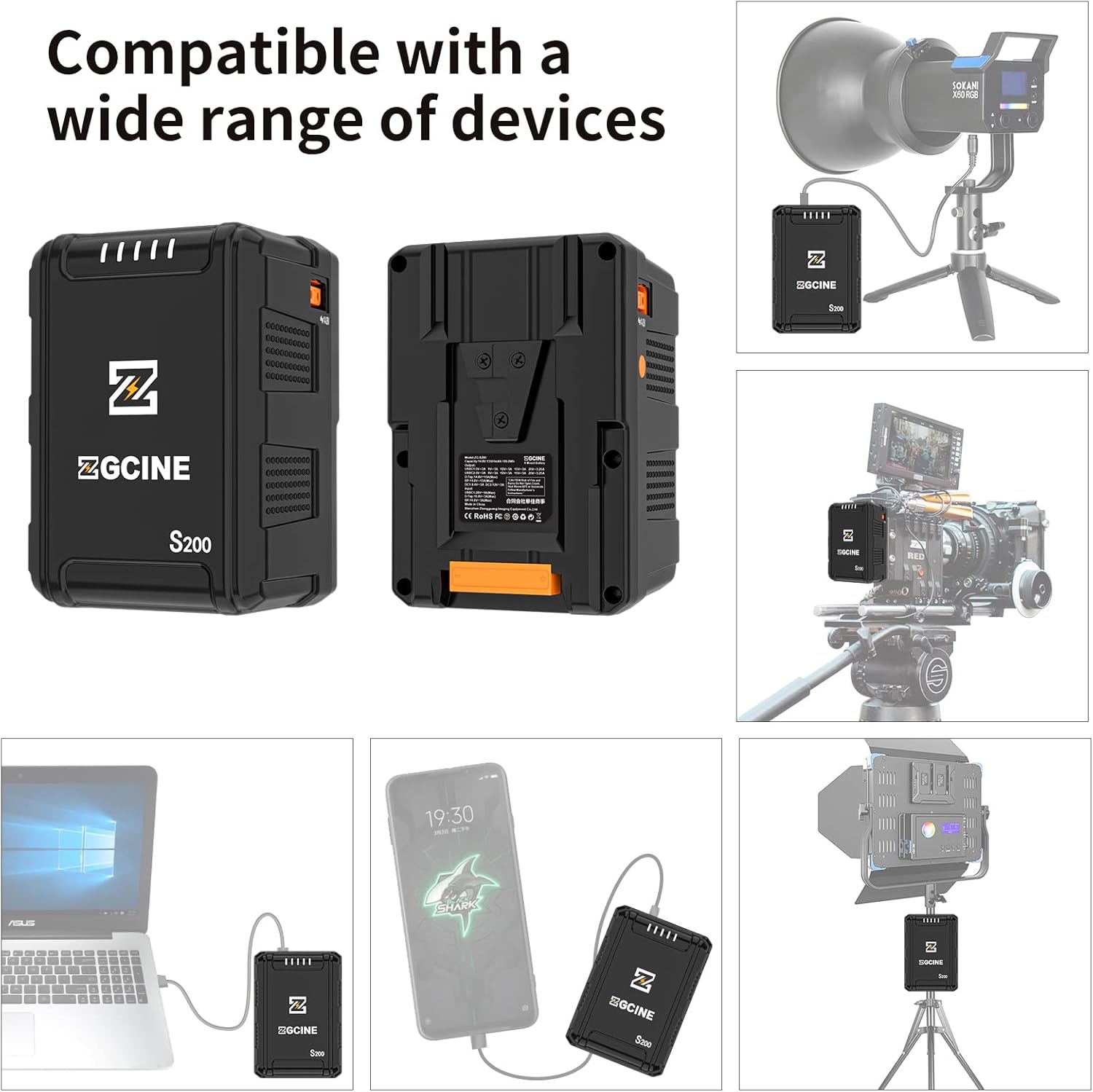
Image: Illustrations showing the ZGCINE S200 V-Mount Battery connected to a studio LED light, a camera rig, a laptop, and a smartphone, demonstrating its wide compatibility.
6. Manutenção
6.1 Armazenamento
When storing the battery for extended periods, ensure it is charged to approximately 50-70% capacity. Store in a cool, dry place away from direct sunlight and extreme temperatures. Avoid storing fully charged or completely depleted batteries for long durations.
6.2 Limpeza
Clean the battery's exterior and contact points with a soft, dry cloth. Do not use liquid cleaners or solvents. Ensure all ports are free from dust and debris.
6.3 Dicas de cuidados com a bateria
- Avoid deep discharges; recharge the battery before it is completely depleted.
- Do not expose the battery to extreme hot or cold environments.
- Regularly check the battery for any signs of damage or swelling. Discontinue use if any abnormalities are observed.
7. Solução De Problemas
- A bateria não carrega:
- Ensure the charging cable and adapter are securely connected and functional.
- Verifique se a fonte de alimentação está ativa.
- Try a different charging port (USB-C PD or D-Tap) or charger.
- Battery not powering devices:
- Verifique se a bateria tem carga suficiente.
- Certifique-se de que o dispositivo seja compatível com o volume de saídatage and current of the selected port.
- Verify that the connection cables are secure and undamaged.
- Press the power button to activate the battery's output.
- Indicadores LED não funcionam:
- Press the power button firmly. If indicators still do not light up, the battery may be completely depleted or require service.
If you encounter issues not covered here, please contact ZGCINE customer support.
8. Especificações
| Recurso | Especificação |
|---|---|
| Número do modelo | S200 |
| Capacidade da bateria | 199 Wh / 14.8 V |
| Composição da célula da bateria | Íon de lítio |
| Dimensões do produto | 3.5 x 3.1 x 5.1 polegadas (8.9 x 7.9 x 13 cm) |
| Peso do item | 2.4 libras (1.09 kg) |
| Entrada/Saída USB-C PD | Input: 5V/3A, 9V/3A, 12V/3A, 15V/3A, 20V/5A (Max 100W) Output: 5V/3A, 9V/3A, 12V/3A, 15V/3A, 20V/3.25A (Max 65W) |
| D-Tap Input/Output | Input: 16.8V/3A (Max) Saída: 14.8V / 13A (Max) |
| Saída DC | 8.4 V/3 A, 12 V/3 A |
| Usos recomendados | Camcorder, Camera, LED Light, Monitor, Smartphone, Tablet |
| Fabricante | ZGCINE |
9. Garantia e Suporte
ZGCINE products are covered by a limited warranty. For specific warranty terms and conditions, please refer to the warranty card included with your product or visit the official ZGCINE website. For technical support, troubleshooting assistance, or warranty claims, please contact ZGCINE customer service through their official channels.
Informações de contato: Please refer to the ZGCINE official website or product packaging for the most up-to-date customer support contact details.


