1. Produto acabadoview
The Kamon K1 wired earbuds are designed for audio playback and communication across various devices. They feature an in-ear design for sound isolation and include an in-line remote with an integrated microphone for convenient control.

Image 1.1: A user wearing Kamon K1 earbuds, demonstrating the product in use for audio listening.
Principais características:
- Microfone embutido: Permite fazer chamadas em modo mãos-livres.
- Multi-functional In-line Remote: Controls calls and music playback.
- Design ergonômico intra-auricular: Proporciona um ajuste seguro e isolamento acústico.
- High Fidelity Sound: Delivers clear audio with defined bass, mid-range, and treble.
- Ampla compatibilidade: Connects to devices with a standard 3.5mm headphone jack.
- Cabo sem emaranhamento: Designed to resist tangling for ease of use and storage.
2. Configuração e conexão
The Kamon K1 earbuds utilize a standard 3.5mm audio jack for connection. No additional software or drivers are required for basic functionality.
Conectando os fones de ouvido:
- Locate the 3.5mm audio port on your device (e.g., smartphone, tablet, laptop, MP3 player).
- Insert the 3.5mm jack of the Kamon K1 earbuds firmly into the device's audio port.
- Ensure the connection is secure. If experiencing sound issues, gently rotate the plug within the port to establish full contact.
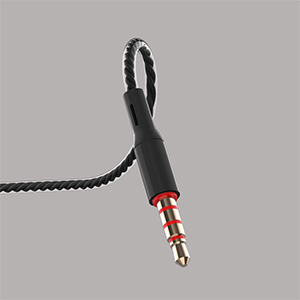
Image 2.1: A close-up of the 3.5mm audio jack, illustrating the connection interface.

Image 2.2: The 3.5mm audio jack of the Kamon K1 earbuds, shown with icons of compatible devices including PCs, Macbooks, iPads, iPhones, Android smartphones, and iPods.
3. Instruções de operação
The in-line remote control allows for easy management of calls and music playback without needing to access your connected device directly.
In-line Remote Control Functions:
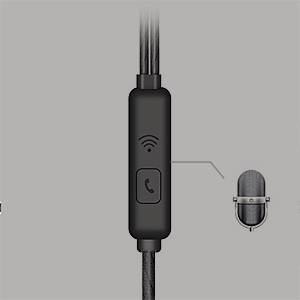
Image 3.1: A detailed image of the in-line remote control for Kamon K1 earbuds, featuring the multi-function button and microphone.
- Atender/encerrar chamada: Pressione o botão uma vez.
- Recusar Chamada: Pressione e segure o botão.
- Reproduzir/Pausar Música: Pressione o botão uma vez.
- Next Music Track: Pressione o botão duas vezes.
- Previous Music Track: Pressione o botão três vezes.
- Ativar o assistente de voz (ex.: Siri): Press and hold the button (functionality may vary by device).
Video 3.1: Official product video demonstrating the features and usage of Kamon K1 wired earbuds, including design, sound quality, and in-line control functions.
4. Manutenção e Cuidados
Proper care helps extend the lifespan and maintain the performance of your Kamon K1 earbuds.
- Handling the Cord: Avoid pulling the earbud cord directly. Always hold the earphone plug part and the earbud housing when disconnecting from devices or removing from ears.
- Limpeza: Regularly clean the ear tips and earbud housing with a soft, dry cloth. Ensure no moisture enters the speaker components.
- Armazenar: Store earbuds in a clean, dry place. The tangle-free cable design assists in neat storage.
- Proteção: The outer layer of the cable is designed for protection against external shocks. However, avoid excessive force or sharp objects.
5. Solução De Problemas
If you encounter issues with your Kamon K1 earbuds, refer to the following common solutions:
- No Sound or Sound from One Side:
- Certifique-se de que o conector de 3.5 mm esteja totalmente inserido na porta de áudio do dispositivo.
- Gently rotate the plug within the port to ensure proper contact.
- Teste os fones de ouvido com outro dispositivo para descartar um problema específico do aparelho.
- Verifique as configurações de volume do seu dispositivo.
- Microfone não funciona:
- Ensure the earbuds are fully plugged in.
- Verify that your device's microphone input is set to the connected earbuds.
- Teste o microfone com outro aplicativo ou dispositivo.
- O controle remoto não responde:
- Confirm the earbuds are securely connected.
- Alguns dispositivos mais antigos ou sistemas operacionais específicos podem ter compatibilidade limitada com funções remotas.
- Qualidade de som ruim (estática, distorção):
- Verifique a qualidade da fonte de áudio.
- Certifique-se de que o conector de 3.5 mm esteja limpo e livre de detritos.
- Test with another device to isolate the problem.
6. Especificações
Detailed technical specifications for the Kamon K1 wired earbuds.
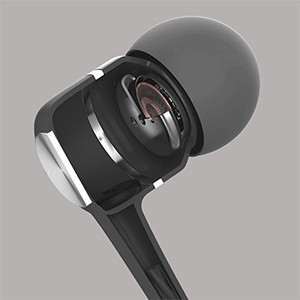
Image 6.1: A cutaway diagram of a Kamon K1 earbud, revealing its internal acoustic components for high-fidelity sound.
| Recurso | Especificação |
|---|---|
| Nome do modelo | KE |
| Tecnologia de Conectividade | Com fio |
| Entrada para fones de ouvido | 3.5 mm Jack |
| Controle de Ruído | Isolamento Acústico |
| Tipo de controle | Remote (Button) |
| Microfone | Integrado |
| Recurso de cabo | Emaranhado grátis |
| Impedância | 32 Ohm ±15% a 1KHz |
| Classificação de potência | 3mW |
| Potência máxima de entrada | 5mW |
| Distorção | 3% Máximo (1KHz/1mW) |
| Resposta de frequência | 20~20,000Hz |
| Comprimento do cabo | 120cm |
| Peso do item | 0.07 quilogramas (aproximadamente 2.39 onças) |
| Material | Plastic, Rubber, Silicone, Thermoplastic Elastomer (TPE) |
| Dispositivos compatíveis | iPhone devices, Android smartphones, iPod, iPad, MP3 players, music speakers |
7. Garantia e Suporte
For warranty information or technical support regarding your Kamon K1 earbuds, please refer to the product packaging or contact Kamon customer service directly. Details for contacting support are typically provided with your purchase or on the official Kamon website.


