1. Introdução
Obrigado pela compra.asing the LFF LDR113-EU Kitchen Radio. This manual provides essential information for the safe and efficient operation of your device. Please read it thoroughly before use and retain it for future reference.
The LFF LDR113-EU is a versatile kitchen radio featuring DAB+, FM, and Bluetooth connectivity. It includes dual alarms, a sleep timer, and 60 station presets, designed for both tabletop use and under-cabinet mounting.
2. Informações de segurança
- Fonte de energia: Utilize apenas o adaptador de energia fornecido. Certifique-se de que o volume esteja correto.tage corresponde à sua fonte de alimentação local.
- Água e Umidade: Do not expose the device to water, rain, or excessive moisture. Avoid placing liquids near the radio.
- Ventilação: Assegure ventilação adequada ao redor do dispositivo. Não obstrua as aberturas de ventilação.
- Aquecer: Mantenha o dispositivo longe de fontes de calor, como radiadores, aquecedores, fogões ou outros aparelhos que produzam calor.
- Limpeza: Desligue da tomada antes de limpar. Use um pano macio e seco. Não use produtos de limpeza líquidos ou em aerossol.
- Manutenção: Não tente consertar este produto sozinho. Encaminhe todos os serviços de manutenção para pessoal de serviço qualificado.
- Colocação: Place the radio on a stable, level surface or mount it securely according to the instructions.
3. Conteúdo da embalagem
Por favor, verifique se todos os itens estão presentes na embalagem:
- LFF LDR113-EU Kitchen Radio
- Adaptador de energia
- Mounting Kit (screws, spacers, mounting template)
- Manual do usuário (este documento)
4. Produto acabadoview
Familiarize-se com os componentes e controles do rádio.

Figura 4.1: Frente view of the LFF LDR113-EU Kitchen Radio, showing the LCD display on the left, control buttons in the center, and a large rotary knob on the right. The buttons include power, mode, menu, info, preset, timer/sleep, and navigation arrows. The rotary knob is for volume and selection.

Figura 4.2: Diagram illustrating the key features of the LFF Kitchen Radio, including DAB/DAB+ radio, FM radio, two alarms, sleep timer, Bluetooth connectivity, and 60 station presets.
4.1. Controles e exibição
- Tela LCD colorida: Shows current mode, station information, time, and settings.
- Botão de energia: Liga/desliga o rádio.
- Botão de modo: Alterna entre os modos DAB+, FM e Bluetooth.
- Botão Menu/Informações: Accesses menu options or displays station information.
- Botões predefinidos (1-5): Quick access to saved stations.
- Timer/Sleep Button: Sets sleep timer or alarm functions.
- Botões de navegação (para cima/para baixo/para a esquerda/para a direita): Navigates through menus and station lists.
- Rotary Knob (Volume/Enter): Adjusts volume, scrolls through options, and confirms selections.
5. Configuração
5.1. Conexão de energia
- Connect the power adapter to the DC IN port on the back of the radio.
- Conecte o adaptador de energia a uma tomada de parede.
- O rádio será ligado ou entrará em modo de espera.
5.2. Initial Scan (DAB+ and FM)
Upon first power-on, the radio will typically perform an automatic scan for DAB+ and FM stations. If not, follow these steps:
- Pressione o Modo Botão para selecionar o modo DAB+ ou FM.
- For DAB+, the radio will usually initiate a full scan automatically. If not, navigate to the 'Full Scan' option in the DAB+ menu and press the rotary knob to confirm.
- For FM, navigate to the 'Auto Scan' option in the FM menu and press the rotary knob to confirm.
- The radio will search for available stations and store them.

Figura 5.1: The LFF Kitchen Radio's LCD color screen displaying the main menu with icons for Digital Radio (DAB+), FM Radio, and Bluetooth, indicating available modes.
6. Instruções de operação
6.1. Ligar/desligar
Pressione o Poder button to turn the radio on or off (standby mode).
6.2. Seleção de modo
Pressione o Modo button repeatedly to cycle through DAB+, FM, and Bluetooth modes.
6.3. Operação do rádio DAB+
- In DAB+ mode, use the Para cima/para baixo navigation buttons or the rotary knob to browse available stations.
- Press the rotary knob to select a station.
- Imprensa Menu / Informação para view Informações da estação (ex.: tipo de programação, intensidade do sinal).
6.4. Operação de rádio FM
- No modo FM, use o Para cima/para baixo navigation buttons to tune to stations manually.
- Pressione e segure o Para cima/para baixo Botões para busca automática de estações.
- Imprensa Menu / Informação para view informações da estação.
6.5. Conectividade Bluetooth
Connect your smartphone or other Bluetooth-enabled device to the radio.
- Pressione o Modo button to select Bluetooth mode. The display will show 'Bluetooth Pairing'.
- No seu dispositivo móvel, ative o Bluetooth e pesquise os dispositivos disponíveis.
- Select 'LFF LDR113-EU' from the list of devices.
- Once connected, the radio display will show 'Bluetooth Connected'. You can now play audio from your device through the radio.
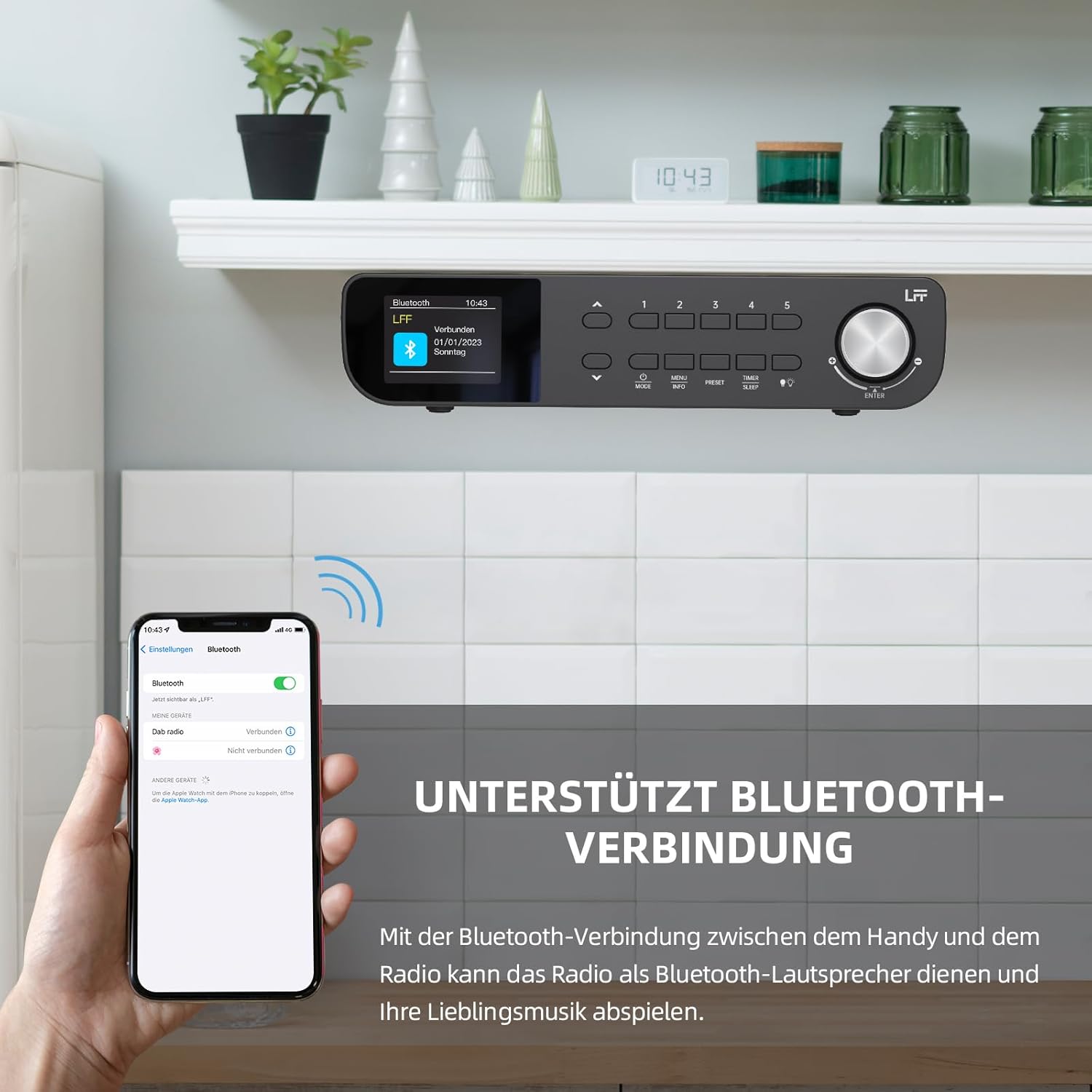
Figura 6.1: The LFF Kitchen Radio displaying a successful Bluetooth connection, with a smartphone screen showing the radio as a connected device.

Figura 6.2: Fechar-se view of the radio's display indicating 'LFF' and 'Connected' under the Bluetooth menu, confirming a successful pairing.
6.6. Definição de alarmes
The radio features two independent alarms.
- Pressione o Temporizador/Repouso button repeatedly until 'Alarm 1' or 'Alarm 2' appears.
- Use the navigation buttons and rotary knob to set the alarm time, source (DAB+, FM, or Buzzer), and frequency (daily, weekdays, weekends, once).
- Confirm settings by pressing the rotary knob.

Figura 6.3: Close-up of the radio's display showing the current time and options to activate or deactivate Alarm 1 and Alarm 2.
6.7. Despertador
O temporizador permite que o rádio desligue automaticamente após um período definido.
- Pressione o Temporizador/Repouso button repeatedly until 'Sleep Timer' appears.
- Use the navigation buttons or rotary knob to select the desired sleep duration (e.g., 15, 30, 60 minutes).
- Confirme pressionando o botão rotativo.

Figura 6.4: Close-up of the radio's display showing the 'Sleep Timer' setting, with an option to set the duration, for example, to 30 minutes.
6.8. Predefinições
Save up to 60 favorite stations for quick access.
- Para salvar uma predefinição: Tune to the desired station. Press and hold one of the Predefinido (1-5) buttons until 'Preset Saved' appears. For additional presets, use the 'Preset Store' option in the menu.
- Para recuperar uma predefinição: Pressione brevemente um dos Predefinido (1-5) buttons. For other presets, navigate to 'Preset Recall' in the menu.
6.9. luz LED
The radio includes an integrated LED light, useful for illuminating the area below if mounted under a cabinet.
- Pressione o Luz button (if available, or navigate through menu) to turn the LED light on or off.

Figura 6.5: The LFF Kitchen Radio mounted under a kitchen cabinet, with its integrated LED light providing illumination to the countertop below.
6.10. Brilho da tela
Adjust the display backlight brightness to suit your environment.
- Access the 'Display' or 'Settings' menu.
- Select 'Brightness' and choose from High, Medium, or Low settings.

Figura 6.6: A visual comparison of the LFF Kitchen Radio's display at three different backlight brightness levels: High, Medium, and Low, demonstrating the adjustable visibility.
7. Instruções de montagem
The LFF LDR113-EU Kitchen Radio offers flexible placement options: tabletop or under-cabinet mounting.
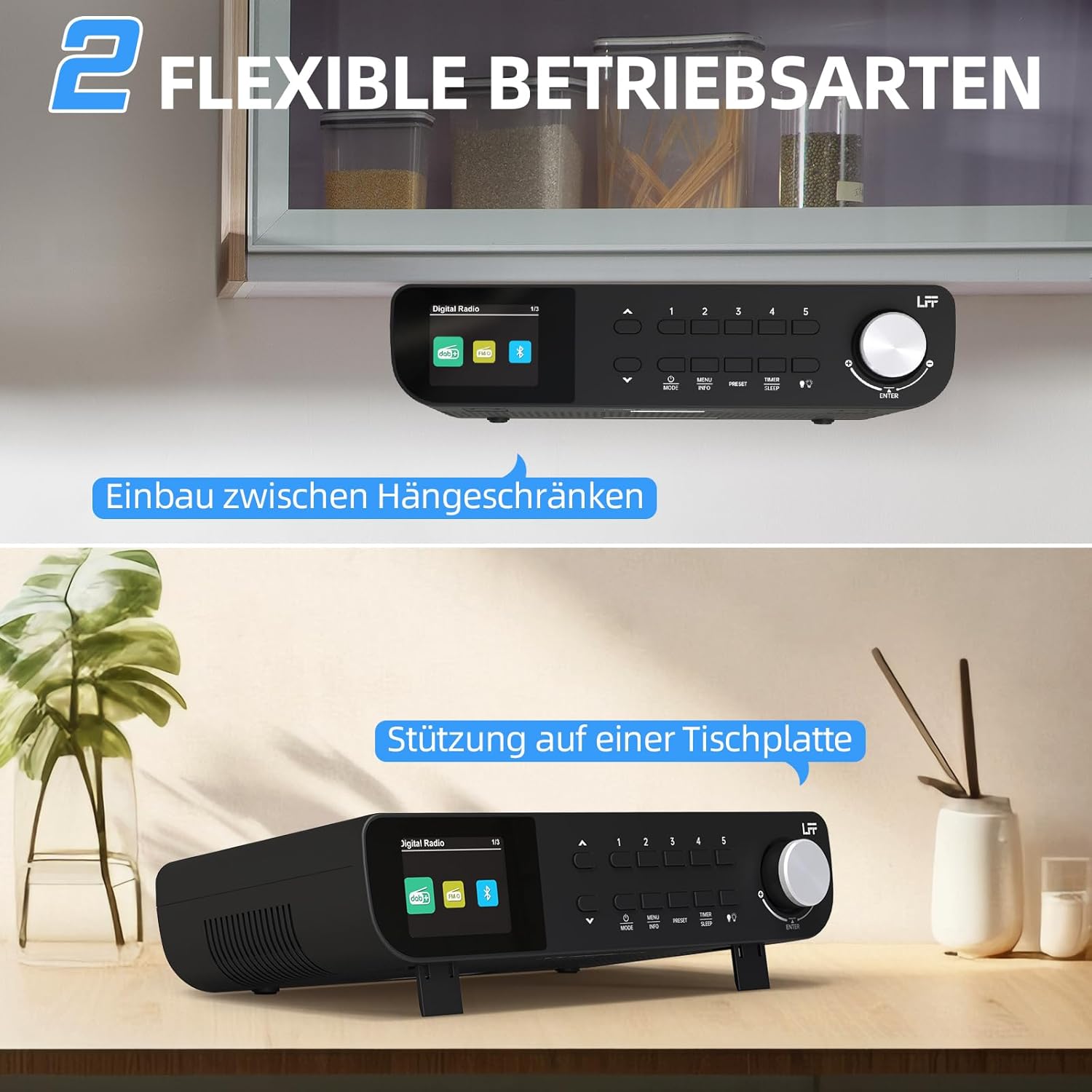
Figura 7.1: The LFF Kitchen Radio displayed in two common installation scenarios: mounted underneath a kitchen cabinet and placed freestanding on a tabletop.
7.1. Tabletop Placement
Simply place the radio on a stable, flat surface. Ensure it is not near the edge to prevent accidental falls.
7.2. Under-Cabinet Mounting
For under-cabinet installation, use the provided mounting kit.
- Prepare o local: Choose a suitable location under a kitchen cabinet, ensuring there is enough space and access to a power outlet.
- Marcar furos de perfuração: Use the provided mounting template to mark the drill holes on the underside of the cabinet.
- Furos piloto de perfuração: Faça furos piloto nas posições marcadas.
- Fixar a placa de montagem (se aplicável): Some models may include a separate mounting plate. Attach this to the cabinet using the screws.
- Proteja o rádio: Align the radio with the mounting holes or plate and secure it using the provided screws. Ensure it is firmly attached.
- Conecte a energia: Conecte o adaptador de energia.

Figura 7.2: Detailed diagram showing the steps for under-cabinet mounting, including measuring distances (e.g., 58mm) and securing the radio with screws.
8. Manutenção
- Limpeza: To clean the radio, disconnect it from the power supply. Use a soft, dry, lint-free cloth. Do not use abrasive cleaners, waxes, or solvents.
- Antena: Ensure the antenna is extended for optimal reception in DAB+ and FM modes. Handle it gently to avoid damage.
- Armazenar: If storing the radio for an extended period, disconnect it from power and store it in a cool, dry place.
9. Solução De Problemas
| Problema | Possível causa | Solução |
|---|---|---|
| Sem energia | Adaptador de energia não conectado ou tomada com defeito. | Verifique a ligação elétrica. Tente outra tomada. |
| Recepção DAB+/FM ruim | Antena não estendida, sinal fraco ou interferência. | Fully extend the antenna. Reposition the radio. Perform a full scan. |
| Bluetooth não conecta | Radio not in pairing mode, device too far, or already connected to another device. | Ensure radio is in Bluetooth mode. Move device closer. Disconnect from other devices. |
| Sem som | Volume too low, mute activated, or incorrect mode. | Increase volume. Check if mute is active. Ensure correct mode (DAB+, FM, Bluetooth). |
| A tela não está funcionando | Brightness too low or device malfunction. | Adjust display brightness. If problem persists, contact support. |
10. Especificações

Figura 10.1: Diagram showing the dimensions of the LFF Kitchen Radio: 250mm length, 146mm width, and 55mm height.
| Recurso | Detalhe |
|---|---|
| Marca | extensão LFF |
| Número do modelo | LDR113-EU |
| Cor | Preto |
| Conectividade | Bluetooth |
| Tecnologia de ajuste | DAB Plus, FM |
| Fonte de energia | Cabo elétrico |
| Freqüência | 108 MHz (FM máx.) |
| Dimensões (C x L x A) | 250 mm x 146 mm x 55 mm |
| Predefinições | 60 |
| Mostrar | Tela LCD colorida |
| Características especiais | Dual Alarms, Sleep Timer, Under-cabinet mounting option, LED Light |
11. Garantia e Suporte
This product comes with a standard manufacturer's warranty. Please refer to the warranty card included in your package for specific terms and conditions. For technical support, troubleshooting assistance, or warranty claims, please contact your retailer or the LFF customer service department.


