1. Introdução
Thank you for choosing the LFF DAB/FM Digital Radio YT81107. This manual provides essential information for the safe and efficient use of your new radio. Please read these instructions carefully before operating the device and retain them for future reference.
Informações de segurança
- Não exponha o aparelho à chuva ou umidade para evitar incêndio ou choque elétrico.
- Não abra o casing. Encaminhe todos os serviços de manutenção para pessoal qualificado.
- Utilize apenas o adaptador de energia ou as baterias especificadas.
- Evite temperaturas extremas, luz solar direta e ambientes empoeirados.
2. Produto acabadoview
The LFF DAB/FM Digital Radio YT81107 offers versatile listening options with DAB+ and FM radio, Bluetooth connectivity, and convenient features like a dual alarm and sleep timer. Its compact design and dual power options make it suitable for various environments.
Principais características
- DAB+ and FM Digital Radio Tuner
- Bluetooth Connectivity for Audio Streaming
- Tela LCD colorida
- 60 Preset Stations (30 DAB+, 30 FM)
- Dual Alarm Clock Function
- Temporizador ajustável
- Conector de fone de ouvido de 3.5 mm
- AC Power Adapter or Battery Operated (4x AA batteries, not included)

Figura 2.1: Frente view of the LFF DAB/FM Digital Radio highlighting its main features.
Controles e Componentes
Familiarize yourself with the buttons and ports on your radio:

Figura 2.2: Frente e topo view of the radio with labeled controls.
- Botão Liga / Desliga / Modo: Turns the radio on/off and switches between modes (DAB, FM, Bluetooth).
- Botão Menu/Informações: Accesses menu settings or displays station information.
- Botão de alarme: Configura e gerencia alarmes.
- Botões predefinidos (1-5): Acesse rapidamente suas estações favoritas salvas.
- Volume Knob/Select: Gire para ajustar o volume ou navegar pelos menus; pressione para confirmar a seleção.
- Tuning/Scroll Buttons: Navigates through stations or menu options.
- Mostrar: Full-color LCD screen.
- Palestrante: Saída de áudio integrada.
- Antena: Antena telescópica extensível para recepção de rádio.
- Porta DC IN: Para conectar o adaptador de energia CA.
- Plug do fone de ouvido: Saída de 3.5 mm para audição privada.
- Compartimento da bateria: Located on the back for 4x AA batteries.
3. Configuração
Alimentando o rádio
Your radio can be powered by the included AC adapter or by batteries for portable use.
- Alimentação CA: Connect the supplied AC adapter to the DC IN port on the back of the radio and plug it into a standard wall outlet.
- Potência da bateria: Open the battery compartment on the back and insert 4x 1.5V AA (LR6) batteries (not included), ensuring correct polarity. Close the compartment securely.

Figure 3.1: Power options and physical dimensions of the radio.
Ajuste da Antena
For optimal radio reception, fully extend the telescopic antenna. Adjust its position for the best signal quality.
4. Instruções de operação
Ligar/Desligar e Seleção de Modo
- Pressione o Potência/Modo botão para ligar ou desligar o rádio.
- While on, press the Potência/Modo button repeatedly to cycle through available modes: DAB, FM, and Bluetooth.
DAB/FM Radio Operation
Ensure the antenna is fully extended for best reception.

Figure 4.1: Radio reception ranges and preset capacity.
- Digitalização automática: No modo DAB ou FM, pressione e segure o Menu / Informação button to initiate an automatic scan for available stations. The radio will store them automatically.
- Sintonia manual: Use o Tuning/Scroll botões para ajustar manualmente a frequência.
- Selecionando estações: Gire o Volume Knob/Select to browse through available stations. Press the knob to select a station.
- Salvando predefinições: To save a station, tune to the desired station, then press and hold one of the Botões predefinidos (1-5) until the display confirms it's saved. You can save up to 30 DAB+ and 30 FM stations.
- Recuperando Predefinições: Pressione brevemente um dos Botões predefinidos (1-5) to recall a saved station.
Modo Bluetooth
Conecte seu smartphone, tablet ou outro dispositivo com Bluetooth para transmitir áudio sem fio.
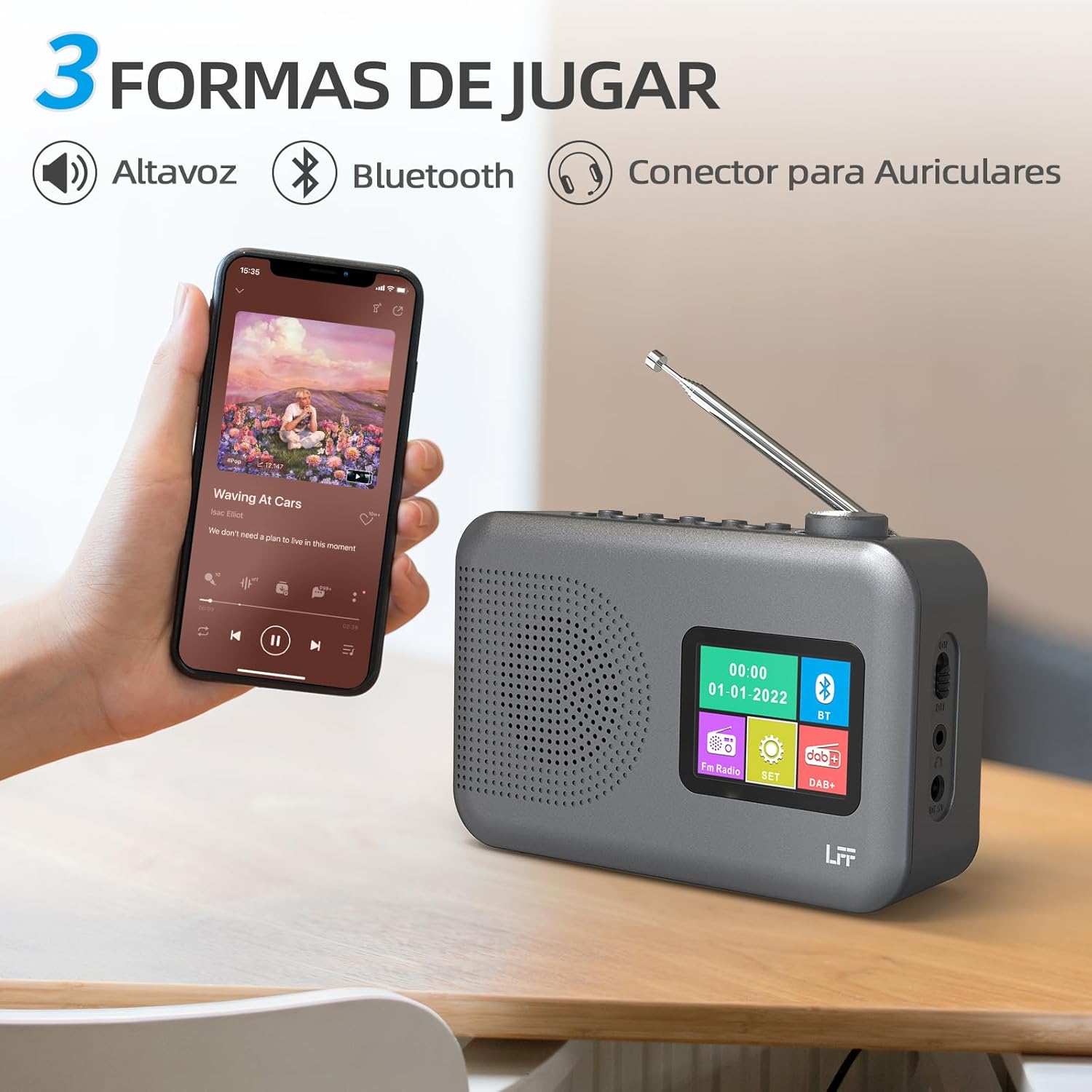
Figure 4.2: Bluetooth connectivity and audio playback options.
- Mude o rádio para o modo Bluetooth usando o Potência/Modo botão. O visor mostrará "Emparelhamento Bluetooth" ou algo semelhante.
- On your device, enable Bluetooth and search for "LFF YT81107" (or similar).
- Select the radio to pair. Once connected, you can play audio from your device through the radio's speaker.
- Adjust volume using the radio's Botão de Volume or your connected device.
Função de despertador
Configure até dois alarmes independentes.
- Pressione o Alarme botão para acessar as configurações do alarme.
- Use o Tuning/Scroll botões e Volume Knob/Select to set the alarm time, source (DAB, FM, or buzzer), and frequency (daily, weekdays, weekends, once).
- Pressione o Alarme Pressione o botão novamente para confirmar e ativar o alarme.
- When an alarm sounds, press any button (except Power) to snooze, or press the Potência/Modo botão para desligá-lo.
Temporizador de sono
O temporizador permite que o rádio desligue automaticamente após um período definido.

Figure 4.3: Sleep timer function in use.
- Pressione o Menu / Informação botão para acessar o menu principal.
- Navigate to the "Sleep Timer" option using the Tuning/Scroll botões e pressione o Volume Knob/Select.
- Select your desired duration (15, 30, 45, 60, 90, or 120 minutes) and confirm. The radio will automatically turn off after the selected time.
Uso de fone de ouvido
For private listening, connect standard 3.5mm headphones to the headphone jack on the side of the radio. The internal speaker will be muted automatically.
Note: This radio does not support Bluetooth headphones. The 3.5mm headphone jack is for wired headphones only.
5. Manutenção
- Limpeza: Limpe o rádio com um pano macio e seco. Não utilize produtos de limpeza abrasivos ou solventes.
- Substituição da bateria: If using batteries, replace all four AA batteries when the low battery indicator appears on the display or when performance degrades. Ensure proper disposal of old batteries.
- Armazenar: Se for guardar o rádio por um longo período, remova as pilhas para evitar vazamentos.
6. Solução De Problemas
| Problema | Possível causa | Solução |
|---|---|---|
| Sem energia | Adaptador CA desconectado ou com defeito; pilhas descarregadas ou inseridas incorretamente. | Check AC adapter connection and power outlet. Replace batteries or ensure correct polarity. |
| Má recepção de rádio | Antena não estendida; área de sinal fraco; interferência. | Estenda e ajuste completamente a antena telescópica. Tente mover o rádio para um local diferente. |
| Bluetooth não conecta | Radio not in Bluetooth mode; device not in pairing mode; radio already connected to another device. | Ensure radio is in Bluetooth mode. Put your device in pairing mode. Disconnect from other Bluetooth devices. |
| Alarme não soa | Alarm not activated; volume too low; incorrect alarm settings. | Check alarm settings and ensure it is enabled. Increase volume. Verify alarm time and source. |
7. Especificações
| Recurso | Detalhe |
|---|---|
| Número do modelo | YT81107 |
| Marca | extensão LFF |
| Tecnologia de ajuste | DAB+,FM |
| Bandas de rádio suportadas | DAB+ (174.928 - 239.2 MHz), FM (87.5 - 108 MHz) |
| Conectividade | Bluetooth, 3.5mm Headphone Jack |
| Fonte de energia | AC Adapter (included), 4x 1.5V AA (LR6) Batteries (not included) |
| Dimensões (C x L x A) | 16.1 cm x 5.9 cm x 10.9 cm |
| Cor | Cinza |
| Características especiais | DAB Radio, DAB Plus Radio, DAB+ Radio, FM Radio, Color Display, Bluetooth, Dual Alarm, Sleep Timer |
| Dispositivos compatíveis | Headphones, MP3 Player, Smartphone, Laptop, Speaker, Tablet |
8. Garantia e Suporte
LFF is committed to providing high-quality products. If you encounter any quality issues with your LFF DAB/FM Digital Radio YT81107, please contact us directly. Our customer support team is available to assist you and resolve any problems you may experience.
Consulte a documentação de compra para obter os termos específicos da garantia e as informações de contato.


