1. Introdução
This user manual provides essential information for the safe and efficient operation of your HYCHIKA 3.6V Cordless Electric Rechargeable Screwdriver Drill Set. Please read this manual thoroughly before first use and keep it for future reference.
The HYCHIKA 3.6V Cordless Electric Screwdriver is designed for various screwing and light drilling tasks around the home. It features a maximum torque of 6 N-m, a 6.35 mm quick-change chuck, and a versatile design that allows for both pistol and straight grip configurations.
2. Instruções de segurança
Sempre observe as precauções básicas de segurança ao usar ferramentas elétricas para reduzir o risco de incêndio, choque elétrico e ferimentos pessoais.
- Segurança da Área de Trabalho: Mantenha sua área de trabalho limpa e bem iluminada. Áreas desorganizadas ou escuras são propícias a acidentes. Não opere ferramentas elétricas em atmosferas explosivas, como na presença de líquidos, gases ou poeira inflamáveis.
- Segurança elétrica: Evite o contato do corpo com superfícies aterradas, como canos, radiadores, fogões e geladeiras. Não exponha ferramentas elétricas à chuva ou umidade.
- Segurança pessoal: Always wear eye protection. Use safety glasses, goggles, or a face shield. Wear hearing protection when operating noisy tools. Dress properly; avoid loose clothing or jewelry.
- Uso e cuidados com a ferramenta: Não force a ferramenta elétrica. Utilize a ferramenta elétrica adequada para a sua aplicação. Desconecte o plugue da tomada e/ou remova a bateria antes de fazer qualquer ajuste, trocar acessórios ou guardar as ferramentas elétricas.
- Uso e cuidados com a bateria: Recarregue apenas com o carregador especificado pelo fabricante. Não utilize as baterias com outras ferramentas elétricas. Quando a bateria não estiver em uso, mantenha-a afastada de outros objetos metálicos.
3. Conteúdo da embalagem
Verifique se todos os itens listados abaixo estão incluídos em seu pacote. Caso algum item esteja faltando ou danificado, entre em contato com o suporte ao cliente.
- 1 x HYCHIKA 3.6V Cordless Screwdriver
- 19 x chave de fenda Bits
- 1 x barra de extensão
- 1 x Adaptador de Carregamento
- 1 x Manual do Usuário

Figure 3.1: Contents of the HYCHIKA 3.6V Cordless Screwdriver package, including the screwdriver, various bits, and charging adapter.
4. Características e componentes do produto
Familiarize yourself with the different parts of your cordless screwdriver.

Figure 4.1: Key components of the screwdriver, including the magnetic chuck, PUSH button, front LED light, On/Off switch, LED charger indicator, 3.5mm charger port, and forward & reverse button.
- Magnetic Chuck: 1/4 inch (6.35mm) quick-change chuck for easy bit installation and removal.
- Luz LED frontal: Ilumina a área de trabalho, melhorando a visibilidade em ambientes escuros.
- Interruptor liga/desliga: Activates and deactivates the screwdriver.
- Forward & Reverse Button: Controls the rotation direction for screwing and unscrewing.
- LED Charger Indicator: Provides status of battery charging.
- 3.5mm Charger Port: Connection point for the charging adapter.
- Botão de pressão: Used to adjust the grip configuration from pistol to straight.
5. Configuração
5.1 Carregando a bateria
The screwdriver is powered by a 3.6V 2000 mAh Lithium-Ion battery. Before first use, fully charge the battery.
- Connect the charging adapter to the 3.5mm charger port on the screwdriver.
- Conecte o adaptador de carregamento a uma tomada elétrica padrão.
- The LED charger indicator will illuminate during charging. Once fully charged, the indicator may change color or turn off depending on the model.
- Desconecte o carregador quando o carregamento estiver concluído.

Figure 5.1: The screwdriver connected to its charging adapter, indicating a full charge.
The screwdriver is designed to maintain full power output even when the battery is low, ensuring consistent performance until the battery is depleted.
5.2 Instalação de Pontas de Chave de Fenda
The screwdriver features a 1/4 inch (6.35mm) magnetic quick-change chuck for easy bit installation.
- Selecione a ponta de chave de fenda apropriada para sua tarefa.
- Insert the bit into the magnetic chuck until it is securely seated. The magnetic chuck will hold the bit firmly in place.
- To remove a bit, simply pull it out of the chuck. Bits with grooves are designed for easier removal.

Figure 5.2: Visual guide for inserting a bit into the magnetic chuck and removing it.
6. Instruções de operação
6.1 Adjusting Grip Configuration
The screwdriver can be used in two grip configurations: pistol grip or straight grip, for enhanced versatility and comfort.
- To change the grip, press and hold the "PUSH" button located at the top of the screwdriver.
- While holding the button, rotate the handle ninety degrees to switch between pistol and straight configurations.
- Release the "PUSH" button once the desired configuration is achieved. The handle will lock into place.
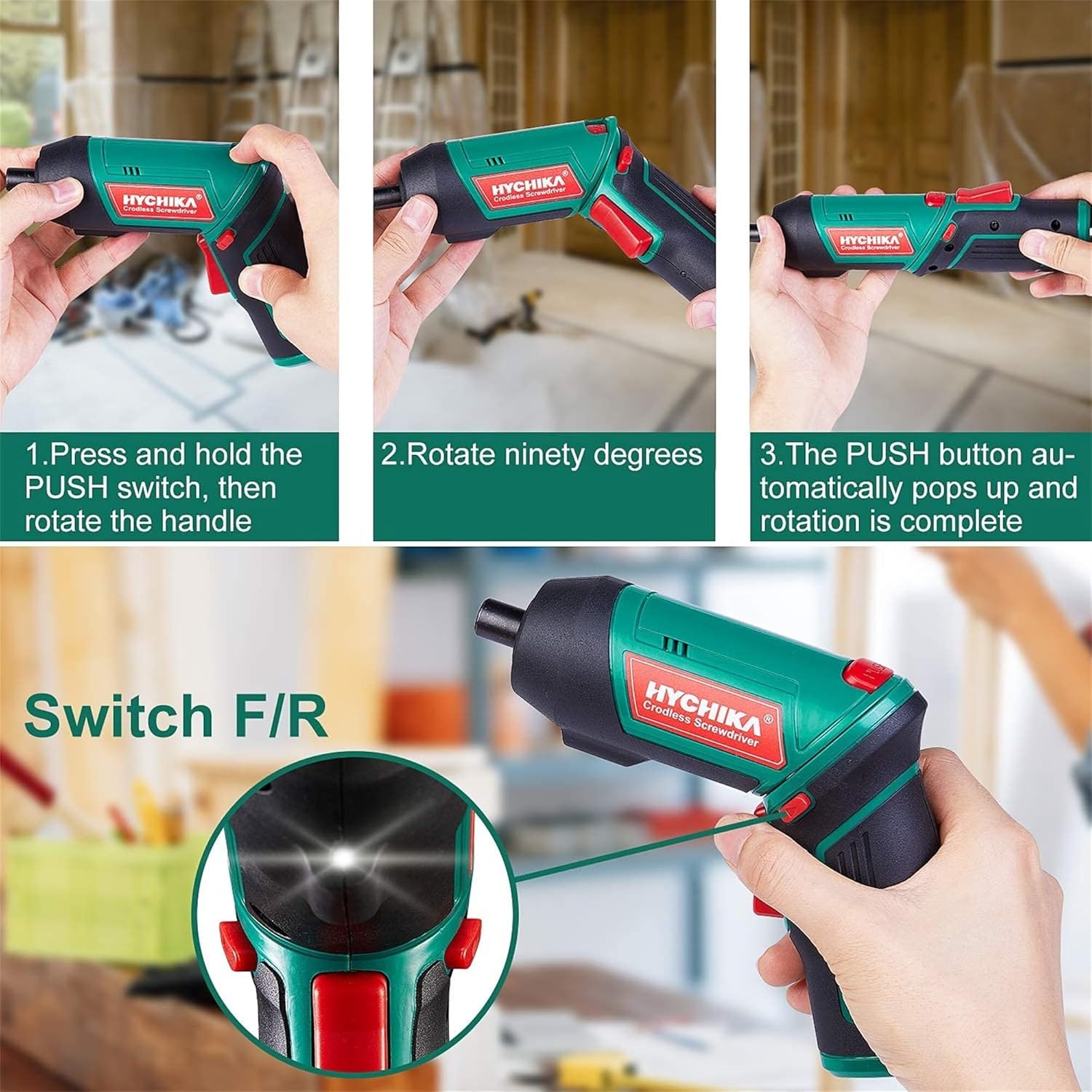
Figure 6.1: Demonstrates the process of transforming the screwdriver's grip by pressing the PUSH button and rotating the handle.
6.2 Forward and Reverse Operation
The forward/reverse button controls the direction of rotation for screwing and unscrewing.
- To drive screws (forward rotation), push the forward/reverse button to the left (when viewna parte traseira da ferramenta).
- To remove screws (reverse rotation), push the forward/reverse button to the right.
- When the button is in the center position, the tool is locked, preventing accidental activation.
6.3 Utilizando a luz de trabalho LED
The built-in LED light automatically illuminates when the screwdriver is in operation, providing visibility in dimly lit areas.

Figure 6.2: The integrated LED light provides clear illumination for working in dark environments.
7. Manutenção
Regular maintenance ensures the longevity and optimal performance of your screwdriver.
- Limpeza: Mantenha as aberturas de ventilação limpas e livres de poeira. Use um pano macio e seco.amp pano para limpar a ferramenta casing. Não utilize produtos químicos agressivos ou produtos de limpeza abrasivos.
- Cuidados com os bits: Clean screwdriver bits after use. Store them in the provided case to prevent loss and damage.
- Armazenamento da bateria: If storing the tool for an extended period, ensure the battery is partially charged (around 50%) and store it in a cool, dry place. Recharge the battery every 3-6 months to maintain its health.
- Inspeção Geral: Periodically check for any loose screws, damaged cords, or worn parts. Do not use the tool if any damage is observed.
8. Solução De Problemas
This section addresses common issues you might encounter with your screwdriver.
| Problema | Possível causa | Solução |
|---|---|---|
| A parafusadeira não liga. | A bateria está esgotada. Forward/Reverse switch is in the center (locked) position. | Carregue a bateria totalmente. Empurre o interruptor de avanço/recuo para a esquerda ou para a direita. |
| A parafusadeira perde potência rapidamente. | A bateria não está totalmente carregada. A vida útil da bateria diminuiu. | Certifique-se de que a bateria esteja totalmente carregada antes de usar. If battery life is significantly reduced, contact customer support for replacement options. |
| Bits are not held securely in the chuck. | Bit is not fully inserted. Chuck is dirty or damaged. | Push the bit firmly into the chuck until it clicks into place. Clean the chuck area. If damage is visible, contact customer support. |
Se o problema persistir após tentar essas soluções, entre em contato com o suporte ao cliente.
9. Especificações
| Recurso | Especificação |
|---|---|
| Marca | Overstock (HYCHIKA) |
| Número do modelo | c131a012-0da9-4306-aeab-b1d9ff5cd4b7 |
| Volumetage | 3.6 Volts |
| Fonte de energia | Alimentado por bateria |
| Velocidade | 180 RPM |
| Torque do item | 6 Newton Meters (6 N-m) |
| Tipo de Bateria | Íon de lítio |
| Capacidade da bateria | 2000 mAh |
| Tamanho do mandril | 1/4 polegada (6.35 mm) |
| Material | Plástico, Borracha |
| Cor | Verde |
| UPC | 616859793583 |
10. Garantia e Suporte
Overstock offers lifetime after-sales service for this product. For any questions, concerns, or technical assistance, please contact our customer support team.
Please have your model number (c131a012-0da9-4306-aeab-b1d9ff5cd4b7) and purchase information ready when contacting support.


