Introdução
This manual provides instructions for the proper setup, operation, and maintenance of your Motorola Talkabout T460 Two Way Radio. Please read this manual thoroughly before using your device to ensure optimal performance and safety.
The Motorola Talkabout T460 is designed for reliable communication with features such as IP54 weatherproof rating, 22 channels, 121 privacy codes, and various power options.
Conteúdo da embalagem
The Motorola Talkabout T460 8-Pack includes the following items:
- 8 Motorola T460 2-Way Radios
- 8 NiMH Rechargeable Battery Packs
- 4 Micro USB Wall Charging Cables
- 8 clipes de cinto
- 4 guias do usuário
Configurar
1. Instalação da bateria
Your T460 radio can be powered by either the included NiMH rechargeable battery pack or three AA alkaline batteries (not included).
- Certifique-se de que o rádio esteja desligado.
- Localize a tampa do compartimento da bateria na parte traseira do rádio.
- Pressione a trava e deslize a tampa para fora.
- Insert the NiMH battery pack or three AA batteries, observing the polarity markings (+/-).
- Recoloque a tampa do compartimento da bateria, certificando-se de que ela se encaixe firmemente no lugar.
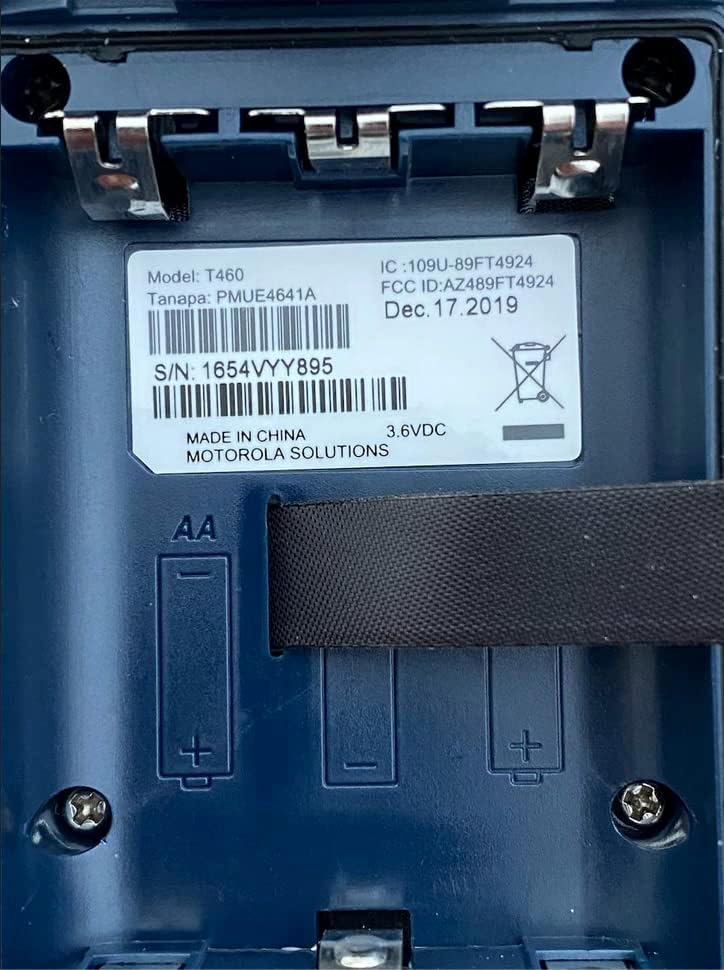
Figura 1: Battery compartment of the Motorola T460 radio, showing the label with model information and slots for AA batteries.
2. Charging the NiMH Battery Pack
The included NiMH battery packs can be charged using the micro-USB wall charging cables. Charging can be done via a standard wall outlet, a vehicle adapter, or a computer USB port.
- Connect the micro-USB cable to the charging port on the radio.
- Connect the other end of the cable to a power source (wall adapter, vehicle adapter, or computer).
- O indicador de bateria no visor do rádio mostrará o status do carregamento.
- Uma carga completa normalmente leva várias horas.
3. Anexando o clipe de cinto
To attach the belt clip, align the clip with the grooves on the back of the radio and slide it downwards until it locks into place.
Instruções de operação
1. Ligar/desligar
To turn the radio on or off, rotate the On/Off/Volume knob clockwise or counter-clockwise until you hear a click.
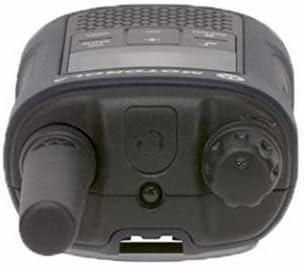
Figura 2: Principal view of the Motorola T460 radio, highlighting the On/Off/Volume knob on the right side.
2. Ajustando o Volume
Rotate the On/Off/Volume knob to adjust the listening volume.
3. Seleção de canal
Your T460 radio has 22 channels. Use the Menu botão e o Para cima/para baixo botões para selecionar um canal.
4. Códigos de Privacidade
The radio supports 121 privacy codes per channel, totaling 2,662 combinations. This helps reduce interference from other users. To set a privacy code, enter the menu and navigate to the privacy code setting for the selected channel.
5. Transmissão e Recepção
- Para transmitir: Press and hold the Push-to-Talk (PTT) button located on the side of the radio. Speak clearly into the microphone. Release the PTT button to listen.
- Para receber: Ensure the PTT button is not pressed. The radio will automatically receive transmissions on the selected channel and privacy code.

Figura 3: Fundo view of the Motorola T460 radio, displaying the 'Talkabout' branding. The PTT button is on the side, not visible in this view.
6. PTT Power Boost
The PTT power boost feature allows you to temporarily increase the transmitter power output to extend transmission range when needed. This feature also helps conserve battery life when maximum range is not required.
7. iVOX/VOX (Hands-Free Communication)
The iVOX/VOX feature enables hands-free communication by detecting your voice and automatically transmitting. This is useful when your hands are occupied. Refer to the radio's on-screen menu for activation and sensitivity settings.
8. VibraCall™ Alert
Activate the VibraCall feature for silent alerts in situations where an audible ring tone might be disruptive.
9. Tons de chamada
Customize your radio's call tone by selecting from the available options in the menu settings.
10. Weather Alert and NOAA Weather Radio
The T460 can receive real-time weather conditions and alerts. Turn on the weather channel or enable weather alerts to stay informed. Note: NOAA radio service availability may vary by region. Consult your local weather office for details.
11. Emergency Alert Button
In an emergency, press the dedicated emergency alert button. The radio will transmit an alert siren followed by spoken or incidental sounds, signaling distress to other radios within range.
12. Lanterna LED integrada
Activate the integrated LED flashlight for illumination during low-light conditions or emergencies.
Manutenção
1. Cuidados com a bateria
- Always use genuine Motorola NiMH battery packs or recommended AA alkaline batteries.
- Charge NiMH batteries fully before first use.
- Do not overcharge or leave batteries discharged for extended periods.
- Remove batteries if the radio will not be used for a long time.
2. Limpeza
Limpe a parte externa do rádio com um pano macio e seco.amp cloth. Do not use harsh chemicals or abrasive cleaners. Ensure the charging port cover is securely closed to maintain the IP54 weatherproof rating.
3. Impermeabilização
The T460 radio has an IP54 weatherproof rating, meaning it is protected against dust and splashing water from any direction. While it can withstand rain and snow, it is not designed for submersion. Ensure all port covers are sealed to maintain water resistance.
Solução de problemas
| Problema | Solução possível |
|---|---|
| O rádio não liga. |
|
| Não é possível transmitir nem receber. |
|
| Qualidade de áudio ruim. |
|
| A duração da bateria é curta. |
|
Especificações
| Modelo | T460 |
| Canais | 22 canais FRS |
| Códigos de Privacidade | 121 (CTCSS/DCS) |
| Resistência às intempéries | IP54 intempéries |
| Tipo de Bateria | NiMH Rechargeable Pack (included) or 3 AA Alkaline Batteries (not included) |
| Duração da bateria (aprox.) | Up to 10 hours (NiMH), Up to 26 hours (AA) |
| Volumetage | 9 Volts |
| Tipo de exibição | LIDERADO |
| Características especiais | Weather Alert, Emergency Alert, iVOX/VOX, VibraCall, LED Flashlight, PTT Power Boost |
| Peso do item (pacote com 8) | 5.52 libras |
| Package Dimensions (8-pack) | 10.63 x 9.96 x 9.84 polegadas |
Informações de garantia
The Motorola Talkabout T460 Two Way Radio comes with a Garantia do fabricante de 1 anos A garantia é válida a partir da data da compra e cobre defeitos de materiais e de fabricação sob uso normal. Guarde o comprovante de compra para eventuais solicitações de garantia.
For full warranty terms and conditions, please refer to the separate warranty document included with your product or visit the official Motorola Solutions website.
Apoiar
For technical assistance, troubleshooting beyond this manual, or to inquire about replacement parts, please contact Motorola Solutions customer support.
- Suporte online: Visit the official Motorola Solutions webSite com perguntas frequentes e recursos de suporte.
- Suporte por telefone: Consulte as informações de contato fornecidas na embalagem do produto ou no site oficial. website.


