1. Introdução
This manual provides essential information for the safe operation and maintenance of your DEERC DE28 RC Helicopter. Please read this manual thoroughly before operating the helicopter to ensure proper function and to prevent damage or injury. The DEERC DE28 is designed for indoor use and features a durable metal airframe, altitude hold, one-key take-off/landing, and multiple speed modes for various skill levels.

Image: The DEERC DE28 RC Helicopter, its remote control, and two interchangeable body shells (red and blue/white).
2. Diretrizes de segurança
AVISO: O não cumprimento destas instruções pode resultar em ferimentos ou danos ao produto.
- Somente para uso interno: This helicopter is designed for indoor flight. Do not operate outdoors, as wind can cause loss of control.
- Recomendação de idade: Recommended for users aged 14 years and up. Adult supervision is advised for younger users.
- Clear Flight Path: Ensure the flight area is clear of obstacles, people, and pets. Maintain a safe distance from walls, furniture, and other objects.
- Segurança da bateria:
- Utilize apenas o carregador e as baterias fornecidas.
- Não sobrecarregue nem provoque curto-circuito nas baterias.
- Não exponha as baterias a temperaturas extremas ou à luz solar direta.
- If batteries swell or leak, discontinue use immediately and dispose of them properly.
- Pás do rotor: Keep fingers, hair, and loose clothing away from rotating blades. Do not touch the helicopter while the blades are spinning.
- Supervisão: Always supervise children when they are operating the helicopter.
- Prevenção de impacto: While durable, repeated hard impacts can damage the helicopter. Avoid crashing.
3. Package Contents and Component Identification
Verify that all items listed below are included in your package. If any items are missing or damaged, please contact DEERC customer support.
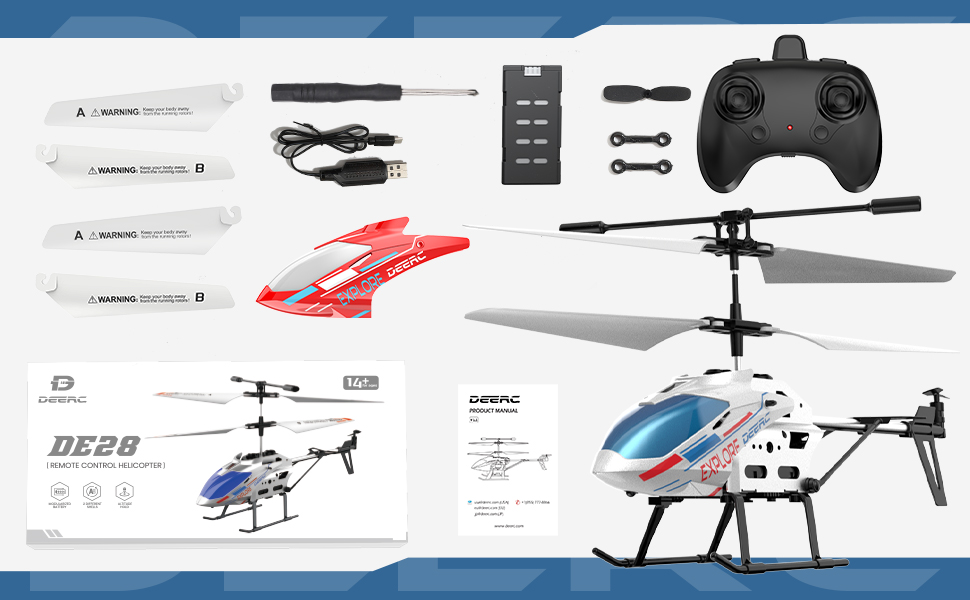
Imagem: Acimaview of the DEERC DE28 RC Helicopter package contents.
Conteúdo da embalagem:
- DEERC DE28 RC Helicopter (1)
- 2.4GHz Remote Control (1)
- Rechargeable Helicopter Batteries (2)
- Cabo de carregamento USB (1)
- Spare Main Rotor Blades (A & B) (2 sets)
- Spare Tail Rotor Blade (1)
- Chave de fenda (1)
- Extra Helicopter Shell (1)
- Manual do usuário (1)
Identificação do componente:

Image: The DEERC DE28 helicopter showcasing its full aluminum alloy body and key features like fast acceleration, altitude hold, one-key takeoff/land, LED light, 2.4GHz, 3 speed modes, gyroscope system, and 2 shells.
- Pás principais do rotor: Provide lift and thrust.
- Tail Rotor Blade: Controls yaw (rotation around vertical axis).
- Luz LED: Front-mounted light for visibility and aesthetics.
- Landing Skids: Provide stable landing and protect the helicopter.
- Compartimento da bateria: Located on the underside of the helicopter.
- Interruptor de alimentação: On/Off switch for the helicopter.
- Porta de carregamento: Para conectar o cabo de carregamento USB.
- Controle remoto:
- Left Stick: Throttle (up/down) and Yaw (left/right).
- Right Stick: Forward/Backward, Left/Right Sideways flight.
- One-Key Take-off/Landing Button.
- Speed Mode Button.
- Power Indicator LED.
- Interruptor de alimentação.

Image: The DEERC DE28 helicopter with its two interchangeable shells, blue/white and red.
4. Guia de configuração
4.1 Carregando a bateria do helicóptero
- Connect the USB charging cable to the helicopter's charging port.
- Plug the other end of the USB cable into a USB power adapter (e.g., computer USB port, phone charger, power bank).
- A luz indicadora de carregamento no cabo USB acenderá durante o carregamento e se apagará quando a carga estiver completa.
- A full charge typically takes approximately 60-90 minutes. Do not leave charging unattended.
- Desconecte o cabo quando o carregamento estiver concluído.

Image: The helicopter's battery compartment, illustrating the battery and its approximate 12-minute flight time per charge.
4.2 Instalação das pilhas do controle remoto
- Abra o compartimento da bateria na parte traseira do controle remoto.
- Insira 3 pilhas AAA (não incluídas) no compartimento, certificando-se da polaridade correta (+/-).
- Feche bem a tampa do compartimento da bateria.
4.3 Emparelhando o helicóptero e o controle remoto
- Ensure both the helicopter and remote control are fully charged/have fresh batteries.
- Coloque o helicóptero em uma superfície plana e nivelada.
- Ligue o interruptor de energia do helicóptero. As luzes LED do helicóptero piscarão.
- Turn on the remote control's power switch. The remote control's indicator light will flash.
- Push the left throttle stick (left joystick) all the way up, then pull it all the way down.
- Both the helicopter's and remote control's indicator lights will become solid, indicating successful pairing.
- Se o emparelhamento falhar, desligue ambos os dispositivos e repita os passos.

Image: The 2.4GHz remote control in use, demonstrating its connection to the helicopter.
5. Operação
5.1 Controles básicos de voo
- Decolagem com um único toque: After pairing, press the One-Key Take-off/Landing button. The helicopter will automatically ascend and hover at a stable altitude.
- Acelerador (Manche esquerdo para cima/para baixo): Controls the helicopter's altitude. Push up to ascend, pull down to descend.
- Guinada (Analógico esquerdo para a esquerda/direita): Controls the helicopter's rotation. Push left to rotate counter-clockwise, right to rotate clockwise.
- Avançar/Recuar (Analógico direito para cima/baixo): Controls the helicopter's forward and backward movement.
- Left/Right Sideways (Right Stick Left/Right): Controls the helicopter's sideways movement (strafe).
- Manter altitude: The helicopter will automatically maintain its current altitude when the throttle stick is released, allowing for easier control.
- Aterrissagem com uma tecla: During flight, press the One-Key Take-off/Landing button again. The helicopter will slowly descend and land automatically.

Image: The helicopter demonstrating its One-Key Take-off and Altitude Hold features.
5.2 modos de velocidade
The DEERC DE28 features 3 speed modes to accommodate different skill levels. Press the Speed Mode button on the remote control to cycle through the modes:
- Baixa velocidade: Ideal for beginners and indoor flight in confined spaces. Provides stable and gentle control.
- Velocidade média: A balanced mode for intermediate users, offering more responsiveness.
- Alta velocidade: For experienced pilots seeking maximum agility and faster flight.

Image: The helicopter demonstrating its three speed levels, suitable for both adults and children.
5.3 Controle de luz LED
The helicopter is equipped with bright LED lights for enhanced visibility, especially in low-light conditions. The LED lights typically turn on automatically when the helicopter is powered on. Refer to the remote control diagram for any dedicated light control buttons, if available.

Image: The helicopter's front LED light illuminated.
6. Manutenção
6.1 Limpeza
- Always turn off the helicopter and remote control before cleaning.
- Wipe the helicopter with a soft, dry cloth. Do not use water or chemical cleaners, as they may damage the electronics.
- Remove any dust or debris from the rotor blades and motors.
6.2 Substituição da lâmina
If a rotor blade becomes damaged, it can be replaced using the spare blades provided and the included screwdriver.
- Identify the damaged blade (A or B).
- Carefully unscrew the small screw holding the blade in place.
- Remove the damaged blade.
- Align the new blade (ensure it's the correct A or B type) and secure it with the screw. Do not overtighten.

Image: The durable and flexible design of the helicopter blades.
6.3 Armazenamento
- Store the helicopter and remote control in a cool, dry place away from direct sunlight and moisture.
- If storing for an extended period, remove batteries from the remote control to prevent leakage.
7. Solução De Problemas
| Problema | Possível causa | Solução |
|---|---|---|
| O helicóptero não responde ao controle remoto. | Not paired; Low battery (helicopter or remote); Remote control off. | Ensure both are on and paired. Charge helicopter battery. Replace remote control batteries. |
| O helicóptero não consegue decolar ou voa com pouca força. | Low helicopter battery; Damaged blades; Obstruction. | Charge helicopter battery fully. Replace damaged blades. Clear any obstructions. |
| Helicopter drifts or spins uncontrollably. | Not calibrated on a flat surface; Damaged tail rotor; Strong airflow. | Ensure helicopter is placed on a flat surface for pairing. Check and replace tail rotor if damaged. Fly in a calm environment. |
| As luzes LED não estão funcionando. | Helicopter off; Malfunction. | Ensure helicopter is powered on. If still not working, contact support. |
8. Especificações
| Recurso | Detalhe |
|---|---|
| Número do modelo | CADE4-DE28 |
| Dimensões (C x L x A) | 19.99 x 4.5 x 12.5 cm (7.87 x 1.77 x 4.92 polegadas) |
| Peso | 290 g |
| Frequência de controle | 2.4 GHz |
| Canais | 3.5 CH |
| Tempo de voo | Aproximadamente 12 minutos por bateria |
| Tempo de carregamento | Aprox. 60-90 minutos |
| Idade Recomendada | 14 anos ou mais |
| Características | Altitude Hold, One-Key Take-off/Landing, 3 Speed Modes, LED Light, Gyroscope System |

Image: Dimensions of the DEERC DE28 RC Helicopter.
9. Garantia e Suporte
DEERC products are manufactured to high quality standards. For information regarding warranty coverage, returns, or technical support, please refer to the official DEERC website ou entre em contato diretamente com o atendimento ao cliente.
DEERC Official Website: www.deerc.com
Please have your model number (DE28) and purchase details ready when contacting support.


