Introdução
Thank you for choosing the Faber 34L Double Glazed 1600W Oven Toaster Grill (OTG). This manual provides essential information for the safe and efficient operation, maintenance, and troubleshooting of your appliance. Please read these instructions thoroughly before first use and retain them for future reference.

Imagem: Frente view of the Faber 34L OTG with its control panel and glass door.
Instruções importantes de segurança
Sempre siga as precauções básicas de segurança ao usar aparelhos elétricos para reduzir o risco de incêndio, choque elétrico e ferimentos.
- Read all instructions before operating the OTG.
- Não toque em superfícies quentes. Use as alças ou puxadores. Sempre use luvas ou protetores de forno ao manusear materiais quentes.
- To protect against electrical shock, do not immerse cord, plug, or any non-removable parts of the oven in water or other liquid.
- É necessária supervisão rigorosa quando qualquer aparelho for usado por crianças ou perto delas.
- Desligue da tomada quando não estiver em uso e antes de limpar. Deixe esfriar antes de colocar ou retirar peças.
- Não opere nenhum aparelho com o cabo ou plugue danificado, ou após o aparelho apresentar mau funcionamento ou ter sido danificado de qualquer forma.
- Não utilize ao ar livre.
- Não deixe o cabo pendurado na borda da mesa ou do balcão, nem toque em superfícies quentes.
- Não coloque sobre ou perto de um queimador a gás ou elétrico quente, nem em um forno aquecido.
- Deve-se ter extremo cuidado ao mover um aparelho que contenha óleo quente ou outros líquidos quentes.
- Não utilize o aparelho para outro fim que não o pretendido.
- Alimentos grandes ou utensílios de metal não devem ser inseridos em uma torradeira, pois podem causar incêndio ou risco de choque elétrico.
- Pode ocorrer um incêndio se o forno estiver coberto ou em contato com materiais inflamáveis, incluindo cortinas, tapeçarias, paredes e similares, quando em operação.
- Não coloque nenhum dos seguintes materiais no forno: papel, papelão, plástico ou materiais similares.
- Não guarde nenhum material, além dos acessórios recomendados pelo fabricante, neste forno quando não estiver em uso.
- Always wear protective, heat-resistant gloves when inserting or removing items from the hot oven.
- Garanta ventilação adequada ao redor do aparelho durante a operação.
Componentes e acessórios do produto
Your Faber OTG comes with the following components and accessories:
- Faber 34L OTG Unit
- Enamelled Bake Tray
- Bandeja Grelha
- Bandeja de migalhas
- Pizza Plate (9-inch)
- Vara de espeto
- Rotisserie Handle (Tongs)
- SS Wire Tray
- Silicon Heat Guard Glove

Image: All included accessories for the Faber 34L OTG, laid out for clear identification.
Configuração e primeiro uso
Desembalando
- Retire cuidadosamente o OTG e todos os acessórios da embalagem.
- Remove any protective films, stickers, or packaging materials from the appliance and accessories.
- Inspecione o aparelho para verificar se há danos. Não o utilize se estiver danificado.
Colocação
- Place the OTG on a stable, flat, heat-resistant surface.
- Certifique-se de que haja espaço suficiente (pelo menos 10 a 15 cm) ao redor de todos os lados do forno para uma ventilação adequada. Não o coloque diretamente contra uma parede ou embaixo de armários.
- Keep the appliance away from flammable materials like curtains, tablecloths, and paper.
Limpeza Inicial
- Antes da primeira utilização, limpe o interior e o exterior do forno com um pano.amp pano.
- Wash all accessories (bake tray, grill tray, rotisserie rod, etc.) in warm, soapy water, rinse thoroughly, and dry completely.
- Insert the crumb tray at the bottom of the oven.
First Use Burn-in
It is recommended to run the oven empty for about 15 minutes on its highest temperature setting (250°C) with the Function Selector set to 'Top + Bottom Heating' to burn off any manufacturing residues. A slight odor or smoke may be present during this process; this is normal. Ensure the area is well-ventilated.
Instruções de operação
The Faber OTG features intuitive controls for various cooking functions.

Imagem: Close-up view of the control knobs on the Faber 34L OTG, indicating their respective functions.
Painel de controle encerradoview
- Botão de função: Selects the cooking function (Off, Rotisserie, Convection, Rotisserie + Convection).
- Botão de temperatura: Ajusta a temperatura de cozimento de 100°C a 250°C.
- Botão Seletor: Chooses the heating mode (Defrost, Top Heating, Bottom Heating, Top + Bottom Heating).
- Botão do cronômetro: Sets the cooking time up to 60 minutes. Includes an auto-cutoff feature.
Cooking Functions and Modes
Your OTG supports 6 cooking functions and various heating modes:

Image: Visual representation of the various cooking modes available with the Faber 34L OTG, including baking, roasting, and grilling.
- Cozimento: Ideal for cakes, cookies, and bread. Use Top + Bottom Heating with or without Convection.
- Assar: Perfect for meats and vegetables. Use Top + Bottom Heating, often with Convection.
- Grelhar: For browning and crisping. Use Top Heating.
- Brinde: For bread and similar items. Use Top Heating.
- Descongelação: Thaws frozen foods. Use the Defrost setting on the Selector Knob.
- Reaquecimento: Warms up cooked food. Use Top + Bottom Heating at a lower temperature.
Função Rotisserie
The auto motorized rotisserie allows for even grilling of whole chickens or large cuts of meat.
- Skewer the food onto the rotisserie rod, securing it with the forks.
- Place the rotisserie rod into the designated slots inside the oven.
- Set the Function Knob to 'Rotisserie' or 'Rotisserie + Convection'.
- Adjust Temperature and Timer as required for your recipe.
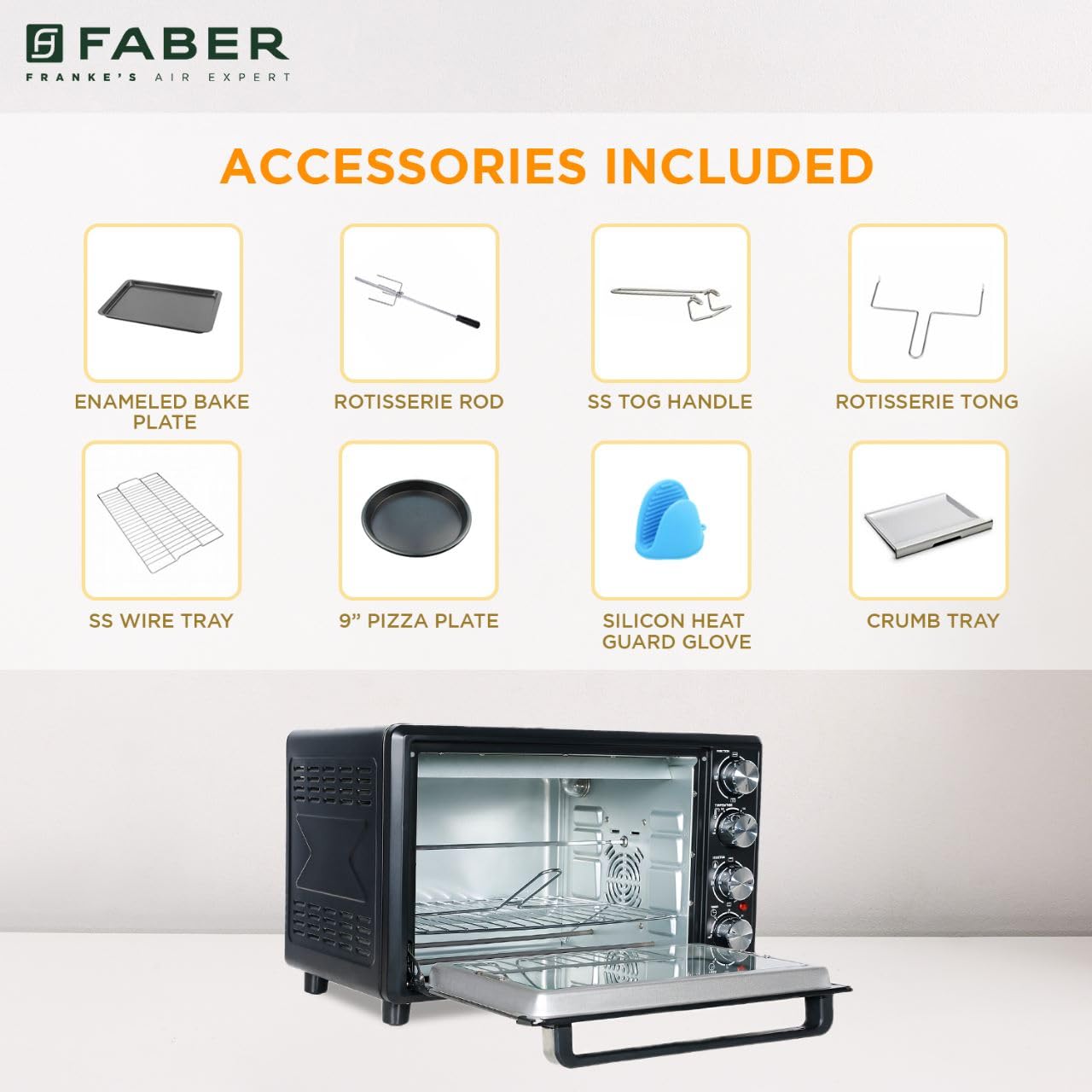
Image: The auto motorized rotisserie feature of the OTG, demonstrating two chickens being evenly grilled.
360° Convection Technology
The 360° Convection Technology ensures uniform cooking by circulating hot air throughout the oven chamber. This results in optimum browning, better crispiness, and higher nutrient retention.
- To activate convection, turn the Function Knob to 'Convection' or 'Rotisserie + Convection'.
- Convection cooking often requires slightly lower temperatures and shorter cooking times compared to conventional baking.

Image: Diagram illustrating the 360° convection technology, showing hot air circulating inside the oven for even cooking.
Timer with Auto Cut-off
The mechanical timer can be set for up to 60 minutes. Once the set time elapses, the oven will automatically switch off, indicated by a bell sound.
- Turn the Timer Knob clockwise to set the desired cooking duration.
- For shorter times (less than 10 minutes), turn the knob past 10 minutes and then back to the desired time for better accuracy.
Manutenção e Limpeza
Regular cleaning and maintenance will ensure the longevity and optimal performance of your OTG.
Limpeza Geral
- Desligue sempre o forno da tomada e deixe-o arrefecer completamente antes de o limpar.
- Limpe as superfícies exteriores com um pano macio, damp pano. Não use produtos de limpeza abrasivos ou esfregões.
- Clean the interior walls, floor, and ceiling with a damp cloth and mild detergent. For stubborn stains, a non-abrasive oven cleaner designed for OTGs can be used, following the product instructions carefully.
- The double glazed glass door can be cleaned with a glass cleaner. The double glazing helps retain heat and prevents burns from touching the outer glass.
- Remove and empty the crumb tray regularly. Wash it in warm, soapy water, rinse, and dry thoroughly.
Limpeza de acessórios
- All removable accessories (bake tray, grill tray, wire rack, rotisserie rod, pizza plate, tongs, silicon glove) can be washed in warm, soapy water. Rinse well and dry completely before storing or reusing.
- Do not use metal scouring pads or abrasive cleaners on non-stick surfaces (if applicable) to avoid damage.

Imagem: Interior view of the Faber 34L OTG with the chamber light on, highlighting the clean racks and crumb tray, ready for use or after cleaning.
Solução de problemas
If you encounter any issues with your Faber OTG, refer to the following table for common problems and solutions.
| Problema | Possível causa | Solução |
|---|---|---|
| O forno não liga. | Não está conectado; energia outage; faulty outlet; timer not set. | Ensure the power cord is securely plugged into a working outlet. Check your household's circuit breaker. Set the timer knob to the desired cooking duration. |
| A comida não está cozinhando uniformemente. | Incorrect temperature/mode; overcrowding; improper rack position; convection fan issue. | Verify temperature and heating mode settings. Avoid overcrowding the oven. Use the appropriate rack position. Ensure the convection fan is not obstructed (if using convection). |
| Excesso de fumaça durante o funcionamento. | Food spills; grease buildup; initial burn-off. | Clean the oven interior and accessories thoroughly. Ensure the crumb tray is clean. If it's the first use, some smoke is normal. |
| Espeto giratório não está girando. | Rotisserie rod not properly seated; Function Knob not set to Rotisserie. | Ensure the rotisserie rod is correctly inserted into the drive socket and support. Set the Function Knob to 'Rotisserie' or 'Rotisserie + Convection'. |
| O temporizador não funciona. | Knob not turned past 10 minutes for short times; mechanical issue. | For times under 10 minutes, turn the knob past 10 and then back to the desired time. If the issue persists, contact customer support. |
If the problem persists after attempting these solutions, please contact Faber customer support.
Especificações
Detailed technical specifications for the Faber 34L OTG:
- Marca: Faber
- Número do modelo: 131.0676.817
- Capacidade: 34 litros
- O quetage: 1600 Watts
- Cor: Preto
- Recurso especial: Temperature Control, 360° Convection, Rotisserie, Double Glazed Glass
- Tipo de controle: Botão
- Estilo da porta: Porta suspensa
- Tipo de material da porta: Vidro temperado
- Fonte de energia: Elétrico com fio
- Peso do item: 10 kg 900 g
- Dimensões do item (CxLxA): 51 x 39 x 32 centímetros
- País de origem: China

Image: Diagram showing the physical dimensions (Length, Width, Height) of the Faber 34L OTG.
Garantia e Suporte
Informações de garantia
Your Faber OTG is covered by a manufacturer's warranty. Please refer to the warranty card included with your product for specific terms, conditions, and duration of the warranty. Keep your purchase receipt as proof of purchase for warranty claims.
Suporte ao cliente
For any service, repair, or technical assistance, please contact Faber customer support. You can find contact details on the warranty card or the official Faber website.
- Suporte online: Visit the official Faber webSite com perguntas frequentes e recursos de suporte.
- Centro de serviço: Locate authorized service centers in your region.


