Introdução
The Bushnell Wingman Mini is a compact GPS Bluetooth speaker designed for golf enthusiasts. It provides audible GPS distances, premium audio quality for music, and the ability to handle calls. Its integrated BITE magnetic cart mount allows for convenient attachment to a golf cart or bag. The device is built with a waterproof IPX7 construction, ensuring durability in various outdoor conditions.
O que está na caixa
- 1x Wingman Mini Black/Silver GPS Speaker
- 1x Mosquetão
- 1x cabo USB-C
- 1x Wearable4U Black EarBuds with Charging E-Bank Case
- 1 x carregador de parede
- Carregador de carro 1x

Image: The complete bundle including the Wingman Mini speaker, earbuds, USB-C cable, wall charger, and car charger.
Produto acimaview

Imagem: Frente view of the Bushnell Wingman Mini GPS Bluetooth Speaker, showcasing its hexagonal design and central 'B' logo.

Imagem: Múltiplas views of the Wingman Mini, highlighting the control buttons for volume, power, and GPS functions, as well as the carabiner clip and USB-C port.

Image: The Wingman Mini speaker in use alongside a smartphone displaying the Bushnell Golf app, showing GPS distances and settings.

Imagem: Close-up view of the USB-C charging port on the side of the Bushnell Wingman Mini speaker.
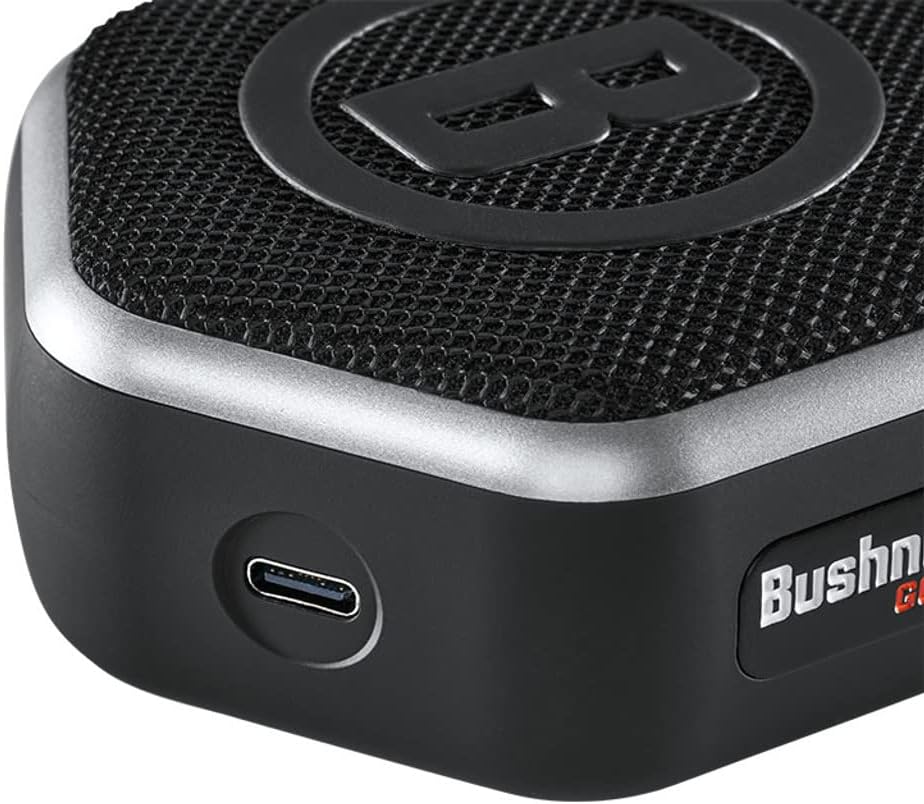
Image: The Wearable4U Ultimate Earbuds with their charging case, highlighting features like Bluetooth 5.0 and 1500 mAh power bank.
Configurar
1. Carregando o dispositivo
Before first use, fully charge the Wingman Mini using the provided USB-C cable and either the wall or car charger. The charging port is located on the side of the speaker. A full charge provides approximately 11 hours of battery life.
2. Emparelhamento Bluetooth
- Power on the Wingman Mini by pressing and holding the power button.
- Certifique-se de que o Bluetooth esteja ativado em seu smartphone.
- Procurar available Bluetooth devices and select "Bushnell Wingman Mini" to pair.
- Once paired, the speaker will confirm the connection.
3. Bushnell Golf App Installation
For full GPS functionality and custom sound bites, download the Bushnell Golf app from your smartphone's app store (Google Play or Apple App Store). Follow the in-app instructions to set up your profile and access golf course data.
Instruções de operação
1. Audible GPS Distances
With the Bushnell Golf app running and the Wingman Mini connected, press the 'B' button on the speaker to receive audible distances to the front, center, and back of the green. The speaker comes preloaded with over 38,000 golf courses worldwide.
2. Reprodução de música
Once paired via Bluetooth, you can stream music from your smartphone or other Bluetooth-enabled devices. Use the volume controls on the speaker or your connected device to adjust audio levels.
3. Chamadas com viva-voz
The built-in microphone allows you to take and make calls directly through the Wingman Mini when connected to your smartphone. Press the play/pause button to answer or end a call.
4. TWS Speaker Pairing (True Wireless Stereo)
If you have two Wingman Mini speakers, you can pair them together for a True Wireless Stereo experience. Refer to the Bushnell Golf app or the full product manual for detailed instructions on TWS pairing.
5. Attaching to Golf Cart/Bag
Utilize the integrated BITE magnetic cart mount to securely attach the speaker to a golf cart bar. Alternatively, use the provided carabiner clip to attach it to your golf bag.
Manutenção
- Limpeza: Limpe o alto-falante com um suave, damp pano. Evite usar produtos químicos agressivos ou produtos de limpeza abrasivos.
- Armazenar: Guarde o dispositivo em local fresco e seco quando não estiver em uso.
- Resistência à água: The Wingman Mini features IPX7 waterproof construction, meaning it can withstand immersion in up to 1 meter of water for 30 minutes. Ensure the charging port cover is securely closed before exposure to water.
- Cuidados com a bateria: Para prolongar a vida útil da bateria, evite descarregá-la completamente com frequência. Carregue o dispositivo regularmente.
Solução de problemas
| Problema | Solução |
|---|---|
| Sem energia/O dispositivo não liga | Ensure the device is fully charged. Connect to a power source using the provided USB-C cable and charger. |
| Não é possível emparelhar via Bluetooth. |
|
| No audible GPS distances |
|
| Má qualidade de áudio |
|
Especificações
- Nome do modelo: Wingman Mini Black/Silver
- Número do modelo do item: w1
- Peso do item: 6 onças
- Dimensões do produto: 4 x 3.23 x 1.57 polegadas
- Tipo de Bateria: 1 bateria de íon de lítio (incluída)
- Duração da bateria: Aproximadamente 11 horas
- Tecnologia de conectividade: Bluetooth
- Características especiais: Audible GPS Distances, Built-in Microphone, Mini, TWS Speaker Pairing Technology, Waterproof (IPX7)
- Tipo de montagem: Suporte para mordida
- Tipo de mapa: Golf Course (preloaded with over 38,000 courses)
- Comando de voz: Microfone
Garantia e Suporte
The Bushnell Wingman Mini comes with a Garantia do fabricante de 2 anos. For warranty claims, technical support, or further assistance, please contact Wearable4U customer service or refer to the official Bushnell Golf website para recursos de suporte.
Fabricante: Wearable4u


