1. Introdução
The ZURURU H98 Fitness Tracker is designed to assist you in monitoring various aspects of your health and fitness. This manual provides detailed instructions for setting up, operating, and maintaining your device to ensure optimal performance.
O que está na caixa
- Fitness Tracker x1 (Band Size: Fits wrist 5.1"- 8.3" in circumference)
- Manual do usuário x1
- Charging Cable x1 (No Charger Included)

Image: Contents of the ZURURU H98 Fitness Tracker package, including the tracker, charging cable, and user manual.
2. Configuração
2.1 Carregando o dispositivo
Before initial use, fully charge your ZURURU H98 Fitness Tracker. The device uses magnetic suction charging. Connect the charging cable to the magnetic contacts on the back of the tracker and plug the USB end into a standard USB charging port (e.g., computer, USB wall adapter). A full charge typically takes approximately 2 hours. A fully charged device can last up to 5 days with normal use or 10 days in power-saving mode.
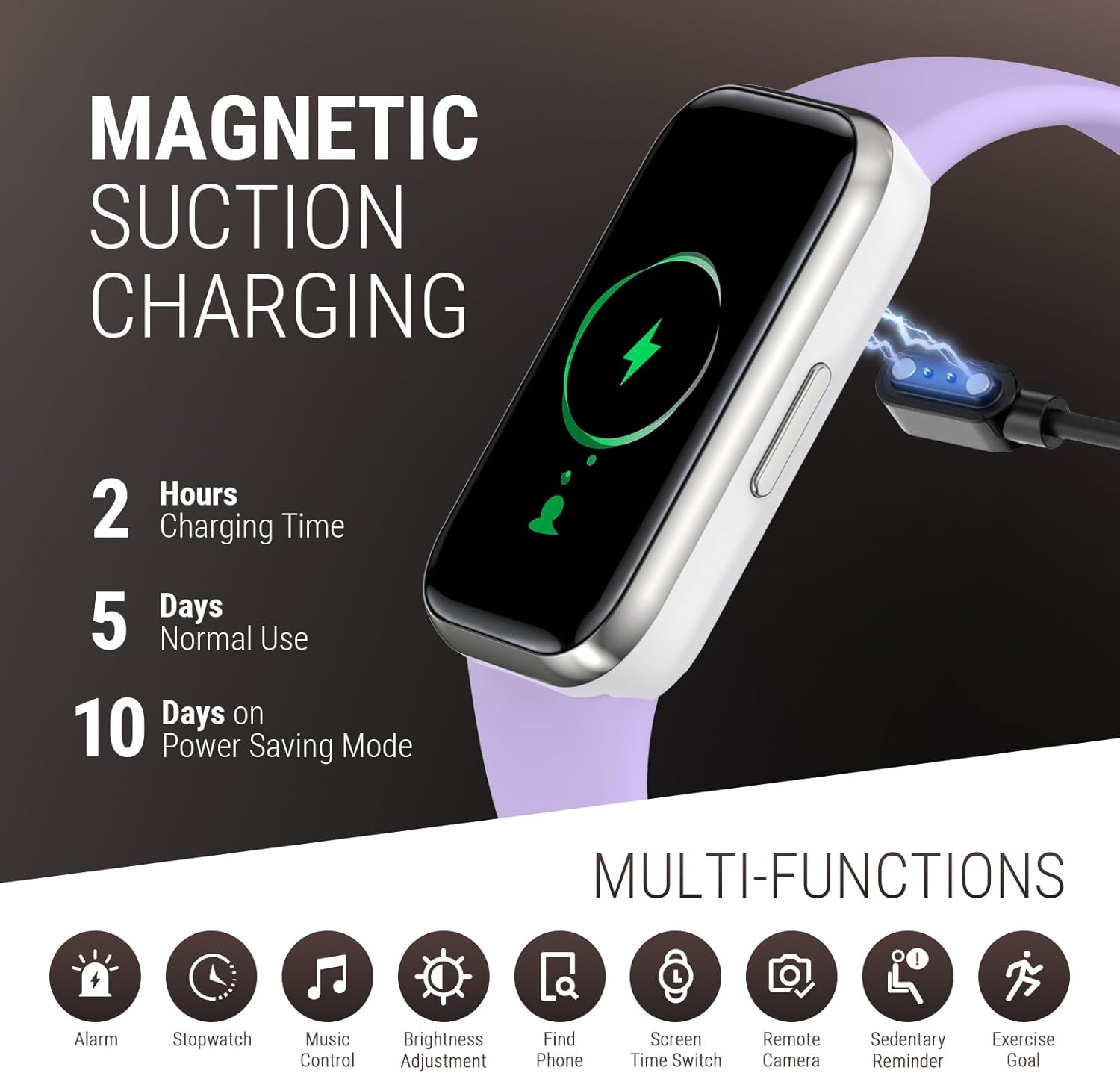
Image: The ZURURU H98 Fitness Tracker connected to its magnetic charging cable, illustrating the charging process.
2.2 Instalação e emparelhamento do aplicativo
- Baixe o aplicativo: Procurar the 'H Band' app in your smartphone's app store (iOS or Android) and install it.
- Ativar Bluetooth: Certifique-se de que o Bluetooth esteja ativado em seu smartphone.
- Abra o aplicativo: Launch the 'H Band' app and follow the on-screen instructions to create an account or log in.
- Emparelhe o dispositivo: Within the app, navigate to the device pairing section. The app will search for available devices. Select 'H98' from the list to connect.
- Confirmar pareamento: A pairing request may appear on your tracker. Confirm the pairing on both your tracker and smartphone.
Once paired, the tracker's time and date will synchronize with your phone, and you can begin customizing settings and tracking data.
3. Instruções de operação
3.1 Navegação básica
The ZURURU H98 Fitness Tracker features a touch-sensitive screen for navigation. Swipe up, down, left, or right to access different functions and menus. A short press of the side button typically returns to the previous screen or activates the display.
3.2 All-Day Activity Tracking
The tracker continuously monitors your daily activities, including steps taken, distance covered, and calories burned. This data is displayed on the device and synchronized with the 'H Band' app for detailed analysis.

Image: The ZURURU H98 Fitness Tracker screen showing steps, distance, calories, and heart rate during an activity.
3.3 Heart Rate and Blood Oxygen (SpO2) Monitoring
The H98 tracker provides real-time heart rate and blood oxygen level measurements. To take a measurement, navigate to the respective function on the tracker. Ensure the device is snug on your wrist for accurate readings. Data is recorded and viewdisponível no aplicativo.

Image: Visual representation of the ZURURU H98's advanced health monitoring capabilities, including heart rate, blood oxygen, sleep, sedentary, and drink reminders.
3.4 Monitoramento do Sono
Wear the tracker to bed for automatic sleep analysis. It monitors deep sleep, light sleep, sleep duration, awake time, and sleep patterns. Review your sleep data in the 'H Band' app to understand and improve your sleep quality.
3.5 Modos Esportivos
Select from various sports modes (e.g., running, yoga, cycling) to track specific workout data. During a workout, the tracker displays real-time metrics such as duration, steps, BPM, calories burned, and distance. This helps in monitoring progress and optimizing exercise routines.
3.6 Notificações Inteligentes
Once paired with your smartphone, the tracker can provide vibrating notifications for incoming calls and messages. Enable this feature in the 'H Band' app settings. You can also reject calls directly from the tracker.

Image: The ZURURU H98 Fitness Tracker showing a message notification on its screen, with various social media app icons around it.
3.7 Recursos Adicionais
- Controle de música: Control music playback on your smartphone directly from the tracker.
- Cronômetro: Utilize o cronômetro integrado para cronometrar as atividades.
- Encontrar telefone: Activate this feature to make your paired phone ring, helping you locate it.
- Ajuste de brilho: Ajuste o brilho da tela para obter a melhor visibilidade.
- Não incomodar: Silenciar notificações em horários específicos.
- Configuração de alarme: Configure alarmes vibratórios silenciosos.
- Activity Reminders: Receive alerts for prolonged inactivity.
- Drink Reminders: Receba lembretes para se manter hidratado.

Image: The ZURURU H98 Fitness Tracker displaying music control options on its screen.

Image: A user receiving a drink reminder notification on their ZURURU H98 Fitness Tracker.
4. Manutenção
4.1 Cleaning Your Tracker
Regularly clean your ZURURU H98 Fitness Tracker to maintain hygiene and performance. Wipe the screen and strap with a soft, damp pano. Evite usar produtos químicos agressivos ou materiais abrasivos, que podem danificar o dispositivo.
4.2 Resistência à água
The ZURURU H98 Fitness Tracker is IP68 waterproof, meaning it is resistant to dust and can withstand immersion in water up to 1.5 meters for up to 30 minutes. It is suitable for daily use, including hand washing, rain, and shallow swimming. However, it is not recommended for hot showers, saunas, or diving, as steam and high water pressure can compromise the seal.

Image: A person surfing with the ZURURU H98 Fitness Tracker, highlighting its IP68 waterproof rating.
5. Solução De Problemas
5.1 O dispositivo não está carregando
- Ensure the magnetic charging contacts on the cable and tracker are clean and properly aligned.
- Try a different USB power source (e.g., another USB port on a computer, a different wall adapter).
- Verifique se o cabo de carregamento está danificado.
5.2 Problemas de conectividade (Bluetooth)
- Certifique-se de que o Bluetooth esteja ativado no seu smartphone e que o rastreador esteja dentro do alcance.
- Restart both your smartphone and the fitness tracker.
- Unpair the device from the 'H Band' app and your phone's Bluetooth settings, then attempt to pair again.
- Ensure the 'H Band' app has necessary permissions (e.g., location, Bluetooth) enabled in your phone's settings.
5.3 Inaccurate Readings (Steps, Heart Rate, SpO2)
- For Steps: Ensure the tracker is worn securely on your wrist. Arm movements not associated with walking may not be counted.
- For Heart Rate/SpO2: Ensure the tracker is snug but comfortable on your wrist, with the sensors in contact with your skin. Avoid excessive movement during measurement. Note that fitness trackers are not medical devices and readings are for reference only.
- Ensure the 'H Band' app is up to date.
6. Especificações
| Número do modelo | H98 |
| Dimensões do produto | 1.73 x 0.98 x 0.43 polegadas |
| Peso do item | 1.06 onças (30 gramas) |
| Tamanho da tela | 1.47 polegadas |
| Tipo de Bateria | Polímero de lítio |
| Capacidade da bateria | 120 Miliamp Horas |
| Tempo de carregamento | Aproximadamente 2 horas |
| Duração da bateria (uso normal) | Até 5 dias |
| Battery Life (Power Saving) | Até 10 dias |
| Resistência à água | IP68 |
| Conectividade | Bluetooth |
| Capacidade de armazenamento de memória | 128 MB |
7. Garantia e Suporte
ZURURU is committed to providing quality products and customer satisfaction. Your H98 Fitness Tracker comes with the following:
- Substituição gratuita por 1 ano: In case of manufacturing defects or issues covered under warranty.
- Garantia sem complicações: A straightforward process for warranty claims.
- Suporte ao cliente 7 horas por dia, 24 dias por semana, 365 dias por ano: Dedicated support available around the clock for any inquiries or assistance you may need.
For support, please refer to the contact information provided in your product packaging or visit the official ZURURU store online.
Image: Graphic detailing ZURURU's commitment to customer satisfaction, including 1-year free replacement, hassle-free warranty, and 24/7 customer support.


