1. Introdução
This manual provides essential information for setting up, operating, maintaining, and troubleshooting your VAIO Pro PF (Model: VJPF11C11N) notebook PC. Please read this manual thoroughly before using your device to ensure proper and safe operation.
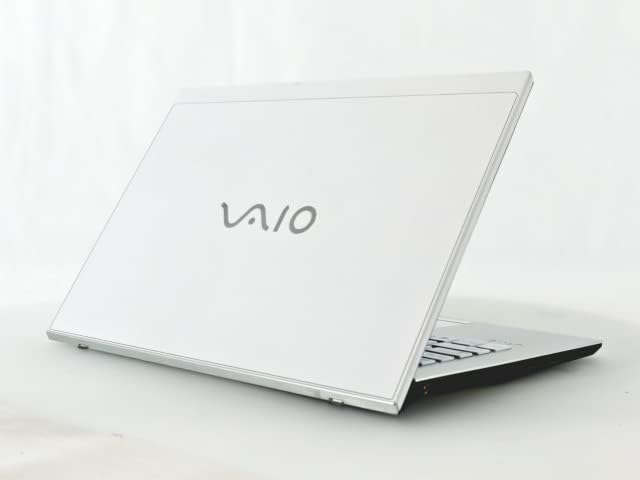
Figure 1: VAIO Pro PF Notebook PC
The VAIO Pro PF is a lightweight and compact mobile notebook designed for productivity. It features an 11.6-inch Full HD display, an Intel 8th Generation Core i5-8250U processor, 8GB of RAM, and a 256GB SSD, running on Windows 11 Pro. The device also includes a backlit keyboard for comfortable typing in various lighting conditions.
2. Configuração
2.1 Desembalagem
Retire cuidadosamente todos os componentes da embalagem. Certifique-se de que os seguintes itens estejam presentes:
- VAIO Pro PF Notebook PC
- Adaptador CA e cabo de alimentação
- Documentação (este manual, informações sobre a garantia)
2.2 Conectando à energia
Before initial use, connect the AC adapter to the laptop's power input port and then plug the power cord into a wall outlet. Allow the battery to charge fully.
2.3 Inicialização do sistema e configuração do Windows
Press the power button to turn on the laptop. Follow the on-screen instructions to complete the initial Windows 11 Pro setup, including language selection, network connection, and user account creation.
3. Operating Your VAIO Pro PF
3.1 Teclado e touchpad
The VAIO Pro PF features a full-sized keyboard with a backlight for improved visibility. The touchpad located below the keyboard supports multi-touch gestures for navigation.

Figura 2: Layout do teclado e do touchpad
3.2 Conectando dispositivos externos
Seu laptop está equipado com diversas portas para conectar dispositivos externos:
- Portas USB 3.0 (x3): Para conectar dispositivos USB, como discos rígidos externos, mouses ou teclados.
- Porta HDMI: For connecting to external displays or projectors with HDMI input.
- D-SUB15 (VGA) Port: For connecting to older external displays or projectors with VGA input.
- Wired LAN Port: For connecting to a wired network using an Ethernet cable.
- Plug do fone de ouvido: Para conectar fones de ouvido ou alto-falantes externos.
3.3 Conectividade sem fio
The VAIO Pro PF supports both Wi-Fi and Bluetooth connectivity:
- Wi-Fi (802.11n): To connect to a wireless network, go to Windows Settings > Network & Internet > Wi-Fi, turn Wi-Fi on, and select your desired network.
- Bluetooth: To connect Bluetooth devices, go to Windows Settings > Bluetooth & devices, turn Bluetooth on, and pair your device.
3.4 Usando o Web Câmera
O integrado web camera can be used for video calls and conferences. Access it through applications like Camera, Microsoft Teams, or Zoom.
4. Manutenção
4.1 Limpeza do laptop
To clean the exterior of your laptop, use a soft, lint-free cloth slightly dampened with water or a mild, non-abrasive cleaning solution. Avoid spraying liquids directly onto the device. For the screen, use a specialized screen cleaner.
4.2 Atualizações de Software
Regularly check for and install Windows updates to ensure your system has the latest security patches and performance improvements. Go to Windows Settings > Windows Update.
4.3 Cuidados com a bateria
Para prolongar a vida útil da bateria, evite temperaturas extremas e descargas completas frequentes. Para armazenamento prolongado, carregue a bateria até cerca de 50-70%.
5. Solução De Problemas
This section addresses common issues you might encounter with your VAIO Pro PF.
| Problema | Solução |
|---|---|
| O laptop não liga. | Ensure the AC adapter is securely connected and the power outlet is functional. Try holding the power button for 10-15 seconds. |
| Problemas de conexão Wi-Fi. | Check if Wi-Fi is enabled in Windows Settings. Restart your router and the laptop. Ensure you are within range of the Wi-Fi network. |
| Keyboard backlight is not working. | Check if the backlight function key (often Fn + F key) is enabled. Adjust brightness settings if available. |
| External display not detected. | Ensure the cable is securely connected to both the laptop and the display. Use Windows display settings to detect or extend displays. Try a different cable or port if available. |
6. Especificações
| Recurso | Detalhe |
|---|---|
| Nome do modelo | VAIO Pro PF (VJPF11C11N) |
| Marca | VAIO (Manufacturer: SONY) |
| Tamanho da tela | 11.6 polegadas |
| Resolução | 1920x1080 pixels (Full HD) |
| CPU | Intel Core i5-8250U (8th Gen, 4 Cores, 8 Threads, 1.6 GHz base, up to 3.4 GHz) |
| BATER | Memória RAM DDR8 de 4 GB |
| Armazenar | SSD (unidade de estado sólido) de 256 GB |
| Sistema operacional | Windows 11 Pro (64 bits) |
| Gráficos | Intel Integrated Graphics |
| Conectividade sem fio | Wi-Fi (802.11n), Bluetooth |
| Portos | 3x USB 3.0, 1x HDMI, 1x D-SUB15 (VGA), 1x Wired LAN, 1x Headphone Jack |
| Web Câmera | Integrado |
| Teclado | Teclado retroiluminado |
| Peso | Approx. 0.87 kg (870 g) |
| Primeira data disponível | 10 de maio de 2023 |
7. Garantia e Suporte
For information regarding your product's warranty, please refer to the warranty card included with your purchase or visit the official VAIO support website. For technical assistance, driver downloads, or further inquiries, please contact VAIO customer support through their official channels.