1. Introdução
This manual provides detailed instructions for the setup, operation, maintenance, and troubleshooting of your Steelplay Adventure Controller for Nintendo Switch. Please read this manual thoroughly before using the product to ensure optimal performance and longevity.
2. Conteúdo da embalagem
- Steelplay Adventure Controller
- Cabo de carregamento USB
- Manual do usuário (este documento)
3. Layout do Controlador
Familiarize yourself with the buttons and features of your Steelplay Adventure Controller.

Figura 1: Frente view of the Steelplay Adventure Controller. This image displays the controller's ergonomic design, featuring a teal main body, brown grips, and yellow accents on the analog sticks, D-pad, and face buttons. The layout includes two clickable analog sticks, a directional pad, A/B/X/Y action buttons, Home, Capture, Plus, Minus, and Turbo buttons.
- Alavanca analógica esquerda: Para controle de movimento e câmera.
- Alavanca analógica direita: Para controle da câmera ou ações específicas dentro do jogo.
- D-pad: Entrada direcional.
- Botões A/B/X/Y: Botões de ação.
- Botões L/R: Botões nos ombros.
- Botões ZL/ZR: Botões de gatilho.
- Botão HOME: Retorna ao menu HOME do Nintendo Switch.
- Botão CAPTURAR: Tira capturas de tela ou grava videoclipes.
- Botão + (Mais): Botão Iniciar/Pausar.
- - Botão (Menos): Selecione o botão.
- Botão TURBO: For setting rapid-fire functionality (refer to operating section).
- Indicadores LED: Display connection status, player number, and charging status.
4. Configuração e conexão
4.1 Carregamento Inicial
Before first use, fully charge the controller. Connect the USB charging cable to the controller's charging port and the other end to a USB power source (e.g., Nintendo Switch dock, USB wall adapter, computer USB port). The LED indicators will show charging status and turn off or change color when fully charged.
4.2 Emparelhamento com o Nintendo Switch
- On your Nintendo Switch HOME Menu, select "Controllers".
- Selecione "Alterar Empunhadura/Ordem".
- On the Steelplay Adventure Controller, press and hold the Botão HOME e o Botão Y simultaneously for a few seconds until the LED indicators start flashing rapidly. This indicates the controller is in pairing mode.
- The Nintendo Switch will detect the controller. Once detected, the LED indicators on the controller will stop flashing and remain solid, indicating a successful connection.
- Press the L+R buttons on the controller as prompted by the Switch screen to finalize the connection.
Once paired, the controller will automatically connect to your Nintendo Switch when powered on and within range.
5. Operando o Controlador
5.1 Controles Básicos
The Steelplay Adventure Controller functions similarly to official Nintendo Switch Pro Controllers. Use the analog sticks for movement, D-pad for directional input, and A/B/X/Y buttons for in-game actions. The L/R and ZL/ZR buttons provide additional input options.
5.2 Controle de movimento
The controller supports motion control functionality, allowing for immersive gameplay in compatible titles. Ensure your Nintendo Switch system software is up to date for optimal motion control performance.
5.3 Função TURBO
The TURBO function allows a button to be pressed repeatedly as long as it is held down, providing a rapid-fire effect.
- Para ativar o TURBO: Pressione e segure o Botão TURBO, then press the desired action button (e.g., A, B, X, Y, L, R, ZL, ZR). The button will now have TURBO functionality.
- Para desativar o TURBO: Pressione e segure o Botão TURBO again, then press the same action button. The TURBO function for that button will be turned off.
6. Manutenção
6.1 Limpeza
Para limpar o seu controle, use um pano macio e seco. Para sujeira mais difícil de remover, umedeça levemente o controle.ampen the cloth with water and gently wipe the surface. Do not use harsh chemicals, solvents, or abrasive cleaners, as these can damage the controller's finish and internal components.
6.2 Armazenamento
Store the controller in a cool, dry place away from direct sunlight, extreme temperatures, and high humidity. Avoid placing heavy objects on the controller to prevent damage to the buttons or casing.
6.3 Cuidados com a bateria
The controller contains a built-in Lithium-ion battery. To prolong battery life, avoid fully discharging the battery frequently. If storing the controller for an extended period, charge it to approximately 50% capacity every few months.
7. Solução De Problemas
| Problema | Possível causa | Solução |
|---|---|---|
| Controller does not connect to Switch. |
|
|
| Atraso na resposta dos comandos ou botões que não respondem. |
|
|
| O controle não carrega. |
|
|
8. Especificações
| Recurso | Detalhe |
|---|---|
| Marca | Steelplay |
| Número do modelo | 3760352735322 |
| Conectividade | Bluetooth (sem fio) |
| Dispositivos compatíveis | Nintendo Interruptor |
| Cor | Multicolore (Teal, Brown, Yellow) |
| Características especiais | Wireless, Motion Control, TURBO Function |
| Peso | 185 gramas |
| Dimensões (C x L x A) | 16 x 11.5 x 6.3 centímetros |
| Tipo de Bateria | 1 Lithium-ion (built-in) |
9. Garantia e Suporte
The product packaging indicates a 5-year warranty. For specific warranty terms, conditions, and support inquiries, please refer to the official Steelplay webou entre em contato diretamente com o serviço de atendimento ao cliente. Guarde o comprovante de compra para eventuais solicitações de garantia.
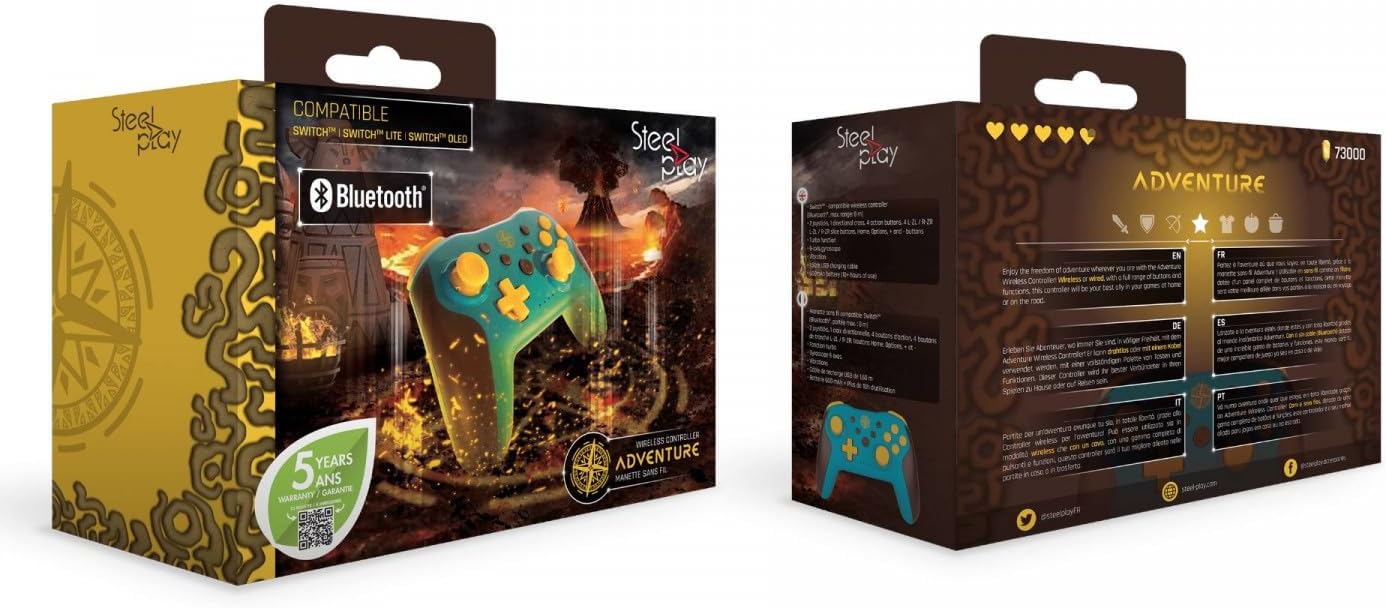
Figura 2: Packaging of the Steelplay Adventure Controller. The box prominently features the controller's design, compatibility with various Nintendo Switch models, Bluetooth logo, and a "5 years warranty" seal. The reverse side provides product information in multiple languages.


