1. Introdução
Thank you for choosing the Taurus Lento Cuina Digital Slow Cooker. This appliance is designed to simplify your cooking process, allowing you to prepare delicious, slow-cooked meals with minimal effort. Featuring a generous 6.5L capacity, digital controls, and a durable stainless steel body, it is perfect for family-sized meals. Please read this manual thoroughly before first use to ensure safe and optimal operation.

Image: The Taurus Lento Cuina Digital Slow Cooker alongside a cooked chicken, illustrating its capacity for large meals.
2. Instruções importantes de segurança
Ao utilizar aparelhos elétricos, siga sempre as precauções básicas de segurança para reduzir o risco de incêndio, choque elétrico e/ou ferimentos, incluindo as seguintes:
- Leia todas as instruções antes de usar a panela elétrica de cozimento lento.
- Não toque em superfícies quentes. Use alças ou botões.
- Para evitar choques elétricos, não mergulhe a unidade base, o cabo ou a ficha em água ou qualquer outro líquido.
- É necessária supervisão rigorosa quando qualquer aparelho for usado por crianças ou perto delas.
- Desligue da tomada quando não estiver em uso e antes de limpar. Deixe esfriar antes de colocar ou retirar peças.
- Não opere nenhum aparelho com o cabo ou plugue danificado, ou após o aparelho apresentar mau funcionamento ou ter sido danificado de qualquer forma.
- O uso de acessórios não recomendados pelo fabricante do aparelho pode causar ferimentos.
- Não utilize ao ar livre.
- Não deixe o cabo pendurado na borda da mesa ou do balcão, nem toque em superfícies quentes.
- Não coloque sobre ou perto de um queimador a gás ou elétrico quente, nem em um forno aquecido.
- Deve-se ter extremo cuidado ao mover um aparelho que contenha óleo quente ou outros líquidos quentes.
- Sempre conecte primeiro o plugue ao aparelho e, em seguida, ligue o cabo na tomada. Para desconectar, gire qualquer controle para a posição "desligado" e, em seguida, retire o plugue da tomada.
- Não utilize o aparelho para outro fim que não o pretendido.
- Evite mudanças bruscas de temperatura, como colocar alimentos refrigerados em uma panela aquecida.
- The ceramic pot is designed for use with this appliance only. It must not be used on a gas or electric stovetop or in a heated oven.
3. Componentes do produto
Familiarize yourself with the parts of your Taurus Lento Cuina Digital Slow Cooker:
- Toughened Glass Lid: Allows you to monitor cooking progress without releasincalor g.
- Vaso de cerâmica removível: The main cooking vessel, easy to clean and serve from.
- Carcaça de Aço Inoxidável: The outer body of the slow cooker, containing the heating element and control panel.
- Painel de controle digital: Features a 4-digit LED display, Mode, Timer, Up, Down, and On/Off buttons.
- Alças: For safe transportation of the unit.
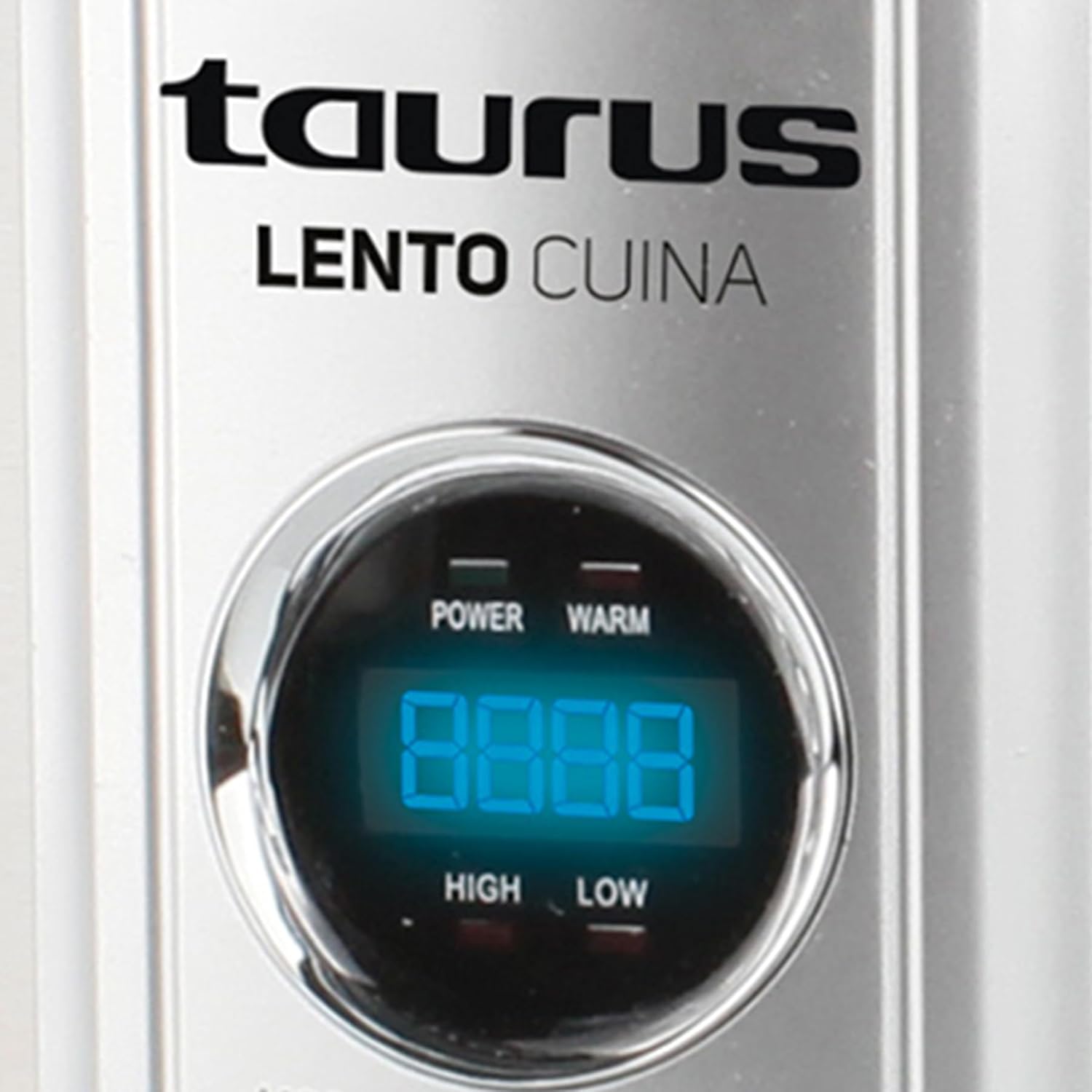
Imagem: Uma frente detalhada view of the Taurus Lento Cuina Digital Slow Cooker, highlighting the digital control panel and stainless steel finish.

Image: The Taurus Lento Cuina Digital Slow Cooker with its removable ceramic pot placed next to it, demonstrating ease of cleaning and serving.
4. Configuração e primeiro uso
Before using your slow cooker for the first time:
- Desembale a panela elétrica e remova todos os materiais de embalagem.
- Wash the ceramic pot and glass lid in warm, soapy water. Rinse thoroughly and dry completely.
- Limpe a parte externa da caixa de aço inoxidável com um pano.amp pano. Não mergulhe a unidade base em água.
- Place the ceramic pot into the stainless steel housing.
- Coloque a panela elétrica em uma superfície plana, estável e resistente ao calor, longe de paredes ou armários, para permitir uma ventilação adequada.
- Ensure the power cord is not tangled and is placed where it will not be tripped over.
5. Instruções de operação
The Taurus Lento Cuina Digital Slow Cooker offers simple digital controls for precise cooking.
5.1 Painel de controle sobreview

Imagem: Um close-up view of the digital control panel, showing the LED display and buttons for Mode, Timer, Up, Down, and On/Off.
- Telão LED: Shows cooking time and temperature settings.
- Botão MODE: Cycles through cooking modes (High, Low, Keep Warm).
- Botão TEMPORIZADOR: Activates the timer setting function.
- Botões PARA CIMA / PARA BAIXO: Ajuste o tempo de cozimento.
- Botão ON/OFF: Liga ou desliga a unidade.
5.2 Processo de Cozimento
- Prepare your ingredients and place them into the ceramic pot.
- Place the ceramic pot into the stainless steel housing and cover with the glass lid.
- Plug the slow cooker into a grounded electrical outlet. The LED display will illuminate.
- Pressione o LIGADO/DESLIGADO botão para ligar a unidade.
- Pressione o MODO button to select your desired cooking setting:
- ALTO: Para um cozimento mais rápido, geralmente leva de 2 a 4 horas.
- BAIXO: Para um cozimento mais lento, normalmente são necessárias de 6 a 8 horas.
- MANTENHA-SE AQUECIDO: Automatically activates after cooking is complete, or can be selected manually to keep food at serving temperature.
- Pressione o CRONÔMETRO botão. O visor piscará. Use o UP e ABAIXO buttons to set the desired cooking time in hours. The timer can be set for up to 20 hours.
- Once the time is set, the display will stop flashing, and the cooking process will begin. The timer will count down.
- When the cooking time expires, the slow cooker will automatically switch to the "KEEP WARM" setting.
- To turn off the slow cooker at any time, press the LIGADO/DESLIGADO button. Unplug the unit from the wall outlet after use.

Image: A hand pressing the ON/OFF button on the slow cooker's control panel, demonstrating the ease of operation.

Image: The Taurus Lento Cuina Digital Slow Cooker with a meal cooking inside, visible through the clear glass lid.
6. Manutenção e Limpeza
Proper cleaning and maintenance will extend the life of your slow cooker.
- Desligue sempre a panela elétrica da tomada e deixe-a esfriar completamente antes de limpá-la.
- Ceramic Pot and Glass Lid: These parts are dishwasher safe or can be washed by hand with warm, soapy water. Avoid abrasive cleaners or scouring pads that may scratch the surface. Rinse thoroughly and dry.
- Carcaça de Aço Inoxidável: Limpe o exterior com um pano macio e seco.amp pano. Não utilize produtos de limpeza abrasivos nem mergulhe a unidade base em água ou qualquer outro líquido.
- For stubborn food residue on the ceramic pot, fill it with warm, soapy water and let it soak for a few hours before cleaning.
- Certifique-se de que todas as peças estejam completamente secas antes de armazenar.
7. Solução De Problemas
Se você tiver problemas com sua panela elétrica de cozimento lento, consulte os problemas e soluções comuns a seguir:
| Problema | Possível causa | Solução |
|---|---|---|
| O fogão lento não liga. | Not plugged in; power outlet not working; unit not switched on. | Ensure plug is securely in a working outlet. Press the ON/OFF button. Check household circuit breaker. |
| Alimentos não cozinham corretamente. | Incorrect heat setting; lid not sealed properly; insufficient cooking time. | Verify correct heat setting (HIGH/LOW). Ensure lid is seated firmly. Adjust cooking time as needed for recipe. Avoid lifting lid frequently. |
| A comida está queimando no fundo. | Too little liquid; cooking on HIGH for too long. | Add more liquid to the recipe. Consider using the LOW setting for longer cooking times. |
| Lid does not fit tightly. | Food obstruction; lid not aligned correctly. | Ensure no food is preventing the lid from seating properly. Realign the lid. |
8. Especificações
Technical details for the Taurus Lento Cuina Digital Slow Cooker:
- Número do modelo: 3997
- Capacidade: 6.5 litros
- Potência / Wattage: 320 watts
- Material: Stainless Steel (housing), Ceramic (pot)
- Cor: Prata
- Método de controle: Toque (Digital)
- Características especiais: Timer, Digital Controls, High/Low/Keep Warm Functions
- Peso do item: 6.5 kg
- Dimensões do produto: 39.8P x 37.3L x 26A centímetros
9. Garantia e Suporte
Your Taurus Lento Cuina Digital Slow Cooker comes with a standard 1-year retail warranty, with an additional 1-year extended warranty. For warranty claims, technical support, or spare parts information, please contact Taurus customer service. Refer to the contact information provided with your purchase documentation or visit the official Taurus website.
Note: Spare part information is not available or provided directly in this manual.


