1. Introdução
This manual provides essential information for the safe and effective operation of your VOLTCRAFT DSO-2202H + AFG Handheld Oscilloscope. This versatile device combines the functions of an oscilloscope, a multimeter, and an arbitrary function generator (AFG) into a single portable unit. Please read this manual thoroughly before using the device to ensure proper handling and to prevent damage or injury.
2. Informações de segurança
Always observe the following safety precautions to avoid personal injury and prevent damage to the instrument or other equipment.
- Leia todas as instruções: Antes de utilizar o dispositivo, leia e compreenda todas as instruções de segurança e de funcionamento.
- Use proper probes: Use only probes and accessories rated for the voltage and current of the measurement.
- Evite condições úmidas: Não opere o dispositivo em ambientes úmidos ou damp ambientes.
- Aterramento: Ensure proper grounding when connecting to mains power or high-voltage circuitos.
- Não abra o casing: Refer all servicing to qualified service personnel. Opening the casing pode expô-lo a vol. perigosostage.
- Observe all ratings: Do not exceed the maximum input ratings of the device.
3. Produto acabadoview
The VOLTCRAFT DSO-2202H + AFG is a compact, multi-functional test instrument designed for various electrical measurement tasks. It features a clear color LCD display and intuitive controls.
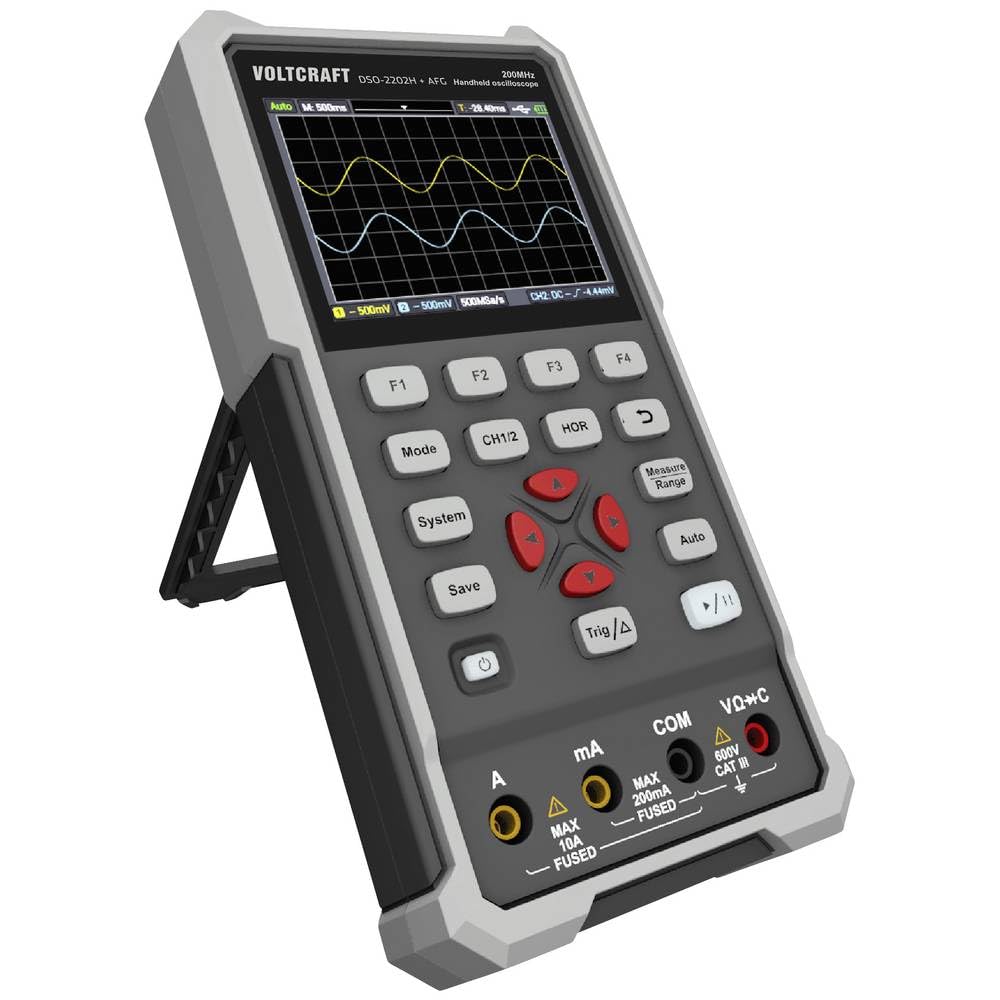
Figura 1: Frente view of the VOLTCRAFT DSO-2202H + AFG Handheld Oscilloscope with connected test probes. The display shows a voltage reading, and the control panel with function buttons and navigation keys is visible below.
Principais características:
- 3-in-1 Oscilloscope, Multimeter, and Waveform Generator
- 3.5-inch (8.89 cm) Color LCD Screen (320 x 240 pixels)
- USB Type-C Interface for connectivity and data storage
- Design durável e robusto
4. Configuração
Follow these steps for initial setup of your device.
4.1 Ligar/Desligar
- Para ligar o dispositivo, pressione e segure o botão Poder button located on the side/top panel.
- The color LCD screen will illuminate, displaying the startup sequence.
- Para desligar, pressione e segure o Poder botão novamente até que o dispositivo desligue.
4.2 Conectando Sondas
For oscilloscope functions, connect the oscilloscope probes to the BNC connectors. For multimeter functions, connect the test leads to the appropriate input jacks (VΩ+C, mA, A, COM) at the bottom of the device.
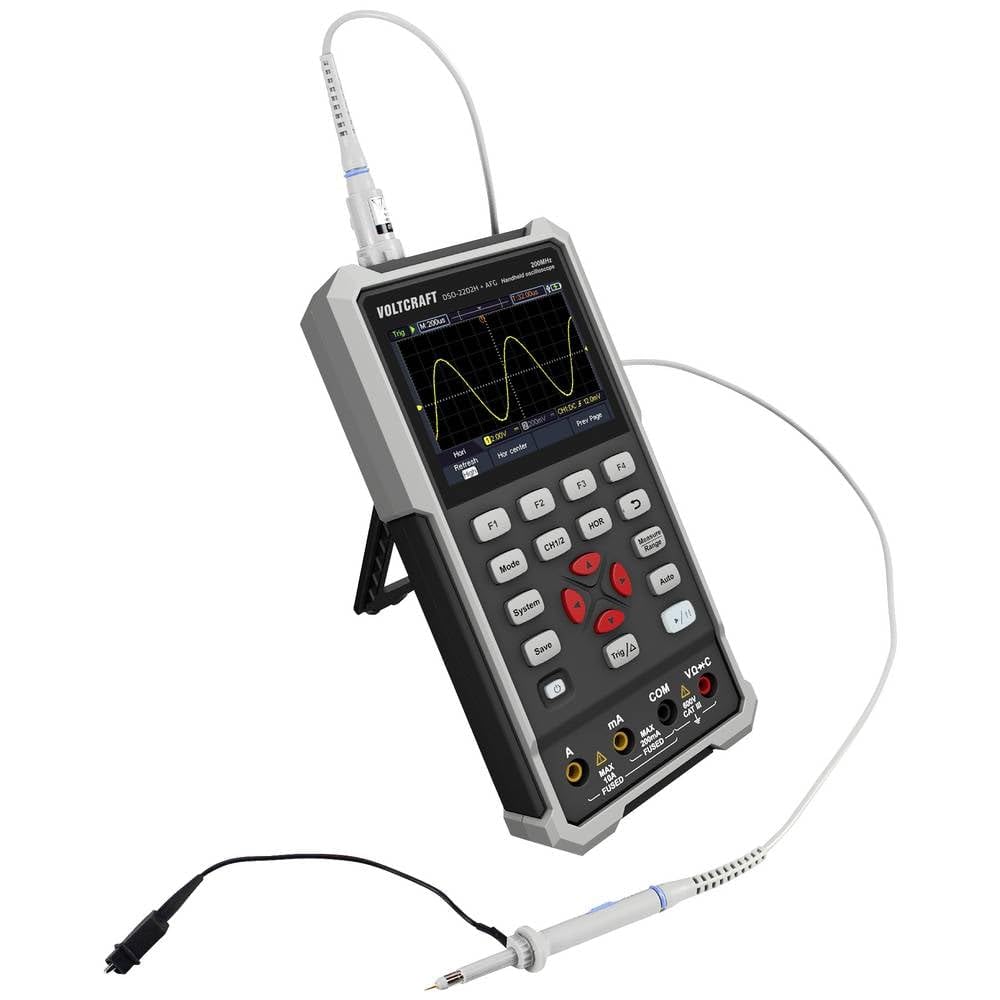
Figura 2: Lateral view of the device showing the kickstand extended for desktop use and an oscilloscope probe connected to the BNC input. The multimeter input jacks are visible at the bottom.
5. Instruções de operação
The DSO-2202H + AFG offers three primary modes of operation: Oscilloscope, Multimeter, and Arbitrary Function Generator.
5.1 Modo Osciloscópio
This mode allows you to visualize and analyze electrical signals. The device features 2 channels and a 200MHz bandwidth.
- Pressione o Modo button to select Oscilloscope mode.
- Connect the oscilloscope probe(s) to the circuit under test.
- Use o CH1/2 button to switch between channels or view ambos.
- Adjust the vertical sensitivity (V/div) and horizontal time base (s/div) using the navigation buttons.
- Use o Trig/Δ button to set trigger conditions for stable waveform display.
- O Auto button can automatically adjust settings for a stable waveform.

Figure 3: The device displaying a waveform in oscilloscope mode. The screen shows voltage and time divisions, indicating a signal measurement.
5.2 Modo Multímetro
The multimeter function allows for precise measurements of voltage, current, resistance, capacitance, and continuity.
- Pressione o Modo button to select Multimeter mode.
- Connect the test leads to the appropriate input jacks (e.g., VΩ+C for voltage/resistance/capacitance, A or mA for current, COM for common).
- Select the desired measurement function (e.g., DC Voltage, AC Vol.tage, Resistance) using the function buttons (F1-F4) or navigation keys.
- Leia o valor da medição no display.
5.3 Arbitrary Function Generator (AFG) Mode
The AFG allows you to generate various waveforms for testing circuits.
- Pressione o Modo button to select AFG mode.
- Connect the output of the AFG to the circuit requiring a signal input.
- Use the function buttons (F1-F4) and navigation keys to select waveform type (sine, square, triangle, etc.), frequency, amplitude e deslocamento.
- Adjust parameters as needed for your application.
5.4 Armazenamento de Dados
The USB Type-C port can be used for data storage. Connect the device to a computer using a USB Type-C cable to transfer saved waveforms or measurement data.
6. Manutenção
A manutenção adequada garante a longevidade e a precisão do seu dispositivo.
- Limpeza: Limpe o dispositivo regularmente com um pano macio e seco. Não utilize produtos de limpeza abrasivos ou solventes.
- Armazenar: Guarde o dispositivo em local fresco e seco, longe da luz solar direta e de temperaturas extremas.
- Cuidados com a bateria: If the device has an internal rechargeable battery, ensure it is charged periodically if stored for long periods to maintain battery health.
- Cuidados com a sonda: Inspect probes and test leads for damage before each use. Replace any damaged accessories immediately.
7. Solução De Problemas
Se você encontrar problemas com seu dispositivo, consulte as etapas comuns de solução de problemas a seguir.
- O dispositivo não liga: Ensure the device is charged or connected to a power source. Check the power button for proper engagement.
- Nenhuma exibição: If the device powers on but the screen is blank, try adjusting the display brightness (if available) or restarting the device.
- Leituras incorretas: Verify that probes and test leads are correctly connected and not damaged. Ensure the correct measurement mode and range are selected. Calibrate the device if necessary (refer to advanced settings or contact support).
- Unstable waveform: In oscilloscope mode, adjust the trigger level, trigger source, and time base settings. Use the Auto button for initial setup.
For persistent issues, contact VOLTCRAFT customer support or your retailer.
8. Especificações
| Especificação | Valor |
|---|---|
| Fabricante | VOLTCRAFT |
| Número do modelo | VC-13438620 (DSO-2202H + AFG) |
| Dimensões do produto (C x L x A) | 17 x 12 x 40 cm |
| Peso | 600 gramas |
| Material | Plástico |
| Largura de banda do osciloscópio | 200 MHz |
| Canais | 2 canais |
| Sample Taxa | 1 GSa/s |
| Profundidade de memória | 8 kpts |
| Resolução | 8 bits |
| Mostrar | 3.5-inch (8.89 cm) Color LCD (320 x 240 pixels) |
| Interface | USB Tipo C |
| Sistema de Medição | Métrica |
| Pilhas incluídas | Não |
| Pilhas necessárias | Não |
9. Garantia e Suporte
For warranty information, please refer to the documentation provided with your purchase or contact your retailer. For technical support, visit the official VOLTCRAFT website ou entre em contato com o departamento de atendimento ao cliente.


