Produto acimaview
The Hoco Smart Ear Wireless Bluetooth 5.3 Earbuds offer a seamless audio experience with advanced features. These smart touch stereo earbuds come with a digital LED display charging case, providing convenience and clear battery status at a glance. Designed for comfort and high-quality sound, they are ideal for daily use with mobile phones and other compatible devices.
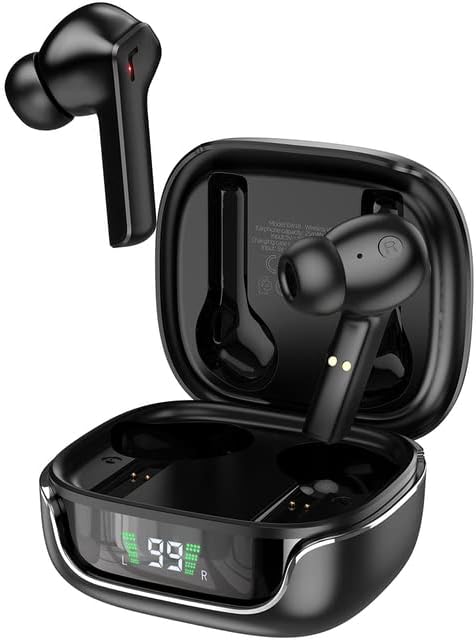
Image: The Hoco Smart Ear Wireless Bluetooth 5.3 Earbuds, showcasing both earbuds and their sleek charging case with a digital LED display.
Conteúdo da embalagem
- Hoco Smart Ear Wireless Bluetooth 5.3 Earbuds
- Estojo de carregamento
- Manual do usuário
- Cabo de carregamento
Configurar
Emparelhamento inicial
To pair your Hoco Smart Ear Earbuds for the first time, ensure they are fully charged. Open the charging case; the earbuds will automatically enter pairing mode. On your device (e.g., smartphone), navigate to Bluetooth settings and select 'Hoco EW18' or a similar name from the list of available devices. Once connected, the earbuds are ready for use.

Image: A visual representation of the Hoco earbuds establishing a wireless connection using Bluetooth 5.3 technology, highlighting stable and low-power consumption.

Image: The earbuds and charging case next to a smartphone, illustrating the automatic pairing feature and the ability to switch between devices seamlessly.
Reconectando
After initial pairing, the earbuds will automatically reconnect to the last paired device when taken out of the charging case and Bluetooth is enabled on the device.
Instruções de operação
The Hoco Smart Ear Earbuds feature intuitive touch controls for various functions:

Image: A detailed diagram illustrating the touch control functions of the Hoco earbuds, including playback, track navigation, call management, power, and voice assistant activation.
- Reproduzir/Pausar: Click the touch area once.
- Próxima faixa: Double click the touch area.
- Faixa anterior: Triple click the touch area.
- Atender chamada: Click the touch area once.
- Desligue a chamada: Double click the touch area.
- Rejeitar chamada: Pressione longamente a área de toque por 2 segundos.
- Ligar: Open the cover of the charging case (automatic boot).
- Ativar Siri/Assistente de Voz: Pressione longamente a área de toque por 2 segundos.
Manutenção
Para garantir a longevidade e o desempenho ideal dos seus fones de ouvido, siga estas orientações de manutenção:
- Limpeza: Limpe regularmente os fones de ouvido e o estojo de carregamento com um pano macio, seco e sem fiapos. Não utilize produtos químicos agressivos ou materiais abrasivos.
- Contatos de carregamento: Periodically clean the charging contacts on both the earbuds and inside the case to ensure a proper connection.
- Armazenar: Quando não estiverem em uso, guarde os fones de ouvido no estojo de carregamento para protegê-los contra poeira e danos.
- Evite umidade: Mantenha os fones de ouvido e o estojo longe de água e umidade excessiva.
- Temperatura: Evite expor o produto a temperaturas extremas.
Solução de problemas
If you encounter issues with your Hoco Smart Ear Earbuds, refer to the following common solutions:
- Sem som:
- Certifique-se de que os fones de ouvido estejam carregados.
- Verifique o volume do dispositivo e o volume dos fones de ouvido.
- Verify Bluetooth connection. Try disconnecting and reconnecting.
- Fones de ouvido não emparelhados:
- Certifique-se de que os fones de ouvido estejam no modo de emparelhamento (abra o estojo).
- Desative e ative o Bluetooth no seu dispositivo.
- Esqueça o dispositivo nas configurações de Bluetooth do seu telefone e emparelhe-o novamente.
- Certifique-se de que nenhum outro dispositivo esteja conectado aos fones de ouvido.
- Problemas de carregamento:
- Verifique se o cabo de carregamento está conectado firmemente.
- Ensure the charging contacts on both earbuds and case are clean.
- Experimente um cabo de carregamento ou adaptador de energia diferente.
- Conexão intermitente:
- Ensure you are within the effective Bluetooth range.
- Minimize a interferência de outros dispositivos sem fio.
Especificações
Detailed technical specifications for the Hoco Smart Ear Wireless Bluetooth 5.3 Earbuds:
| Recurso | Especificação |
|---|---|
| Modelo | WE-1005004459784466-002 |
| Versão Bluetooth | 5.3 |
| Número de motoristas | 2 |
| Diâmetro do driver | 13 mm |
| Distorção harmônica total | 15% |
| Impedância | 32 Ohm |
| Fator de forma do fone de ouvido | Intra-auricular |
| Tecnologia de Conectividade | Bluetooth |
| Tecnologia de comunicação sem fio | Bluetooth |
| Dispositivos compatíveis | Telemóveis |
| Recurso de cabo | Cable-free (Wireless) |
| Cor | Preto |
| Primeira data disponível | 6 de julho de 2023 |

Imagem: Uma explosão view illustrating the 13mm moving coil driver and bio-carbon fiber composite diaphragm, designed for immersive sound quality.

Image: A person wearing the Hoco earbuds, highlighting the soft silicone ear caps and in-ear ergonomic design for comfortable wear and pure sound enjoyment.
Garantia e Suporte
Hoco is committed to customer satisfaction and product quality. We offer the following:
- Garantia 12-Month: All products come with a 12-month warranty.
- Atendimento ao Cliente: If you experience any issues with defective or incorrect products, please contact us through the Amazon platform. We are dedicated to providing the best solution, including full refunds or product replacements, to ensure 100% customer satisfaction.
- Delivery Guarantee: We ensure product delivery within the specified timeframe on our sales page.


