Introdução
This manual provides comprehensive instructions for the Silvergear XL Smartwatch. It covers setup, operation, maintenance, and troubleshooting to ensure you get the most out of your device. The Silvergear XL Smartwatch features a large 2.41-inch IPS display, integrated cameras, 4G connectivity, and extensive fitness tracking capabilities.
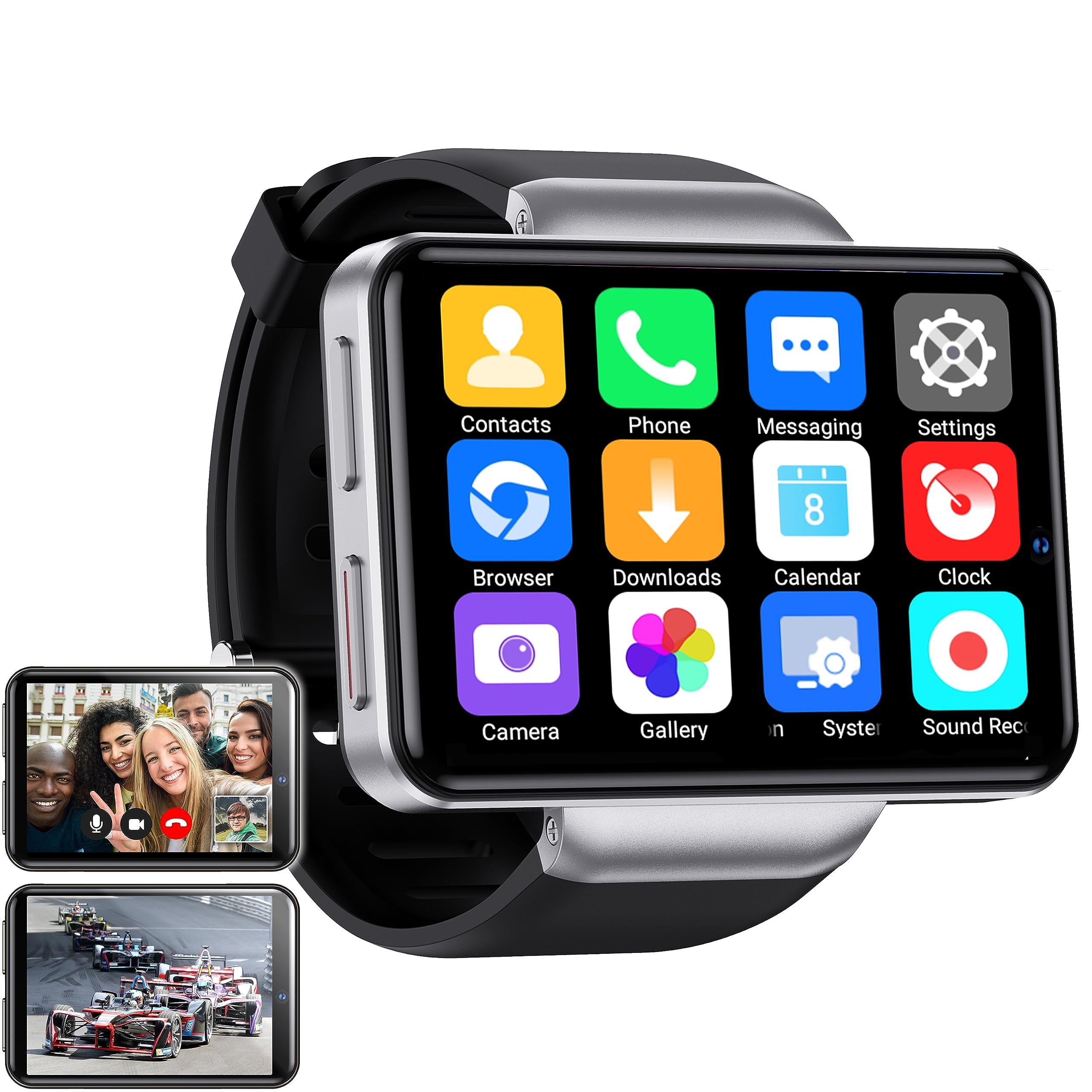
Figure 1: Silvergear XL Smartwatch overview.

Figure 2: The Silvergear XL Smartwatch offers a perfect balance of style, functionality, and advanced technology, including a 2.41-inch IPS display, live video streaming, app downloads, fitness tracking, and communication features.
1. Configuração
1.1 Desembalagem e Conteúdo da Embalagem
Carefully unpack your Silvergear XL Smartwatch and verify all contents.

Figure 3: Package contents including the Smartwatch XL, charging base, screen protector, and two screwdrivers. Dimensions are also shown: 4.5 cm height, 6.5 cm width, 1.5 cm thickness for the watch body, and strap lengths of 8.5 cm and 12 cm. The watch weighs 120 grams.
- Silvergear XL Smartwatch
- Base de carregamento
- Protetor de tela
- 2x Screwdrivers (for SIM card tray)
- Manual do usuário (este documento)
1.2 Carregando o Smartwatch
Before first use, fully charge the smartwatch.
- Connect the charging base to a USB power adapter (not included) or a computer's USB port.
- Place the smartwatch onto the charging base, ensuring the charging pins align.
- O visor do relógio indicará o status do carregamento. Aguarde aproximadamente 2 a 3 horas para uma carga completa.
1.3 Instalação do cartão SIM
To enable 4G connectivity, calls, and internet access, install a Nano SIM card.

Figure 4: Illustration of how to insert a Nano SIM card into the smartwatch. The image also shows the watch's ability to download apps from the Play Store.
- Localize a bandeja do cartão SIM na lateral do smartwatch.
- Use the provided screwdriver to open the SIM card tray.
- Carefully insert a Nano SIM card into the tray, ensuring correct orientation.
- Close the SIM card tray securely with the screwdriver.
1.4 Inicialização e Configuração
Press and hold the power button until the Silvergear logo appears. Follow the on-screen prompts to complete the initial setup, including language selection, time zone, and network connection.
2. Operando o Smartwatch
2.1 Navegação básica
- Tela sensível ao toque: Deslize para a esquerda, direita, para cima ou para baixo para navegar pelos menus e telas. Toque para selecionar itens.
- Botão de energia: Pressione para ativar/desativar a tela. Pressione e segure para ligar/desligar ou reiniciar.
- Back Button (if applicable): Some watches have a dedicated back button or gesture. Refer to on-screen prompts.
2.2 Recursos de comunicação
With a Nano SIM card installed, you can make and receive calls and messages directly from your smartwatch.
- Chamadas: Tap the "Phone" icon to access the dialer or contacts.
- Mensagens: Tap the "Messaging" icon to send and receive text messages.
- Aplicativos: Download communication apps from the Play Store for additional functionality.
Funcionalidade da câmera 2.3
The smartwatch is equipped with both front and side cameras for capturing photos and videos.

Figure 5: The smartwatch features a 5MP front camera and a 2MP side camera, allowing you to capture photos and videos directly from your wrist.
- Acessar câmera: Tap the "Camera" icon on the home screen or app drawer.
- Trocar câmeras: Use the on-screen icon to switch between the 5MP front camera and the 2MP side camera.
- Capturar: Toque no botão do obturador para tirar uma foto ou iniciar/parar a gravação de vídeo.
2.4 Multimedia Entertainment
Enjoy videos, TV programs, series, and music directly on your smartwatch's extra-large screen.

Figure 6: The extra-large screen allows you to enjoy multimedia content such as sport competitions, TV programmes, series, videos, and music.
- Video/TV: Use pre-installed apps or download streaming services from the Play Store.
- Música: Play music stored on the device or stream from compatible apps.
2.5 Monitoramento de condicionamento físico e saúde
Monitor your physical activity and health metrics with the integrated sensors.

Figure 7: The smartwatch offers pedometer and fitness tracking for various activities including running, hiking, cycling, basketball, football, jumping rope, and badminton.
- Pedômetro: Monitora seus passos diários, distância percorrida e calorias queimadas.
- Monitor de frequência cardíaca: Provides accurate heart rate readings.
- Modos de treino: Select from 9 pre-defined exercise types (e.g., running, walking, cycling, swimming) to track your performance.
- Monitoramento do sono: Monitors your sleep patterns (if supported by the device's software).
2.6 App Downloads
Expand your smartwatch's functionality by downloading applications from the Play Store.
- Ensure your smartwatch is connected to Wi-Fi or has an active 4G data connection.
- Tap the "Play Store" icon and browse or search for desired applications.
- Follow on-screen instructions to download and install apps.
3. Manutenção
3.1 Limpeza
Para manter a aparência e a funcionalidade do seu smartwatch:
- Limpe a tela e a carcaça com um pano macio e sem fiapos.
- Para manchas persistentes, ligeiramente dampUmedeça o pano com água. Evite produtos químicos agressivos ou materiais abrasivos.
- Certifique-se de que os contatos de carregamento estejam limpos e secos antes de carregar.
3.2 Resistência à água e poeira
The Silvergear XL Smartwatch is rated IP67 for water and dust resistance.

Figure 8: The smartwatch is IP67 water- and dustproof, designed to withstand various weather conditions. This includes IP67 splashproof and IP67 dustproof ratings.
- Classificação IP67: This means the device is protected from dust ingress and can withstand immersion in water up to 1 meter for up to 30 minutes.
- It is suitable for splashes, rain, and incidental exposure to water.
- Avoid prolonged immersion, hot water, or high-pressure water jets.
- Ensure the SIM card tray is properly sealed to maintain water resistance.
3.3 Atualizações de Software
Verifique periodicamente se há atualizações de software disponíveis para garantir o desempenho ideal e o acesso a novos recursos.
- Connect your smartwatch to Wi-Fi.
- Navigate to "Settings" > "About Watch" > "Software Update" (or similar path).
- Follow on-screen instructions to download and install any available updates.
4. Solução De Problemas
| Problema | Possível causa | Solução |
|---|---|---|
| O smartwatch não liga. | Bateria fraca; dispositivo travado. | Carregue o dispositivo por pelo menos 30 minutos. Pressione e segure o botão liga/desliga por 10 a 15 segundos para forçar a reinicialização. |
| Não consigo fazer/receber chamadas. | No SIM card; SIM card not properly inserted; no network signal; incorrect network settings. | Ensure SIM card is correctly installed and activated. Check network signal strength. Verify network settings in the smartwatch. |
| A tela não responde. | Software glitch; screen protector interference. | Restart the smartwatch. Remove and reapply the screen protector if it's causing issues. |
| Fitness tracking data is inaccurate. | Improper fit; sensor obstruction; software calibration needed. | Ensure the watch is worn snugly on your wrist. Clean the sensor area. Check for software updates. |
| Não é possível conectar ao Wi-Fi. | Senha incorreta; fora do alcance; problema no roteador. | Verifique a senha do Wi-Fi. Aproxime-se do roteador Wi-Fi. Reinicie o roteador. |
If you encounter issues not listed here, or if the suggested solutions do not resolve the problem, please refer to the support section.
5. Especificações
Below are the technical specifications for the Silvergear XL Smartwatch (Model: 8711568088660).

Figure 9: Key technical specifications of the Silvergear XL Smartwatch, including Android 7.1.1 OS, MT6739 Quad-Core CPU (1.5 GHz), 2.41-inch full screen, 640x480 resolution, and 4G & WiFi connectivity.
| Recurso | Detalhe |
|---|---|
| Marca | Engrenagem prateada |
| Número do modelo | 8711568088660 |
| Sistema operacional | Android (version 7.1.1 from image) |
| Tamanho da tela | 2.41 polegadas |
| Tipo de exibição | LCD (IPS from description) |
| Resolução | 640x480 (from image) |
| Processador | MT6739 Quad-Core CPU, 1.5 GHz (from image) |
| Conectividade | 4G, Wi-Fi |
| Câmera Frontal | 5 megapixels |
| Câmera lateral | 2 megapixels |
| Capacidade de armazenamento de memória | 500 MB |
| Resistência à água e poeira | IP67 |
| GPS | Sem GPS |
| Dispositivos compatíveis | Smartphone |
6. Informações de garantia
The Silvergear XL Smartwatch comes with a manufacturer's warranty.
- Garantia do fabricante: 2 anos.
- Esta garantia cobre defeitos de materiais e de fabricação sob uso normal.
- Não cobre danos causados por uso indevido, acidentes, modificações não autorizadas ou desgaste normal.
- Guarde o comprovante de compra para reclamações de garantia.
7. Suporte
For further assistance, technical support, or warranty claims, please contact Silvergear customer service.
- Refer to the Silvergear official website para detalhes de contato.
- Tenha em mãos o número do modelo do seu produto (8711568088660) e o comprovante de compra ao entrar em contato com o suporte.


