1. Introdução
The TAUROX gaming mouse is designed to provide precise and responsive control for an enhanced gaming experience. With an impressive sensor resolution of up to 7,200 DPI and customizable features, it adapts to various gaming styles.
Principais características
- High-precision sensor with up to 7,200 DPI for accurate tracking.
- Two integrated DPI switches for on-the-fly sensitivity adjustment.
- 5 configurable buttons for personalized control and macros.
- Lightweight design (135 grams with cable) for comfortable extended use.
- Customizable RGB lighting to personalize your gaming setup.
- Durable fabric-covered cable with 1.8-meter length for flexibility.
- USB-A connection for easy and universal compatibility.

Image: The TAUROX Gaming Mouse showcasing its multi-coloured LED lighting and ergonomic design.
2. Conteúdo da embalagem
Certifique-se de que todos os itens estejam presentes na embalagem:
- TAUROX Gaming Mouse
- Configuration Software (downloadable or included)

Imagem: Frente view of the TAUROX Gaming Mouse retail packaging, highlighting key features.
3. Guia de configuração
3.1 Conectando o Mouse
Connect the USB-A connector of the TAUROX Gaming Mouse to an available USB port on your computer. The mouse is plug-and-play for basic functionality.
3.2 Instalação de software
For full utilization of all functions, including macro programming and advanced customization, the installation of the dedicated configuration software is necessary. This software is typically provided via a download link or included on a small disc. Refer to the product packaging or Speedlink's official website for the download location.
Image: Side of the product box indicating the need for configuration software.
4. Operating Your TAUROX Gaming Mouse
4.1 Ajuste de DPI
The TAUROX Gaming Mouse features two integrated DPI switches located behind the scroll wheel. Use these buttons to cycle through different sensitivity levels (up to 7,200 DPI) to match your gaming style or task requirements. The current DPI setting may be indicated by the mouse's LED lighting color, depending on software configuration.

Image: Screenshot of the Speedlink software's 'Performance' tab, showing DPI control settings.
4.2 botões programáveis
The mouse is equipped with 5 configurable buttons. These buttons can be assigned various functions, including keyboard macros, multimedia controls, or specific in-game actions, using the configuration software. Launch the software and navigate to the 'Button' or 'Macro' section to customize these settings.
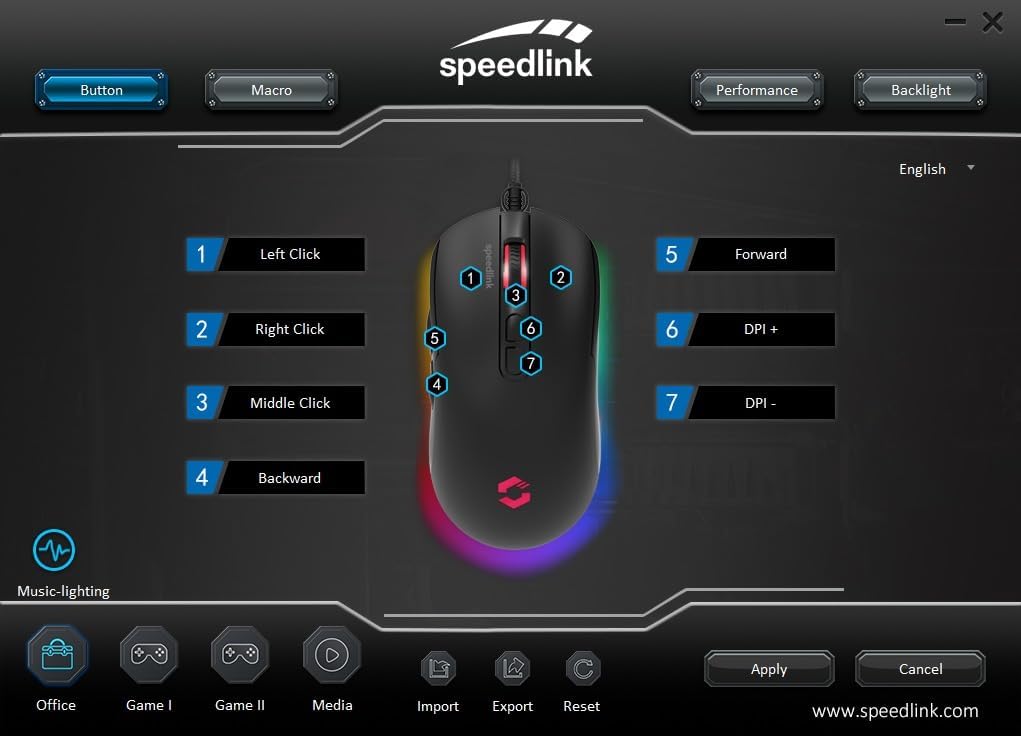
Image: Screenshot of the Speedlink software's 'Button' tab, illustrating the mapping of the mouse's 7 buttons.
4.3 Iluminação RGB
The TAUROX Gaming Mouse features multi-coloured RGB lighting that can be customized through the configuration software. You can select from various lighting effects, colors, and brightness levels to match your personal preference or gaming setup. Access the 'Backlight' section in the software to adjust these settings.

Image: Screenshot of the Speedlink software's 'Backlight' tab, showing options for customizing the mouse's RGB lighting effects.
5. Manutenção
To ensure the longevity and optimal performance of your TAUROX Gaming Mouse, follow these maintenance guidelines:
- Limpeza: Use um pano macio e seco para limpar a superfície do mouse. Para sujeira mais resistente, use um pano levemente umedecido.amp cloth can be used, but ensure no liquid enters the mouse. Avoid abrasive cleaners.
- Cuidados com os cabos: Avoid sharp bends, kinks, or excessive pulling on the cable. Store the cable neatly when not in use to prevent damage.
- Manutenção do sensor: Mantenha o sensor óptico na parte inferior do mouse limpo e livre de poeira ou detritos para garantir um rastreamento preciso.
6. Solução De Problemas
If you encounter issues with your TAUROX Gaming Mouse, consider the following:
- O mouse não responde: Ensure the USB cable is securely connected to your computer. Try plugging the mouse into a different USB port.
- Rastreamento impreciso: Clean the optical sensor on the bottom of the mouse. Ensure you are using the mouse on a suitable surface (e.g., a mouse pad).
- Problemas de software: If the configuration software is not functioning correctly, try reinstalling it. Ensure your operating system is up to date.
- Botões não funcionam: Check the button assignments in the configuration software to ensure they are correctly configured.
- Iluminação não funciona: Verify the RGB lighting settings in the configuration software.
For persistent issues, refer to the support section on the Speedlink website.
7. Especificações técnicas
| Recurso | Especificação |
|---|---|
| Dimensões do produto | 4.92 x 2.48 x 0.04 inches (125x63x40 mm LxWxH) |
| Peso do item | 5.7 ounces (135 grams with cable) |
| Número do modelo | SL-680016-BK |
| Marca | Ligação rápida |
| Cor | Preto |
| Tecnologia de Conectividade | USB-A (com fio) |
| Características especiais | Programmable Buttons, Multi-coloured LED Lighting |
| Tecnologia de detecção de movimento | Óptico |
| Resolução de DPI | Até 7,200 DPI (ajustável) |
| Comprimento do cabo | 1.8 metros |
| Fabricante | Ligação rápida |
8. Safety Instructions and Compliance
8.1 Instruções importantes de segurança
Please note that the failure to observe these instructions can cause product damage, explosion, fire and/or electric shock!
- Use apenas os dispositivos conforme indicado no guia do usuário. Não os abra ou repare.
- Não exponha os dispositivos a líquidos, calor ou frio.
- Não utilize os dispositivos em anúnciosamp ambiente. Limpe o dispositivo com um pano seco.
- Mantenha os dispositivos e todas as peças soltas longe de crianças, animais de estimação e pessoas não autorizadas.
- Only use the devices with the appropriate provided accessories.
- Disconnect cables from the devices if they will not be used for a long time. When disconnecting by cables, don't pull on the cord but on the plug.
- Don't use the cables in any way other than mentioned in the user guide. Don't bend, cut, extend, knot or step on them.
- Don't insert any foreign objects into the openings of the device.
- Se os dispositivos estiverem danificados de alguma forma ou ficarem muito quentes, pare de usá-los imediatamente.
- Take caution when using devices that emit radio signals if you have a pacemaker or are dependent on other sensitive electronic aids.
Instruções de segurança em outros idiomas: www.speedlink.com
8.2 Warning Symbols and Markings
Extended use of input devices may cause health problems such as discomfort or pain. As such, take regular breaks and consult a doctor if problems persist.
8.3 Declaração FCC
Este equipamento foi testado e considerado em conformidade com os limites para um dispositivo digital Classe B, de acordo com a parte 15 das Regras da FCC. Esses limites são projetados para fornecer proteção razoável contra interferência prejudicial em uma instalação residencial. Este equipamento gera, usa e pode irradiar energia de radiofrequência e, se não for instalado e usado de acordo com as instruções, pode causar interferência prejudicial às comunicações de rádio. No entanto, não há garantia de que a interferência não ocorrerá em uma instalação específica. Se este equipamento causar interferência prejudicial à recepção de rádio ou televisão, o que pode ser determinado desligando e ligando o equipamento, o usuário é encorajado a tentar corrigir a interferência por uma ou mais das seguintes medidas:
- Reoriente ou reposicione a antena receptora.
- Aumente a separação entre o equipamento e o receptor.
- Conecte o equipamento a uma tomada de um circuito diferente daquele ao qual o receptor está conectado.
- Consulte o revendedor ou um técnico de rádio/TV experiente para obter ajuda.
Este dispositivo está em conformidade com a parte 15 das Regras da FCC. A operação está sujeita às duas condições a seguir: (1) Este dispositivo não pode causar interferência prejudicial e (2) este dispositivo deve aceitar qualquer interferência recebida, incluindo interferência que possa causar operação indesejada.
Observação: Modifications to this product will void the user's authority to operate this equipment.
8.4 Conformity Notice
IMPORTADOR/FABRICANTE: Zocherl Media GmbH, Im Dorf 5, 29303 Hemslingen, GERMANY
Telefone: +49 4267 9341 0
DETALHES DO PRODUTO:
Tipo nº: SL-680016-BK
Descrição do produto: Rato para jogos TAUROX, preto
O PRODUTO ESTÁ EM CONFORMIDADE COM AS SEGUINTES DIRETRIZES:
EMC: 2014/30/UE
RoHS: 2011/65/UE
For a full declaration of conformity, the latest user guide, FAQ or further information, please visit: www.speedlink.com
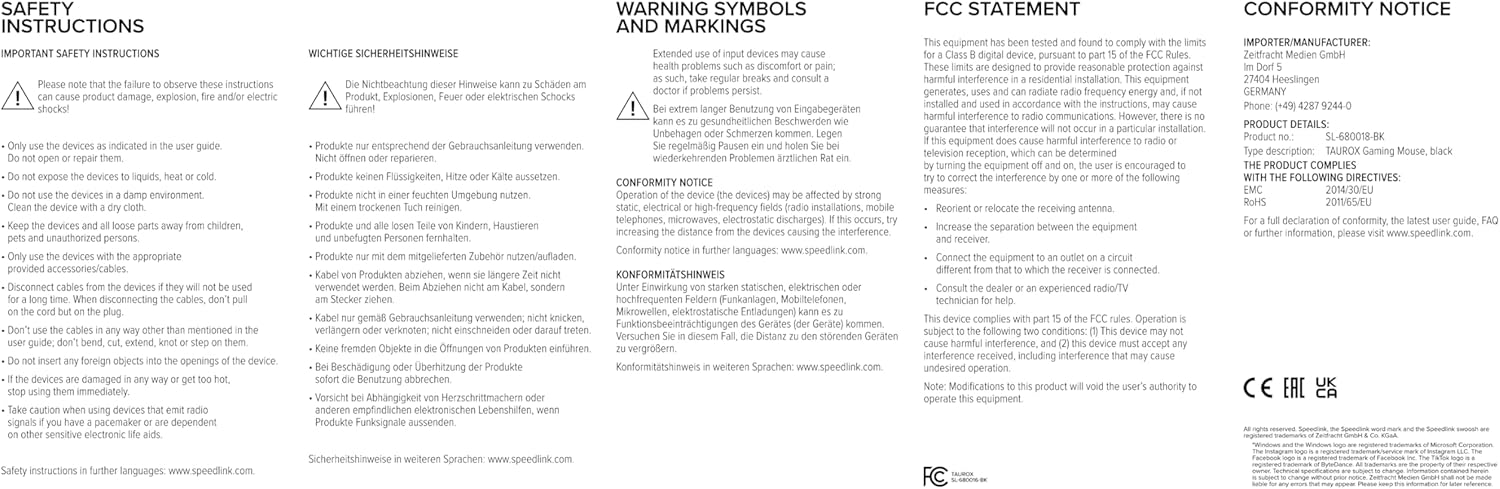
Image: Product packaging displaying various certifications and multilingual product names.
9. Garantia e Suporte
For warranty information, technical support, frequently asked questions (FAQs), and the latest user guides, please visit the official Speedlink website:


