1. Introdução
This manual provides instructions for the safe and effective operation of your iJoy Stitch Speaker. Please read this manual thoroughly before using the device and retain it for future reference.

Image 1.1: The iJoy Stitch Speaker, showcasing the Stitch Hula Dancing design. This portable Bluetooth speaker is designed for wireless audio playback and features a silicone loop for portability.
2. Conteúdo da embalagem
Verifique se todos os itens estão presentes na embalagem:
- iJoy Stitch Speaker
- Manual do Proprietário (este documento)
- Cabo de carregamento (Micro USB)

Image 2.1: The iJoy Stitch Speaker alongside its retail packaging, illustrating the product and its box.
3. Características e componentes do produto
The iJoy Stitch Speaker is equipped with various features for versatile audio playback and portability.
3.1 botões de controle
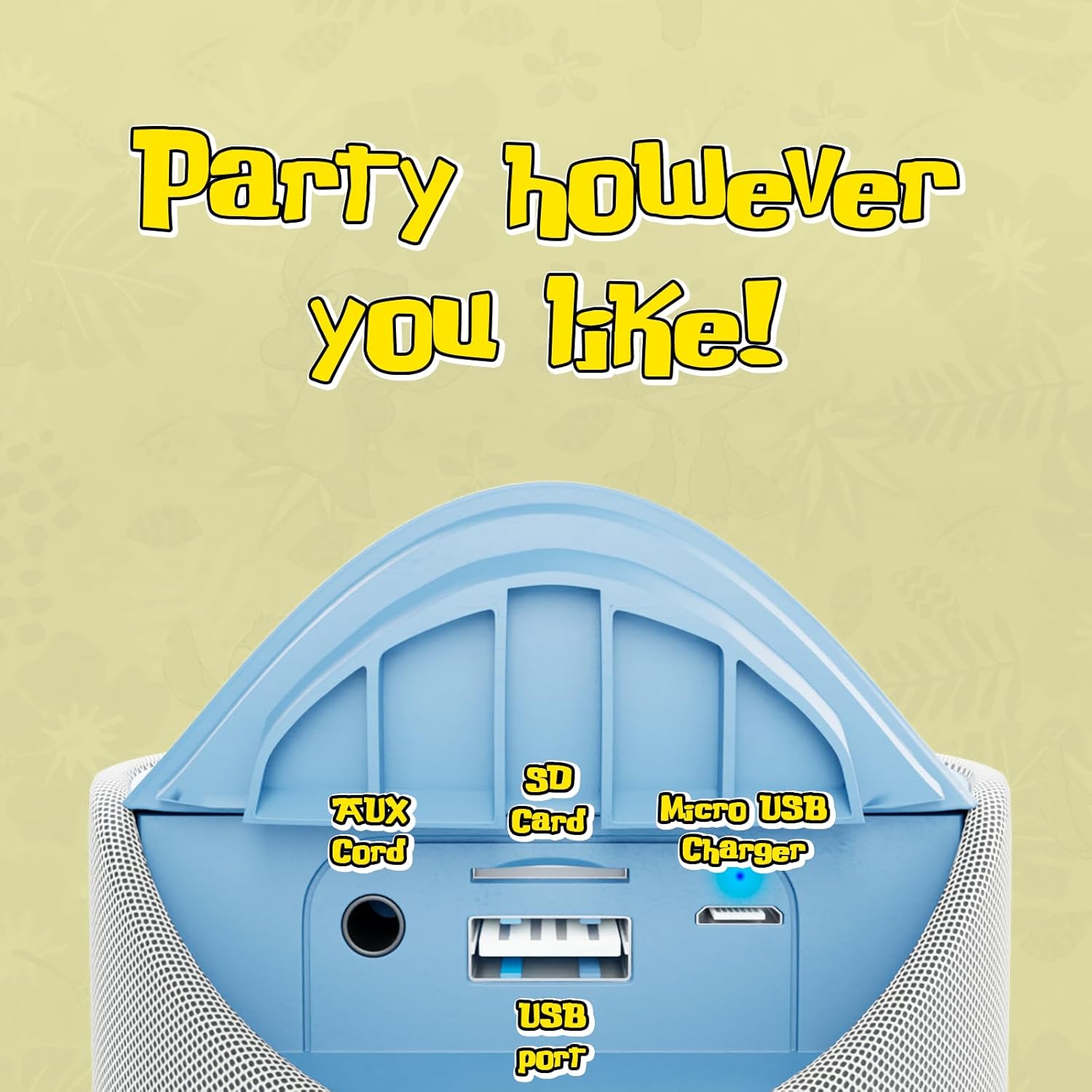
Image 3.1: Top panel of the speaker displaying the control buttons. These include Volume Down (-), Volume Up (+), Play/Pause/Call Answer, Mode Switch (M), and Power On/Off.
- Botão de energia (⏻): Press and hold to power the speaker on or off.
- Botão Reproduzir/Pausar/Atender Chamada (⏸): Press to play or pause audio. Press to answer or end a phone call.
- Botão Diminuir Volume (−): Pressione para diminuir o volume.
- Botão de aumentar o volume (+): Pressione para aumentar o volume.
- Botão de seleção de modo (M): Press to cycle through available modes (Bluetooth, FM Radio, SD Card, AUX).
3.2 Portas e Indicadores

Image 3.2: Rear panel of the speaker revealing the various input ports. These include the AUX port, SD Card slot, USB port, and Micro USB charging port.
- Porta AUX: Para conectar dispositivos de áudio externos através de um cabo de áudio de 3.5 mm.
- Slot para cartão SD: Para reproduzir áudio filediretamente de um cartão de memória SD.
- Porta USB: Para reproduzir áudio files diretamente de uma unidade flash USB.
- Porta de carregamento micro USB: Para carregar a bateria interna da caixa de som.
- Indicador LED: Indicates charging status and Bluetooth pairing status.
4. Configuração e carregamento
4.1 Carregando o alto-falante
- Conecte a extremidade Micro USB do cabo de carregamento à porta de carregamento Micro USB da caixa de som.
- Conecte a extremidade USB-A do cabo de carregamento a um adaptador de energia USB (não incluído) ou à porta USB de um computador.
- The LED indicator will illuminate to show charging is in progress.
- Charging typically takes approximately 2 hours. The LED indicator will change or turn off once fully charged.
Uma carga completa proporciona até 3 horas de reprodução.
4.2 Ligar/Desligar
- Para ligar: Pressione e mantenha pressionado o botão Liga/Desliga (⏻) until the speaker indicates it is on (e.g., a sound prompt or LED illumination).
- Para desligar: Pressione e mantenha pressionado o botão Liga/Desliga (⏻) again until the speaker indicates it is off.
5. Instruções de operação
5.1 Emparelhamento Bluetooth
- Ensure the speaker is powered on and in Bluetooth mode. If not, press the Mode Switch (M) button until the speaker enters Bluetooth pairing mode (indicated by a flashing LED).
- No seu dispositivo (por exemplo, smartphone, tablet), ative o Bluetooth e procure os dispositivos disponíveis.
- Select "iJoy Stitch Speaker" from the list of found devices.
- Once paired, the speaker will indicate a successful connection (e.g., a sound prompt or solid LED).
- O alcance do Bluetooth é de aproximadamente 9 metros (30 pés).
5.2 SD Card / USB Playback
- Insert a formatted SD card or USB flash drive containing audio files into the respective slot on the speaker.
- Press the Mode Switch (M) button to select SD Card mode or USB mode.
- O alto-falante começará a reproduzir áudio automaticamente. files da mídia inserida.
Rádio 5.3 FM
- Press the Mode Switch (M) button to select FM Radio mode.
- In FM mode, press the Play/Pause button (⏸) to automatically scan and save available radio stations.
- Use o botão Aumentar Volume (+) e Diminuir Volume (−) buttons to navigate between saved stations.
5.4 Entrada AUX
- Conecte uma extremidade de um cabo de áudio de 3.5 mm (não incluído) à porta AUX da caixa de som.
- Conecte a outra extremidade do cabo de áudio à entrada de fone de ouvido ou à saída de áudio do seu dispositivo externo.
- Press the Mode Switch (M) button to select AUX mode.
- O áudio será reproduzido agora pelo alto-falante do seu dispositivo conectado.
5.5 Funções de Chamada
- When a call is incoming while connected via Bluetooth, press the Play/Pause button (⏸) para atender a chamada.
- Pressione o botão Reproduzir / Pausar (⏸) novamente para encerrar a chamada.
- Para rejeitar uma chamada recebida, pressione e mantenha pressionado o botão Reproduzir/Pausar (⏸).
6. Manutenção
6.1 Limpeza
Limpe o alto-falante com um pano macio e seco. Não use produtos de limpeza abrasivos ou solventes.
6.2 Resistência à água
The speaker has an IPX4 water resistance rating, meaning it is protected against splashing water from any direction. It is not designed for submersion in water.
7. Solução De Problemas
| Problema | Solução |
|---|---|
| A caixa de som não liga. | Certifique-se de que a bateria esteja carregada. Conecte a caixa de som a uma fonte de energia usando o cabo Micro USB. |
| Nenhum som sai do alto-falante. | Check the volume level on both the speaker and your connected device. Ensure the correct mode (Bluetooth, SD, FM, AUX) is selected. |
| Não foi possível emparelhar via Bluetooth. | Ensure the speaker is in Bluetooth pairing mode (flashing LED). Make sure your device's Bluetooth is enabled and within 30 feet of the speaker. Try restarting both devices. |
| Recepção de rádio FM ruim. | Relocate the speaker to an area with better signal. Ensure automatic station scanning has been performed. |
8. Especificações

Image 8.1: Visual representation of the speaker's dimensions, indicating it is approximately 6.3 inches tall and 2.9 inches across.
| Recurso | Detalhe |
|---|---|
| Nome do modelo | Stitch Speaker |
| Marca | iAlegria |
| Tecnologia de Conectividade | Bluetooth |
| Tecnologia de comunicação sem fio | Bluetooth |
| Alcance Bluetooth | 30 pés (9 metros) |
| Tipo de alto-falante | Alto-falante Bluetooth portátil |
| Potência máxima de saída do alto-falante | 5 Watts |
| Modo de saída de áudio | Estéreo |
| Fonte de energia | Alimentado por bateria |
| Capacidade da bateria | 800 Miliamp Horas |
| Tempo de carregamento | 2 horas |
| Hora de brincar | Até 3 horas |
| Nível de resistência à água | IPX4 (resistente à água) |
| Dimensões do produto | 3"D x 3"W x 6"H (aprox. 7.6 cm de profundidade x 7.6 cm de largura x 15.2 cm de altura) |
| Peso do item | 8 onças (aproximadamente 227 gramas) |
| Material | Silicone |
| Método de controle | Touch (Button Controls) |
| UPC | 810116713943 |
9. Garantia e Suporte
The iJoy Stitch Speaker comes with a Garantia do fabricante de 90 dias. For warranty claims or technical support, please contact the manufacturer, Quest USA Corp, or refer to the contact information provided with your purchase documentation.
Para obter mais assistência, visite o iJoy Store on Amazon.


