Introdução
Obrigado pela compra.asing the JTEMAN Cell Phone Stand with Wireless Bluetooth Speaker and Alarm Clock. This multi-functional device is designed to enhance your daily routine by combining essential features into one compact and stylish unit. It serves as a high-quality Bluetooth speaker, a reliable alarm clock with a clear display, and a stable, adjustable stand for your mobile devices. Please read this manual carefully to ensure proper use and optimal performance.
Informações de segurança
- Não exponha o dispositivo a temperaturas extremas, luz solar direta ou alta umidade.
- Evite deixar cair ou submeter o dispositivo a impactos fortes.
- Keep away from water and other liquids. If the device comes into contact with liquid, disconnect it immediately and allow it to dry completely before reuse.
- Não tente desmontar, reparar ou modificar o dispositivo por conta própria. Encaminhe todos os serviços de manutenção a pessoal qualificado.
- Utilize apenas o cabo de carregamento fornecido ou um equivalente certificado.
- Mantenha fora do alcance de crianças.
Conteúdo da embalagem
- JTEMAN Cell Phone Stand with Wireless Bluetooth Speaker and Alarm Clock (Model: JT-L36)
- Cabo de carregamento tipo C
- Manual do usuário
Produto acimaview
Familiarize yourself with the components and controls of your JTEMAN device:
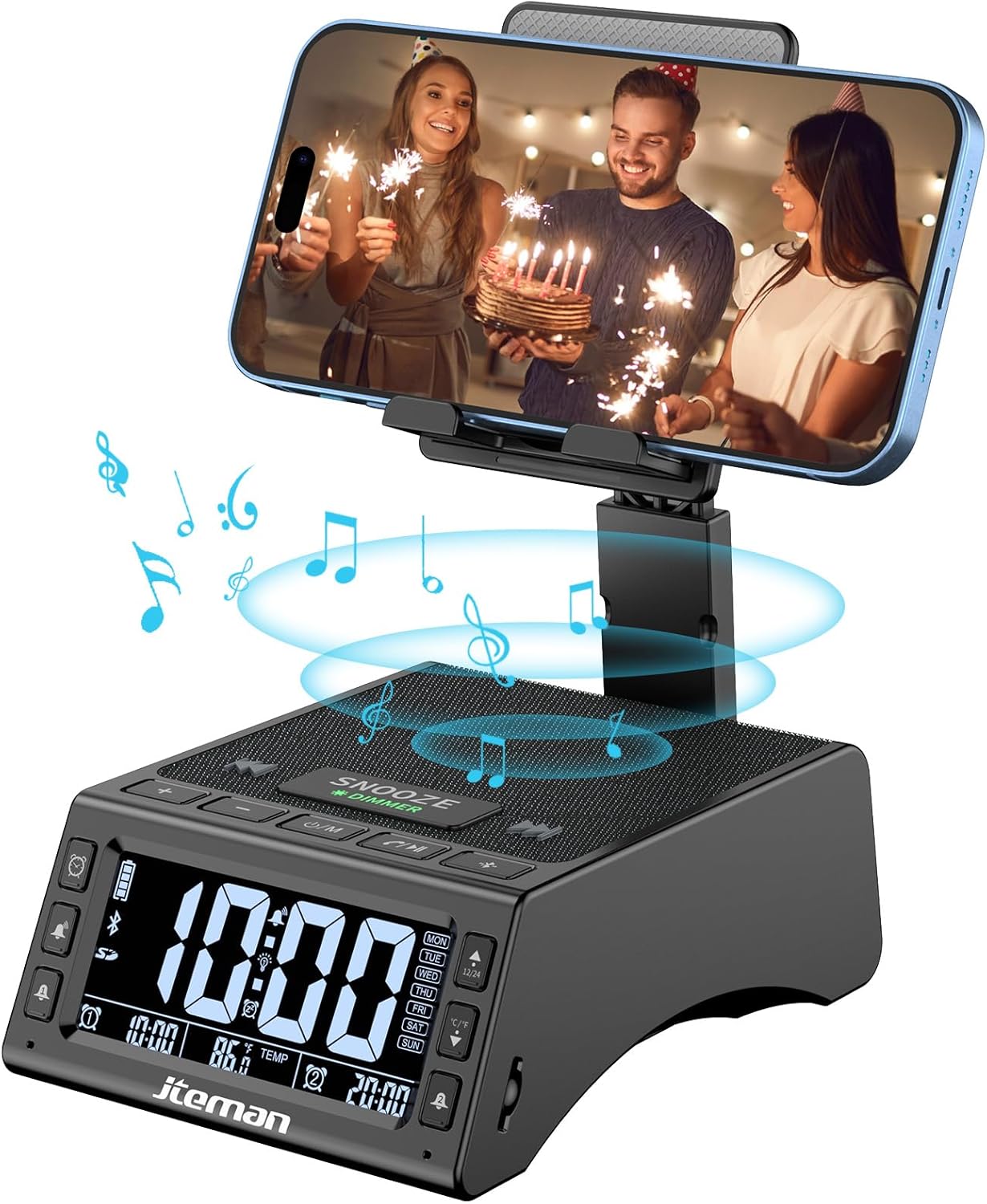
Figura 1: Frente view of the JTEMAN device with a smartphone on the adjustable stand, displaying the time and temperature.

Figura 2: Overview highlighting the multi-functional aspects including Bluetooth speaker, 12/24H time display, temperature display, foldable phone stand, TF card support, microphone, charging station, dual alarm clocks, and 9 ringtones.
Controles e portas:
- Tela de exibição: Shows time, temperature, day of the week, and alarm indicators.
- Botão SNOOZE/DIMMER: Press to snooze an active alarm (5 minutes); long press to adjust display brightness (4 levels).
- Power On/Off/Mode Button: Long press to power on/off; short press to cycle through modes (Bluetooth, TF Card).
- Play/Pause/Answer Button: Controls music playback; answers/ends calls.
- Botão de aumentar o volume/próxima faixa: Increases volume; short press for next track.
- Botão para diminuir o volume/faixa anterior: Decreases volume; short press for previous track.
- Botão de emparelhamento Bluetooth: Inicia o modo de emparelhamento Bluetooth.
- Alarm 1 & Alarm 2 Buttons: For setting and managing dual alarms.
- Microfone: Para chamadas em modo mãos-livres.
- Porta de entrada tipo C: Para carregar o dispositivo.
- Porta de saída tipo C: Para carregar dispositivos externos.
- Slot para cartão TF: Para reproduzir música diretamente de um cartão TF.
- Suporte ajustável para celular: Foldable and extendable for various viewing angles. Features anti-slip pads and base for stability.
Configurar
1. Carregamento inicial
- Connect the provided Type-C charging cable to the Porta de entrada tipo C no dispositivo.
- Connect the other end of the cable to a compatible USB power adapter (not included) and plug it into a wall outlet.
- The display will indicate charging status. Fully charge the device before first use.

Figure 3: The device connected via Type-C for charging itself and an external phone.
2. Definir hora e data
- Upon powering on, the device should automatically synchronize the current time.
- If manual adjustment is needed, refer to the detailed instructions in the full user manual (included in the package).
- To switch between 12/24 hour format or °F/°C temperature display, use the dedicated buttons or refer to the full manual.

Figure 4: The HD display showing time, temperature, and alarm settings with brightness adjustment levels.
Instruções de operação
1. Using the Phone Stand
- The integrated phone stand can be pulled up from the back of the unit.
- Ajuste a altura e o ângulo do suporte conforme sua preferência viewing position. The stand is designed to be stable and strong, accommodating devices from 4.0 to 13 inches.
- When not in use, the stand can be folded back into the unit for a compact form factor.

Figure 5: Demonstrates the adjustable height and angle of the phone stand, along with its anti-slip features and foldable design.
2. Função de alto-falante Bluetooth
- Ligar: Long press the Power On/Off/Mode button. The device will enter Bluetooth pairing mode, indicated by a flashing Bluetooth icon on the display.
- Emparelhamento: On your smartphone or other Bluetooth-enabled device, search for “JT-L36” in the Bluetooth settings and select it to pair. A confirmation sound will indicate successful pairing.
- Reprodução de música: Once paired, you can play audio from your device through the JTEMAN speaker. Use the Play/Pause, Volume Up/Next Track, and Volume Down/Previous Track buttons to control playback.
3. Reprodução de cartão TF
- Insert a TF card (not included) with audio files into the TF Card Slot.
- The device will automatically switch to TF Card mode and begin playing music. If not, short press the Mode button to select TF Card mode.
4. Alarm Clock Features
- Configuração de alarmes: Use the Alarm 1 and Alarm 2 buttons to set up to two independent alarms. Follow the on-screen prompts to set the time and alarm frequency (e.g., Mon-Fri, Sat-Sun, Mon-Sun).
- Função soneca: When an alarm sounds, press the large SNOOZE button on top to activate a 5-minute snooze.
- Ajuste de brilho: Long press the SNOOZE/DIMMER button to cycle through four levels of display brightness, including an off setting for minimal light disturbance.
5. Chamadas com viva-voz
- When a call comes in while your phone is connected via Bluetooth, press the Play/Pause/Answer button to answer the call.
- Use o microfone embutido para uma comunicação clara.
- Press the Play/Pause/Answer button again to end the call.
6. Carregamento de dispositivos externos
- Connect your external device (e.g., smartphone, tablet) to the Porta de saída tipo C on the JTEMAN unit using a compatible charging cable.
- The JTEMAN device will provide power to charge your external device.
Manutenção
- Limpe o dispositivo com um pano macio e seco. Não utilize produtos de limpeza abrasivos ou solventes.
- Certifique-se de que todas as portas estejam livres de poeira e detritos.
- Guarde o dispositivo em local fresco e seco quando não estiver em uso por longos períodos.
Solução de problemas
| Problema | Possível causa | Solução |
|---|---|---|
| O dispositivo não liga. | Low battery; power adapter/cable issue. | Charge the device fully. Check power adapter and cable connections. |
| Nenhum som sai do alto-falante. | Volume too low; not paired correctly; wrong mode. | Increase volume on both device and connected phone. Re-pair Bluetooth. Ensure correct mode (Bluetooth/TF Card). |
| O emparelhamento Bluetooth falha. | Device too far; pairing mode not active; interference. | Ensure device is in pairing mode and within 10 meters. Turn off other Bluetooth devices. Try restarting both devices. |
| O alarme não dispara. | Alarm not set; alarm volume too low; alarm disabled. | Verify alarm settings and ensure it's enabled. Increase alarm volume. |
| Phone not charging via output port. | Cable issue; device battery low; incompatible device. | Ensure the JTEMAN device is charged. Try a different charging cable. Confirm your phone is compatible with Type-C charging. |
Especificações
| Marca | JTEMAN |
| Número do modelo | JT-L36 |
| Dimensões do produto | 6.1 x 4.3 x 2.1 polegadas |
| Peso do item | 1.26 libras |
| Cor | Preto |
| interface de hardware | USB 2.0 |
| Total de portas USB | 2 (Type-C Input, Type-C Output) |
| Compatibilidade | 4.0-13 inch devices |
Garantia e Suporte
JTEMAN products are manufactured with high standards of quality. For specific warranty information, please refer to the warranty card included in your product packaging or visit the official JTEMAN website. If you encounter any issues or have questions not covered in this manual, please contact JTEMAN customer support through the contact information provided on the product packaging or website.
Guarde o comprovante de compra para reclamações de garantia.


