1. Introdução
This manual provides detailed instructions for the setup, operation, and maintenance of your Victrola Montauk Vinyl Record Player, Model VM-135-FNT. This belt-driven turntable system offers three playback speeds, integrated Bluetooth connectivity, and includes matching stereo speakers for a complete audio experience. Please read this manual thoroughly before use to ensure proper functionality and longevity of your product.

Figure 1: Victrola Montauk Vinyl Record Player with included stereo speakers.
2. O que está na caixa
- Victrola Montauk Turntable Unit
- Stereo Bluetooth Speakers (2 units)
- Tampa protetora removível
- Adaptador de energia
- RCA Output Cable
- Cabo de entrada auxiliar de 3.5 mm
- Manual de instruções

Figure 2: All components included in the Victrola Montauk package.
3. Instruções de configuração
- Descompacte os componentes: Retire cuidadosamente todos os itens da embalagem. Certifique-se de que todos os componentes listados estejam presentes.
- Place Turntable and Speakers: Position the turntable on a stable, level surface. Place the stereo speakers on either side of the turntable, ensuring they are within reach of the speaker cables.
- Install Drive Belt and Platter: Gently place the sub-platter onto the spindle. Carefully loop the drive belt around the motor pulley and the sub-platter. Then, place the main platter on top of the sub-platter.
- Balance Tone Arm: Install the counterweight onto the rear of the tone arm. Adjust the counterweight by rotating it until the tone arm is balanced and floats horizontally. Refer to the detailed instructions in the included manual for precise balancing.
- Instalar a tampa protetora contra poeira: Attach the removable dust cover to the hinges at the back of the turntable unit.
- Conectar alto-falantes: Connect the included speaker cables from the turntable's speaker outputs to the input terminals on the back of each stereo speaker. Ensure correct polarity (red to red, black to black).
- Conecte a energia: Plug the power adapter into the DC IN port on the back of the turntable, then plug the adapter into a wall outlet.
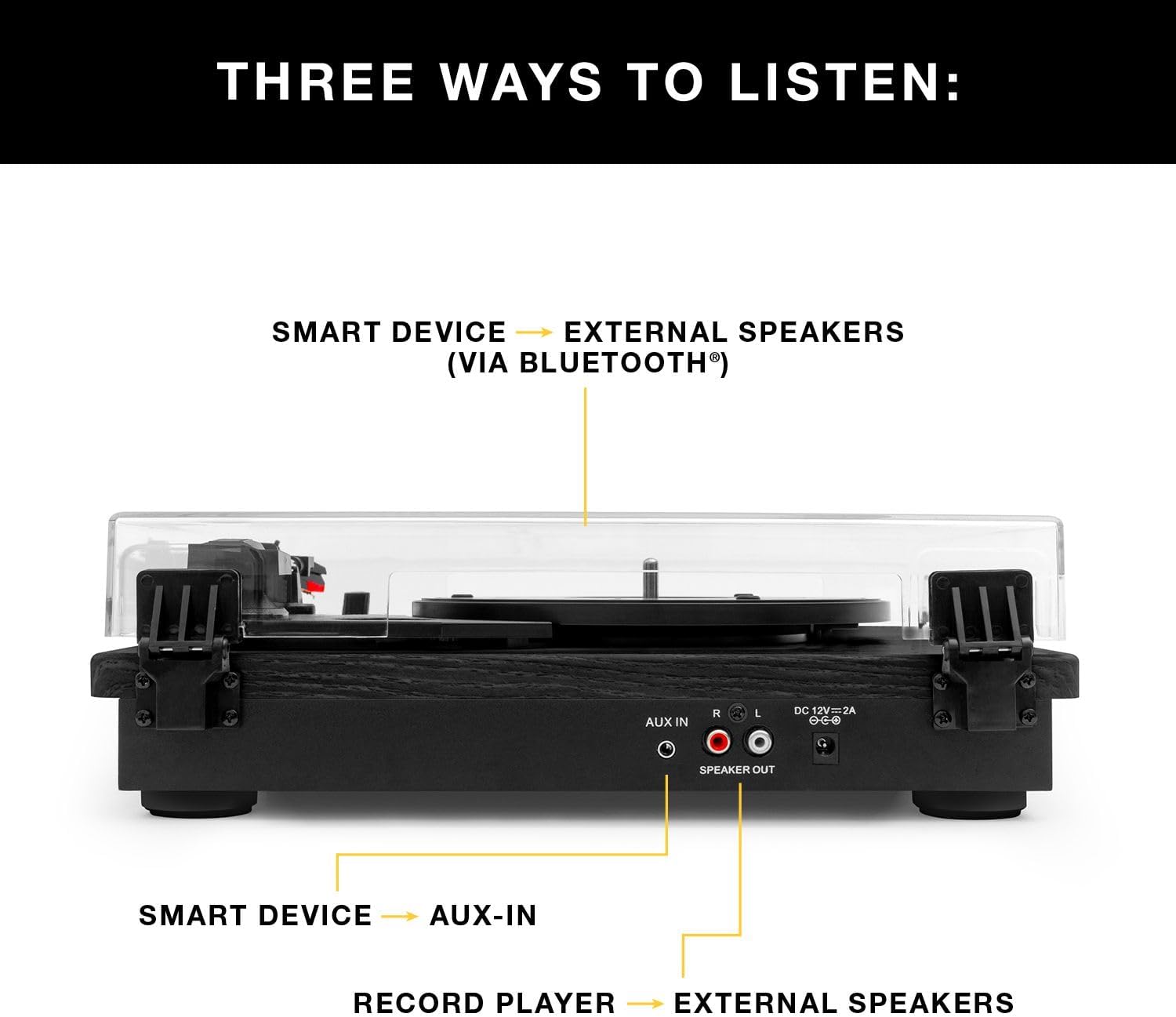
Figura 3: Traseira view of the turntable showing audio output and power connections.
4. Instruções de operação
4.1 Tocando discos de vinil
- Ligar: Ligue o toca-discos usando o botão liga / desliga.
- Selecione Velocidade: Choose the appropriate speed (33 1/3, 45, or 78 RPM) for your record using the speed selector switch.
- Recorde de Lugar: Coloque cuidadosamente o disco de vinil no prato.
- Posicione o braço de leitura/gravação: Release the tone arm lock. Gently lift the tone arm using the cueing lever and position the stylus over the desired track on the record.
- Braço de tom inferior: Slowly lower the cueing lever to gently place the stylus onto the record. Playback will begin automatically.
- Ajustar volume: Use the volume knob on the turntable to adjust the sound level.
- Fim da reprodução: At the end of the record, the tone arm will automatically return to its rest position (if auto-stop is enabled). Alternatively, manually lift the tone arm using the cueing lever and return it to its rest.

Figure 4: Detail of the stylus and record during playback.
4.2 Reprodução Bluetooth
- Ative o Bluetooth: Switch the turntable to Bluetooth mode. The Bluetooth indicator will flash, indicating it's ready for pairing.
- Dispositivo de par: On your smart device (phone, tablet, etc.), enable Bluetooth and select
Documentos relacionados - VM-135-FNT

Victrola Montauk VM-135 Turntable: Instruction Manual & Operation Guide
Comprehensive guide to setting up, operating, and maintaining your Victrola Montauk VM-135 turntable. Learn about Bluetooth connectivity, stylus replacement, safety, and warranty.
Sistema de toca-discos Victrola VM-135 Montauk: Manual de instruções
Este manual de instruções fornece informações detalhadas sobre o sistema de toca-discos Victrola VM-135 Montauk, abrangendo diretrizes de segurança, configuração, operação para discos, Bluetooth e entrada auxiliar, especificações, layout do toca-discos, substituição da agulha e garantia.
Manual do Usuário do Victrola V50-200 - Toca-discos e Central Multimídia Retrô Anos 50 com Bluetooth
Manual do usuário completo para o toca-discos e central multimídia retrô Victrola V50-200 dos anos 50 com Bluetooth. Saiba mais sobre seu toca-discos de 3 velocidades, reprodutor de CD, rádio AM/FM, streaming via Bluetooth e recursos de gravação de vinil para MP3, além de instruções de configuração e segurança.
Victrola VM-137 Kingfield Turntable with Bluetooth Speakers - User Manual
Comprehensive user manual for the Victrola VM-137 Kingfield Turntable, detailing setup, operation, stylus replacement, Bluetooth and AUX-in connectivity, specifications, safety instructions, and warranty information.
Victrola Avery 3-in-1 Turntable (VTA-320B) User Manual
User manual for the Victrola Avery 3-in-1 Turntable (Model VTA-320B), detailing setup, operation, maintenance, troubleshooting, specifications, and warranty information for versatile audio playback.
Manual de instruções do toca-discos automático Victrola VPT-800
Este manual fornece instruções completas para a configuração, operação e manutenção do Toca-Discos Automático Victrola VPT-800. Saiba mais sobre como desembalar, instalar o prato, conectar caixas de som via Bluetooth ou RCA, tocar discos, substituir a agulha, solucionar problemas comuns e especificações do produto.