Instruções importantes de segurança
Please read these instructions carefully before operating the unit and retain them for future reference.
- Não exponha este aparelho a gotas ou salpicos de água.
- Não coloque objetos com líquidos, como vasos, sobre o aparelho.
- Garanta uma ventilação adequada. Não obstrua nenhuma abertura de ventilação.
- Não instale perto de fontes de calor, como radiadores, registros de calor, fogões ou outros aparelhos (incluindo amplificadores) que produzem calor.
- Utilize somente acessórios/anexos especificados pelo fabricante.
- Desligue este aparelho durante tempestades com relâmpagos ou quando não for utilizado por longos períodos.
- Encaminhe todos os serviços de manutenção para pessoal de serviço qualificado. A manutenção é necessária quando o aparelho foi danificado de alguma forma.
Produto acimaview
The Muse M17CB is a compact dual PLL FM/MW digital alarm clock radio designed for reliable timekeeping and audio playback. It features a clear 0.9-inch white LED display with a dimmer function and a 24-hour time format. Users can set two independent alarms, choosing to wake up to either the radio or a buzzer. The digital tuner allows for 6 preset stations (3 FM and 3 MW) for quick access to your favorite broadcasts. Additional functions include SNAP, SLEEP, and SNOOZE for enhanced user convenience.
Frente View

Descrição da imagem: This image displays the front of the Muse M17CB alarm clock radio. It features a prominent 0.9-inch white LED display showing "12:00". Above the display are various control buttons and two rotary knobs. The buttons include P.1, P.2, P.3, DIM., O/SOURCE, and a large SNOOZE button. The left rotary knob is for VOLUME, and the right is for TUNING/SET. A small "muse" logo tag is visible on the left side.
Controles do painel superior

Descrição da imagem: Esta imagem fornece uma visão de cima para baixo. view of the Muse M17CB alarm clock radio, highlighting the control panel. It shows two large rotary knobs for Volume and Tuning/Set, along with several push buttons: P.1, P.2, P.3 (for radio presets), DIM. (dimmer), O/SOURCE (power/source selection), and a large circular SNOOZE button. The layout is clear and intuitive.
Conexões do painel traseiro

Descrição da imagem: This image shows the rear panel of the Muse M17CB alarm clock radio. It clearly displays the "AC~" power input socket, the "FM ANT." wire antenna, and an "AUX IN" 3.5mm jack for connecting external audio devices. A speaker grille is also visible on the right side.
Configurar
Conexão de energia
- Unpack the Muse M17CB unit and all accessories.
- Connect the AC power cord to the "AC~" input on the rear of the unit.
- Conecte a outra extremidade do cabo de alimentação a uma tomada de parede padrão.
- The LED display will light up, indicating the unit is receiving power.
Configuração da Antena
- For optimal FM reception, fully extend the FM wire antenna located at the back of the unit.
- Adjust the position of the antenna for the best possible signal reception.
Instruções de operação
Definir o tempo
- Certifique-se de que a unidade está ligada.
- Pressione e segure o TUNING/SET knob for approximately 2 seconds until the hour digits flash on the display.
- Gire o TUNING/SET botão para ajustar a hora.
- Pressione o TUNING/SET knob once to confirm the hour; the minute digits will flash.
- Gire o TUNING/SET knob to adjust the minutes.
- Pressione o TUNING/SET knob again to confirm the minutes and exit time setting mode.
- A hora é exibida no formato de 24 horas.
Setting the Alarm (Alarm 1 and Alarm 2)
A unidade possui dois alarmes independentes (Alarme 1 e Alarme 2).
- Pressione o P.1 botão (para Alarme 1) ou P.2 button (for Alarm 2) once. The alarm icon and hour digits will flash.
- Gire o TUNING/SET knob to adjust the alarm hour.
- Pressione o TUNING/SET knob to confirm the hour; the minute digits will flash.
- Gire o TUNING/SET knob to adjust the alarm minutes.
- Pressione o TUNING/SET knob to confirm the minutes. The alarm source (radio or buzzer) will flash.
- Gire o TUNING/SET knob to select either Rádio or Campainha as the alarm sound.
- Pressione o TUNING/SET knob to confirm the alarm source. The alarm volume will flash (if radio is selected).
- Gire o VOLUME knob to set the desired alarm volume (for radio alarm).
- Pressione o TUNING/SET knob to save the alarm settings. The corresponding alarm icon will appear on the display, indicating the alarm is active.
Para desativar um alarme, pressione o botão correspondente. P.1 or P.2 Pressione o botão até que o ícone de alarme desapareça do visor.
Radio Operation (FM/MW)
- Pressione o O/SOURCE button to turn on the radio. Press it repeatedly to cycle between FM, MW, and AUX modes.
- Gire o TUNING/SET knob to manually tune to a desired frequency.
- Para buscar estações automaticamente, pressione e segure o botão. TUNING/SET knob for 2 seconds. The radio will scan and stop at the next available station.
Setting and Recalling Presets (P.1, P.2, P.3)
- Para armazenar uma predefinição: Sintonize a estação desejada. Pressione e mantenha pressionado um dos botões de predefinição (P.1, P.2, ou P.3) for 2 seconds until the display confirms the preset is saved.
- Para recuperar uma predefinição: Briefly press the desired preset button (P.1, P.2, ou P.3) to tune to the stored station.
Função Dimmer
Pressione o DIM. button repeatedly to adjust the brightness of the LED display to your preference (e.g., High, Medium, Low, Off).
Função soneca
Quando o alarme tocar, pressione o botão grande. SONECA Pressione o botão para silenciar temporariamente o alarme. O alarme soará novamente após aproximadamente 9 minutos.
Função de sono
A função soneca permite que você adormeça ouvindo o rádio, que desligará automaticamente após um período predefinido.
- Enquanto o rádio estiver tocando, pressione o P.3 button (often doubles as SLEEP function) repeatedly to cycle through available sleep timer durations (e.g., 90, 60, 30, 15 minutes, or OFF).
- O rádio desligará automaticamente após o período selecionado.
SNAP Function
The specific operation of the SNAP function is not detailed in the provided product description. Please refer to the full printed manual included with your device for instructions on using the SNAP feature.
Entrada auxiliar (AUX IN)
Conecte um dispositivo de áudio externo (por exemplo, um reprodutor de MP3 ou um smartphone) à AUX IN jack on the rear of the unit using a 3.5mm audio cable. Press the O/SOURCE button repeatedly until "AUX" appears on the display to switch to auxiliary input mode. Audio from the connected device will play through the alarm clock's speaker.
Manutenção
- Limpeza: Use um pano macio e seco para limpar a parte externa da unidade. Não use produtos de limpeza abrasivos, ceras ou solventes.
- Armazenar: Se o aparelho não for utilizado por um longo período, desconecte-o da tomada e guarde-o em local fresco e seco.
- Evite umidade: Keep the unit away from water and high humidity.
Solução de problemas
| Problema | Possível causa | Solução |
|---|---|---|
| Sem energia / Tela desligada | Cabo de alimentação não está conectado corretamente. | Certifique-se de que o cabo de alimentação CA esteja firmemente conectado à unidade e a uma tomada elétrica em funcionamento. |
| Má recepção de rádio | A antena FM não está estendida ou posicionada corretamente. | Fully extend and adjust the position of the FM wire antenna for better reception. Try moving the unit to a different location. |
| O alarme não soa | Alarme não ativado ou configurado incorretamente. | Verify that the alarm icon is displayed. Recheck alarm time and source settings. Ensure alarm volume is not set to minimum if radio alarm is selected. |
| Tela muito brilhante/escura | É necessário ajustar a intensidade da luz do dimmer. | Pressione o DIM. Pressione repetidamente o botão para alternar entre os níveis de brilho. |
Especificações
- Modelo: M17CB
- Mostrar: 0.9-inch White LED with Dimmer
- Formato de hora: 24 horas
- Sintonizador: Digital FM/MW PLL
- Predefinições: 6 (3 FM + 3 MW)
- Alarmes: Dual Alarm (Radio or Buzzer)
- Funções: SNAP, SLEEP, SNOOZE
- Fonte de energia: Energia CA
- Dimensões: 13 cm (comprimento) x 11 cm (largura) x 6.5 cm (altura)
- Cor: Turquesa
- Material: Resin or Plastic
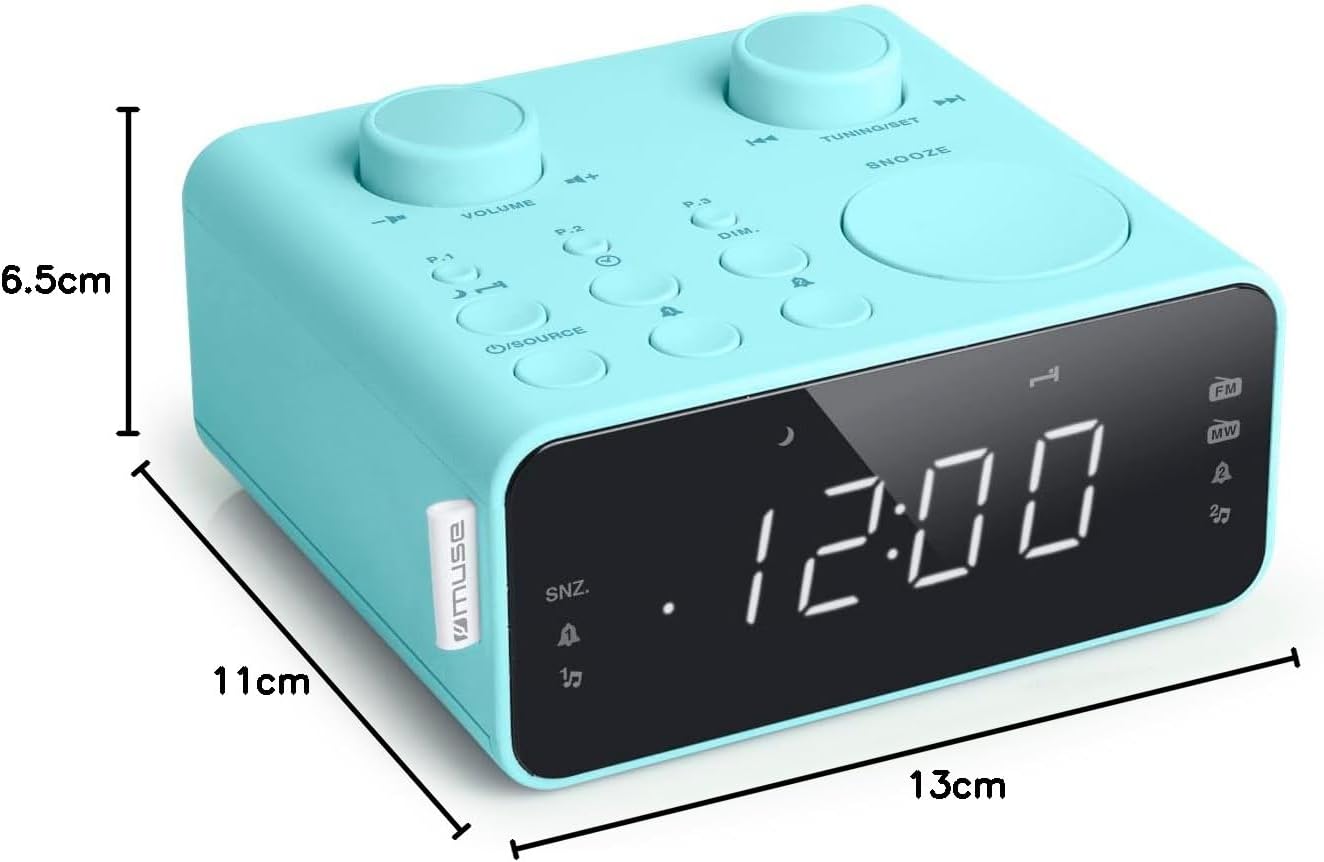
Descrição da imagem: This image illustrates the dimensions of the Muse M17CB alarm clock radio. It shows the unit with measurements indicating a length of 13cm, a width of 11cm, and a height of 6.5cm.
Garantia e Suporte
For warranty information and technical support, please refer to the warranty card included with your product or visit the official Muse webGuarde o comprovante de compra como prova de aquisição.
The product includes a user manual (as indicated by "Pièces incluses: Manuel du propriétaire").


