1. Introdução e maisview
The INKBIRDPLUS PTH-10C Portable CO2 Detector is designed to monitor carbon dioxide levels in various indoor environments. It features an advanced Non-Dispersive Infrared (NDIR) sensor for high-precision detection, a large color LCD screen for clear readings, and an audible alarm system. Its compact and portable design, coupled with a long-lasting rechargeable battery, makes it suitable for use in homes, offices, grow tents, greenhouses, and other spaces where air quality monitoring is essential.

Image: The INKBIRDPLUS PTH-10C Portable CO2 Detector on a desk, displaying CO2 levels.
2. Recursos do Produto
- High-Precision NDIR Sensor: Utilizes advanced infrared technology for accurate CO2 detection.
- Função de alarme duplo: Features visual (tri-color indicator) and audible alarms with customizable thresholds.
- Design portátil e durável: Compact size with an included lanyard for easy carrying.
- Large Color LCD Screen: Provides clear and easy-to-read CO2 concentration values.
- ECO Power-Saving Mode: Automatically turns off the screen after 5 minutes of inactivity to conserve battery.
- Bateria de longa duração: Built-in 1000mAh lithium battery offers up to 72 hours of operation.
- USB C recarregável: Convenient charging via a standard USB-C port.
- Calibração automática e manual: Ensures measurement accuracy over time.
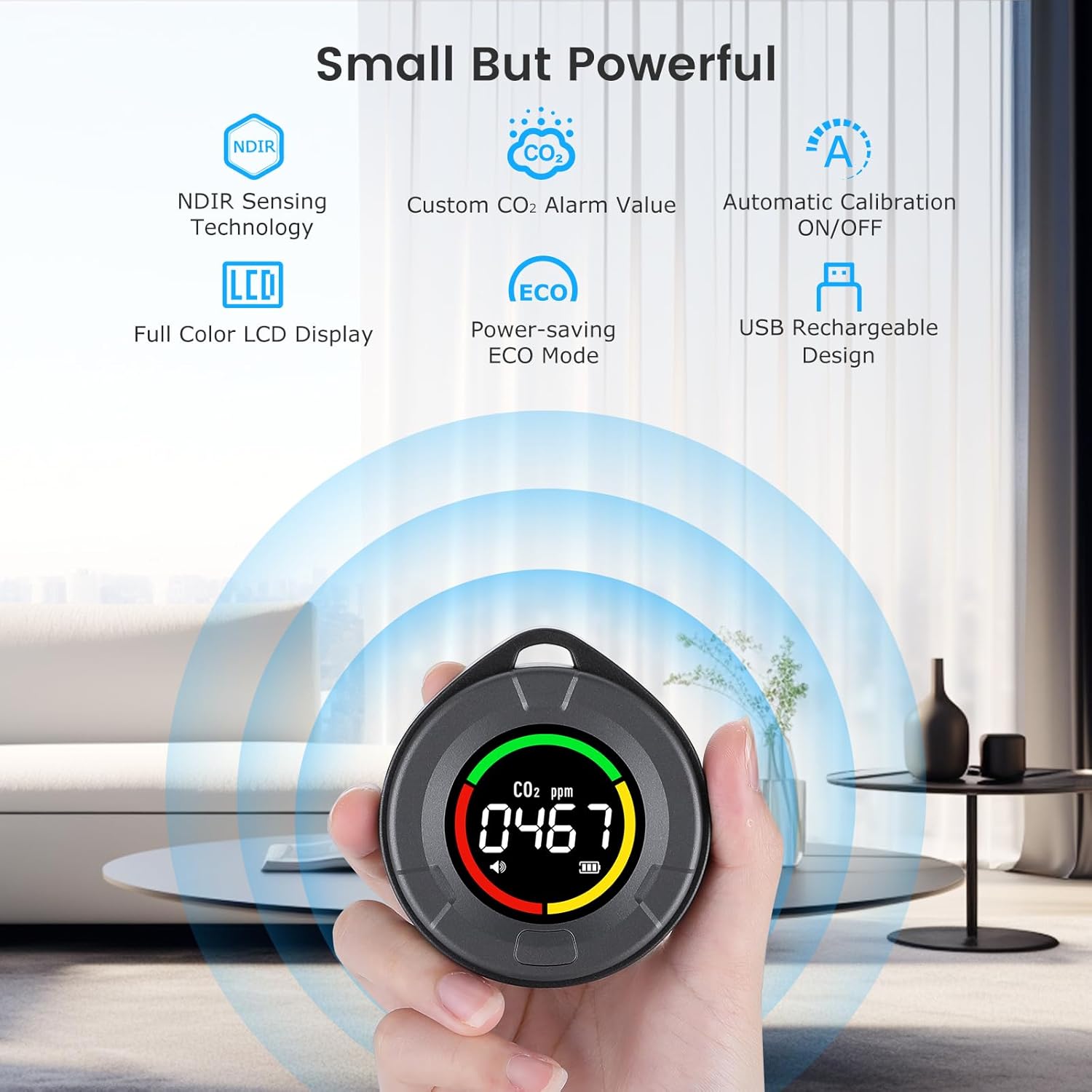
Imagem: Acimaview of the detector's main features, including NDIR sensor, LCD, alarm, ECO mode, calibration, and USB charging.
3. Conteúdo da embalagem
Por favor, verifique se a embalagem contém os seguintes itens:
- 1 x INKBIRDPLUS PTH-10C Portable CO2 Detector
- Cabo de carregamento USB-C 1 x
- 1 x Cordão
- 1 x Manual do Usuário
4. Layout do dispositivo
The device features a simple and intuitive design. The main display shows CO2 concentration, battery status, and alarm indicators. A single multi-function button controls various settings and calibration.

Imagem: Frente view of the INKBIRDPLUS CO2 detector highlighting its main features.
5. Configuração
- Carregamento inicial: Before first use, fully charge the device using the provided USB-C cable and a compatible 5V USB power adapter. The battery indicator on the screen will show charging status. A full charge typically takes about 3 hours.
- Calibração na primeira utilização: For optimal accuracy, it is highly recommended to perform a manual calibration in an open, unpopulated environment with fresh air (e.g., outdoors) during the first use. Refer to Section 7 for calibration instructions.
6. Operação
6.1 Ligar/Desligar
Press and hold the multi-function button for approximately 3 seconds to power the device on or off.
6.2 Leitura do visor
The large color LCD screen displays the current CO2 concentration in parts per million (ppm). The device also features a tri-color indication light system around the display to quickly assess air quality:
- Luz verde: 400-699 ppm (Good concentration)
- Luz amarela: 700-1499 ppm (Medium concentration)
- Luz vermelha: 1499-5000 ppm (Dangerous concentration)

Image: Explanation of the tri-color CO2 indication light system.
6.3 ECO Power-Saving Mode
To conserve battery, the device automatically enters ECO power-saving mode after 5 minutes of inactivity, turning off the screen. The device continues to monitor CO2 levels in the background. Press any button to reactivate the display.
7. Calibração
Calibration ensures the accuracy of your CO2 detector. The device supports both automatic and manual calibration.
7.1 Calibração Automática
Automatic calibration is enabled by default. The device will periodically self-calibrate in environments with stable CO2 levels. You can manually toggle automatic calibration on or off.

Image: Instructions for toggling automatic calibration (C-ON/C-OF).
7.2 Calibração Manual
Para realizar uma calibração manual:
- Place the device in an open, unpopulated environment with fresh air (e.g., outdoors) for at least 10-15 minutes to allow CO2 levels to stabilize.
- Long press the multi-function button. The screen will display "CAL" and initiate a 200-second countdown.
- Keep the device in the fresh air environment until the countdown completes. The device will then be calibrated.

Image: Steps for initiating manual calibration.
8. Configurações de alarme
The device is equipped with an audible alarm that activates when the CO2 concentration exceeds a set threshold. The default alarm threshold is 1500 ppm.
8.1 Customizing the Alarm Value
To adjust the alarm threshold:
- Long press the multi-function button for approximately 5 seconds until the alarm value starts flashing.
- Press the button once to increment the flashing digit.
- Press the button twice quickly to move to the next digit.
- Once the desired alarm value is set, wait a few seconds for the device to save the setting automatically.
8.2 Deactivating the Alarm
The audible alarm function can be deactivated if desired. Follow the steps for customizing the alarm value and set it to 'OFF' or a similar indicator if available, or set the threshold to its maximum value (5000 ppm) to effectively disable it for typical indoor use.

Image: Illustration of the smart CO2 alarm in action.
9. Gerenciamento de energia
The PTH-10C is powered by a built-in 1000mAh lithium-polymer battery.
9.1 Duração da bateria
A fully charged battery provides up to 72 hours of continuous operation. Actual battery life may vary depending on usage patterns and environmental conditions.

Image: Illustration of the 1000mAh lithium battery and its 72-hour endurance.
9.2 Carregamento
Connect the device to a 5V USB power source using the provided USB-C cable. The battery icon on the display will indicate charging status. The device can be used while charging.
10. Manutenção
- Limpeza: Wipe the device with a soft, dry cloth. Do not use liquid cleaners, abrasive materials, or solvents, as these can damage the sensor or casing.
- Armazenar: Store the device in a cool, dry place away from direct sunlight, extreme temperatures, and high humidity when not in use for extended periods.
- Calibração: Regular calibration (as described in Section 7) is recommended to maintain measurement accuracy.
11. Solução De Problemas
| Problema | Possível causa | Solução |
|---|---|---|
| Inaccurate CO2 readings | Sensor drift; device not calibrated; sensor obstructed. | Perform a manual calibration in a fresh air environment. Ensure the sensor opening is clear. |
| O dispositivo não liga | A bateria está esgotada. | Carregue o dispositivo usando o cabo USB-C. |
| Alarme não soa | Alarm function deactivated; alarm threshold set too high. | Check alarm settings (Section 8) and ensure it is enabled and the threshold is appropriate. |
| Bateria de curta duração | Battery not fully charged; frequent screen activation. | Ensure the device is fully charged. Utilize ECO power-saving mode. |
12. Especificações
| Parâmetro | Valor |
|---|---|
| Número do modelo | PTH-10C |
| Fabricante | INKBIRDPLUS |
| Dimensões (C x L x A) | 7 x 7 x 2.5 cm (2.75 x 2.75 x 0.98 polegadas) |
| Peso | 20 gramas (0.7 oz) |
| Tipo de Bateria | 1000mAh Lithium-polymer (included) |
| Fonte de energia | Battery powered, USB-C rechargeable |
| Volumetage | 5 Volts |
| Material | Plástico |
| Tipo de sensor | Infravermelho não dispersivo (NDIR) |
| Tipo de alarme | Audível |
| Faixa de detecção de CO2 | 400-5000 ppm |
| Tempo de carregamento | Aproximadamente 3 horas |
| Tempo de operação | Até 72 horas |
13. Informações de segurança
- Não exponha o dispositivo à água ou umidade excessiva.
- Do not disassemble or attempt to repair the device. Unauthorized repairs will void the warranty.
- Mantenha fora do alcance de crianças.
- Use only the provided or a certified USB-C cable for charging.
- This device is intended for general air quality monitoring and should not be used as a substitute for professional medical advice or certified safety equipment in critical environments.
- Avoid placing the device in direct sunlight or near heat sources, as this may affect sensor accuracy.
14. Garantia e Suporte
For detailed warranty information, technical support, or customer service inquiries, please visit the official INKBIRDPLUS website or contact their customer support team directly. Please have your model number (PTH-10C) and purchase information ready when contacting support.


