1. Produto acabadoview
The Vorago BSP-500-V2 is a portable Bluetooth speaker designed for robust performance and durability. It features IPX5 water resistance, making it suitable for various environments, including outdoor adventures and parties. This manual provides detailed instructions for setting up, operating, and maintaining your speaker.
Principais características:
- True Wireless Stereo (TWS) Connectivity: Connect two BSP-500-V2 speakers for an immersive stereo sound experience.
- Vida útil da bateria estendida: Enjoy up to 7 hours of music playback at 70% volume, thanks to its 2000 mAh battery.
- Carregamento USB tipo C: Convenient and modern USB-C port for charging.
- Conectividade versátil: Supports Bluetooth for wireless streaming and a 3.5mm auxiliary input for wired connections.
- Resistência à água IPX5: Protected against low-pressure water jets from any direction.
Conteúdo da embalagem:
- Alto-falante Bluetooth Vorago BSP-500-V2
- Cabo de carregamento USB Tipo-C
- Cabo de áudio de 3.5 mm
- Manual do usuário (este documento)
Diagrama do produto:

Figura 1.1: Frente view of the Vorago BSP-500-V2 Bluetooth speaker, showcasing its mesh grille and central Vorago logo.

Figura 1.2: Angulado view of the speaker, highlighting its robust, rectangular design and integrated carrying strap.

Figura 1.3: parte superior view showing the control panel with power, volume down, play/pause, and volume up buttons.
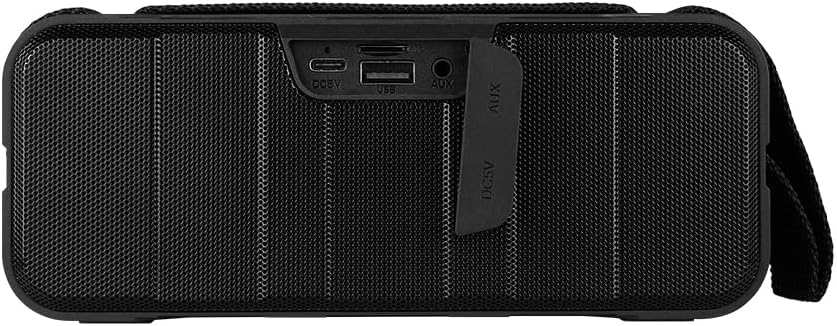
Figura 1.4: Traseira view of the speaker, showing the protective flap covering the input ports.

Figure 1.5: Close-up of the input ports, including DC 5V (USB-C), USB-A, and AUX (3.5mm) inputs, protected by a rubber cover.
2. Informações de segurança
- Não exponha o alto-falante a temperaturas extremas (quentes ou frias).
- Evite deixar cair ou submeter o alto-falante a impactos fortes.
- Keep the speaker away from direct sunlight and heat sources.
- Do not disassemble, repair, or modify the speaker yourself. This will void the warranty.
- Ensure the port cover is securely closed when using the speaker near water to maintain IPX5 water resistance.
- Do not immerse the speaker in water. IPX5 rating protects against splashes and light rain, not submersion.
- Utilize apenas o cabo de carregamento fornecido ou um cabo USB Type-C certificado para carregar o dispositivo.
- Limpe o alto-falante com um pano macio e seco. Não use produtos de limpeza abrasivos ou solventes.
3. Configuração
3.1 Carregando o alto-falante
- Open the protective rubber cover on the rear of the speaker to access the charging port.
- Connect the USB Type-C end of the charging cable to the speaker's DC 5V port.
- Conecte a outra extremidade do cabo USB a um adaptador de alimentação USB (não incluído) ou à porta USB de um computador.
- A luz indicadora de carregamento acenderá durante o carregamento e apagará quando a carga estiver completa.
- Once charging is complete, securely close the protective rubber cover to maintain water resistance.
3.2 Ligar/Desligar
- Para ligar: Pressione e segure o Botão de energia on the top panel for approximately 3 seconds until you hear an audible prompt.
- Para desligar: Pressione e segure o Botão de energia for approximately 3 seconds until you hear an audible prompt.
3.3 Emparelhamento Bluetooth
- Certifique-se de que a caixa de som esteja ligada. Ela entrará automaticamente no modo de emparelhamento Bluetooth, indicado por uma luz LED piscando.
- No seu dispositivo (smartphone, tablet, laptop), ative o Bluetooth e procure por dispositivos disponíveis.
- Select "BSP-500-V2" from the list of found devices.
- Once successfully paired, the speaker will emit an audible confirmation, and the LED light will stop flashing and remain solid.
- O alto-falante se reconectará automaticamente ao último dispositivo emparelhado ao ser ligado, se o dispositivo estiver dentro do alcance e o Bluetooth estiver ativado.
Emparelhamento estéreo sem fio verdadeiro (TWS) 3.4.
TWS allows you to connect two BSP-500-V2 speakers together for a true stereo sound experience.
- Ensure both BSP-500-V2 speakers are powered on and not connected to any other Bluetooth device.
- Em uma das caixas de som (esta será a caixa de som principal), pressione duas vezes o botão. Botão Reproduzir/Pausar. The speaker will enter TWS pairing mode.
- The two speakers will automatically search for and connect to each other. You will hear an audible confirmation once they are successfully paired.
- Once TWS is established, connect your device to the primary speaker via Bluetooth as described in Section 3.3.
- To disconnect TWS, double-press the Botão Reproduzir/Pausar em qualquer um dos alto-falantes.
3.5 Conexão Auxiliar (AUX)
For devices without Bluetooth, you can use the 3.5mm audio cable.
- Open the protective rubber cover on the rear of the speaker.
- Connect one end of the 3.5mm audio cable to the speaker's AUX port.
- Conecte a outra extremidade do cabo à entrada de saída de áudio do seu dispositivo.
- A caixa de som mudará automaticamente para o modo AUX.
- Once disconnected, securely close the protective rubber cover.
4. Instruções de operação
4.1 Funções dos botões:
| Botão | Função (Pressão curta) | Função (pressione longamente) |
|---|---|---|
| Botão de energia | N / D | Ligar/Desligar |
| Botão de diminuir volume | Diminuir volume | Faixa anterior |
| Botão Reproduzir/Pausar | Reproduzir/Pausar música, atender/encerrar chamada | Reject Call, Double-press for TWS Pairing |
| Botão Aumentar volume | Aumentar o volume | Próxima faixa |
5. Manutenção
- Limpeza: Use a soft, dry, lint-free cloth to clean the speaker's surface. For stubborn dirt, slightly dampUmedeça o pano com água. Não utilize produtos químicos agressivos, solventes de limpeza ou detergentes fortes.
- Cuidados com a resistência à água: Always ensure the rubber port cover on the back of the speaker is fully and securely sealed when using the speaker outdoors or near water. This maintains its IPX5 water resistance. After exposure to water, wipe the speaker dry before opening the port cover for charging or auxiliary connections.
- Armazenar: When not in use for extended periods, store the speaker in a cool, dry place, away from direct sunlight and extreme temperatures. It is recommended to charge the speaker fully before storing and to recharge it every few months to maintain battery health.
- Cuidados com a bateria: To prolong battery life, avoid fully discharging the battery frequently. Charge the speaker when the low battery indicator is active.
6. Solução De Problemas
| Problema | Possível causa | Solução |
|---|---|---|
| A caixa de som não liga. | Bateria fraca. | Carregue totalmente a caixa de som usando o cabo USB Tipo C fornecido. |
| Não foi possível emparelhar via Bluetooth. | Speaker is not in pairing mode; Device's Bluetooth is off; Speaker is already connected to another device; Device is too far from speaker. | Ensure speaker is powered on and flashing (pairing mode). Turn on Bluetooth on your device. Disconnect from other devices. Move device closer to speaker (within 10 meters). |
| Sem som ou volume muito baixo. | Volume too low on speaker or device; Incorrect input mode; Speaker not connected. | Increase volume on both speaker and connected device. Ensure correct mode (Bluetooth or AUX) is active. Verify successful Bluetooth pairing or AUX cable connection. |
| Distorção de som. | Volume too high; Device too far from speaker; Interference. | Reduce volume on speaker and/or device. Move device closer to speaker. Avoid obstacles between speaker and device. |
| O emparelhamento TWS falha. | Speakers are already paired to a device; Speakers are too far apart. | Ensure both speakers are disconnected from any Bluetooth devices. Place speakers close to each other during TWS pairing. |
7. Especificações
| Recurso | Detalhe |
|---|---|
| Nome do modelo | BSP-500-V2 |
| Tipo de alto-falante | Multimídia |
| Recurso especial | Bluetooth |
| Uso recomendado | Para tocadores de música |
| Dispositivos compatíveis | Laptop, reprodutor de MP3, smartphone, tablet |
| Tipo de controlador | Botão |
| Configuração do canal de som surround | 5.0 |
| Duração da bateria | 7 horas |
| Componentes Incluídos | Palestrante |
| Dimensões do produto | 5P x 15L x 18A centímetros |
| Peso do produto | 1 quilogramas |
| Impermeável | Sim (IPX5) |
| Capacidade da bateria | 2000 mAh |
| Amptipo mais vital | Ativo |
| Fonte de energia | Bateria |
| Resposta de frequência | 180 Hz |
| Tecnologia de Conectividade | Bluetooth |
| Modo de saída de áudio | Estéreo |
| Tipo de montagem | Suporte de mesa |
8. Garantia e Suporte
The Vorago BSP-500-V2 Bluetooth Speaker comes with a limited warranty. Please refer to the warranty card included with your product for specific terms and conditions, or visit the official Vorago website para mais detalhes.
For technical support, troubleshooting assistance, or warranty claims, please contact Vorago customer service through their official channels. You can find more information and contact details on the Vorago Brand Store on Amazon ou seu oficial website.
Guarde o comprovante de compra para fins de garantia.


