1. Introdução
The Generac GB2000 Portable Power Station provides clean, emission-free power for various applications. This manual outlines the proper setup, operation, and maintenance procedures to ensure safe and efficient use of your device. Whether for home backup, camping, or outdoor activities, the GB2000 offers reliable energy.

Image 1: Generac GB2000 Portable Power Station, a compact and durable unit with a handle for easy transport.
2. Informações de segurança
AVISO: Leia todos os avisos e instruções de segurança antes de usar este produto. O não cumprimento dos avisos e instruções pode resultar em choque elétrico, incêndio e/ou ferimentos graves.
- Uso interno / externo: This power station is designed for both indoor and outdoor use. Ensure adequate ventilation when operating indoors.
- Evite umidade: Do not expose the power station to rain or wet conditions.
- Conexões adequadas: Ensure all connections are secure and correctly inserted to prevent electrical hazards.
- Proteção contra sobrecarga: Do not exceed the rated output of the power station. Overloading can cause damage to the unit and connected devices.
- Crianças e animais de estimação: Mantenha a central elétrica fora do alcance de crianças e animais de estimação.
- Armazenar: Store the unit in a cool, dry place away from direct sunlight and flammable materials.
3. Conteúdo da embalagem
Verifique se todos os itens estão incluídos em seu pacote:
- Generac GB2000 Portable Power Station
- Generac 8031 Charge Enhancer 200W Charger
- Cabo de carregamento
- Manual do usuário (este documento)
4. Características e componentes do produto
The Generac GB2000 is equipped with a variety of ports and features for versatile power delivery:
- Multi-Color Display: Provides real-time information on battery status, input/output wattage, e tempo de execução restante.
- AC Receptacles (NEMA 1-15R): Standard household outlets for powering various appliances.
- USB-C Output Receptacles: Para dispositivos USB-C compatíveis com carregamento rápido.
- USB-A Output Receptacles: Standard USB ports for charging smaller electronic devices.
- Tomada 12V para carro: For powering 12V DC devices or charging the power station from a vehicle.
- Portas paralelas: Allows connection of two GB2000 units for increased power output (Parallel Kit sold separately).
- Base de carregamento sem fio: Built-in 15W wireless charging for compatible devices.
- LED ON/OFF Button & Diffused LED Light: Fornece iluminação para diversas situações.
- AC Output ON/OFF Button: Controls the AC power output.
- Botão ON / OFF de saída DC: Controls the DC power output.
- Display On/Off Button: Toggles the display screen.
- Main ON/OFF Button: Powers the entire unit on or off.

Imagem 2: Detalhada view of the Generac GB2000 control panel, highlighting various input/output ports and control buttons.
5. Configuração
- Descompacte: Carefully remove the Generac GB2000 and all accessories from the packaging.
- Carga inicial: Before first use, fully charge the power station using the provided charging cable and a standard wall outlet. The display will indicate charging progress.
- Familiarize-se: Review the control panel and port locations as detailed in Section 4.
6. Instruções de operação
- Ligar/desligar: Pressione e segure o Main ON/OFF Button to power the unit on or off. The multi-color display will activate.
- Activate AC Output: Pressione o Botão ON / OFF de saída CA to enable the AC receptacles. The indicator light will illuminate.
- Activate DC Output: Pressione o Botão Ligar/Desligar Saída DC to enable the DC ports (USB, 12V Car Port). The indicator light will illuminate.
- Conectar dispositivos: Plug your devices into the appropriate AC or DC ports. Monitor the display for real-time output wattage.
- Carregamento sem fio: Place your compatible device on the built-in 15W wireless charging pad located on top of the unit.
- Luz LED: Pressione o Botão LED ON / OFF to activate the diffused LED light. Press again to cycle through brightness settings or activate SOS mode.
- Operação paralela: For increased power, connect two Generac GB2000 units using a Parallel Kit (sold separately) via the Parallel Ports. Refer to the Parallel Kit manual for detailed instructions.
7. Recharging Options
The Generac GB2000 offers flexible recharging methods:
- Tomada de parede: Use the provided charging cable to connect to a standard AC wall outlet.
- Painéis solares: Connect compatible solar panels (sold separately) to the designated input ports for eco-friendly recharging.
- Carregador de carro: Use a car charger (sold separately) to recharge the power station from your vehicle's 12V outlet.
- Charge Enhancer: Utilize the Generac 8031 Charge Enhancer 200W Charger to recharge your GB Power Station up to 25% faster.
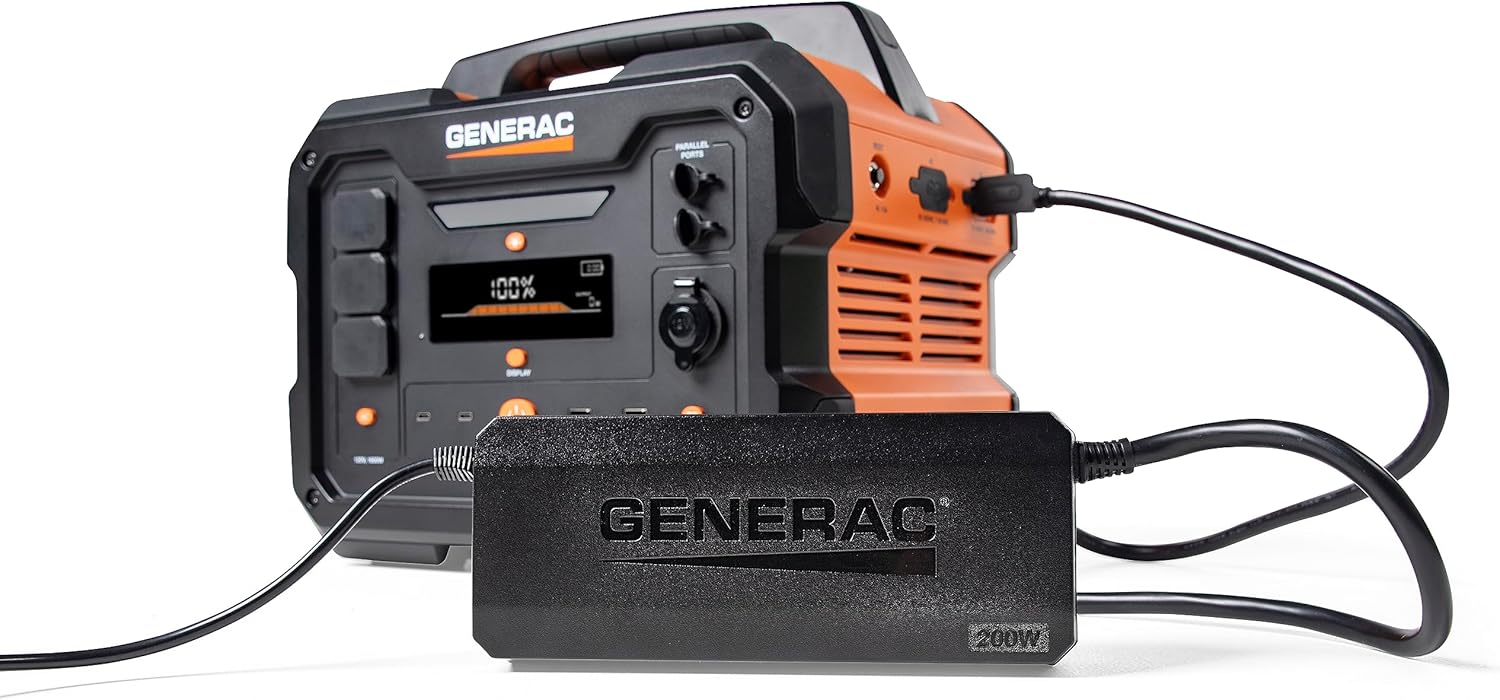
Image 3: Generac GB2000 connected to the Generac 8031 Charge Enhancer for optimized charging speed.

Image 4: Optional accessories for the Generac GB2000, including a Parallel Kit, Charge Enhancer, and Solar Panel.
8. Manutenção
- Limpeza: Wipe the exterior of the power station with a soft, dry cloth. Do not use abrasive cleaners or solvents.
- Armazenar: If storing for extended periods, ensure the battery is charged to at least 50% and recharge every 3-6 months to maintain battery health. Store in a cool, dry environment.
- Inspeção: Periodically inspect the unit and cables for any signs of damage. Do not operate if damaged.
9. Solução De Problemas
- Unidade não liga: Verifique se a bateria está carregada. Caso contrário, conecte-a a uma fonte de energia.
- Sem saída nas portas: Verify that the AC/DC output buttons are pressed and their indicator lights are on. Check device connections.
- Indicação de sobrecarga: If the overload alarm activates, disconnect some devices to reduce the load. The unit may automatically reset or require a manual restart.
- Problemas de carregamento: Ensure the charging cable is securely connected and the power source is active. Check the display for charging status.
10. Especificações
| Recurso | Especificação |
|---|---|
| Marca | Gerar |
| Nome do modelo | GB2000 |
| O quetage | 2106 watts (Starting), 2000 watts (Output) |
| Fonte de energia | Solar Powered (compatible) |
| Recurso especial | Lightweight, Portable, Wireless Charging |
| Componentes incluídos | Charging Cable, Generac 8031 Charge Enhancer 200W Charger |
| Total de tomadas | 6 (AC, USB-A, USB-C, 12V DC) |

Image 5: Estimated runtimes for common devices with the Generac GB2000 Portable Power Station.
11. Garantia e Suporte
For warranty information, technical support, or service inquiries, please refer to the warranty card included in your product packaging or visit the official Generac webGuarde o comprovante de compra como prova de aquisição.


