1. Instruções importantes de segurança
Please read these instructions carefully before using the Goldair Remote Wall Fan. Failure to follow these safety guidelines may result in electric shock, fire, or injury.
- Fonte de energia: Ensure the fan is connected to a power supply that matches the voltage especificado na etiqueta de classificação.
- Colocação: Do not place the fan near curtains, drapes, or any objects that may be drawn into the fan blades.
- Crianças: Este aparelho não se destina ao uso por pessoas (incluindo crianças) com capacidades físicas, sensoriais ou mentais reduzidas, ou falta de experiência e conhecimento, a menos que tenham recebido supervisão ou instruções sobre o uso do aparelho por uma pessoa responsável por sua segurança. As crianças devem ser supervisionadas para garantir que não brinquem com o aparelho.
- Limpeza: Desligue sempre o ventilador da tomada antes de limpá-lo ou realizar qualquer manutenção.
- Dano: Não utilize o ventilador com um cabo ou ficha danificados. Se o cabo de alimentação estiver danificado, deve ser substituído pelo fabricante, pelo seu agente de assistência técnica ou por pessoal qualificado para evitar riscos.
- Água: Do not immerse the fan in water or other liquids. Do not use the fan in wet or damp ambientes.
- Ventilação: Ensure adequate ventilation around the fan during operation.
- Desmontagem: Do not attempt to repair or disassemble the fan yourself. Contact qualified service personnel for repairs.
2. Produto acabadoview
The Goldair Remote Wall Fan (GWFR-160) is designed to provide efficient cooling with convenient remote control operation. It features a modern design and 90-degree oscillation.
2.1 Componentes
- Fan Head (with blades and grille)
- Wall Mounting Bracket
- Controle remoto
- Cabo de alimentação
- Acessórios de montagem (parafusos, buchas)
2.2 Características
- 40 cm fan size
- Remote controlled operation
- Full 90-degree oscillation
- Várias configurações de velocidade
- Função de temporizador
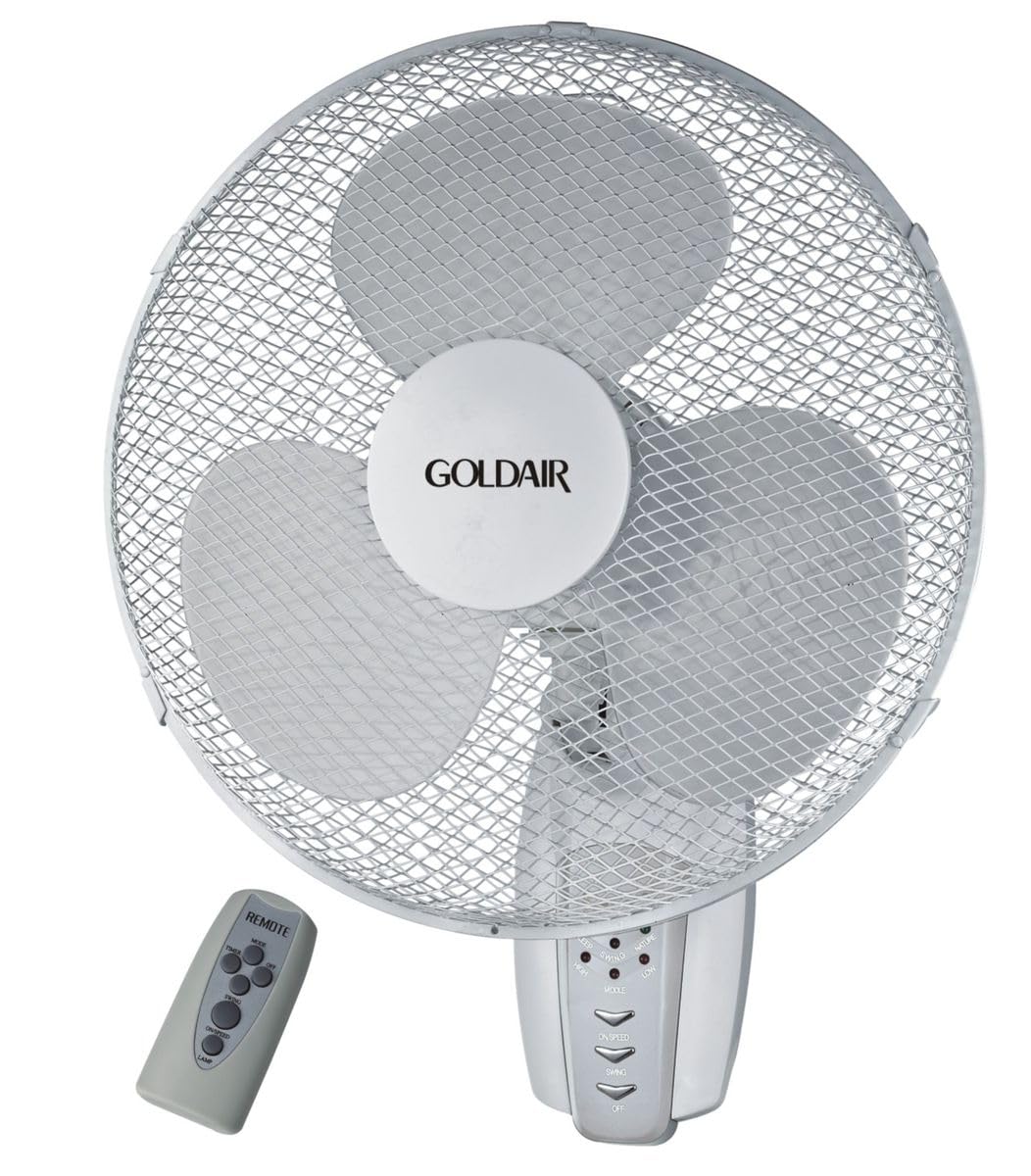
Figura 1: Frente view of the Goldair Remote Wall Fan GWFR-160. This image shows the fan head, grille, and the central control panel.
3. Configuração e instalação
Before installation, ensure you have the necessary tools: drill, screwdriver, and a pencil.
3.1 Escolhendo um local
- Select a sturdy wall surface capable of supporting the fan's weight (approximately 5 kg).
- Ensure the location is within reach of a power outlet and allows for optimal airflow distribution.
- Avoid areas with excessive moisture or direct sunlight.
3.2 Montagem na parede
- Hold the wall mounting bracket against the desired wall location and mark the drill holes with a pencil.
- Drill pilot holes into the marked positions. Use an appropriate drill bit size for the provided wall plugs.
- Insira as buchas nos orifícios perfurados.
- Align the mounting bracket with the holes and secure it to the wall using the provided screws. Ensure the bracket is firmly attached.
- Carefully lift the fan unit and align the mounting slots on the back of the fan with the hooks or slots on the wall bracket.
- Slide the fan down onto the bracket until it locks securely into place.
3.3 Conexão de Energia
Once the fan is securely mounted, plug the power cord into a standard electrical outlet. Ensure the outlet is easily accessible.
4. Instruções de operação
The Goldair Remote Wall Fan can be operated using either the control panel on the fan unit or the supplied remote control.
4.1 Operação de controle remoto
Before first use, insert 2x AAA batteries (not included) into the remote control, observing polarity.
- Botão ON/OFF: Pressione para ligar ou desligar o ventilador.
- Botão VELOCIDADE: Pressione repetidamente para alternar entre as velocidades do ventilador (por exemplo, baixa, média, alta).
- Botão MODE: Selecione diferentes modos de ventilação (por exemplo, Normal, Natural, Suspensão).
- Botão OSC: Press to activate or deactivate the oscillation function (90-degree swing).
- Botão TEMPORIZADOR: Set the fan to operate for a specific duration (e.g., 1 hour, 2 hours, up to 7.5 hours).
4.2 Manual Control Panel
The control panel on the fan unit typically mirrors the functions of the remote control. Refer to the icons on the panel for specific button functions.
5. Manutenção e Limpeza
Regular cleaning will help maintain the fan's performance and extend its lifespan. Always unplug the fan before cleaning.
5.1 Limpando o Ventilador
- Desconecte: Desconecte o ventilador da fonte de alimentação.
- Exterior: Limpe as superfícies externas do ventilador com um pano macio e seco.amp pano. Não use produtos de limpeza abrasivos ou solventes.
- Grelha e lâminas: To clean the fan blades, you may need to carefully remove the front grille. Consult the diagram in the packaging for grille removal instructions. Use a soft brush or vacuum cleaner to remove dust from the blades and grilles.
- Remontar: Reattach the front grille securely before plugging the fan back in.
5.2 Armazenamento
Quando não estiver em uso por longos períodos, guarde o ventilador na embalagem original ou cubra-o para protegê-lo da poeira. Armazene em local fresco e seco.
6. Solução De Problemas
If you encounter issues with your Goldair Remote Wall Fan, refer to the following common problems and solutions:
| Problema | Possível causa | Solução |
|---|---|---|
| O ventilador não liga. | Sem fonte de alimentação. As baterias do controle remoto estão gastas. | Verifique se o cabo de alimentação está firmemente conectado a uma tomada em funcionamento. Substitua as baterias do controle remoto. |
| Fluxo de ar fraco. | A velocidade do ventilador está muito baixa. A grelha ou as lâminas estão empoeiradas. | Increase fan speed setting. Limpe a grade e as pás do ventilador conforme as instruções de manutenção. |
| Ventilador é barulhento. | Peças soltas. Fan not mounted securely. | Check for any loose components. Ensure the fan is securely mounted to the wall bracket. |
| O controle remoto não funciona. | As pilhas estão descarregadas ou inseridas incorretamente. Obstrução entre o controle remoto e o ventilador. | Substitua as pilhas, certificando-se da polaridade correta. Remove any obstacles blocking the signal. Ensure you are within range. |
If the problem persists after trying these solutions, please contact Goldair customer support.
7. Especificações
| Marca | Gold Air |
| Número do modelo | GWFR-160 |
| Cor | Branco |
| Tamanho do ventilador | 40 centímetros |
| Material | Metal |
| Características especiais | Remote Controlled, 90-degree Oscillation |
| Peso do item | 5 kg |
| Dimensões do produto | 42P x 15L x 43A centímetros |
| Fonte de energia | Elétrico com fio |
| Tipo de montagem | Montagem na parede |
8. Garantia e Suporte
For warranty information and customer support, please refer to the warranty card included with your product or visit the official Goldair webGuarde o comprovante de compra como prova de aquisição.
Goldair Official Website: www.goldair.co.za (Nota: Este é um espaço reservado. URLConsulte a documentação do seu produto para obter informações sobre a região correta. website.)
Entre em contato com o suporte: For technical assistance or service inquiries, please contact Goldair customer service through their official channels.


