1. Introdução
This manual provides detailed instructions for the safe and efficient operation of your Telefunken THP-2535 Solar Powered Portable Bluetooth FM Radio. Please read this manual thoroughly before using the device and retain it for future reference.
The Telefunken THP-2535 is a versatile portable radio featuring Bluetooth connectivity, FM radio tuning, USB and TF card playback, and an AUX input. It is designed for portability with a built-in speaker, headphone jack, carrying handle, and a solar panel for convenient battery charging.
2. Informações de segurança
- Do not expose the device to extreme temperatures, direct sunlight for prolonged periods (beyond charging), or high humidity.
- Evite deixar cair ou submeter o dispositivo a impactos fortes.
- Não desmonte, repare ou modifique o dispositivo por conta própria. Encaminhe todos os serviços de manutenção a pessoal qualificado.
- Mantenha o dispositivo longe de água e outros líquidos.
- Assegure-se de que a ventilação esteja adequada durante o carregamento para evitar o sobreaquecimento.
- Utilize apenas o cabo de carregamento e as fontes de alimentação especificadas.
- Descarte as baterias e os componentes eletrônicos de forma responsável, de acordo com as normas locais.
- Do not operate the radio at excessively high volumes for extended periods to prevent hearing damage.
3. Conteúdo da embalagem
Por favor, verifique se todos os itens estão presentes na embalagem:
- 1 x Telefunken Solar Powered Portable Bluetooth FM Radio (THP-2535)
- 1 x Cabo de Carregamento (USB)
- 1 x Manual do Usuário (este documento)
4. Produto acabadoview
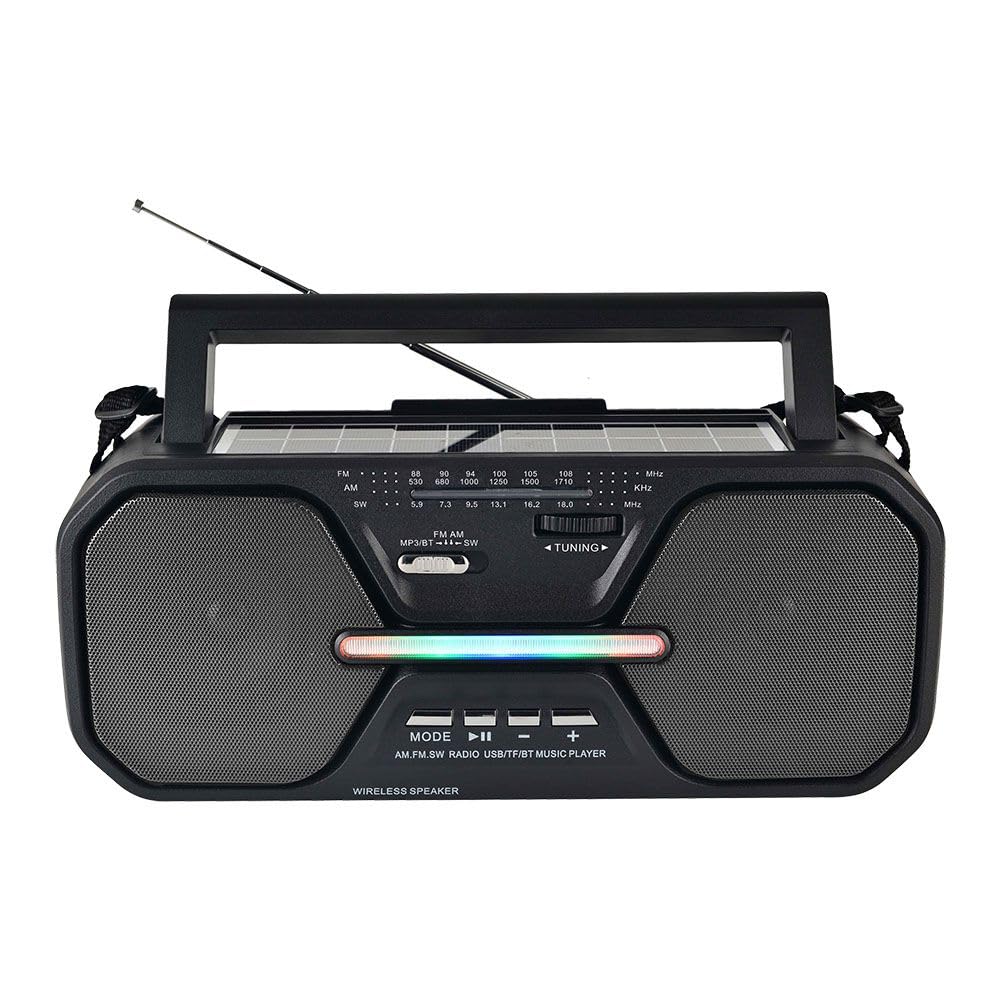
Figura 4.1: Frente view of the Telefunken THP-2535 radio, showing speakers, control panel, antenna, and carrying handle.

Figura 4.2: parte superior view highlighting the solar panel and control buttons.
Controles e portas:
- Interruptor de alimentação: Liga ou desliga o rádio.
- Botão de modo: Switches between Bluetooth, FM, USB, TF, and AUX modes.
- Botão Reproduzir/Pausar: Controls playback in Bluetooth, USB, and TF modes.
- Botão Anterior/Diminuir Volume: Skips to the previous track or decreases volume.
- Botão Próximo/Aumentar Volume: Skips to the next track or increases volume.
- Botão de sintonia: For manual FM station selection.
- Porta USB: For playing music from USB flash drives.
- Slot para cartão TF: For playing music from TF (MicroSD) cards.
- Entrada AUX: Para conectar dispositivos de áudio externos através de um cabo de 3.5 mm.
- Plug do fone de ouvido: Para audição privada.
- Painel solar: Charges the internal battery when exposed to sunlight.
- Porta de carregamento: For charging the internal battery using the provided USB cable.
- Antena: Estenda para melhorar a recepção de rádio FM.
5. Configuração
5.1 Carregamento Inicial
- Before first use, fully charge the radio's internal battery.
- Connect the provided USB charging cable to the radio's charging port.
- Conecte a outra extremidade do cabo USB a um adaptador de energia USB padrão (não incluído) ou a uma porta USB do computador.
- A luz indicadora de carregamento acenderá. Quando a carga estiver completa, a luz poderá mudar de cor ou apagar (consulte o comportamento específico do indicador, se detalhado na embalagem do produto).
- Charging via the solar panel: Place the radio with the solar panel facing direct sunlight. Ensure the panel is clean and unobstructed. Solar charging is slower than USB charging and is best for maintaining charge or extending playtime.
5.2 Ligar/Desligar
- To power on the radio, slide the Power Switch to the "ON" position.
- To power off the radio, slide the Power Switch to the "OFF" position.
6. Instruções de operação
Seleção de 6.1 modos
Pressione o Modo button repeatedly to cycle through the available modes: Bluetooth, FM Radio, USB, TF Card, and AUX Input.
6.2 Modo Bluetooth
- Switch the radio to Bluetooth mode. The radio will indicate it is ready for pairing (e.g., a voice prompt or flashing indicator light).
- No seu dispositivo com Bluetooth (smartphone, tablet, etc.), ative o Bluetooth e procure por dispositivos disponíveis.
- Select "THP-2535" (or similar name) from the list of devices.
- Once paired, the radio will confirm the connection. You can now stream audio from your device to the radio.
- Use the Play/Pause, Previous/Volume Down, and Next/Volume Up buttons on the radio to control playback and volume.
6.3 Modo Rádio FM
- Mude o rádio para o modo FM.
- Estenda completamente a antena telescópica para obter a melhor recepção.
- Gire o Dial de sintonia to scan for FM radio stations (frequency range: 87.5-108 MHz).
- Adjust the volume using the Volume Up/Down buttons.
6.4 Reprodução de cartão USB/TF
- Insert a USB flash drive into the USB port or a TF (MicroSD) card into the TF card slot.
- Switch the radio to USB or TF mode. The radio will automatically detect and begin playing audio files (ex.: formato MP3).
- Use the Play/Pause, Previous/Volume Down, and Next/Volume Up buttons to control playback and volume.
Modo de entrada AUX 6.5
- Connect one end of a 3.5mm audio cable (not included) to the AUX input port on the radio.
- Connect the other end of the audio cable to the headphone jack or audio output of your external device (e.g., MP3 player, laptop).
- Switch the radio to AUX mode.
- Control playback and volume primarily from your external device. The radio's volume controls will also adjust the output.
6.6 Uso de fones de ouvido
Insert 3.5mm headphones (not included) into the headphone jack for private listening. The internal speakers will automatically mute.
7. Manutenção
- Limpeza: Limpe o rádio com um pano macio e seco. Não utilize produtos de limpeza abrasivos, ceras ou solventes.
- Armazenar: Quando não estiver em uso por longos períodos, guarde o rádio em local fresco e seco.
- Cuidados com a bateria: To prolong battery life, avoid fully discharging the battery frequently. Recharge the battery regularly, even if the radio is not in active use.
- Painel solar: Keep the solar panel clean and free of dust or debris to ensure efficient charging.
8. Solução De Problemas
| Problema | Possível causa | Solução |
|---|---|---|
| O rádio não liga. | A bateria está descarregada. O interruptor de alimentação está desligado. | Charge the battery using the USB cable or solar panel. Ensure the power switch is in the "ON" position. |
| Nenhum som. | Volume is too low. Mute function active. Incorrect mode selected. Headphones connected. | Increase the volume. Check if headphones are plugged in. Ensure the correct mode (Bluetooth, FM, USB, TF, AUX) is selected. |
| Má recepção FM. | Antenna not extended. Weak signal. Interference. | Estenda completamente a antena telescópica. Reposicione o rádio para obter um sinal melhor. Evite fontes de interferência eletrônica. |
| O Bluetooth não está emparelhando. | Radio not in Bluetooth mode. Device's Bluetooth is off. Radio is already paired with another device. | Ensure the radio is in Bluetooth mode. Turn on Bluetooth on your device. Disconnect from other devices or restart the radio and your device. |
| O cartão USB/TF não está funcionando. | Incorrect mode. Unsupported file Formato. Corrompido files. Card/drive not inserted correctly. | Ensure the correct mode is selected. Check if audio files are in a supported format (e.g., MP3). Reinsert the USB drive/TF card. Try another drive/card. |
9. Especificações
| Número do modelo | THP-2535 |
| Marca | TELEFUNKEN |
| Fonte de energia | Solar Powered, USB Rechargeable (Lithium Ion Battery) |
| Conectividade | Bluetooth, USB, TF Card, AUX Input |
| Tecnologia de sintonizador | FM |
| Bandas de rádio suportadas | FM (87.5-108 MHz) |
| Dimensões do produto | 38.7C x 13.3L x 16.5A centímetros |
| Características especiais | Portable, Built-in Speaker, Headphone Jack, Carrying Handle |
10. Garantia e Suporte
10.1 Garantia do Fabricante
This Telefunken THP-2535 radio comes with a Garantia do fabricante de 1 anos A garantia é válida a partir da data da compra. Esta garantia cobre defeitos de fabricação e mão de obra em condições normais de uso. Não cobre danos causados por uso indevido, acidentes, modificações não autorizadas ou desgaste normal.
Guarde o comprovante de compra para reclamações de garantia.
10.2 Suporte ao cliente
For technical assistance, warranty claims, or further inquiries, please contact your retailer or the Telefunken customer support service. Refer to the product packaging or the official Telefunken website para detalhes de contato.


