Introdução
Thank you for choosing the S.M.S.L PL200 MQA-CD Player. This device is designed to deliver high-fidelity audio playback from MQA-CDs and standard CDs, along with versatile digital and analog input/output options. It integrates an advanced AK4499EX DAC chip and a powerful headphone amplifier to ensure an exceptional listening experience. This manual provides essential information for setting up, operating, and maintaining your PL200 player.
1. Configuração
1.1 Desembalagem e Inspeção Inicial
Carefully remove all components from the packaging. Ensure all items listed in the packing list are present and undamaged. Keep the original packaging for future transport or storage.
Vídeo: Unboxing the S.M.S.L PL200 CD Player. This video demonstrates the careful unboxing process and initial presentation of the device and its accessories.
1.2 Identificação do Componente
Familiarize yourself with the various parts and connections of your PL200 player.

Imagem: Rear panel of the S.M.S.L PL200, showing labeled ports including Headphone output, XLR balanced output, RCA output, Coaxial output, Optical output, USB input, Bluetooth antenna, and AC input.
1.3 Conexão de Energia
Connect the provided power cable to the AC input on the rear panel of the PL200 and then to a suitable power outlet.
1.4 Conexões de Áudio
The PL200 offers multiple output options for connecting to your audio system:
- Saída balanceada XLR: For high-quality analog connection to ampamplificadores com entradas XLR.
- Saída RCA: Standard analog connection to amplificadores ou receptores.
- Saída óptica: Digital audio output for connecting to DACs or receivers with optical inputs.
- Saída coaxial: Digital audio output for connecting to DACs or receivers with coaxial inputs.
- Saída de fone de ouvido: Connect your headphones to the dedicated output for private listening.
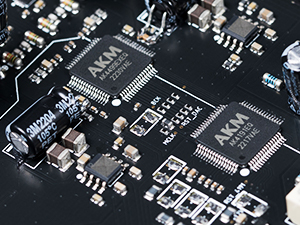
Imagem: Close-up of the S.M.S.L PL200's rear panel, highlighting the USB input, XLR balanced line outputs, and optical and coaxial digital outputs.
2. Instruções de operação
2.1 Ligar/Desligar
To power on the device, press the power button. The IPS display screen will illuminate. To power off, long-press the power button.
2.2 Carregando um CD
The PL200 features a top-loading CD mechanism. Lift the disc cover, place the CD onto the spindle, and secure it with the magnetic disc pressure clamp. Close the disc cover to begin reading the CD.

Imagem: The top-loading CD mechanism of the S.M.S.L PL200, showing the disc cover and magnetic clamp for securing a CD.
Vídeo: A closer look at the physical S.M.S.L PL200T, demonstrating the precision CD loading and aluminum clamp for secure disc holding.
2.3 Controles básicos de reprodução
Use the buttons on the front panel or the remote control for playback:
- Reproduzir/Pausar: Pressione para iniciar ou pausar a reprodução.
- Faixa anterior/seguinte: Pressione para pular para a faixa anterior ou seguinte.
- Parar: Pressione para parar a reprodução.
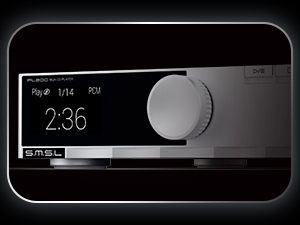
Imagem: The IPS display screen of the S.M.S.L PL200, showing playback information and the function knob.
2.4 Seleção de entrada
The PL200 supports various input sources. Use the function knob or remote control to select between CD, USB, and Bluetooth inputs.
2.5 Reprodução Bluetooth
To use Bluetooth, select the Bluetooth input. The device will enter pairing mode. On your mobile device, search for 'S.M.S.L PL200' and connect. The PL200 supports high-quality Bluetooth codecs like LDAC and aptX HD.
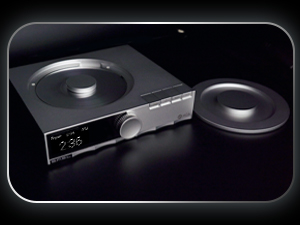
Imagem: The S.M.S.L PL200 displaying Bluetooth connectivity and supported codecs like LDAC, aptX, and SBC.
2.6 MQA-CD Playback
The PL200 fully supports MQA-CD playback, allowing you to experience master-quality audio. When an MQA-CD is inserted, the display will indicate 'MQA' to confirm full decoding.
Vídeo: A demonstration of the S.M.S.L PL200 MQA-CD Player, highlighting its HiFi lossless capabilities and AK4499EX chip.
3. Manutenção
3.1 Limpeza
Use a soft, dry cloth to clean the exterior of the device. Avoid using abrasive cleaners or solvents. For the CD mechanism, use a specialized CD lens cleaner if necessary, following its instructions.
3.2 Armazenamento
When not in use for extended periods, store the PL200 in a cool, dry place, away from direct sunlight and extreme temperatures. It is recommended to use the original packaging for protection.
4. Solução De Problemas
- Sem energia: Ensure the power cable is securely connected to both the device and the power outlet. Check if the power outlet is functional.
- Sem som: Verify that the correct input source is selected. Check all audio cable connections (XLR, RCA, Optical, Coaxial) to your amplifier/receiver. Ensure the volume is not muted or set too low.
- CD não está sendo lido: Ensure the CD is clean and free of scratches. Make sure the disc is placed correctly on the spindle and secured with the magnetic clamp.
- Problemas de emparelhamento Bluetooth: Ensure the PL200 is in Bluetooth input mode and discoverable. Delete previous pairings on your mobile device and try pairing again.
- Controle remoto não funciona: Check the batteries in the remote control. Ensure there are no obstructions between the remote and the PL200's remote window.
5. Especificações
| Dimensões do produto | 7.87 x 6.89 x 1.65 polegadas |
| Peso do item | 3.74 libras |
| Nome do modelo | PL200 |
| Chip DAC | AK4499EX |
| Suporte MQA | MQA-CD, MQA Full Decoding |
| USB Input Support | 32bit/768kHz, DSD512 |
| Conectividade | Bluetooth, USB |
| Saídas | XLR Balanced, RCA, Optical, Coaxial, Headphone |
| Mostrar | Tempered glass fully fitted IPS display screen |
6. Garantia e Suporte
The S.M.S.L PL200 comes with a manufacturer's warranty. Please refer to the warranty card included in your packaging for specific terms and conditions. For technical support, troubleshooting assistance, or warranty claims, please contact your retailer or visit the official S.M.S.L webGuarde o comprovante de compra como prova de aquisição.


