1. Introdução
This manual provides detailed instructions for the safe and efficient operation of your Phezer P15 Handheld Inkjet Printer. The P15 is a versatile, portable inkjet printer designed for marking various surfaces with text, numbers, QR codes, barcodes, production dates, times, and logos. It features a 4.3-inch LCD touch screen and an independent operating system, eliminating the need for external apps or computers.

The Phezer P15 Handheld Inkjet Printer with its intuitive 4.3-inch touch screen interface.
2. Conteúdo da embalagem
Before starting, please verify that all items are present in your package.
- Phezer P15 Handheld Inkjet Printer (main unit)
- Manual do usuário
- Carregador
- Caneta Touch com Driver USB
- Bateria de lítio
- Placa de suporte
- (Note: Ink cartridge is NOT included and must be purchased separately.)

Included components in the Phezer P15 package.
3. Configuração
- Carregue a bateria: Insert the provided lithium battery into the printer. Connect the charger to the printer and a power outlet to ensure the battery is fully charged before first use.
- Instale o cartucho de tinta: Open the ink cartridge compartment. Carefully insert a compatible ink cartridge (not included) into the designated slot until it clicks into place. Ensure the nozzle is clean and free from protective covers.
- Ligar: Press and hold the power button until the screen illuminates and the system starts.
- Screen Calibration (if needed): If the touch screen is unresponsive or inaccurate, perform a calibration. Turn off the printer, then press and hold the screen with the touch pen while turning the printer back on. Follow the on-screen prompts to tap the calibration points (Top Left -> Top Right -> Bottom Right -> Bottom Left -> Middle).
Video demonstrating how to recalibrate the screen of the Phezer Inkjet Printer.
4. Operação
4.1. Criação e edição de conteúdo impresso
The P15 printer allows direct input and editing of content via its 4.3-inch LCD touch screen.
- Entrada de texto: Use o teclado na tela para inserir texto.
- Content Types: The printer supports various content types including text, numbers, QR codes, barcodes, production dates, times, and custom logos.
- Ajustes: Modify font, size, spacing, rotation, and style directly on the device.
- Salvando Files: Save your created print jobs for future use.

The Phezer P15 supports printing various content types, including dates, fonts, logos, serial numbers, QR codes, and barcodes.
4.2. Impressão em diversas superfícies
The P15 is designed for printing on a wide range of materials.
- Supported Surfaces: Print on paper, boards, carton, stone, pipe, cable, metal, glass, plastic, and cloth.
- Printing Angle: Suporta impressão em 360 graus.
- Print Height & Length: Adjustable print height from 2mm to 12.7mm, with unlimited print length.
- Using the Support Plate: For stable and precise printing on smaller or irregularly shaped objects, utilize the included support plate. Place the object within the plate's guides and move the printer along the surface.

The Phezer P15 printer offers wide application across various materials.

The printer supports 360-degree all-round coding for versatile application.

Utilizing the fixed positioning plate for consistent printing results.
5. Manutenção
- Ink Cartridge Protection: When the ink cartridge is not in use, always cover it with its protective cap to prevent drying and clogging.
- Limpeza do bico: If you experience blurry printing, missing lines, or whitelines, gently wipe the ink cartridge nozzle with a soft tissue or soft cloth. Do not use harsh chemicals or abrasive materials.
- Cuidados com a tela: Keep the touch screen clean. Use the provided touch pen for interaction to avoid scratches or damage.

Important maintenance tips for your Phezer P15 printer.
6. Solução De Problemas
- Tela sensível ao toque que não responde: If the touch screen becomes insensitive or unresponsive, turn off the printer. Press and hold the screen with the touch pen, then turn the printer back on. Start the touchscreen calibration process as described in Section 3.
- Poor Print Quality (Blurry, Missing Lines, Whitelines): This often indicates a clogged or dirty nozzle. Gently wipe the ink cartridge nozzle with a soft, lint-free cloth. Ensure the ink cartridge is properly seated.
- A impressora não liga: Check if the battery is properly inserted and fully charged. Connect the printer to the charger to confirm it's receiving power.
7. Especificações
| Recurso | Especificação |
|---|---|
| Dimensões do produto | 2.36"P x 3.54"L x 8.86"A |
| Tipo de controlador | Andróide |
| Tamanho máximo da mídia | A9 |
| Mídia impressa | Fabric, Labels |
| Capacidade máxima de entrada de folhas | 10 |
| Velocidade máxima de cópia (preto e branco) | 70 ppm |
| Resolução máxima de impressão a cores | 600 dpi |
| Resolução máxima de impressão em preto e branco | 600 dpi |
| Impressão frente e verso | Não |
| Resolução máxima de cópia em cores | 600 dpi |
| Resolução máxima de cópia em preto e branco | 600 dpi |
| Duplex | Simplex |
| interface de hardware | USB |
| Cor da tinta | Black, White, Red, Yellow, Blue, Green, Invisible, UV |
| Funções adicionais da impressora | Somente impressão |
| Método de controle | App (Note: Printer operates independently, but some features might be managed via an app if available) |
| Contagem de processadores | 4 |
| Total de portas USB | 1 |
| Série de Modelos | P15 |
| Tipo de tinta da impressora | Water-based, Solvent-based |
| Peso do item | 1.19 libras (0.54 kg) |
| Número do modelo do item | P15-Plus-NOINK |
| Baterias | São necessárias 1 pilha de 9V (incluída). |
| Fabricante | Phézer |
| Marca | Phézer |
| Tecnologia de Conectividade | USB |
| Tecnologia de impressão | Jato de tinta |
| Recurso especial | Internal Memory, Lightweight, Portable, Touch Screen |
| Cor | Preto |
| Nome do modelo | P15-Plus-NOINK |
| Saída da impressora | Monocromático |
| Velocidade máxima de impressão (cor) | 70 ppm |
| Velocidade máxima de impressão monocromática | 70 ppm |
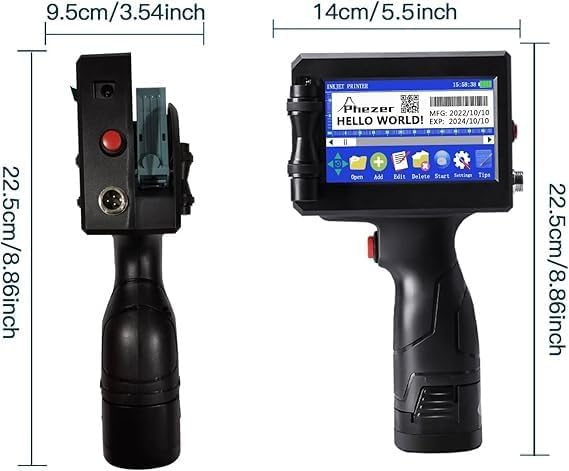
Physical dimensions of the Phezer P15 printer.
8. Garantia e Suporte
For warranty information, please refer to the documentation included with your purchase or contact Phezer customer support.
Entrando em contato com o suporte:
If you require assistance or have questions regarding your Phezer P15 printer, you can contact the seller directly through the Amazon platform.
- Visit the product page on Amazon.
- Locate the "Sold by" section, usually near the "Add to Cart" button.
- Click on the seller's name, "Phezer Coding and Marking Solution".
- On the seller's page, you will find an option to "Ask a question" or contact them directly.

Guide on how to contact Phezer support through Amazon.
You can also visit the official Phezer website para mais informações: www.phezer.com


