1. Introdução
Thank you for choosing the Baseus AeQur G10 TWS Earphones. This manual provides detailed instructions on how to set up, operate, maintain, and troubleshoot your new earphones. Please read this manual thoroughly before using the product to ensure optimal performance and longevity.
2. Conteúdo da embalagem
Carefully unpack the box and ensure all items listed below are present and in good condition. If any items are missing or damaged, please contact your retailer.
- Baseus AeQur G10 TWS Earphones (Left and Right)
- Estojo de carregamento
- USB-A/USB-C Wireless Dongle
- Cabo de carregamento USB-C
- Vários tamanhos de pontas auriculares
- Manual do usuário (este documento)

Image 2.1: Complete package contents of the Baseus AeQur G10 TWS Earphones.
3. Produto acabadoview
Familiarize yourself with the components of your Baseus AeQur G10 TWS Earphones.
3.1 fones de ouvido
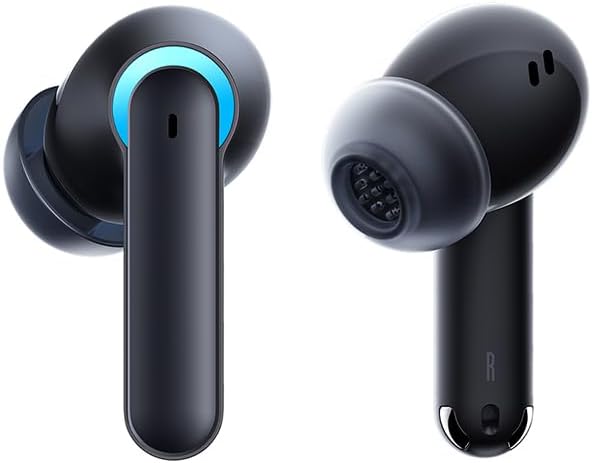
Image 3.1: Left and Right Baseus AeQur G10 Earphones. Each earphone features a touch control area, microphone, and charging contacts.
3.2 estojo de carregamento

Image 3.2: Baseus AeQur G10 Earphones in their charging case with the lid open. The case has charging slots for each earphone and an LED indicator for battery status.
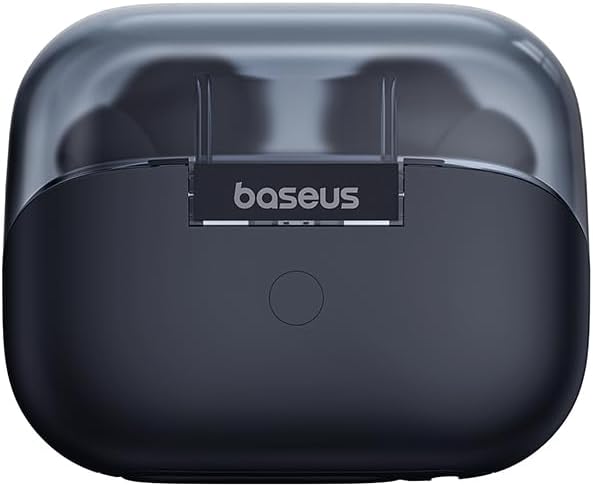
Imagem 3.3: Traseira view of the Baseus AeQur G10 charging case, displaying the Baseus brand logo and a USB-C charging port (not explicitly visible but implied by common design).
3.3 USB-A/USB-C Wireless Dongle
The included wireless dongle allows for low-latency connection to various devices, including PCs, laptops, gaming consoles, and mobile devices.

Image 3.4: Compatibility diagram for the Baseus AeQur G10, illustrating connections to Type-C Androids & Tablets, Type-C/USB-A PCs & Laptops, PS5/PS4/Switch, Steam Deck, and VR devices.
4. Configuração
4.1 Carregamento Inicial
- Coloque os dois fones de ouvido no estojo de carregamento.
- Conecte o cabo de carregamento USB-C à porta de carregamento do estojo e a outra extremidade a uma fonte de alimentação USB (por exemplo, porta USB do computador, adaptador de parede).
- The LED indicator on the case will show charging status. A full charge typically takes approximately 1.5 hours for the earphones and 2 hours for the case.
4.2 Emparelhamento com dispositivos Bluetooth
- Ensure the earphones are in the charging case and the case has sufficient charge.
- Open the charging case lid. The earphones will automatically enter pairing mode (indicated by a flashing LED on the earphones or case).
- No seu dispositivo (smartphone, tablet, laptop), ative o Bluetooth e procure por novos dispositivos.
- Select "Baseus AeQur G10" from the list of available devices.
- Once connected, the LED indicator will stop flashing, and you will hear a confirmation tone.
4.3 Connecting via USB Wireless Dongle
- Insert the USB-A or USB-C end of the wireless dongle into the corresponding port on your device (PC, laptop, gaming console).
- Ensure the earphones are in the charging case and the lid is open.
- The earphones will automatically attempt to connect to the dongle. The dongle's LED indicator will show connection status.
- Once connected, the LED on the dongle will become solid, and you will hear a confirmation tone from the earphones.
5. Instruções de operação
5.1 Ligar/Desligar
- Ligar: Open the charging case lid, or take the earphones out of the case. They will power on automatically.
- Desligar: Place the earphones back into the charging case and close the lid. They will power off automatically and begin charging.
5.2 Como usar os fones de ouvido
- Identify the 'L' (left) and 'R' (right) markings on each earphone.
- Gently insert the earphones into your ear canals.
- Rotate them slightly to find a comfortable and secure fit. Choose the appropriate ear tip size for optimal sound quality and comfort.
5.3 Controles de toque
The Baseus AeQur G10 earphones feature touch-sensitive controls on each earbud. The specific functions may vary slightly depending on the device and application.
| Ação | Função |
|---|---|
| Toque único (E/D) | Tocar / pausar música, atender / encerrar chamada |
| Toque duplo (L) | Faixa anterior |
| Toque duplo (R) | Próxima faixa |
| Toque triplo (E/D) | Ativar Assistente de Voz |
| Pressione e segure (esquerda/direita, 2s) | Rejeitar chamada |
| Pressione e segure (esquerda/direita, 3s) | Toggle Gaming/Music Mode (if applicable) |
6. Manutenção
6.1 Limpeza
- Use a soft, dry, lint-free cloth to clean the earphones and charging case.
- For earwax or debris in the ear tips, gently remove the ear tips and clean them with a cotton swab lightly dampened with rubbing alcohol. Ensure they are completely dry before reattaching.
- Não utilize produtos de limpeza abrasivos, solventes ou sprays aerossóis.
6.2 Armazenamento
- Always store the earphones in their charging case when not in use to protect them and keep them charged.
- Conservar em local fresco e seco, longe de temperaturas extremas e da luz solar direta.
6.3 Cuidados com a bateria
- Charge the earphones and case regularly, even if not used frequently, to maintain battery health.
- Avoid fully discharging the batteries for extended periods.
7. Solução De Problemas
If you encounter issues with your Baseus AeQur G10 earphones, refer to the following common solutions:
7.1 Sem som ou conexão intermitente
- Ensure earphones are charged and properly connected to your device (Bluetooth or dongle).
- Check the volume level on both the earphones and your connected device.
- Aproxime-se do seu dispositivo para evitar interferências ou problemas de alcance.
- Try disconnecting and re-connecting the earphones.
- For Bluetooth, forget the device on your phone and re-pair.
- For dongle, unplug and re-plug the dongle.
7.2 Earphones Not Charging
- Certifique-se de que o cabo de carregamento esteja conectado firmemente ao estojo e à fonte de alimentação.
- Verifique se a fonte de alimentação está ativa.
- Clean the charging contacts on both the earphones and inside the case with a dry cotton swab.
- Experimente um cabo de carregamento ou adaptador de energia diferente.
7.3 Only One Earphone Working
- Place both earphones back into the charging case, close the lid, wait a few seconds, then open the lid and take them out again.
- Certifique-se de que ambos os fones de ouvido estejam carregados.
- Tente reiniciar os fones de ouvido (consulte as instruções do fabricante). web(Consulte o site para obter instruções específicas de reinicialização, se necessário).
8. Especificações
Key technical specifications for the Baseus AeQur G10 TWS Earphones:
| Recurso | Especificação |
|---|---|
| Nome do modelo | A00055400111-00 |
| Marca | Baseus |
| Cor | Preto |
| Colocação da orelha | No ouvido |
| Fator de forma | No ouvido |
| Tecnologia de Conectividade | Wireless (Bluetooth) |
| Tecnologia de comunicação sem fio | Bluetooth |
| Baterias | 1 bateria de íon de lítio necessária (incluída) |
| Dimensões do produto | 10 x 5 x 1.27 cm |
| Peso do item | 220 g |
| Fabricante | Baseus |
| Usos específicos | Viagem |
9. Garantia e Suporte
Baseus products are designed and manufactured to the highest quality standards. For information regarding warranty coverage, technical support, or service, please refer to the warranty card included with your product or visit the official Baseus website. Guarde o comprovante de compra para solicitações de garantia.
For further assistance, you may contact Baseus customer support through their official channels.


