Introdução
Welcome to the user manual for your new ECHO RAINBOW PRO Smartwatch. This device is designed to seamlessly integrate into your daily life, offering advanced health monitoring, sports tracking, and smart connectivity features. With its elegant rose metal finish and interchangeable straps, it combines style with functionality. This manual provides essential information on setting up, operating, maintaining, and troubleshooting your smartwatch to ensure optimal performance and a satisfying user experience.
Informações de segurança
- Não tente desmontar, reparar ou modificar o dispositivo. Isso pode causar danos, incêndio ou choque elétrico.
- Mantenha o dispositivo longe de temperaturas extremas, luz solar direta e alta umidade.
- Evite expor o dispositivo a impactos ou vibrações fortes.
- Utilize apenas o cabo de carregamento fornecido e um adaptador de energia compatível.
- Consult a medical professional before starting any new exercise regimen or if you have pre-existing health conditions, especially if relying on the health monitoring features. The health data provided by this device is for reference only and should not be used for medical diagnosis or treatment.
- If you experience skin irritation or discomfort while wearing the watch, discontinue use and consult a doctor.
Conteúdo da embalagem
Por favor, marque a caixa para os seguintes itens:
- ECHO RAINBOW PRO Smartwatch (with metal strap attached)
- 1 x Silicone Strap (interchangeable)
- Cabo de carregamento
- Manual do usuário (este documento)

Image: The ECHO RAINBOW PRO Smartwatch in rose metal, shown with its pre-attached metal strap and a separate light pink silicone strap, highlighting the interchangeable design.

Image: The ECHO RAINBOW PRO Smartwatch body displayed alongside its detached light pink silicone strap and rose metal mesh strap, illustrating the modular design.

Image: The retail packaging for the ECHO RAINBOW PRO Smartwatch, showing the watch and its accessories through a clear window, with product features listed on the box.
Produto acimaview
Familiarize yourself with the components of your ECHO RAINBOW PRO Smartwatch.
- Mostrar: High-resolution touchscreen for interactive use.
- Botão lateral/Coroa: Used for power on/off, screen wake/sleep, and navigating menus.
- Sensores: Located on the back of the watch for health monitoring (heart rate, SpO2, blood pressure, ECG).
- Strap Attachment Points: Allows for easy changing of straps.
- Contatos de carregamento: Contatos magnéticos na parte traseira para carregamento.

Imagem: Uma imagem detalhada view of the ECHO RAINBOW PRO Smartwatch's display, showcasing a watch face with a mechanical gear design, current time, date, temperature, and health metrics.

Imagem: Um profissional lateralfile view of the ECHO RAINBOW PRO Smartwatch, highlighting its slim design and the functional side button/crown.
Configurar
1. Carregando o smartwatch
Antes da primeira utilização, carregue totalmente o seu smartwatch.
- Conecte o cabo de carregamento magnético aos contatos de carregamento na parte traseira do relógio.
- Conecte a extremidade USB do cabo a um adaptador de energia USB (não incluído) ou à porta USB de um computador.
- O visor do relógio exibirá um indicador de carregamento. Uma carga completa normalmente leva cerca de 2 horas.
2. Attaching/Changing Straps
Your ECHO RAINBOW PRO Smartwatch comes with interchangeable straps, allowing you to customize its look.
- To remove a strap, locate the quick-release pin on the underside of the strap near the watch body.
- Slide the pin inwards to detach the strap from the watch.
- To attach a new strap, insert one end of the pin into the watch lug.
- Slide the quick-release pin inwards and align the other end with the opposite lug hole. Release the pin to secure the strap. Gently pull on the strap to ensure it is properly locked in place.

Image: Two ECHO RAINBOW PRO Smartwatches are shown side-by-side, one fitted with the rose metal mesh strap and the other with the light pink silicone strap, demonstrating the versatility of interchangeable bands.
3. Emparelhando com seu smartphone
To unlock the full potential of your smartwatch, pair it with your smartphone via the dedicated app.
- Baixe o aplicativo: Procurar the "ECHO Fit" app (or similar, check packaging for exact name) on your smartphone's app store (Google Play Store for Android, Apple App Store for iOS). Install the app.
- Ativar Bluetooth: Certifique-se de que o Bluetooth esteja ativado em seu smartphone.
- Abra o aplicativo: Launch the ECHO Fit app and follow the on-screen instructions to create an account or log in.
- Adicionar dispositivo: In the app, navigate to the "Device" or "Add Device" section. The app will search for nearby smartwatches.
- Selecione o seu relógio: Select "ECHO RAINBOW PRO" from the list of found devices. A pairing request may appear on your watch and phone. Confirm the pairing on both devices.
- Configuração completa: Once paired, the app will guide you through initial settings such as personal information, notification preferences, and health goals.
Operando seu smartwatch
Navegação básica
- Tela de ativação: Pressione o botão lateral ou levante o pulso.
- Gestos na tela sensível ao toque:
- Swipe Up/Down: Scroll through menus or notifications.
- Swipe Left/Right: Access quick widgets or different functions.
- Tap: Select an item or confirm an action.
- Press and Hold: Customize watch faces (from home screen).
- Side Button Function:
- Short Press: Return to home screen, or go back in a menu.
- Long Press: Power on/off, or access a shortcut menu (e.g., restart).
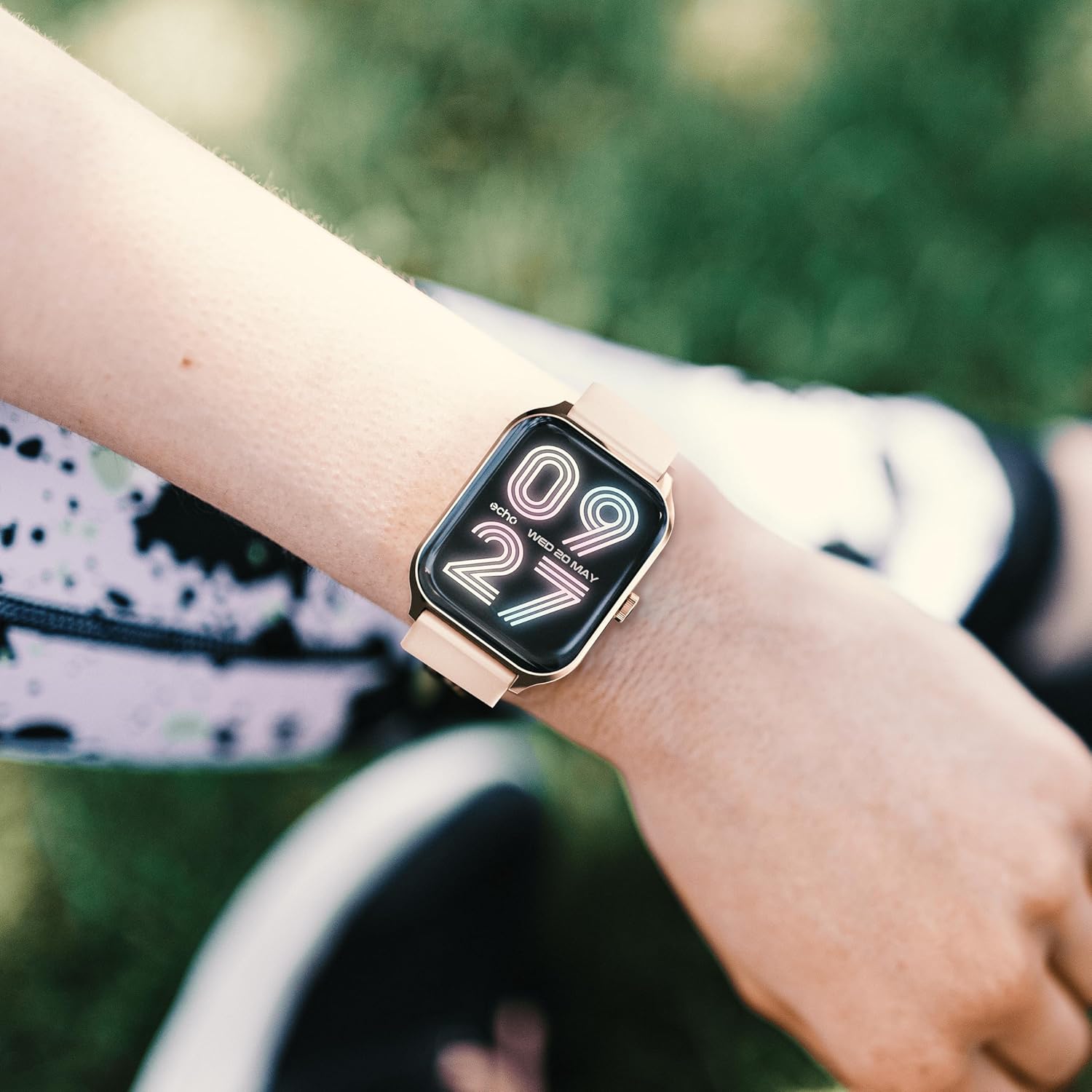
Image: The ECHO RAINBOW PRO Smartwatch worn on a wrist, displaying a digital watch face with the current time and date.

Image: A close-up of the ECHO RAINBOW PRO Smartwatch's screen, showing a clear digital time display along with battery status, step count, and temperature.
Monitoramento de Saúde
Your smartwatch is equipped with advanced sensors to help you monitor your health.
- Frequência cardíaca: Access the heart rate function on your watch or through the app. Ensure the watch is snug on your wrist for accurate readings.
- Pressão arterial: Follow the instructions on the watch screen or app for taking a blood pressure measurement.
- Oxigênio no sangue (SpO2): Measure your blood oxygen saturation levels. Remain still during the measurement.
- ECG (Eletrocardiograma): Use the ECG function as directed by the app to record your heart's electrical activity.
Importante: The health data provided by this device is for reference only and should not be used for medical diagnosis or treatment. Always consult a qualified medical professional for any health concerns.
Activity and Sports Modes
Track your daily activity and specific workouts.
- Pedômetro: O relógio monitora automaticamente seus passos, distância e calorias queimadas ao longo do dia.
- Modos esportivos: Select from various sports modes (e.g., running, cycling, walking) to track specific workout data like duration, heart rate zones, and calories.
- Personalized Goals: Set daily activity goals within the companion app to stay motivated.
Monitoramento do sono
Wear your smartwatch to bed to monitor your sleep patterns. The app will provide detailed analysis of your sleep stages (deep, light, REM) and sleep quality.
Acompanhamento do ciclo menstrual
For female users, the app offers menstrual cycle tracking. Input your cycle data into the app to receive predictions and insights.
Conectividade inteligente
Mantenha-se conectado sem precisar ficar checando o celular o tempo todo.
- Notificações: Receive call, message, and app notifications directly on your wrist. Customize notification settings in the app.
- Controle do smartphone: Control certain smartphone functions, such as music playback or camera shutter, directly from your watch.
Duração da bateria
The ECHO RAINBOW PRO Smartwatch offers an extended battery life, typically requiring a recharge only every 5 days, depending on usage. To maximize battery life:
- Reduza o brilho da tela.
- Disable continuous heart rate monitoring (if continuous monitoring is enabled).
- Desative as notificações desnecessárias.
Manutenção
Como limpar seu smartwatch
- Limpe a tela e a caixa do relógio com um pano macio e sem fiapos. Se necessário, dampUmedeça levemente o pano com água.
- For the metal strap, use a soft brush to gently clean between links. For the silicone strap, wash with mild soap and water, then rinse thoroughly.
- Ensure the watch is completely dry before charging or wearing.
- Evite usar produtos químicos agressivos, produtos de limpeza abrasivos ou solventes, pois estes podem danificar o acabamento do relógio.
Resistência à água
The ECHO RAINBOW PRO Smartwatch is designed to be resistant to splashes and sweat. It is suitable for daily use and light exercise. However, it is not recommended for swimming, showering, or diving. Prolonged exposure to water or use in high-pressure water environments may cause damage.
Solução de problemas
| Problema | Possível causa/solução |
|---|---|
| O relógio não liga. | Battery might be depleted. Charge the watch for at least 30 minutes. If it still doesn't turn on, try a different charging port or adapter. |
| Não foi possível emparelhar com o smartphone. |
|
| Leituras de saúde imprecisas. |
|
| Notificações não recebidas. |
|
| Bateria de curta duração. |
|
Especificações
| Recurso | Detalhe |
|---|---|
| Número do modelo | e40c8026-5752-4c6b-9f6c-f5735f7e9eaf |
| Tipo de Bateria | 1 bateria de íon-lítio (incluída) |
| Vida útil típica da bateria | Até 5 dias (dependendo do uso) |
| Dimensões da embalagem | 18.1 x 10.6 x 3.5 cm |
| Peso do item | 20 grams (watch body only, approximate) |
| Fabricante | Samsung (as per product data) |
| País de origem | China |
| Conectividade | Bluetooth (compatible with all smartphones) |
| Sensores de Saúde | ECG, Blood Pressure, Blood Oxygen (SpO2), Heart Rate, Sleep Tracker, Pedometer |
| Alças incluídas | 1 Metal Strap, 1 Silicone Strap |
Garantia e Suporte
For warranty information and customer support, please refer to the warranty card included in your product packaging or visit the official ECHO website.
If you encounter any issues not covered in this manual, please contact our customer service team for assistance.
- Suporte online: www.echo.com/support (examp(Para obter o link, consulte a documentação do produto.)
- Suporte por e-mail: support@echo.com (exampo e-mail)


