1. Introdução
Welcome to the Surfola SF530Max Action Camera user manual. This guide provides detailed instructions on how to set up, operate, and maintain your new action camera. The SF530Max is designed to capture your adventures in stunning 4K at 60 frames per second (fps) with a 24MP photo resolution. It features a responsive touch panel, dual color screens for versatile shooting, built-in Wi-Fi, and comes with a wired microphone for superior audio recording. Its robust design, including a waterproof case, allows for use in various environments up to 40 meters deep.
2. Produto acabadoview
2.1 Conteúdo da embalagem
Por favor, verifique a embalagem para garantir que todos os itens estejam presentes:
- Surfola SF530Max Action Camera
- Caixa à prova d'água
- Wired External Microphone
- 32GB U3 Micro SD Card
- Pilhas recarregáveis (x2)
- Carregador de bateria
- Wrist-mounted Remote Control
- Various Mounting Accessories (e.g., helmet mounts, bicycle mount, adhesive pads)
- Cabo de carregamento USB
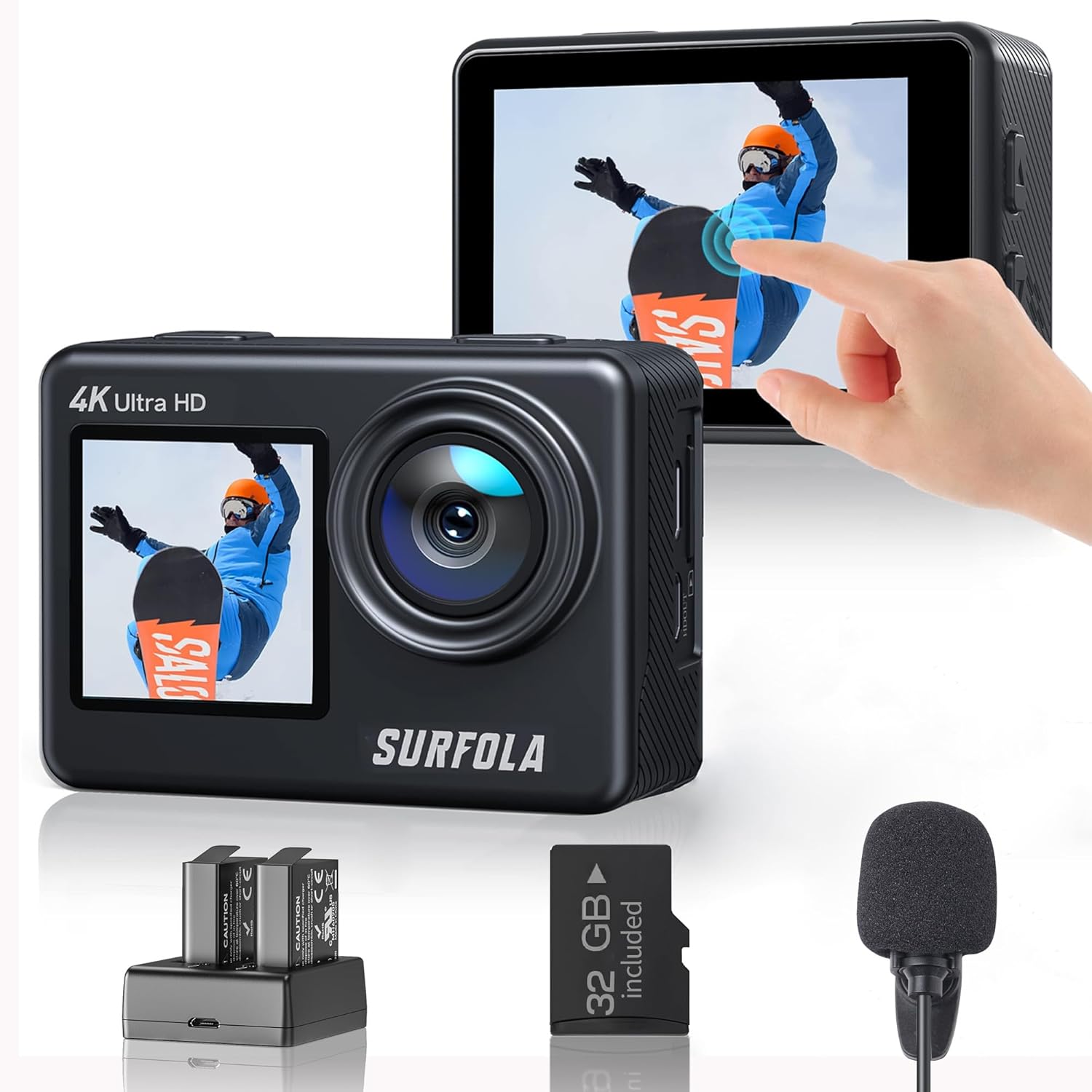
Image: The Surfola SF530Max Action Camera shown with its primary accessories: two batteries, a battery charger, a 32GB microSD card, and a wired external microphone.

Image: A comprehensive set of mounting accessories for the Surfola action camera, including helmet mounts, adhesive pads, and various connectors, laid out on a blue and white surface.
2.2 Componentes da câmera
The SF530Max features a user-friendly design with intuitive controls and displays:
- Front Screen (1.4-inch): Ideal for vlogging and selfies, allowing you to frame yourself perfectly.
- Rear Touch Screen (2.0-inch): A responsive touch panel for easy navigation through menus, settings, and playback.
- Lente: High-quality 7-layer optical glass lens with a SONY CMOS sensor for crisp images and videos.
- Portas: Includes USB and HDMI ports for connectivity, and a dedicated port for the external wired microphone.

Image: The Surfola SF530Max Action Camera demonstrating its dual-screen functionality. The top image shows the front 1.4-inch screen in use for a selfie, while the bottom image shows the rear 2.0-inch touch screen displaying a landscape, being operated by a finger.
3. Configuração
3.1 Instalação e carregamento da bateria
To install the batteries, open the battery compartment cover on the bottom of the camera. Insert the two provided 1050mAh batteries, ensuring correct polarity. To charge, place the batteries into the included dual-slot battery charger and connect it to a USB power source using the USB cable. The indicator lights on the charger will show the charging status. A full charge provides approximately 8 hours of use.

Image: The Surfola SF530Max Action Camera with its battery compartment open, showing a battery being inserted. Next to it, the dual-slot battery charger is shown with two 1050mAh batteries charging, indicating the power capacity.
3.2 Instalação do cartão microSD
Locate the microSD card slot on the side of the camera. Insert the included 32GB U3 microSD card until it clicks into place. It is recommended to format the card within the camera's settings before first use to ensure optimal performance and compatibility.

Image: The Surfola SF530Max Action Camera with a 32GB microSD card floating next to it, indicating that the card is included and ready for immediate use.
3.3 Uso da capa à prova d'água
The included waterproof case allows the SF530Max to be used safely underwater up to a depth of 40 meters. Before each use, ensure the case is clean and free of debris, and that the seals are properly seated. Close the case securely. This case also provides protection against dust, cold, and impact.

Image: A child swimming underwater, with the Surfola SF530Max Action Camera encased in its waterproof housing, demonstrating its capability to record clear footage up to 40 meters deep.
3.4 Wired Microphone Connection
Connect the wired external microphone to the designated port on the camera. This microphone significantly enhances audio quality by increasing sound volume by 100% compared to the built-in microphone and features noise cancellation to filter out low-frequency sounds like wind, air conditioning, or traffic noise. Both the wired and built-in microphones can be used, offering flexibility for various recording scenarios.
3.5 Configuração do controle remoto
The wrist-mounted remote control allows for easy operation of the camera from a distance. Simply power on the camera and the remote; they should pair automatically. This is particularly useful for outdoor sports like skiing, skydiving, bungee jumping, or mountain biking, where direct camera access might be difficult.

Image: A person on a ski slope holding a selfie stick with the Surfola action camera mounted, demonstrating the ease of remote operation using the wrist-mounted remote control for capturing moments during outdoor activities.
4. Operação
4.1 Ligar/Desligar
To power on the camera, press and hold the Power/Mode button. To power off, press and hold the same button again.
4.2 Gravação básica de vídeo e captura de fotos
Use the 2.0-inch rear touch screen to navigate between video and photo modes. In video mode, press the Shutter/OK button to start recording; press again to stop. In photo mode, press the Shutter/OK button to capture a still image. The intuitive touch interface simplifies operation compared to traditional action cameras with multiple buttons.

Image: A hand interacting with the 2.0-inch touch screen of the Surfola SF530Max Action Camera, demonstrating its intuitive control for capturing moments in 4K resolution.
Funcionalidade de tela dupla de 4.3 polegadas
The SF530Max allows seamless switching between the front and rear screens. This feature is particularly useful for vlogging, self-portraits, or any situation where you need to see yourself while recording. The front screen ensures you are always in frame, making it ideal for content creation on platforms like InstagRAM e YouTube.
4.4 Conectividade Wi-Fi
Activate the Wi-Fi function in the camera settings. Download the dedicated app on your smartphone to connect to the camera. This allows you to remotely control the camera, view foo vivotage, and easily transfer photos and videos to your device for instant sharing with family and friends.
5. Modos e configurações
The SF530Max offers a variety of shooting modes and customizable settings to suit different scenarios:
- Gravação em loop: Grava vídeos continuamente, sobrescrevendo os mais antigos. files quando o cartão de memória estiver cheio.
- Espaço de tempo: Captures a series of photos at set intervals and stitches them into a video, ideal for capturing slow-changing scenes.
- Câmera lenta: Records video at a higher frame rate, allowing for smooth slow-motion playback.
- Explosão de tiro: Captures multiple still images in quick succession, perfect for fast-moving subjects.
- Modo carro: Functions as a dashcam, automatically starting recording when the vehicle starts.
- Filtros: Apply creative filters such as Sepia, Black & White, and Negative to your footage.
- Zoom digital 8x: Magnify distant subjects without losing detail, ensuring you don't miss any beautiful scenery during your travels.
- EIS (Estabilização Eletrônica de Imagem): Reduces blur and shakiness in your videos, providing smoother and more stable footage, especialmente durante atividades dinâmicas.
6. Manutenção
Proper maintenance ensures the longevity and optimal performance of your Surfola SF530Max Action Camera:
- Limpeza da lente e da tela: Use a soft, lint-free cloth specifically designed for optics to clean the camera lens and screens. Avoid abrasive materials or harsh chemicals.
- Cuidados com a bateria: Store batteries in a cool, dry place. Avoid fully discharging batteries for extended periods. If not using the camera for a long time, charge the batteries to about 50% before storage.
- Cuidados com a capa à prova d'água: After using the waterproof case in saltwater, rinse it thoroughly with fresh water and allow it to air dry. Inspect the O-ring seal regularly for any signs of damage or debris.
- Atualizações de firmware: Periodically check the official Surfola website for any available firmware updates. Updates can improve performance, add new features, or fix bugs. Follow the instructions provided with the update carefully.
7. Solução De Problemas
If you encounter issues with your Surfola SF530Max, refer to the following common problems and solutions:
| Problema | Possível causa | Solução |
|---|---|---|
| A câmera não liga. | Bateria fraca ou descarregada. | Carregue as baterias completamente. Certifique-se de que as baterias estejam inseridas corretamente. |
| A gravação para inesperadamente. | SD card full or slow write speed. | Exclua desnecessários files or format the SD card. Use a high-speed (U3) microSD card. |
| Qualidade de áudio ruim. | External microphone not connected properly or damaged. | Ensure the wired microphone is securely plugged in. Test with the built-in microphone. |
| Problemas de conexão Wi-Fi. | Configurações incorretas de Wi-Fi ou interferência. | Ensure Wi-Fi is enabled on the camera and your smartphone. Restart both devices. Check for app updates. |
| Image/Video blurry or distorted. | Lens dirty or protective film still on. EIS not enabled or insufficient for extreme motion. | Clean the lens. Ensure EIS is enabled in settings. For very shaky footage, consider additional stabilization equipment. |
8. Especificações
Detailed technical specifications for the Surfola SF530Max Action Camera:
| Recurso | Especificação |
|---|---|
| Marca | Surfola |
| Número do modelo | SF530Max |
| Resolução de captura de vídeo | 4K (60fps) |
| Resolução de imagem estática | Até 24MP |
| Tecnologia de sensor fotográfico | CMOS (SONY Sensor) |
| Lente | 7-layer Optical Glass Lens |
| Zoom Ratio (Optical) | 8X |
| Distância focal (teleobjetiva) | 2.1 milímetros |
| Aperture (Wide Angle) | 2.5 pés |
| Estabilização de Imagem | Digital (EIS) |
| Mostrar | 2.0-inch Touch Panel (Rear), 1.4-inch Front Screen |
| Profundidade impermeável | 40m (with included waterproof case) |
| Tipo de Bateria | 1050mAh Rechargeable (x2 included) |
| Mídia de armazenamento | Micro SD Card (32GB U3 included, supports up to 128GB) |
| Formato de captura de vídeo | MP4 |
| Formatos de áudio suportados | AAC, MP3 |
| Tecnologia de Conectividade | HDMI, Wi-Fi, Ethernet (via adapter, not included) |
| Características especiais | Remote Control, Lightweight Design |
| Dimensões do produto | 6 x 3 x 4.2 cm; 570 g |
9. Garantia e Suporte
Surfola is committed to providing high-quality products and excellent customer service.
9.1 Garantia do Produto
Your Surfola SF530Max Action Camera comes with a standard 12-month product warranty from the date of purchase. In case of any malfunction or defect, Surfola will provide an exchange or refund as deemed appropriate. For official Surfola website members, the warranty is automatically extended to 24 months.

Image: A graphic illustrating Surfola's warranty policy, indicating a 12-month product warranty plus an additional 12-month extended warranty for registered members, ensuring peace of mind after purchase.
9.2 Suporte ao cliente
For any questions regarding your product, delivery, or technical assistance, please feel free to contact Surfola customer support. Our team is dedicated to assisting you with any inquiries you may have.
Note: All Surfola group products (sports cameras, projectors, portable players, etc.) comply with the technical standards stipulated by the Electrical Appliance and Material Safety Act (PSE).


