Introdução
Thank you for choosing the TECNO TRUE 1 TWS Earbuds. This manual provides essential information on setting up, operating, maintaining, and troubleshooting your new earbuds. Please read it carefully before use to ensure optimal performance and longevity of your device.
The TECNO TRUE 1 TWS Earbuds are designed to deliver a superior audio experience with advanced features such as 42 dB Active Noise Cancellation, deep bass from 10mm drivers, and a long-lasting battery life of up to 45 hours with the charging case. They are also IPX5 rated for sweat, water, and dust resistance, making them suitable for various activities.
O que está na caixa
- TECNO TRUE 1 TWS Earbuds (Left and Right)
- Estojo de carregamento
- Manual do usuário
- Ear Tip Pairs (various sizes)
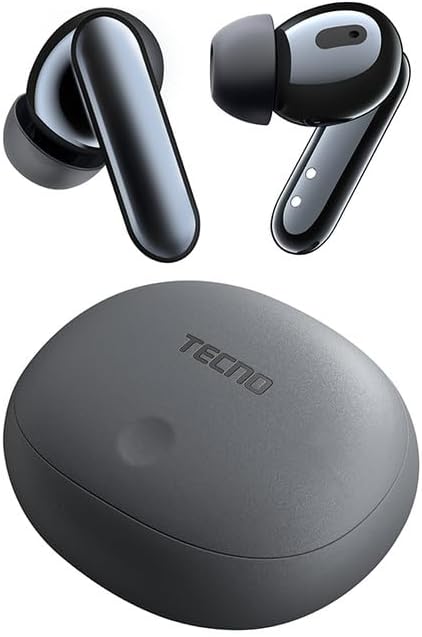
Image: The TECNO TRUE 1 TWS Earbuds and their charging case, showcasing o design elegante.
Configurar
1. Carregando os fones de ouvido e o estojo
Antes da primeira utilização, carregue totalmente os fones de ouvido e o estojo de carregamento. Conecte o estojo de carregamento a uma fonte de energia usando um cabo USB compatível. As luzes indicadoras no estojo mostrarão o status do carregamento.

Image: The TECNO TRUE 1 TWS charging case connected to a charging cable, illustrating the charging process.
Place the earbuds into the charging case. They will begin charging automatically. A full charge provides up to 6 hours of playback for the earbuds, and the case extends total playtime to 45 hours.
2. Emparelhamento com seu dispositivo
- Certifique-se de que os fones de ouvido estejam dentro do estojo de carregamento e que a tampa do estojo esteja aberta.
- No seu dispositivo (smartphone, tablet, etc.), ative o Bluetooth.
- Procurar new Bluetooth devices. The earbuds should appear as "TECNO TRUE 1" or similar.
- Select the earbuds to pair. A voice prompt will confirm successful connection.
The earbuds support pop-up connection for compatible devices, simplifying the pairing process.
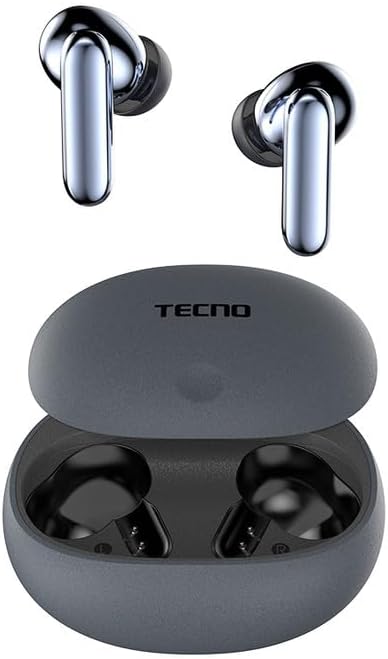
Image: The TECNO TRUE 1 TWS Earbuds resting inside their open charging case, ready for pairing.
3. Usando os fones de ouvido
Gently insert the earbuds into your ear canals. Rotate them slightly to find a comfortable and secure fit. Choose the appropriate ear tip size from the included pairs for optimal sound quality and noise cancellation.
Instruções de operação
Controles de toque
The TECNO TRUE 1 TWS Earbuds feature intuitive touch controls on each earbud. The specific functions may vary slightly based on your device and app, but common controls include:
- Toque único: Reproduzir/Pausar música, Atender/Encerrar chamada.
- Toque duas vezes (esquerda/direita): Next/Previous track (may vary).
- Toque Triplo: Ative o Voice Assistant.
- Pressão longa: Alterne entre o Cancelamento Ativo de Ruído (ANC) e o Modo Transparência.
Cancelamento Ativo de Ruído (ANC) e Modo Transparência
The earbuds offer 42 dB Active Noise Cancellation to minimize ambient sounds, providing a more immersive listening experience. Transparency Mode allows you to hear your surroundings without removing the earbuds, which is useful for awareness in busy environments.
To switch between ANC and Transparency Mode, perform a long press on either earbud's touch sensor.
Manutenção
Limpeza
A limpeza regular ajuda a manter a qualidade do som e a higiene:
- Use um pano macio, seco e sem fiapos para limpar os fones de ouvido e o estojo de carregamento.
- Para limpar as pontas auriculares, retire-as dos fones de ouvido e limpe-as com um produto de limpeza.amp cloth and mild soap if necessary. Rinse thoroughly and dry completely before reattaching.
- Remova cuidadosamente qualquer cera ou resíduo da tela do fone de ouvido usando uma escova pequena e macia ou um cotonete.
Armazenar
Quando não estiverem em uso, guarde sempre os fones de ouvido no estojo de carregamento para protegê-los contra poeira, danos e para mantê-los carregados.
Resistência à água (IPX5)
The earbuds are IPX5 rated, meaning they are resistant to sweat and splashes of water. They are not designed for submersion in water. Avoid exposing them to heavy rain or showering with them. Ensure the earbuds and charging port are dry before charging to prevent damage.
Solução de problemas
| Problema | Possível causa | Solução |
|---|---|---|
| Fones de ouvido não emparelham | Low battery, out of range, not in pairing mode, previously paired to another device. | Charge earbuds and case. Ensure Bluetooth is on and within range. Place earbuds in case, close and reopen lid to re-enter pairing mode. Disconnect from other devices. |
| Sem som ou volume baixo | Volume too low, earbuds not properly seated, debris in earbud mesh, connection issue. | Increase volume on device and earbuds. Adjust earbud fit. Clean earbud mesh. Re-pair earbuds. |
| Problemas de carregamento | Cable or adapter fault, dirty charging contacts, case battery empty. | Try a different cable/adapter. Clean charging contacts on earbuds and case. Charge the charging case. |
| O ANC não está funcionando de forma eficaz. | Improper fit, ear tips not sealed, very high-frequency noise. | Adjust earbud fit and try different ear tip sizes for a better seal. ANC is most effective on low-frequency sounds. |
Especificações
| Recurso | Detalhe |
|---|---|
| Marca | Tecno |
| Nome do modelo | 10309821 |
| Cor | Cinza |
| Material | Plástico |
| Colocação da orelha | Intra-auricular |
| Fator de forma | Intra-auricular |
| Isolamento de ruído | Active Noise Cancellation (42 dB) |
| Tecnologia de Conectividade | Sem fio |
| Tecnologia de comunicação sem fio | Bluetooth |
| Dispositivos compatíveis | Smartphones, tablets, laptops, computadores de mesa, alto-falantes inteligentes |
| Usos específicos do produto | Travel, Sport |
| Nível de resistência à água | IPX5 (resistente à água) |
| Faixa de frequência | 20 a 20,000 Hz |
| Tempo de reprodução | Até 6 horas (fones de ouvido), até 45 horas (com estojo de carregamento) |
| Componentes incluídos | Charging Case, User Manual, Ear Tip Pairs |
Garantia e Suporte
For warranty information and customer support, please refer to the official TECNO webConsulte o site ou entre em contato com o revendedor local. Guarde o comprovante de compra para eventuais solicitações de garantia.
Para obter mais assistência, você pode visitar o Página do produto na Amazon.com.be or contact TECNO customer service directly.


