1. Introdução
Welcome to the user manual for your MESWAO MES-B3 15.6-inch Android 13 Tablet. This document provides essential information for setting up, operating, maintaining, and troubleshooting your device. The MES-B3 tablet features a large 15.6-inch IPS HD display, an Octa-Core processor, 6GB RAM, 128GB internal storage (expandable), and a 12000mAh battery, designed for a versatile user experience.

Figure 1: MESWAO MES-B3 Tablet Overview
2. Informações de segurança
Please read all safety instructions carefully before using your tablet to prevent injury or damage to the device. Keep this manual for future reference.
- Segurança da bateria: Do not attempt to replace the battery yourself. Do not expose the tablet to extreme temperatures, direct sunlight, or fire. Do not puncture, drop, or disassemble the battery.
- Água e Umidade: This tablet is not waterproof. Avoid exposing it to water, rain, or high humidity.
- Limpeza: Use um pano macio e seco para limpar o tablet. Não use produtos de limpeza líquidos ou aerossóis.
- Manuseio: Evite deixar o tablet cair ou submetê-lo a impactos fortes.
- Proteção auditiva: When using headphones, set the volume to a moderate level to avoid hearing damage.
3. Conteúdo da embalagem
Verifique se todos os itens estão presentes na embalagem:
- MESWAO MES-B3 15.6-inch Android 13 Tablet
- Adaptador de energia
- Cabo USB-C
- Manual do usuário (este documento)
4. Dispositivo acabadoview
Familiarize yourself with the physical components of your MESWAO MES-B3 tablet.

Figure 2: Buttons and Connectors
- Botão de energia: Press and hold to turn the tablet on or off. Press briefly to turn the screen on or off.
- Botões de volume: Ajuste o volume do áudio.
- Câmera frontal: Para videochamadas e selfies (5MP).
- Rear Camera with Flashlight: Para tirar fotos e gravar vídeos (13MP).
- Porta Type-C: Para carregar o tablet e conectá-lo a um computador.
- Slot para cartão TF: Insert a MicroSD card to expand storage.
- Auto-falantes estéreo: Fornecer saída de áudio.
5. Configuração
5.1 Carregando o tablet
Before first use, fully charge your tablet. Connect the USB-C cable to the tablet's Type-C port and the other end to the power adapter. Plug the adapter into a wall outlet. The battery indicator on the screen will show charging status.
5.2 Ligar/Desligar
- Para ligar: Press and hold the Power Button until the MESWAO logo appears.
- Para desligar: Press and hold the Power Button until the power options appear, then select 'Power off'.
- Reiniciar: Press and hold the Power Button until the power options appear, then select 'Restart'.
5.3 Assistente de Configuração Inicial
Ao ser ligado pela primeira vez, o tablet irá guiá-lo através de um processo de configuração inicial:
- Selecione seu idioma preferido.
- Conecte-se a uma rede Wi-Fi.
- Faça login com sua conta do Google ou crie uma nova.
- Review e aceitar os termos e condições.
- Configure o bloqueio de tela (PIN, padrão, senha).
5.4 Inserindo um cartão microSD
To expand the tablet's storage, you can insert a MicroSD card (up to 256GB, as per some product information, though 1TB is also mentioned in images, please verify with product packaging for exact maximum). Locate the TF card slot on the side of the tablet. Gently insert the MicroSD card with the gold contacts facing down until it clicks into place.

Figure 3: Storage Expansion with MicroSD Card
6. Operando seu tablet
6.1 Navegação básica
The MESWAO MES-B3 runs on Android 13, offering an intuitive touch interface.
- Tocar: Selecione um item ou abra um aplicativo.
- Deslize: Navegue pelas telas, role listas ou descarte notificações.
- Ampliar com os dedos: Ampliar ou reduzir o conteúdo na tela.
- Tela inicial: Access your apps and widgets. Swipe down from the top for notifications and quick settings.
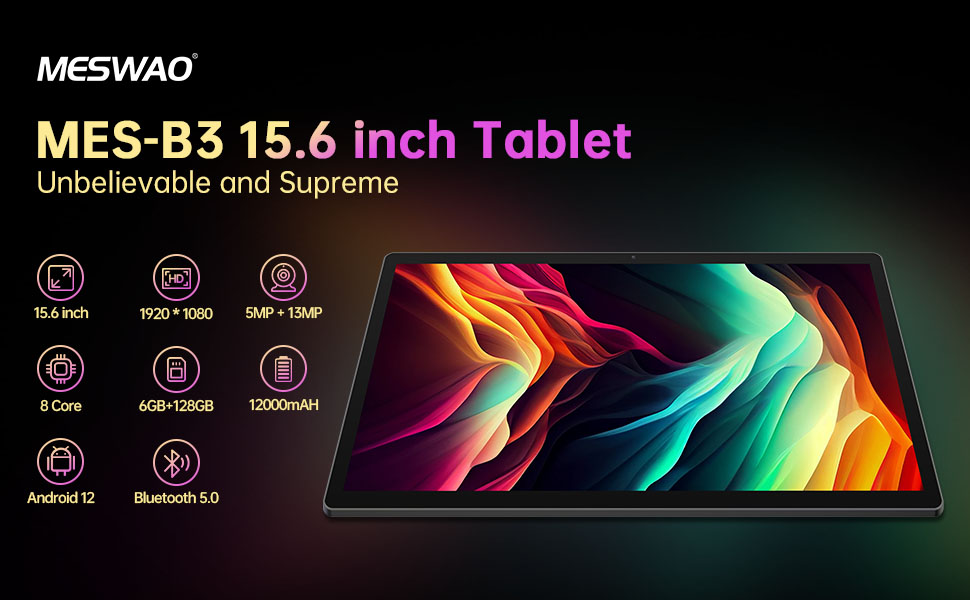
Figura 4: Interface do Android 13
6.2 Conexão Wi-Fi
- Vá para Configurações > Rede e internet > Internet.
- Ligue o Wi-Fi.
- Selecione a rede desejada na lista e digite a senha, se solicitado.
6.3 Emparelhamento Bluetooth
The tablet supports Bluetooth 5.0 for connecting wireless accessories.
- Vá para Configurações > Dispositivos conectados > Preferências de conexão > Bluetooth.
- Ligue o Bluetooth.
- Certifique-se de que seu dispositivo Bluetooth esteja no modo de emparelhamento.
- Select your device from the 'Available devices' list and follow on-screen prompts to pair.
6.4 Gerenciamento de aplicativos
- Instalar aplicativos: Abra o aplicativo Google Play Store, pesquise o aplicativo desejado e toque em "Instalar".
- Desinstalar aplicativos: Press and hold an app icon on the home screen or app drawer, then drag it to 'Uninstall' or select 'App info' and choose 'Uninstall'.
- Gerenciar aplicativos: Vá para Configurações > Aplicativos para view, force stop, or clear data for installed applications.
6.5 Configurações de exibição
Personalize o seu viewexperiência de aprendizagem:
- Vá para Configurações > Mostrar.
- Ajustar Nível de brilho.
- Definir Tempo limite da tela (sleep duration).
- Mudar Tamanho da fonte e Tamanho da tela.
- Habilitar Tema escuro for reduced eye strain.
6.6 Gerenciamento de bateria
The MES-B3 features a 12000mAh battery for extended use.

Figura 5: Vida útil prolongada da bateria
- Vá para Configurações > Bateria para view usage and optimize settings.
- Habilitar Economizador de bateria mode to extend battery life when needed.
- Feche os aplicativos não utilizados em execução em segundo plano.
- Reduza o brilho da tela.
7. Manutenção
7.1 Limpeza
- Use um pano macio e sem fiapos para limpar delicadamente a tela e a carcaça.
- Para manchas persistentes, aplique ligeiramenteampLimpe o pano com água ou um produto de limpeza específico para telas eletrônicas.
- Avoid using abrasive materials, alcohol, or chemical solvents.
7.2 Armazenamento
- Guarde o comprimido em local fresco e seco, longe da luz solar direta e de temperaturas extremas.
- If storing for an extended period, ensure the battery is charged to about 50% to prolong its lifespan.
7.3 Atualizações de Software
Verifique regularmente se há atualizações de software disponíveis para garantir o melhor desempenho e segurança.
- Vá para Configurações > Sistema > Atualização do sistema.
- The tablet will check for available updates. Follow the on-screen instructions to download and install any updates.
8. Solução De Problemas
Aqui estão soluções para problemas comuns que você pode encontrar:
| Problema | Solução |
|---|---|
| O tablet não liga. | Certifique-se de que o tablet esteja carregado. Conecte-o ao carregador por pelo menos 30 minutos e, em seguida, tente ligá-lo novamente. |
| Problemas de conexão Wi-Fi | Restart your Wi-Fi router and the tablet. Go to Settings > Network & internet > Internet, forget the network, and reconnect. |
| Desempenho lento | Close unused apps. Clear cache for frequently used apps (Settings > Apps > [App Name] > Storage & cache > Clear cache). Restart the tablet. |
| A bateria descarrega rapidamente | Reduce screen brightness. Disable Wi-Fi/Bluetooth when not in use. Close background apps. Check battery usage in Settings > Battery to identify power-hungry apps. |
| Aplicativos travando ou congelando | Force stop the app (Settings > Apps > [App Name] > Force stop). Clear the app's cache. If the problem persists, uninstall and reinstall the app. |
9. Especificações
Detailed technical specifications for the MESWAO MES-B3 tablet:

Figura 6: Principais características e especificações
| Recurso | Especificação |
|---|---|
| Marca | MESWAO |
| Número do modelo | MES-B3 |
| Sistema operacional | Androide 13 |
| Processador | MediaTek Octa-Core (MTK6789) |
| BATER | 6 GB |
| Armazenamento interno | 128 GB |
| Armazenamento expansível | Up to 256 GB (via TF/MicroSD card) |
| Tamanho da tela | 15.6 polegadas |
| Resolução da tela | 1920 x 1080 pixels (IPS HD) |
| Câmera Frontal | 5 MP |
| Câmera Traseira | 13 MP |
| Capacidade da bateria | 12000 mAh |
| Duração da bateria | Approximately 10 hours (usage dependent) |
| Conectividade | Bluetooth 5.0, Wi-Fi (802.11ac, 2.4G/5G) |
| Portos | USB Type-C, TF Card Slot |
| Cor | Cinza |
| Dimensões (C x L x A) | 36.85 x 22.25 x 0.93 cm |
| Peso | 1.1 quilos |
10. Garantia e Suporte
Your MESWAO MES-B3 tablet is covered by a standard manufacturer's warranty. Please refer to the warranty card included in your package for specific terms and conditions, including warranty duration and coverage details.
For technical support, troubleshooting assistance beyond this manual, or warranty claims, please contact MESWAO customer service through the retailer where you purchased the product or visit the official MESWAO website para informações de contato.


