1. Produto acabadoview
The VTech ES2050 is a DECT cordless phone designed for home and office use, featuring an integrated digital answering machine, call blocking capabilities, and enhanced audio functions. This manual provides detailed instructions for setting up, operating, and maintaining your phone.

The VTech ES2050 DECT Cordless Phone with its base unit, showcasing the handset's backlit display and keypad, and the base unit's answering machine controls.

The VTech ES2050 DECT Cordless Phone positioned in a contemporary living space, highlighting its sleek design and integration into a home environment.

Illustration of the VTech ES2050's Nuisance Call Blocker feature, showing how it helps prevent unwanted calls from ringing through. Up to 100 numbers can be blacklisted.

The VTech ES2050's Digital Answering System, capable of recording up to 30 minutes of messages, with a digital message counter on the base unit.

Depiction of the VTech ES2050's easy one-touch features, including Mute/Alarm, adjustable ring volume and melodies, and a high-quality handsfree speakerphone.

Visual representation of the VTech ES2050's Volume Booster function, which amplifies incoming sounds for enhanced clarity and loudness, beneficial for hearing-impaired users.

The VTech ES2050 handset with its backlit display and keypad illuminated, demonstrating improved visibility in low-light conditions.

A composite image illustrating key features: 100 name and number phonebook, calling numbers displayed with 20 call list records, 10 last number redial, and up to 18 hours talk time / 250 hours standby time.
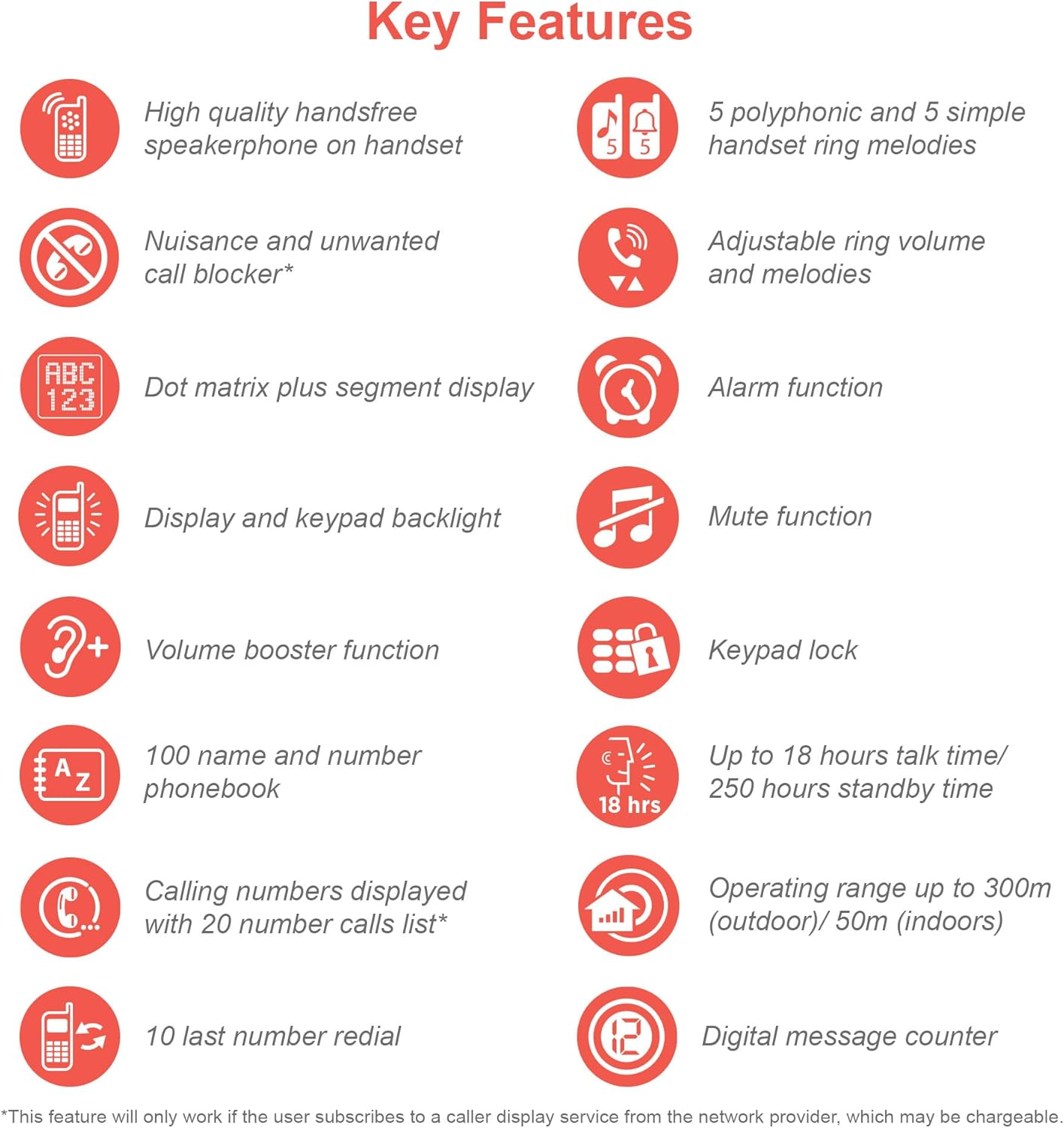
An infographic summarizing the VTech ES2050's key features, including speakerphone, call blocker, polyphonic ringtones, alarm, mute, keypad lock, volume booster, phonebook, call list, redial, talk time, operating range, and digital message counter.
Principais características:
- Secretária eletrônica digital: 30 minutes recording time.
- Bloqueador de chamadas indesejadas: Block up to 100 blacklisted numbers.
- Volume Booster: Amplifies incoming sounds for enhanced clarity.
- Bateria de longa duração: Up to 18 hours talk time / 250 hours standby time.
- Visor e teclado retroiluminados: Fácil viewna penumbra.
- Viva-voz: High-quality speakerphone on handset.
- Da agenda telefônica: 100 name and number capacity.
- Discagem rápida: 3 speed dial numbers.
- Modo Eco: For reduced power consumption.
- Caller ID / Call Waiting: Stores 20 records.
- Remarcação: 10 last number redial.
- Função de alarme: Integrated alarm.
- Função Silenciar: For privacy during calls.
- Bloqueio do teclado: Prevents accidental dialing.
2. O que está na caixa
Antes de começar, certifique-se de que todos os componentes estejam presentes:
- 1 Unidade Base
- 1 monofone sem fio
- 1 Charger (for handset)
- 1 Battery Pack (2 AAA batteries included)
- Cabo de linha telefônica
- Guia de Início Rápido (consulte este manual para obter detalhes completos)
3. Guia de configuração
3.1. Instalação e carregamento da bateria
- Locate the battery compartment cover on the back of the handset. Slide it open.
- Conecte firmemente o plugue da bateria na entrada dentro do compartimento.
- Place the 2 AAA batteries (included) into the compartment, ensuring correct polarity (+ and -).
- Recoloque a tampa do compartimento da bateria.
- Place the handset on the base unit or charger. The charging indicator light on the handset should illuminate.
- Deixe o aparelho carregar por pelo menos 16 horas antes do primeiro uso para garantir a capacidade total da bateria.
3.2. Conectando a unidade base
- Conecte uma extremidade do cabo da linha telefônica à entrada TEL LINE na parte traseira da unidade base.
- Conecte a outra extremidade do cabo da linha telefônica à tomada telefônica de parede.
- Conecte a extremidade menor do adaptador de energia à entrada POWER na parte traseira da unidade base.
- Conecte a extremidade maior do adaptador de energia a uma tomada elétrica padrão.
- Ensure all cables are securely connected and routed to prevent tripping hazards.
3.3. Configuração inicial (data e hora)
After the handset is charged, you will need to set the date and time. Follow the on-screen prompts on the handset display. If prompted multiple times, ensure each step is confirmed before proceeding.
- Pressione o MENU / OK botão.
- Navegar para Data e hora usando as teclas de seta.
- Imprensa MENU / OK para selecionar.
- Digite a data e a hora atuais usando o teclado.
- Imprensa MENU / OK para salvar.
4. Instruções de operação
4.1. Fazendo e recebendo chamadas
- Fazer uma ligação: Pegue o fone ou pressione o FALAR button. Dial the number.
- Para receber uma chamada: Quando o telefone tocar, atenda ou pressione o botão. FALAR botão.
- Para encerrar uma chamada: Place the handset back on the base unit/charger or press the FIM botão.
4.2. Utilizando o viva-voz
Durante uma chamada, pressione o PALESTRANTE button to activate the handsfree speakerphone. Press it again to switch back to the handset earpiece.
4.3. Secretária eletrônica digital
- Mensagens de reprodução: Na unidade de base, pressione REPRODUZIR/PARAR.
- Excluindo mensagens: Durante a reprodução da mensagem, pressione EXCLUIR na unidade básica.
- Gravação de mensagem de saída (OGM): Refer to the handset menu for OGM recording options.
4.4. Nuisance Call Blocker
This feature allows you to block unwanted calls. You can add numbers to a blacklist.
- To Block a Number from Call History: Access the Call History, select the number, and choose the "Block" option.
- To Manually Add a Number to Blacklist: Navigate to the Call Blocker menu in the handset settings and add the number.
- The phone can store up to 100 blacklisted numbers.
4.5. Volume Booster
Para amplify the incoming sound during a call, press the IMPULSIONAR button (often marked with a speaker icon or "+") on the handset. Press it again to deactivate.
4.6. Agenda telefônica e discagem rápida
- Adicionando contatos: Access the Phonebook menu, select "Add New Entry", and enter the name and number.
- Discagem a partir da agenda telefônica: Pressione o LISTA TELEFÔNICA button, scroll to the desired contact, and press FALAR.
- Discagem rápida: Assign frequently called numbers to speed dial keys (e.g., 1, 2, 3). Refer to the handset menu for speed dial setup.
4.7. Modo ECO
The phone automatically enters ECO mode when the handset is close to the base unit, reducing power consumption and transmission power. This mode is indicated by an ECO icon on the display.
5. Manutenção
- Limpeza: Limpe o telefone e a unidade base com um pano macio e seco.amp pano. Não use produtos de limpeza abrasivos ou solventes.
- Cuidados com a bateria: For optimal battery life, avoid overcharging by leaving the handset off the charger for extended periods once fully charged. If the phone will not be used for a long time, remove the batteries.
- Localização: Coloque a unidade base em um local central, longe de outros dispositivos eletrônicos que possam causar interferência.
6. Solução De Problemas
If you experience issues with your VTech ES2050 phone, try the following solutions:
| Problema | Solução possível |
|---|---|
| Sem sinal de linha / Não consigo fazer nem receber chamadas. |
|
| Qualidade de som ruim / Estática. |
|
| A secretária eletrônica não está gravando mensagens. |
|
| Handset display is blank or unresponsive. |
|
| Difficulty with menu navigation or settings. |
|
7. Especificações
| Recurso | Detalhe |
|---|---|
| Número do modelo | ES2050 |
| Tipo de telefone | DECT sem fio |
| Tipo de sistema de atendimento | Digital |
| Capacidade de Gravação | 30 minutos |
| Tempo de conversação telefônica | Até 18 horas |
| Tempo de espera do telefone | Até 250 horas |
| Baterias | 2 pilhas AAA (incluídas) |
| Fonte de energia | Alimentado por bateria |
| Tipo de discador | Teclado único |
| Dispositivos compatíveis | Standard Landline Telephone Networks |
| Cor | Preto |
| Fabricante | VTech |
| País de origem | China |
8. Garantia e Suporte
Para informações sobre garantia e suporte técnico, consulte o site oficial da VTech. webou entre em contato com o serviço de atendimento ao cliente da VTech. Guarde o comprovante de compra como prova de aquisição.
Fabricante: VTech
For the most up-to-date support resources, visit the VTech support page or refer to the contact information provided with your product packaging.


