Introdução
This manual provides essential information for the safe and efficient operation of your WUPRO 110" Black Crystal Electric Retractable Projector Screen. Please read all instructions carefully before setup and use. Keep this manual for future reference.
Aviso de segurança: To avoid purchasing an incompatible projection screen and potential inconveniences, please carefully check the specifications table before purchasing. Given the large size of the screen, it is essential to measure the dimensions of your room, lift, and corridors to ensure that the selected size fits your space.
Conteúdo da embalagem
Verifique se todos os itens listados abaixo estão incluídos em seu pacote:
- Electric Retractable Projector Screen (110" Black Crystal)
- Controle remoto
- Cabo de energia
- USB Trigger (for projector synchronization)
- Manual de instruções
Especificações
| Recurso | Detalhe |
|---|---|
| Marca | WUPRO-EUA |
| Modelo | 110" Black Crystal |
| Tipo de tela | Electric Retractable, Fixed Frame Anti-Light Projection |
| Material da tela | Black Crystal (ALR) |
| Contrast Gain | 1.5 |
| Suporte de Resolução | Full HD 4K/8K |
| Rejeição de luz ambiente | ≥ 70% (suitable for normal light) |
| Suporte para 3D | Sim |
| Recommended Lumens | 1800 ANSI or higher (for normal/telephoto projectors) |
| Compatibilidade | Standard/Long Throw Projectors (NOT for ultra-short-throw projectors) |
| Conectividade | USB (for sync trigger) |
| Opções de controle | RF remote, Manual control, Synchronizer (optional), IR remote (optional) |
| Peso do item | 59.4 libras |
| Resolução de exibição | 3840 x 2160 |
Configurar
1. Desembalagem e montagem dos componentesview
Carefully unbox the projector screen and identify all components listed in the 'Package Contents' section.
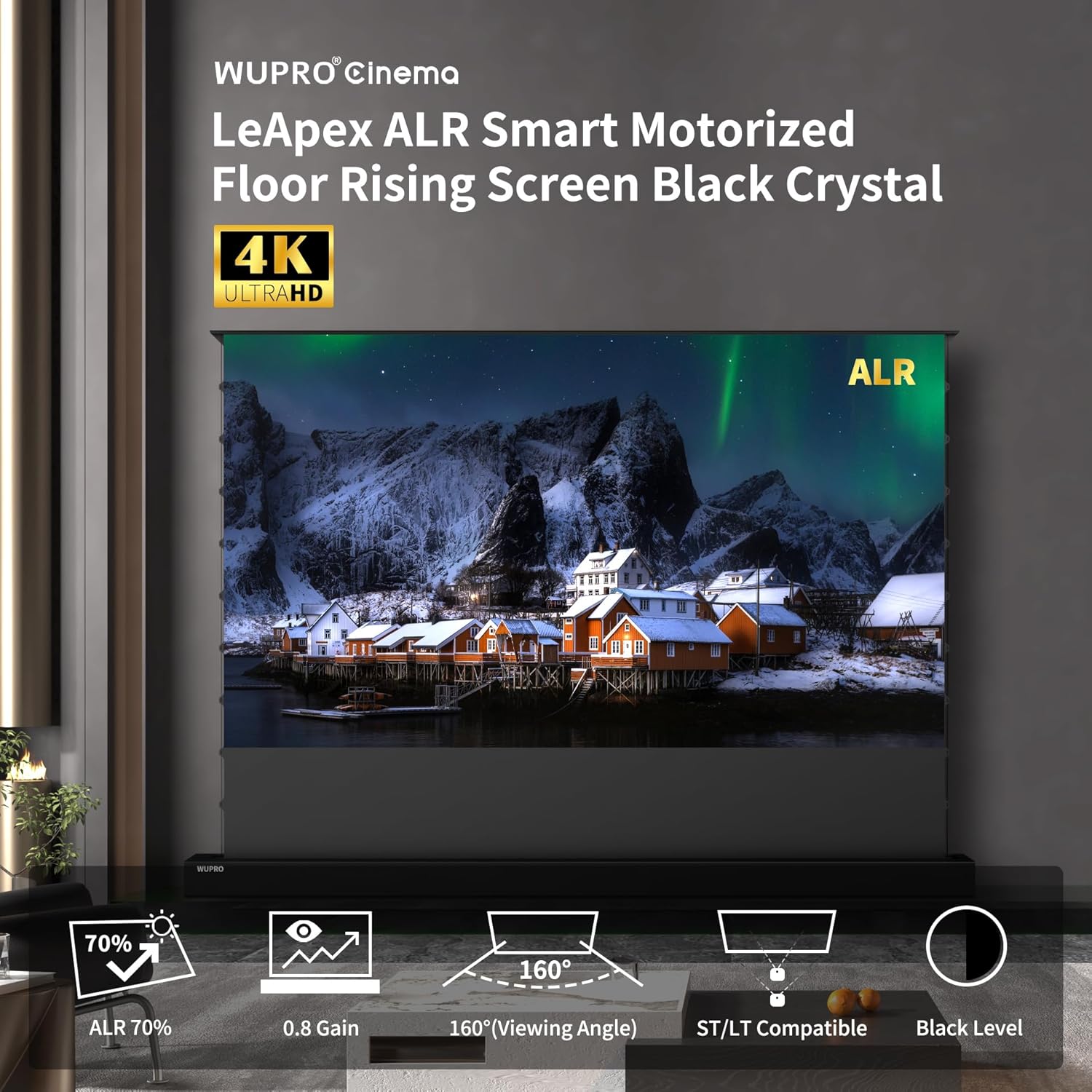
Image: Unboxing the WUPRO projector screen, showing the main unit, remote, power cable, and USB trigger.
2. Métodos de instalação
The WUPRO projector screen offers versatile installation options to suit various environments:
- Colocação no chão: The screen can be placed directly on the floor with its base retracted.
- Montagem de mesa: The base can be extended and secured with screws onto a table surface.
- Montagem na parede: Install wall mount accessories (not included) to secure the screen to a wall.
- Instalação do gabinete: The screen can be inserted into a compatible TV cabinet slot.
No drilling or complex mounting is required for floor or tabletop placement, allowing for effortless setup.

Image: The WUPRO projector screen in its open and closed status, highlighting the ease of setup without drilling or mounting.
Video: "2025model-Electric Projector Screen Installation Video" by MIGO SCREEN. This video demonstrates the installation process for an electric projector screen.
3. Physical Dimensions and Placement
Refer to the parameters table and dimension image to ensure proper placement and compatibility with your room and projector.
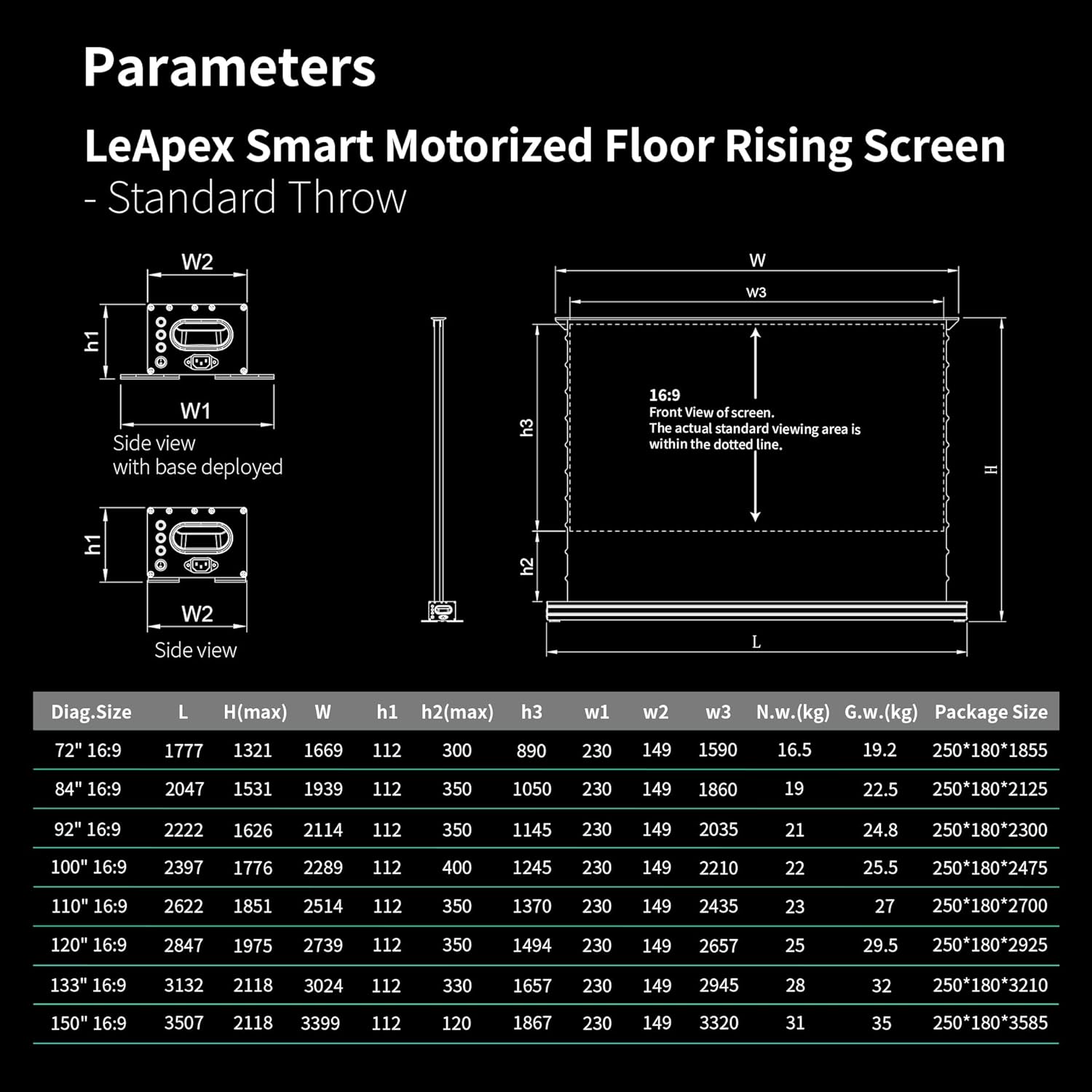
Image: A table detailing the parameters for the LeApex Smart Motorized Floor Rising Screen - Standard Throw, including diagonal size, length, height, and package dimensions.

Image: A diagram showing the overall dimensions of the WUPRO projector screen, with height and width measurements.
Instruções de operação
1. Opções de controle
Your WUPRO projector screen offers multiple ways to control its operation:
- Controle remoto RF: Use the provided RF remote for convenient wireless control.
- Controle manual: Buttons on the screen unit allow for direct control.
- USB Trigger: Connect the USB trigger to your projector for synchronized screen deployment and retraction.
- Controle Remoto IR: An optional IR remote may be available for specific control systems.

Image: Icons representing various control options for the WUPRO projector screen, including Tuya Smart, Google Assistant, Amazon Alexa, App Control, Remote Control, Voice Control, and Control Panel.
Video: "2023 Wupro New Electric Retractable Projector Screen Fixed Frame Anti-Light Projection" by WUPRO. This video showcases the screen's automatic operation and synchronization with a projector.
2. Automatic Leveling System
The screen features an automatic leveling system. When it reaches its maximum height, it will descend approximately 5 cm, which is normal behavior.
3. Height Memory Function
Effortlessly set and recall your preferred viewing height using the convenient height memory function on the remote control.

Image: A person using a remote control to adjust the height of the WUPRO projector screen, illustrating the height memory function.
4. Adjustable Upper and Lower Limits
You can easily set the screen's upper and lower limits to suit any setup using the remote control. Follow these steps for setting the upper limit:
- Long-press the Pause button until you hear a beep.
- Press Up + Pause together; the beep will stop.
- Press Up repeatedly to reach the desired upper position.
- Press Up + Pause together once more until you hear a beep, then release.
- Feito.
The lower limit can be set following the same steps, using the Down button instead of Up.

Image: A diagram illustrating how to set the adjustable upper and lower limits of the screen using the remote control.
Manutenção
To maintain the quality and longevity of your WUPRO projector screen, follow these guidelines:
- Limpeza: Use um pano macio e macioamp cloth to gently wipe the screen surface. Avoid harsh chemicals or abrasive materials.
- Vincos: Some screens may develop creases during use. This is normal and usually reduces gradually, although in some cases they may not disappear completely.
- Armazenar: When not in use, ensure the screen is fully retracted into its casing to protect the screen material.
Solução de problemas
If you encounter issues with your projector screen, refer to the following common problems and solutions:
- Screen not retracting/deploying: Check power connection and remote control batteries. Ensure no obstructions are blocking the screen's path.
- Problemas com a qualidade da imagem: Ensure your projector is compatible with the screen type (Standard/Long Throw only, NOT Ultra-Short-Throw). Adjust projector settings for optimal brightness and contrast.
- Creases on screen: As noted in maintenance, minor creases can occur and typically reduce over time. If severe, ensure proper storage and handling.
- Incompatible projector: This screen is designed for Standard/Long Throw projectors. It is NOT compatible with Ultra-Short-Throw projectors. Using an incompatible projector may result in poor image quality or damage.
Garantia e Suporte
Your WUPRO projector screen comes with a standard return policy. For any questions or support, please contact WUPRO customer service.
- Política de devolução: Devoluções fáceis em 30 dias.
- Planos de proteção: Optional 3-Year Protection Plan and Complete Protect plans are available for purchase separately.
- Suporte ao cliente: Contact WUPRO directly for assistance.


