1. Introdução
This manual provides detailed instructions for the installation, configuration, and operation of your SODOLA 24 Port 2.5G Smart Web Managed Switch. This device is designed to enhance network performance with its multi-gigabit capabilities, offering 24x 2.5G Base-T ports and 2x 10G SFP+ ports for high-speed data transfer and flexible network expansion. Please read this manual thoroughly before using the product to ensure proper setup and functionality.
2. Informações de segurança
- Certifique-se de que o dispositivo esteja instalado em uma área bem ventilada para evitar superaquecimento.
- Utilize somente o adaptador de energia fornecido.
- Não exponha o interruptor à água ou umidade excessiva.
- Evite colocar objetos pesados sobre o interruptor.
- Somente para uso interno.
3. Conteúdo da embalagem
Verifique se todos os itens estão presentes no seu pacote:
- 1 x SODOLA 24 Port 2.5G Smart Web Switch gerenciado
- 1 x Manual do Usuário
- 1 x Cabo de alimentação
4. Produto acabadoview
The SODOLA 24 Port 2.5G Smart Web Managed Switch is designed for robust network environments, offering a combination of high-speed Ethernet and SFP+ ports.

Figura 4.1: geral view of the SODOLA 24 Port 2.5G Smart Web Interruptor Gerenciado.
4.1 Painel Frontal
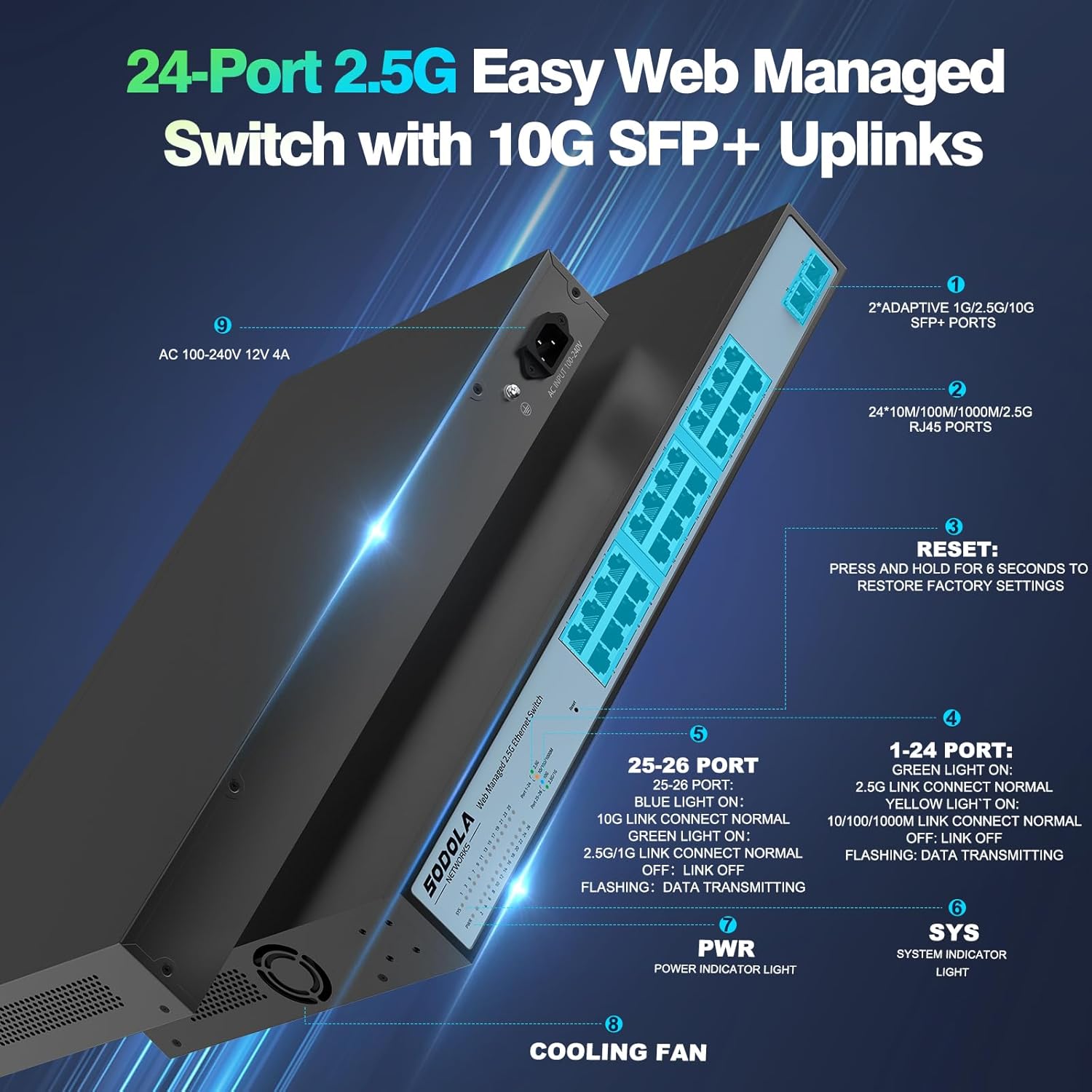
Figura 4.2: Detalhado view of the switch's front and rear panels, highlighting ports and indicators.
- 24 x 100/1000/2500M RJ45 Ports: These ports support 2.5 Gigabit Ethernet connectivity. Each port has Link/Act LEDs: Green for 2.5G Link/Act, Yellow for 10/100/1000M Link/Act, and flashing for data transmission.
- 2 portas SFP+ de 10G: These ports provide high-speed 10 Gigabit fiber connectivity for uplinks or connecting to high-bandwidth devices.
- Botão de reinicialização: Pressione e segure por 6 segundos para restaurar as configurações de fábrica.
- LED PWR: Luz indicadora de energia.
- LED SISTEMA: System indicator light.
4.2 Painel traseiro
- Entrada de energia CA 100-240V: Connect the provided power cord here.
- Ventilador de resfriamento: The switch features a bilateral cooling design without a built-in fan for silent operation.
5. Instruções de configuração
5.1 Instalação Física
- Montagem: The switch supports 1U rack mounting. Ensure adequate space for ventilation. It can also be placed on a desktop.
- Conectar dispositivos: Connect your network devices (computers, servers, NAS, WiFi 6 APs) to the RJ45 ports using Cat5e, Cat6, or Cat6a Ethernet cables.
- Conectar Uplink: Use the 10G SFP+ ports for high-speed connections to your router or other core network devices.
- Ligar: Connect the power cord to the switch and then to a power outlet. The PWR LED should illuminate.
5.2 Inicial Web Acesso de gerenciamento
Para acessar o web interface de gerenciamento:
- Configuração do endereço IP: Before logging in, ensure your computer's IP address is set within the same IPv4 subnet as the switch's default IP address (e.g., if the switch is 192.168.2.1, set your computer to 192.168.2.X, where X is not 1).
- Abrir Web Navegador: Use um compatível web browser (e.g., IE 9.0+, Chrome 23.0+, Firefox 20.0+).
- Digite o endereço IP: Type the default IP address of the switch (192.168.2.1) into the browser's address bar and press Enter.
- Conecte-se: Insira as credenciais padrão:
Nome de usuário: administrador
Senha: administrador
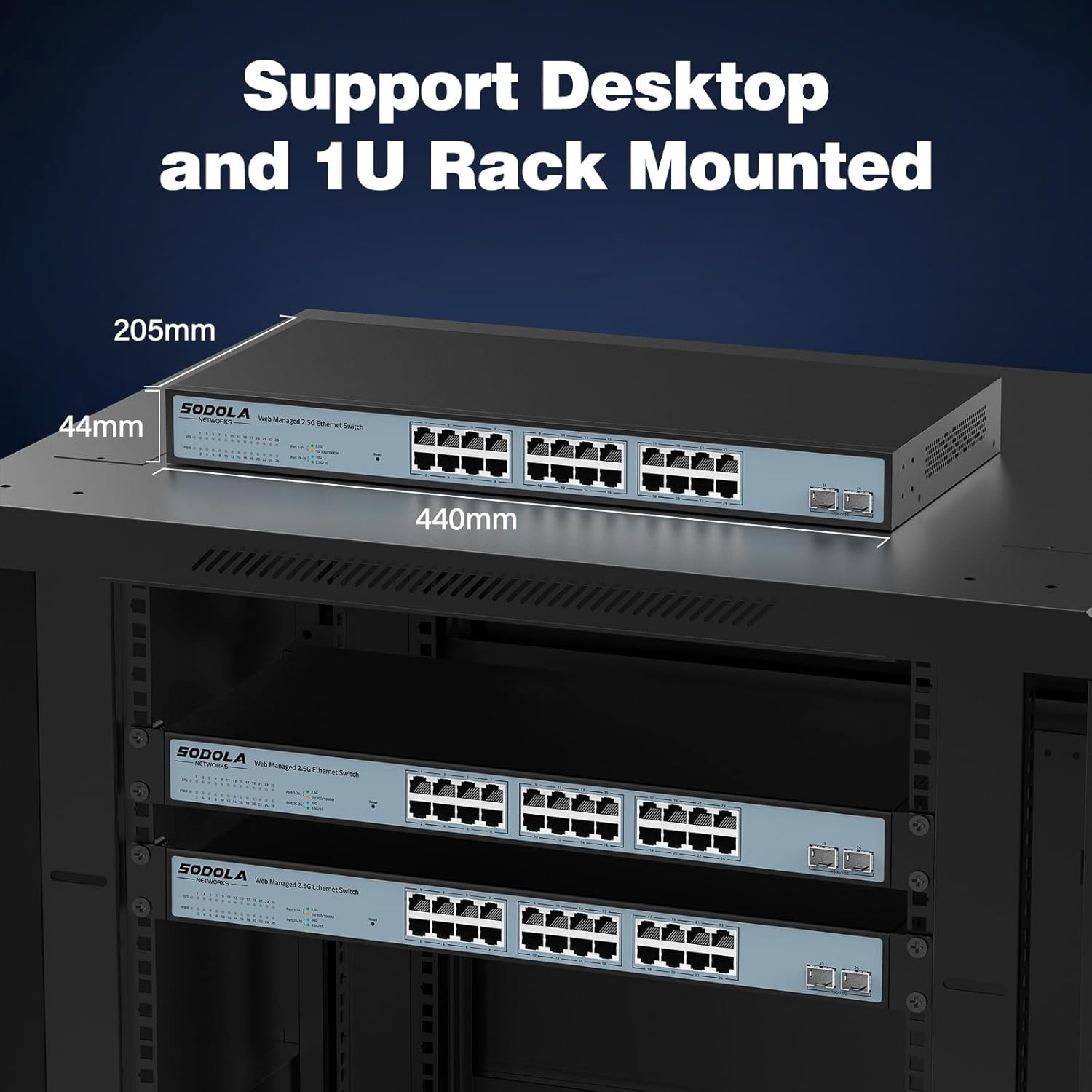
Figura 5.1: Captura de tela do web management interface login page.
6. Operating Instructions (Web Gerenciamento)
O web management interface allows for configuration, monitoring, and troubleshooting without requiring command-line interface (CLI) expertise. Key features include:

Figure 6.1: Visual representation of the switch's basic management features.
- Agregação de links (LACP): Combine várias ligações físicas em uma única ligação lógica para aumentar a largura de banda e a redundância.
- VLAN (Rede Local Virtual): Segment your network into smaller, isolated broadcast domains for improved security and performance.
- QoS (Qualidade de Serviço): Prioritize network traffic to ensure critical applications receive sufficient bandwidth.
- Multitransmissão: Efficiently deliver data to multiple recipients simultaneously.
- Gerenciamento de endereços MAC: Control access to the network based on MAC addresses.
- RSTP (Rapid Spanning Tree Protocol): Prevent network loops and ensure network stability.
- Quadros Jumbo: Support larger Ethernet frames for increased data throughput.
- Detecção de loop: Identify and mitigate network loops.
- ERPS (Ethernet Ring Protection Switching): Provide fast protection and recovery switching in Ethernet ring topologies.
6.1 Salvando a configuração
After making any changes in the web interface, navegue até Tools > Save to ensure your settings are permanently stored and not lost upon power cycling the device.
7. Manutenção
- Limpeza: Use a dry, soft cloth to clean the exterior of the switch. Do not use liquid or aerosol cleaners.
- Ventilação: Ensure the ventilation openings on the sides of the switch are not obstructed. The fanless design relies on natural convection for cooling.
- Atualizações de firmware: Verifique periodicamente as instruções do fabricante. webO site verifica se há atualizações de firmware disponíveis para garantir o melhor desempenho e segurança.
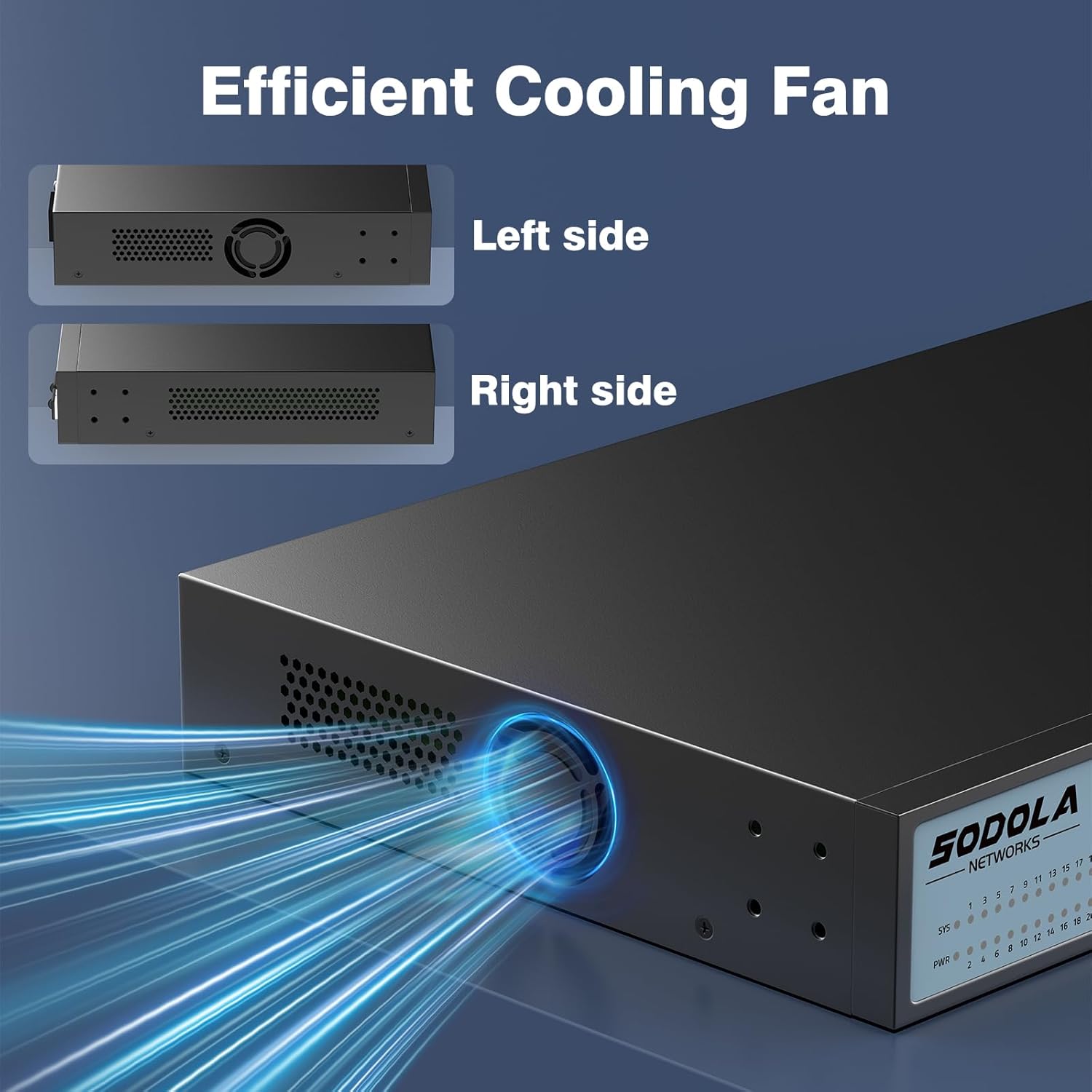
Figure 7.1: Illustration of the switch's efficient fanless cooling design.
8. Solução De Problemas
8.1 Problemas e soluções comuns
- Sem energia: Check if the power cord is securely connected to both the switch and the power outlet. Verify the power outlet is functional.
- Sem ligação/atividade na porta: Ensure the Ethernet cable is properly connected to both the switch port and the connected device. Verify the connected device is powered on and functioning correctly. Try a different cable or port.
- Velocidade de rede lenta: Ensure all connected devices and cables support 2.5G or 10G speeds for optimal performance. Check for network congestion or duplex mismatches in the web interface.
- Não é possível acessar Web Interface:
- Verify your computer's IP address is in the same subnet as the switch's IP.
- Confirm the switch's IP address (default is 192.168.2.1).
- Garantir o web browser is compatible.
- If the management interface becomes unresponsive, a power cycle may resolve the issue.
- Network Instability: Ensure Spanning Tree Protocol (STP) or Rapid Spanning Tree Protocol (RSTP) is enabled to prevent network loops, especially in complex network topologies.
- Configuration Loss: Always remember to save your configuration changes via Tools > Save no web interface.
8.2 Redefinição de fábrica
If you encounter persistent issues or forget your login credentials, you can restore the switch to its factory default settings by pressing and holding the Reiniciar botão por 6 segundos.
9. Especificações
| Marca | Sodola |
| Número do modelo | 24X2.5G+2X10G SFP+(Managed) |
| Número de portas | 26 (24 portas RJ45 de 2.5G, 2 portas SFP+ de 10G) |
| Tipo de interface | RJ45, SFP+ |
| Taxa de transferência de dados | 2500 Megabytes Per Second (2.5Gbps per RJ45 port) |
| Capacidade de comutação | 160 Gbps |
| Taxa de encaminhamento de pacotes | 119.04 Mpps |
| Tamanho da tabela de endereços MAC | 16 mil |
| Package Cache | 12Mbit |
| Material da caixa | Metal |
| Cor | Preto |
| Dimensões do produto | 17.32 x 8.07 x 1.73 polegadas |
| Peso do item | 5.89 libras |
| Dispositivos compatíveis | Laptop, Server |
10. Garantia e Suporte
SODOLA provides a replacement for any quality issue within one year of purchase. For technical support or warranty claims, please refer to your purchase documentation or the retailer where the product was acquired. Please note that official SODOLA website, phone number, or email for direct support may not be readily available.


