Introdução
This manual provides essential information for setting up, operating, and maintaining your HP 17.3 Inch Laptop. Designed for productivity and entertainment, this laptop features a 13th Gen Intel Core i7 processor, a vibrant 17.3-inch HD+ touchscreen, 36GB RAM, and a 1TB SSD, running on Windows 11 Pro.
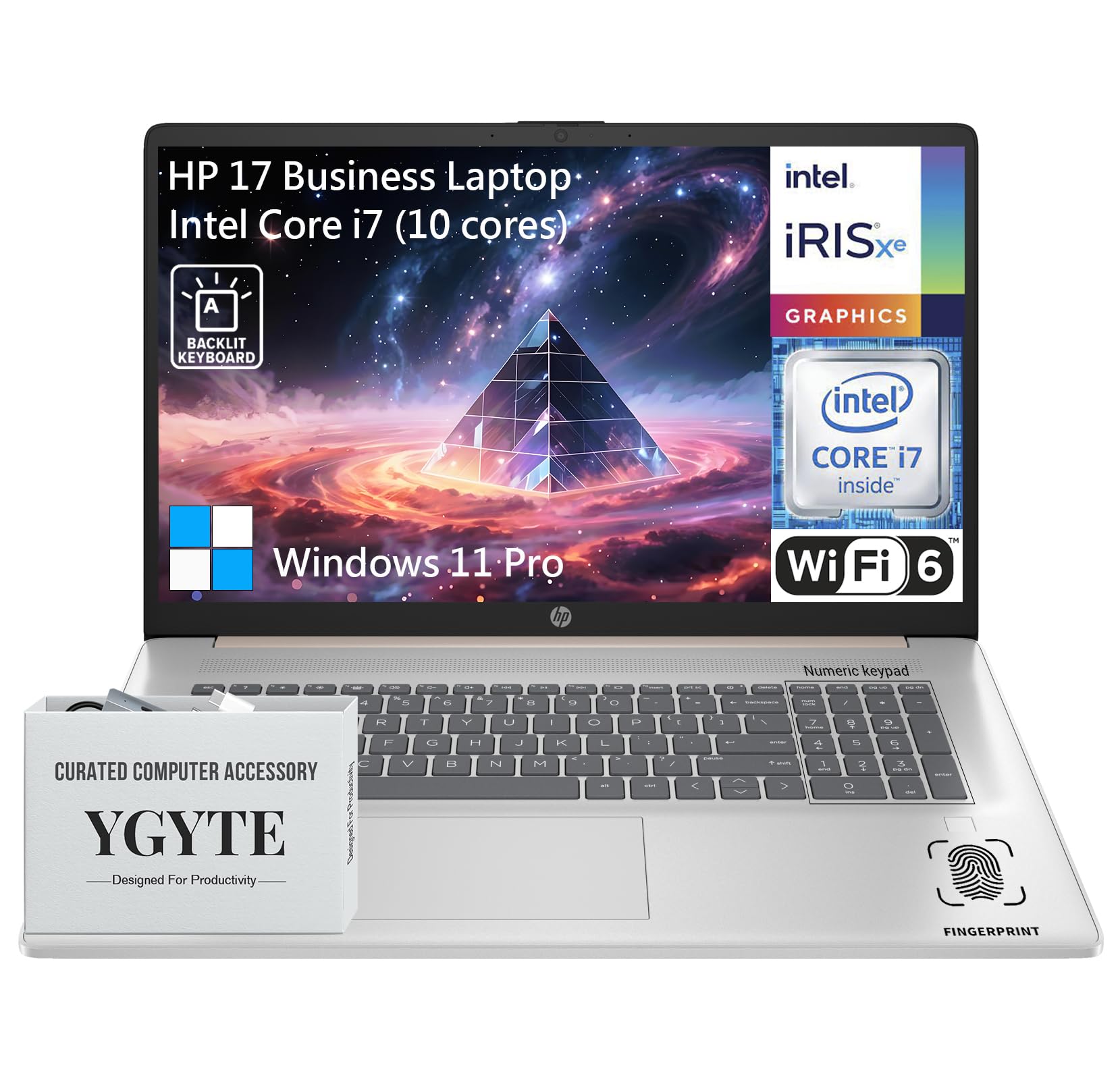
Um general view of the HP 17.3 Inch Laptop, showcasing its design and large display.

Sobreview of the HP 17.3 Inch Laptop, highlighting its core components: Intel Core i7 processor, Intel Iris Xe Graphics, and Windows 11 Pro operating system.
O que está na caixa
Upon unpacking your HP 17.3 Inch Laptop, ensure all the following items are present:
- HP 17.3 Inch Laptop
- Adaptador de energia CA
- Documentação (Guia de Início Rápido, Informações sobre a Garantia)
Configurar
1. Inicialização e carregamento
- Conecte o adaptador de energia: Plug the AC power adapter into the laptop's power port and then into a wall outlet.
- Carregue a bateria: Deixe o laptop carregando por pelo menos 30 minutos antes do primeiro uso, ou até que o indicador de bateria mostre carga suficiente.
- Ligar: Abra a tampa do laptop e pressione o botão liga/desliga, geralmente localizado no teclado.
2. Configuração do Windows 11 Pro
Follow the on-screen instructions to complete the Windows 11 Pro setup process. This includes:
- Selecione sua região e layout de teclado.
- Conectando-se a uma rede Wi-Fi.
- Entrar na sessão ou criar uma conta Microsoft.
- Configurar um PIN ou senha.
- Configurando as definições de privacidade.
3. Conexão de rede
Your laptop supports Wi-Fi 6 for fast wireless connectivity. During Windows setup, you will be prompted to connect to a Wi-Fi network. If you need to connect later:
- Clique no ícone do Wi-Fi na barra de tarefas.
- Selecione a rede desejada na lista.
- Insira a chave de segurança da rede (senha) se solicitado.
- Clique Conectar.
Operando seu laptop
Mostrar
The HP 17.3 Inch Laptop features a 17.3-inch HD+ (1600 x 900) BrightView Touchscreen. This display offers crisp details and vibrant colors, providing ampo espaço para multitarefa e imersão viewexperiências.

The 17.3-inch HD+ touchscreen display offers a resolution of 1600x900 pixels with BrightView technology for enhanced visual clarity.
Desempenho
Your laptop is equipped with a 13th Gen Intel Core i7 processor (10 cores, 12 threads, up to 5.0GHz) and Intel Iris Xe Graphics. This configuration provides robust performance for demanding applications, multitasking, and immersive entertainment.

Details of the Intel Core i7-1355U processor, including its 10 cores, 12 threads, 12MB cache, and a maximum turbo frequency of 5.0 GHz, designed for fast response and processing speed.
Storage and Multitasking
With 36GB of high-bandwidth DDR4 RAM, the laptop allows for seamless switching between applications. The 1TB high-speed SSD provides rapid boot times, quick application loading, and amparmazenamento para o seu files.

The laptop features 36GB DDR4 RAM for swift multitasking efficiency, a 1TB SSD for fast access and ample storage, and Wi-Fi 6 for faster wireless connectivity.
Conectividade
The HP 17.3 Inch Laptop offers a range of ports and wireless technologies to keep you connected:
- USB-C: SuperSpeed USB-C (5Gbps signaling rate) for data transfer and power delivery.
- USB-A: Two SuperSpeed USB-A ports (5Gbps signaling rate).
- HDMI 1.4b: Para conexão a monitores externos.
- Wi-Fi 6: Advanced wireless networking for faster and more reliable internet.
- Bluetooth: Para conectar periféricos sem fio.
- Conector combinado para fone de ouvido/microfone: Para entrada e saída de áudio.
- Pino inteligente CA: Para conexão do adaptador de energia.

Lado profissionalfile of the HP 17.3 Inch Laptop illustrating the placement of USB Type-A, HDMI 1.4b, headphone/microphone combo, USB Type-C, and AC smart pin ports, along with its dimensions and weight.
Audio and Camera
Engage in clear video calls and enjoy immersive audio with the integrated features:
- HP Wide Vision 720p HD Camera: Provides clear visuals for video conferencing.
- Dual Array Digital Microphones: Ensures your voice is captured clearly.
- B&O Dual Speakers: Delivers rich, authentic audio tuned by Bang & Olufsen.

The HP 17.3 Inch Laptop features an HP True Vision 720p HD camera, dual array digital microphones, and B&O dual speakers for enhanced communication and audio experience.
Teclado e Touchpad
The full-size backlit keyboard includes a 10-key number pad for comfortable and efficient typing. The larger trackpad provides precise navigation.
Leitor de impressão digital
For enhanced security and quick login, utilize the integrated fingerprint reader. You can set this up through Windows Hello in your laptop's settings.
Manutenção
Proper maintenance ensures the longevity and optimal performance of your HP laptop:
- Limpeza: Use um pano macio e sem fiapos para limpar a tela e a parte externa. Para manchas persistentes, dampLimpe o pano com água ou um produto de limpeza para telas. Evite produtos químicos agressivos.
- Atualizações de software: Regularly check for and install Windows updates and HP driver updates to ensure system stability and security.
- Cuidados com a bateria: To prolong battery life, avoid extreme temperatures. If storing the laptop for an extended period, charge the battery to about 50-70%.
- Ventilação: Certifique-se de que as aberturas de ventilação do laptop não estejam obstruídas para evitar superaquecimento. Use o laptop em uma superfície plana e rígida.
- Backup de dados: Faça backups regulares de dados importantes em um disco rígido externo ou armazenamento em nuvem para evitar a perda de dados.
Solução de problemas
Aqui estão alguns problemas comuns e suas soluções:
| Emitir | Solução |
|---|---|
| O laptop não liga. | Certifique-se de que o adaptador de energia esteja firmemente conectado tanto ao laptop quanto a uma tomada elétrica funcional. Verifique se a tomada está funcionando. Tente usar outra tomada. |
| A tela está em branco ou preta. | Press the power button to ensure the laptop is on. Connect an external monitor to check if the display output is working. Adjust screen brightness using function keys. |
| Problemas de conexão Wi-Fi. | Ensure Wi-Fi is enabled in Windows settings. Restart your router and modem. Check for updated Wi-Fi drivers. Try connecting to a different network if available. |
| Desempenho lento. | Close unnecessary applications. Check for background processes consuming high resources (Task Manager). Ensure Windows and drivers are up to date. Run a disk cleanup. |
| Keyboard or touchpad not responding. | Restart the laptop. Check for any physical obstructions. Ensure drivers are updated. |
Especificações
| Recurso | Detalhe |
|---|---|
| Marca | HP |
| Nome do modelo | Essential 17 (HP 17) |
| Tamanho da tela | 17.3 polegadas |
| Resolução da tela | 1600 x 900 pixels (HD+) |
| Processador | 13th Gen Intel Core i7 (10 Cores, up to 5.0 GHz) |
| BATER | 36 GB DDR4 |
| Armazenar | 1 TB SSD (PCIe x 16 interface) |
| Coprocessador gráfico | Gráficos Intel Iris Xe (Integrados) |
| Sistema operacional | Windows 11 Pro |
| Tipo sem fio | 802.11ax (Wi-Fi 6) |
| Conectividade | USB-C (5Gbps), 2x USB-A (5Gbps), HDMI 1.4b, Headphone/Microphone Combo |
| Características especiais | Backlit Keyboard, Fingerprint Reader, Touchscreen |
| Peso do item | 4.61 libras |
| Dimensões do produto (CxLxA) | 15.78 x 10.15 x 0.78 polegadas |
| Cor | Ouro rosa |
| Baterias | 1 bateria de íon de lítio (incluída) |
Garantia e Suporte
Your HP 17.3 Inch Laptop comes with a standard manufacturer's warranty. For detailed warranty terms and conditions, please refer to the documentation included with your product or visit the official HP support website.
For technical assistance, driver downloads, or further support, please visit the official HP support website:
You may also find helpful resources and community forums on the HP website.