Introdução
This manual provides detailed instructions for the installation, operation, and maintenance of your ANNKE 5MP Wireless Camera System. This system features a 10-channel 5MP Wireless NVR and four 5MP weatherproof IP cameras, designed for reliable surveillance. Please read this manual thoroughly before using the product to ensure proper setup and functionality.
Conteúdo da embalagem
Before installation, verify that all components are present in your package:
- 1x ANNKE 10-Channel 5MP Wireless NVR
- 4x ANNKE 5MP Weatherproof IP Cameras
- Adaptadores de energia para NVR e câmeras
- Mouse USB
- Cabo Ethernet
- Kits de parafusos de montagem
- Guia de início rápido
Note: Hard Disk Drive (HDD) is not included and must be purchased separately if local storage is desired.
Configuração e instalação
Follow these steps for initial setup and installation of your ANNKE Wireless Camera System.
1. Conexão inicial
The system is designed for true plug-and-play installation. The cameras and NVR are pre-paired at the factory.
- Conecte o NVR a uma tomada elétrica usando o adaptador de energia fornecido.
- Conecte cada câmera a uma tomada elétrica usando seu respectivo adaptador de energia.
- Wait for the cameras to power on and establish a wireless connection with the NVR. This may take a few minutes.

Figure 1: True Plug and Play Installation Steps
This image illustrates the two primary methods for setting up your ANNKE wireless camera system. The first method involves connecting the cameras and NVR to power, then using the ANNKE Sight app for live viewing. The second method involves connecting the cameras and NVR to power, then linking the NVR directly to a TV or monitor for live viewindo.
2. NVR Display Connection
Para view the camera feeds directly from the NVR:
- Connect the NVR to a TV or monitor using an HDMI or VGA cable (not included).
- Connect the USB mouse to the NVR's USB port for navigation.
- Follow the on-screen prompts for initial NVR configuration, including setting a password.
3. Mobile App Setup (ANNKE Sight)
For remote monitoring and advanced features, download the ANNKE Sight app:
- Download the "ANNKE Sight" app from your smartphone's app store (iOS App Store or Google Play Store).
- Registre uma conta e faça o login.
- Tap the '+' icon to add your device. Scan the QR code on the NVR or manually enter the device ID.
- Follow the in-app instructions to complete the device addition.

Figure 2: Cascading Connection and Auto Pairing
This image illustrates how the ANNKE wireless cameras automatically pair with the NVR and can utilize a cascading connection to extend wireless range within a home environment.
4. Posicionamento da câmera
Consider the following when placing your cameras:
- Linha de visão: Ensure minimal obstructions between cameras and the NVR for optimal wireless signal.
- Área de cobertura: Position cameras to cover critical entry points and areas of interest.
- Acesso de energia: Each camera requires a power outlet.
- Proteção contra intempéries: While IP67 weatherproof, avoid direct exposure to extreme conditions if possible to prolong lifespan.
Instruções de operação
This section details the various functions and features of your ANNKE Wireless Camera System.
1. Viver View e reprodução
- Monitor NVR: Use the connected monitor and USB mouse to navigate the NVR interface for live viewing, recording playback, and system settings.
- Aplicativo móvel: Open the ANNKE Sight app on your smartphone or tablet to view live feeds from all connected cameras. You can also access recorded footage.

Figure 3: Remote Monitoring Across Devices
This image demonstrates the system's capability for remote control and monitoring, allowing users to view live camera feeds on various devices such as laptops, desktop monitors, smartphones, and tablets.
2. Gravação e armazenamento
The system supports continuous recording and motion-triggered recording.
- Armazenamento local: Install a compatible HDD (up to 10TB) into the NVR for local video storage. Configure recording schedules and modes via the NVR interface.
- Armazenamento em nuvem: Optional cloud storage services may be available through the ANNKE Sight app for off-site backup (subscription may be required).
- Compressão de vídeo H.264+: The system utilizes advanced H.264+ compression to optimize storage space while maintaining video quality.
3. Detecção de movimento e alertas
The system features smart motion detection to alert you to activity.
- Detecção Inteligente de Humanos: The advanced AI can detect and distinguish human movement, reducing false alarms from pets or swaying branches.
- Customizable Motion Areas: Defina áreas específicas dentro da câmera. view where motion detection should be active. This helps focus alerts on critical zones.
- Alertas instantâneos: Receive instant app notifications and email alerts with screenshots when motion is detected.

Figure 4: Smart Human Detection Alerts
This image highlights the system's smart human detection feature, which identifies human movement and sends immediate notifications to your email and the ANNKE Sight app, helping to focus on relevant security events.

Figure 5: Customizable Motion Detection Area
This image demonstrates the ability to customize specific zones for motion detection, allowing users to define areas of interest and reduce unnecessary alerts from non-critical zones.
4. Áudio bidirecional
Each camera includes a built-in microphone and speaker for two-way communication.
- Ouça: Hear audio from the camera's location via the NVR or mobile app.
- Speak Out: Use the app's intercom function to speak through the camera's speaker, allowing you to communicate with visitors or deter intruders.

Figura 6: Comunicação de áudio bidirecional
This image illustrates the two-way audio feature, showing how a user can communicate with someone at their door, such as a delivery person, directly through the camera system via the mobile app.
5. Visão noturna
The cameras provide clear surveillance even in low-light conditions.
- Visão noturna de 10 metros (100 pés): Equipped with Smart IR technology, cameras can see up to 100 feet in complete darkness.
- Modo Dia/Noite: The system automatically switches between day (color) and night (black and white infrared) modes based on ambient light.
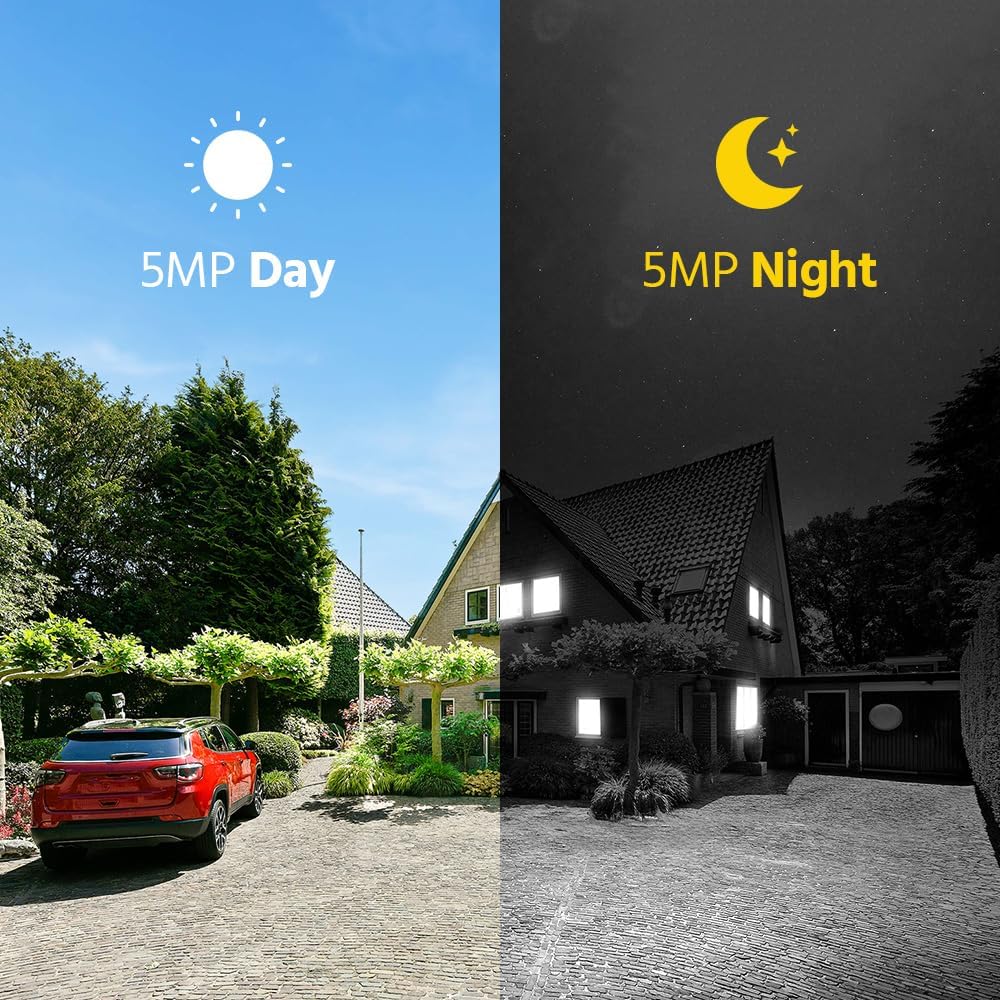
Figura 7: Comparação da visão diurna e noturna
This image visually compares the camera's performance during the day with full color and at night with infrared vision, demonstrating its ability to provide clear 5MP surveillance around the clock.
Manutenção
A manutenção regular garante o desempenho ideal e a longevidade do seu sistema de segurança.
- Limpeza da lente da câmera: Limpe periodicamente as lentes da câmera com um pano macio e seco.amp Use um pano para remover poeira, sujeira ou manchas que possam afetar a nitidez da imagem. Não use produtos químicos agressivos.
- Proteção contra intempéries: Although cameras are IP67 weatherproof, ensure they are securely mounted and protected from direct, prolonged exposure to extreme weather conditions where possible.
- Atualizações de firmware: Check the ANNKE website or app regularly for firmware updates for your NVR and cameras. Keeping firmware updated ensures the latest features and security patches.
- Verificação da fonte de alimentação: Ensure all power adapters and cables are securely connected and free from damage.
- NVR Ventilation: Certifique-se de que o NVR esteja localizado em uma área bem ventilada para evitar superaquecimento. Não bloqueie as aberturas de ventilação.
Solução de problemas
Consulte esta seção para obter soluções para problemas comuns.
- Sem exibição de vídeo:
- Check if the NVR and cameras are powered on.
- Verify HDMI/VGA cable connection between NVR and monitor.
- Ensure cameras are within wireless range of the NVR.
- Reinicie o NVR e as câmeras.
- Cameras Not Connecting to NVR:
- Confirm cameras are powered.
- Check for physical obstructions or excessive distance between cameras and NVR.
- If previously paired, try re-pairing cameras to the NVR (refer to NVR manual for specific steps).
- Sem alertas de detecção de movimento:
- Ensure motion detection is enabled in NVR/app settings.
- Verify motion detection areas are correctly configured.
- Check alert notification settings in the ANNKE Sight app.
- Ensure the NVR has internet access for email alerts.
- Má qualidade de imagem:
- Limpe as lentes da câmera.
- Verifique se há fontes de luz fortes posicionadas diretamente em frente à câmera.
- Ensure stable power supply to cameras.
- Problemas de conectividade de aplicativos:
- Certifique-se de que seu smartphone tenha uma conexão de internet estável.
- Verifique se o NVR está conectado à internet.
- Update the ANNKE Sight app to the latest version.
- Restart your router, NVR, and smartphone.
Especificações
Key technical specifications for the ANNKE 5MP Wireless Camera System.
| Recurso | Especificação |
|---|---|
| Marca | ANNE |
| Tecnologia de Conectividade | Sem fio |
| Resolução de captura de vídeo | 5MP (1920p, 1944p) |
| Características especiais | Motion Sensor, Night Vision, Waterproof (IP67), Wireless, Two-Way Audio |
| Número de canais | 10 |
| Fonte de energia | Elétrico com fio |
| Alcance de visão noturna | 100 pés |
| Taxa de quadros | 30 qps |
| Modo de gravação | Detecção contínua de movimento |
| Entrada de vídeo | HDMI, VGA |
| Classificação à prova de intempéries | IP67 |
| Compressão de vídeo | H.264 + |
| Capacidade máxima do disco rígido | 10 TB (HDD não incluído) |
Garantia e Suporte
For warranty information, technical support, or service inquiries, please contact ANNKE customer support.
- Suporte online: Visit the official ANNKE website for FAQs, troubleshooting guides, and support resources.
- Informações de contato: Refer to the contact details provided in your product packaging or on the ANNKE official webSite para assistência direta.
- Registo de produto: Register your product online to receive updates and streamline warranty claims.


