1. Introdução
This manual provides comprehensive instructions for the installation, operation, and maintenance of your Taffio CH7102-F3 Android Car Radio GPS CarPlay System. This system is specifically designed for Mazda 3 vehicles, models BM and BN, manufactured between 2013 and 2019. It integrates advanced navigation, communication, and entertainment features into your vehicle's dashboard, enhancing your driving experience with modern multimedia capabilities.
Please read this manual thoroughly before installation and use to ensure proper functionality and to prevent damage to the unit or your vehicle. Keep this manual for future reference.
2. Informações de segurança
- Instalação profissional recomendada: Due to the complexity of car electrical systems, professional installation is highly recommended to avoid damage to the unit or vehicle.
- Desconexão de energia: Always disconnect the vehicle's battery before performing any electrical work to prevent short circuits or electrical shock.
- Fiação: Ensure all wiring connections are secure and properly insulated to prevent electrical hazards. Do not modify the wiring harness unless specifically instructed.
- Segurança ao dirigir: Do not operate the system in a way that distracts you from driving. Always prioritize road safety.
- Ventilação: Ensure the unit has adequate ventilation and is not obstructed by other components.
- Limpeza: Use um pano macio e seco para limpar a tela e o aparelho. Evite produtos de limpeza abrasivos ou solventes.
3. Conteúdo da embalagem
Before beginning installation, verify that all components listed below are present in your package. If any items are missing or damaged, please contact your vendor.

Figura 3.1: Sobreview of all components included in the delivery. This includes the Android Display, Main Unit, Frame, Power Cable, LVDS cable, Speaker Cables, USB Cable, Mic Cable, Aux Adapter, Screws, Display Cable, GPS Antenna, and 4G Antenna.
- Android Display (10.25-inch touchscreen)
- Main Unit (Processor box)
- Vehicle-specific Frame
- Chicote de Cabos de Alimentação
- Cabo LVDS
- Cabos de alto-falante
- Cabo(s) USB
- Cabo de microfone
- Adaptador Aux
- Parafusos de montagem
- Cabo de exibição
- Antena GPS
- Antena 4G
4. Configuração e instalação
The Taffio CH7102-F3 system is designed for a plug-and-play installation, requiring no modifications, restrictions, or coding of the original vehicle system. The original system's functions, including radio, controller, steering wheel controls, and vehicle settings, are fully preserved and supported.
4.1 instalação encerradaview
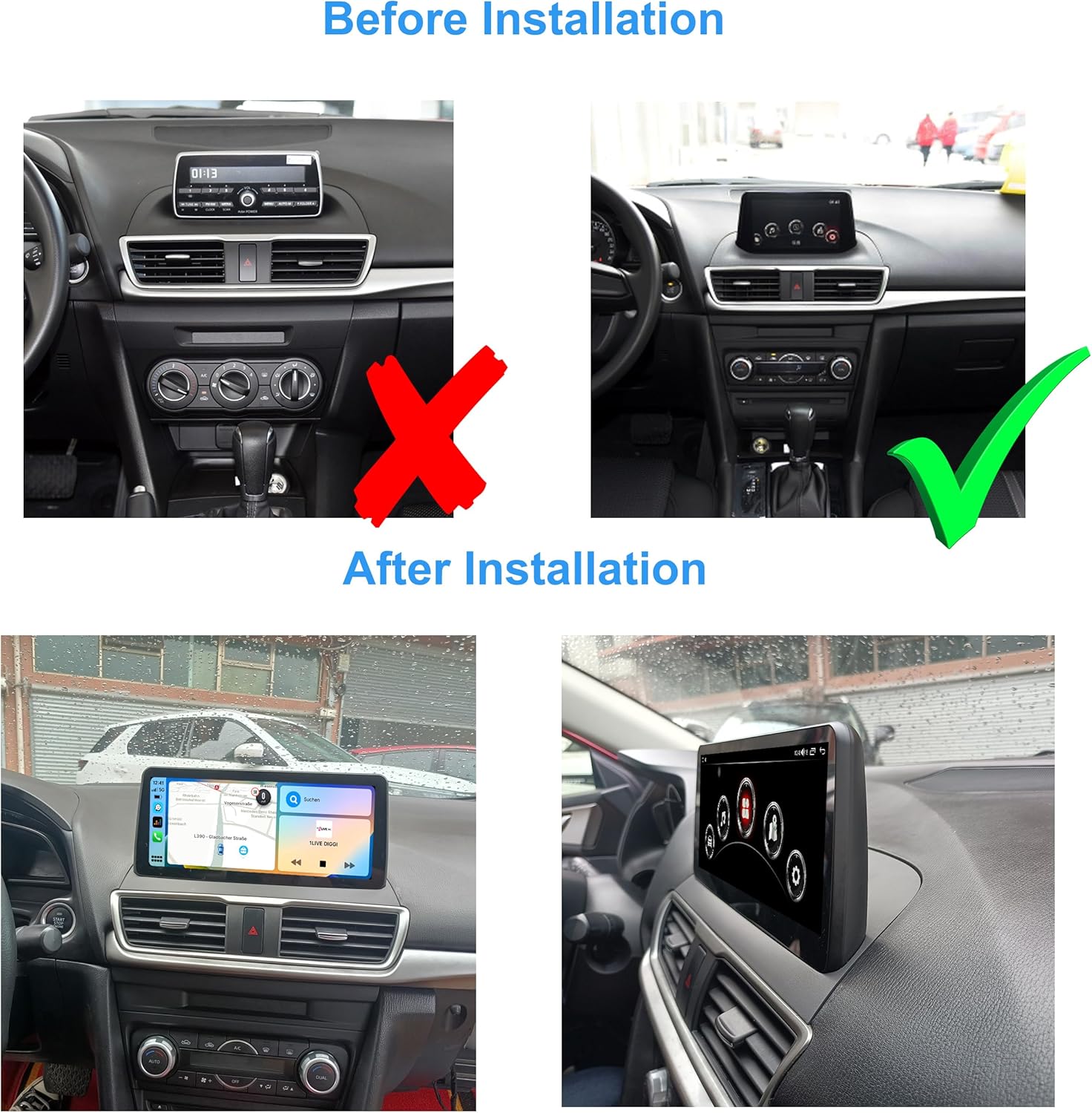
Figura 4.1: Visual comparison of the Mazda 3 dashboard before and after the Taffio Android display installation. The original small display is replaced with the larger 10.25-inch Android unit.
The installation involves replacing the original display with the new 10.25-inch Android display and connecting the main unit and associated cables. The process is designed to be straightforward, primarily involving connecting the display and the main connection cable.
4.2 Diagrama de Conexão
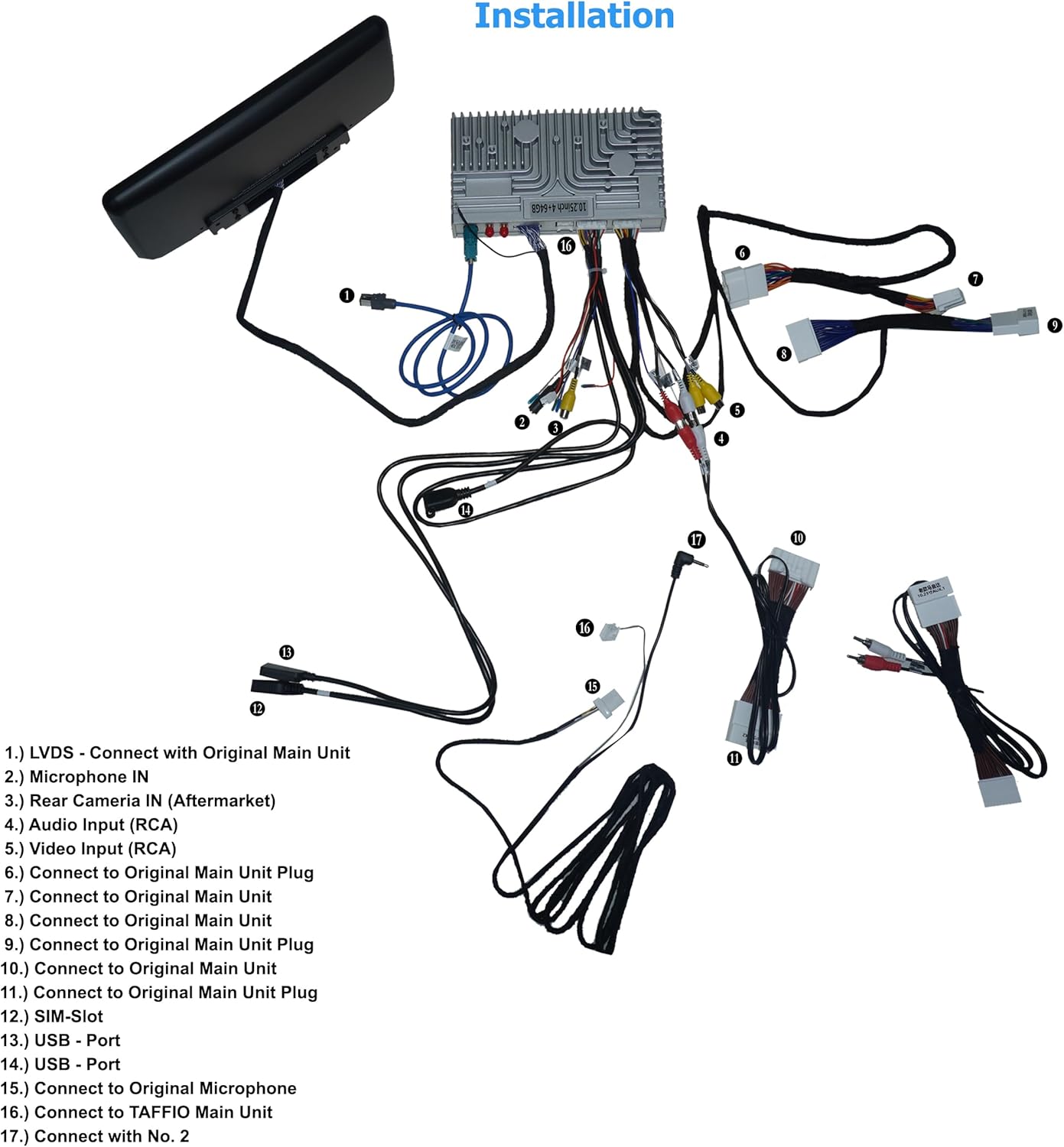
Figura 4.2: Detailed wiring diagram illustrating how to connect the Taffio CH7102-F3 components. Key connections include LVDS to the original main unit, microphone input, rear camera input, audio/video inputs, USB ports, SIM slot, and antennas.
Refer to the diagram above for specific connection points. The numbered points correspond to the following:
- LVDS: Connect with Original Main Unit.
- Microphone IN: Input for external microphone.
- Rear Camera IN (Aftermarket): Connect aftermarket rear view câmera.
- Entrada de áudio (RCA): Para fontes de áudio externas.
- Video Input (RCA): For external video sources.
- Connect to Original Main Unit Plug: Main power and data connection.
- Connect to Original Main Unit: Additional data connection.
- Connect to Original Main Unit: Additional data connection.
- Connect to Original Main Unit Plug: Main power and data connection.
- Connect to Original Main Unit Plug: Main power and data connection.
- Connect to Original Main Unit Plug: Main power and data connection.
- SIM-Slot: Insert 3G/4G SIM card for mobile data.
- USB - Port: Conecte dispositivos USB.
- USB - Port: Conecte dispositivos USB.
- Connect to Original Microphone: If applicable, connect to the vehicle's original microphone.
- Connect to TAFFIO Main Unit: Connect the display to the main processing unit.
- Connect with No. 2: Specific connection point as per diagram.
5. Instruções de operação
The Taffio CH7102-F3 operates on Android 12, providing a familiar and intuitive user interface. The 10.25-inch capacitive multi-touch screen allows for easy navigation through menus and applications.
5.1 Interface do Sistema

Figura 5.1: Main home screen of the Android system, displaying various application icons.

Figura 5.2: Secondary home screen with additional application icons, including vehicle settings.

Figura 5.3: Third home screen displaying connectivity and utility applications.
Swipe left or right on the screen to navigate between different home screens. Tap on an icon to launch the corresponding application. The system supports multi-touch gestures for zooming and scrolling.
5.2 CarPlay e Android Auto
The unit features integrated CarPlay and Android Auto functionality, allowing seamless integration with your smartphone without the need for additional adapters.
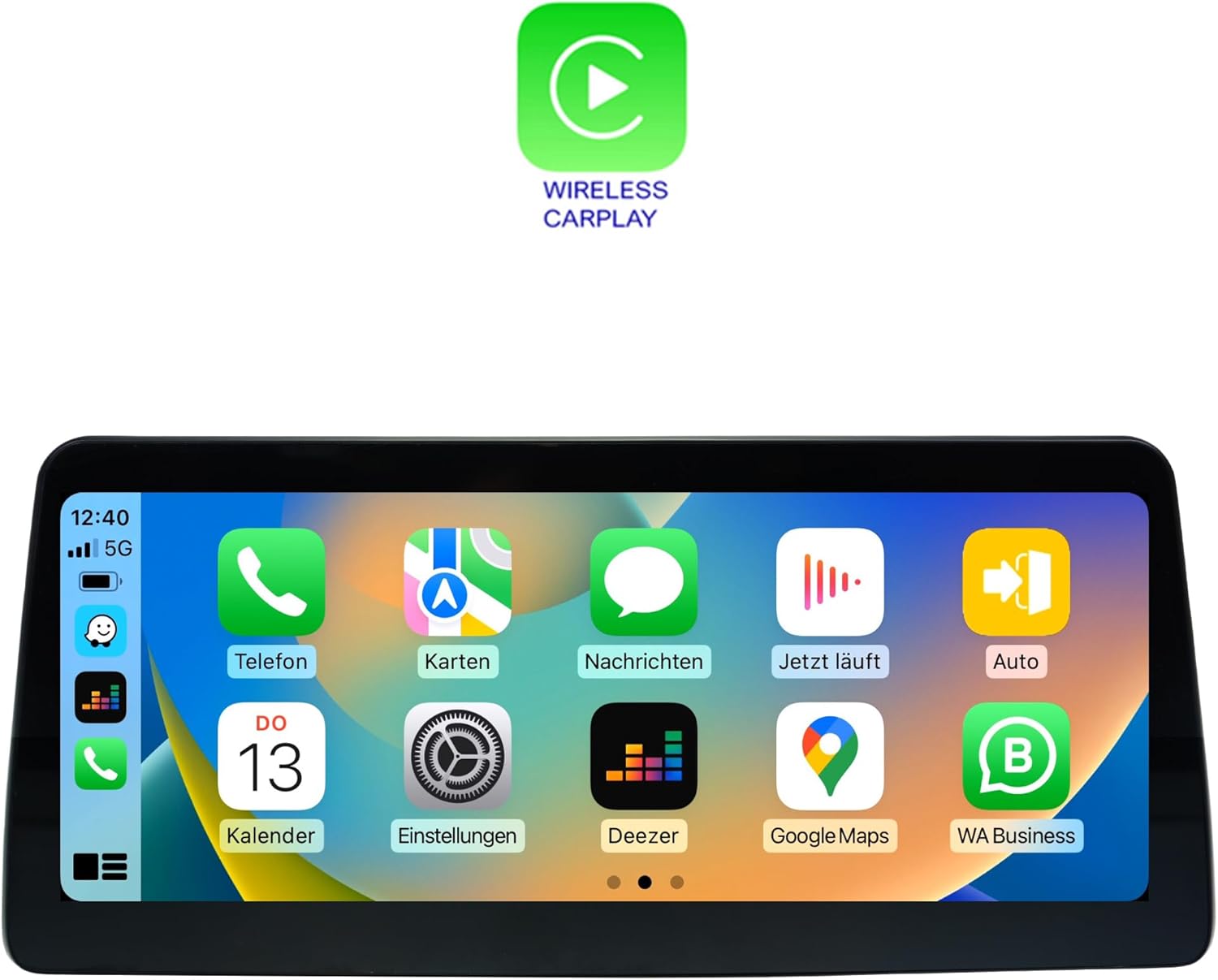
Figura 5.4: Wireless CarPlay interface, mirroring your iPhone's essential apps.

Figura 5.5: Android Auto interface, providing access to Android apps optimized for driving.
To use CarPlay or Android Auto, connect your compatible smartphone via USB or wirelessly (if supported by your phone and the unit). Follow the on-screen prompts to establish the connection. Once connected, you can access navigation, music, messages, and other apps directly from the unit's display.
5.3 Navegação (GPS)
The unit includes an integrated GPS receiver with high sensitivity and accuracy. It comes with 3D map material and free lifetime updates. To use navigation, launch the 'Navi' or 'Maps' application from the home screen. Ensure the GPS antenna is properly installed and has a clear view do céu para uma recepção de sinal ideal.
5.4 Connectivity (Wi-Fi, Bluetooth, 4G LTE)
- Wi-fi: Connect to Wi-Fi hotspots or your smartphone's hotspot for internet access. Go to Settings > Network & Internet > Wi-Fi to configure.
- Bluetooth 5.0: Pair your smartphone for hands-free calling and audio streaming. Go to Settings > Connected devices > Pair new device.
- 3G/4G LTE: Insert a SIM card into the dedicated slot for faster navigation and streaming capabilities. Ensure the 4G antenna is connected.
5.5 Reprodução multimídia
The system supports various audio and video formats:
- Formatos de vídeo: 1080p, H264, AVI, RMVB, FLV, MKV.
- Formatos de áudio: MP3, WMA, FLAC, APE, AAC.
Play media from USB drives, internal storage, or streaming apps. The unit also supports DVR functions via USB 2.0 & AV/CVBS.
5.6 Rear Camera Connection
The unit supports connection to a rear view camera. It features an automatic switching function when the vehicle is put into reverse gear, displaying the camera feed on the screen.
6. Especificações
| Recurso | Especificação |
|---|---|
| Número do modelo | CH7102-F3 |
| Sistema operacional | Androide 12 |
| CPU | 8-core (Cortex A75 x 2 @ 1.80 GHz, Cortex A55 x 6 @ 1.80 GHz) |
| BATER | 4 GB |
| Armazenamento interno | 64 GB |
| GPU | Mali-G52 |
| Tamanho da tela | LCD de 10.25 polegadas |
| Resolução de exibição | 1920 x 1080 |
| Tecnologia Touch | Multitoque capacitivo |
| Conectividade | Bluetooth 5.0, Wi-Fi, USB, Ethernet, 3G/4G LTE (SIM slot) |
| Modem | X11 LTE (Max 390 Mbit/s download, 150 Mbit/s upload) |
| Receptor GPS | Integrated, high sensitivity and accuracy |
| Integração de carros | Built-in CarPlay, Android Auto |
| Formatos de vídeo suportados | 1080p, H264, AVI, RMVB, FLV, MKV |
| Formatos de áudio suportados | MP3, WMA, FLAC, APE, AAC |
| Suporte para DVR | USB 2.0 & AV/CVBS |
| Entrada da câmera traseira | Yes, with automatic switching |
| Peso | 3 quilos |
| Tipo de montagem | Suporte para painel |
7. Manutenção
7.1 Limpeza
To clean the display screen, use a soft, lint-free cloth. For stubborn smudges, slightly dampen the cloth with water or a screen-safe cleaning solution. Avoid using harsh chemicals, abrasive cleaners, or solvents, as these can damage the screen coating or plastic components.
7.2 Atualizações de Software
Periodically check for software updates to ensure optimal performance and access to new features. Updates can typically be found through the system's settings menu under 'System' or 'About device'. Ensure a stable internet connection (Wi-Fi or 4G) during the update process and do not power off the unit.
7.3 Cuidados Gerais
- Evite expor o aparelho a temperaturas extremas ou à luz solar direta por períodos prolongados.
- Do not place heavy objects on the unit or apply excessive force to the screen.
- Keep liquids away from the unit to prevent electrical damage.
8. Solução De Problemas
This section addresses common issues you might encounter with your Taffio CH7102-F3 system. If you experience a problem not listed here, or if the suggested solutions do not resolve the issue, please contact customer support.
| Problema | Possível causa | Solução |
|---|---|---|
| Unidade não liga | Conexão elétrica solta, fusível queimado, problema na bateria do veículo. | Check all power cable connections. Verify vehicle's fuse box and battery. Consult a professional installer. |
| Sem som | Volume too low, incorrect audio source selected, speaker cable issue. | Increase volume. Ensure correct audio output is selected (e.g., AUX). Check speaker cable connections. |
| Sinal de GPS perdido ou impreciso | GPS antenna obstructed, antenna not connected, poor satellite coverage. | Certifique-se de que a antena GPS esteja instalada corretamente e com uma conexão desobstruída. view of the sky. Check antenna connection. Move to an open area. |
| CarPlay/Android Auto não conecta | Cabo USB incorreto, configurações do telefone, incompatibilidade de software. | Use a high-quality USB data cable. Ensure CarPlay/Android Auto is enabled on your phone. Restart both phone and unit. |
| Tela sensível ao toque sem resposta | System freeze, physical damage. | Perform a soft reset (refer to system settings for reset option). If issue persists, contact support. |
| Original vehicle functions not working | Incorrect wiring, system conflict. | Double-check all connections to the original main unit. Ensure the system is correctly configured to switch between original and Android modes. |
9. Garantia e Suporte
9.1 Informações de garantia
Please refer to the warranty card included with your product for specific warranty terms and conditions. Typically, products come with a limited warranty covering manufacturing defects for a specified period from the date of purchase. Keep your proof of purchase for warranty claims.
9.2 Suporte ao cliente
For technical assistance, troubleshooting, or warranty inquiries, please contact your retailer or the manufacturer's customer support. Have your product model number (CH7102-F3) and purchase details ready when contacting support.
Manufacturer: Real Media GmbH & Co. KG


